Spectrum Modem Return: Step-by-Step Guide for Homeowners
Learn how to correctly return your Spectrum modem with a simple, practical process. This guide covers eligibility, packing, labeling, shipping, and verification to avoid charges and ensure a smooth Spectrum modem return.


This guide walks you through the spectrum modem return process, including eligibility checks, packaging, and shipping. You’ll need the modem, the power adapter, a return authorization or label, and a sturdy box. Follow the steps to prepare, ship, and verify receipt to avoid charges.
Understanding Why Returns Matter
Returning your Spectrum modem correctly matters for avoiding unexpected charges and ensuring you receive any account credits you’re entitled to. A proper spectrum modem return also helps Spectrum reconcile equipment inventory and prevents late-fee charges from accruing if the contract ends. According to Modem Answers, starting with the official return process and keeping a clear record reduces follow-up questions and speeds up processing. You’ll need to gather the modem, its power adapter, and any included cables, along with your return authorization or shipping label. The goal is to make the device reach Spectrum in good condition and with all required accessories so your account reflects the correct status. This article uses simple, actionable steps to walk you through the spectrum modem return without jargon.
Spectrum Modem Return Eligibility and Terms
Eligibility for returning a Spectrum modem depends on how you obtained the device (rental vs. ownership) and the terms of your current service. If you rented the modem, Spectrum typically requires its return when you cancel service or replace equipment. If you own the device, you may not owe a return fee, but you should still follow the official return channel to ensure the device is marked as returned. Be mindful of timing windows for returns, and preserve any packing materials and documentation. In all cases, keep a record of your return authorization, tracking number, and any communications from Spectrum. Clear documentation helps prevent post-return disputes or billing questions.
What You’ll Need Before You Start
Before you initiate a spectrum modem return, assemble the key items and information. You'll need the modem unit, the power adapter, any included coaxial and Ethernet cables, the original packaging if available, or a sturdy replacement box, packing materials, and the return authorization or prepaid shipping label provided by Spectrum. Have your Spectrum account number handy, along with the modem’s model number and serial number if accessible. A calm workspace, a tape measure for packaging, and a clean surface will help you avoid damage during packing. Collecting these items upfront minimizes back-and-forth and speeds up the process.
Tools and Materials You’ll Need (Overview)
To prepare for your spectrum modem return, gather essential tools and materials:
- Modem (Spectrum-issued) — required, with model and serial numbers noted
- Power adapter — required, preferably the original
- Coaxial cable and Ethernet cable — optional but recommended if included with the device
- Return authorization or prepaid shipping label — required
- Original packaging or a sturdy replacement box — required
- Packing materials (bubble wrap, packing paper) — recommended
- Tape, scissors, and a marker — required for sealing and labeling
- Sharpie or printer for labeling — optional but helpful
- Account number or service address — helpful for reference
Packaging Your Modem for Return Properly
Packaging quality matters. If you still have the original box, reuse it and reseal with ample padding to prevent jostling. If not, choose a similarly sized box with enough interior cushioning (bubble wrap or foam). Place the modem in the center, wrap cables separately, and avoid loose items rattling inside the box. Seal all openings securely with tape, and affix the return label on the largest flat surface. Include a short note with your contact info and return authorization code inside the box. Proper packaging reduces the risk of damage during transit and helps Spectrum process the return smoothly.
Steps for Labeling, Tracking, and Documentation
Labeling must be clear and legible. Attach the prepaid return label securely, ensuring the barcode is visible. Include the return authorization number or reference in the box, and keep a copy of the shipping receipt or tracking number. Take photos of the packed box from multiple angles and the front/back of the label for your records. If Spectrum asks for confirmation, provide the tracking number and any authorization codes promptly. Documentation reduces the chance of misdelivery or delayed processing.
Shipping Your Modem Back Safely
Choose a reliable carrier and use tracking services to monitor the shipment. Insured shipping is advisable in case of loss or damage. Retain the receipt, tracking number, and any proof of pickup or drop-off. If you used a label generated by Spectrum, verify that the address matches the service address on your account. Avoid repackaging at the carrier’s facility; bring the package to a staffed location if possible to confirm acceptance. Timely shipment helps ensure credits or refunds are applied in the expected cycle.
What to Expect After Spectrum Receives the Return
Once Spectrum receives the modem, the processing time varies by region and current workload. You should receive a confirmation email or notification that the device was received and scanned. Spectrum may apply a credit to your account, waive any applicable fees, or issue a refund according to your service terms. If there’s a discrepancy (missing accessories, damaged device, or missing label), contact Spectrum support with your tracking and authorization numbers. Keeping copies of all documents speeds resolution and reduces uncertainty.
Common Pitfalls and How to Avoid Them
Common issues include missing accessories, damaged packaging, or delays due to lost labels. To avoid these problems, verify you’re returning exactly what was issued (modem, power adapter, cables), use original packaging if possible, and ensure the label is legible and securely attached. Always use tracking and keep documentation. If you’re uncertain about eligibility or the required items, contact Spectrum before shipping to avoid unnecessary charges.
In-Store Return Options and Considerations
Some Spectrum locations may accept in-store modem returns, but policies vary by region. If you prefer in-person service, call ahead to confirm that a store can process the return and whether you need to bring the device in its original box. In-store returns can provide immediate confirmation of receipt, but they might not apply the same credits instantly as mail-in returns. Always obtain a receipt and note any reference numbers for your records.
Data Privacy, Cleaning, and Accessories
Modems generally do not store personal data in the same way a computer does, but you should consider securing the device's admin settings before returning it. If applicable, reset the admin password to a known default and remove any sensitive configurations you installed. Include only the accessories that came with the device in your return, and avoid shipping extraneous items. Keeping the process clean and documented protects your privacy and simplifies returns for Spectrum.
Final Checklist Before You Hit Send
Before shipping, double-check that you have: a) the modem and all included cables, b) the original or replacement packaging, c) the return authorization code or prepaid label, d) a tracking number and confirmation of pickup or drop-off, e) a photo record of the packed box. Verify the address on the label, and ensure the box is sealed securely. Once shipped, monitor the tracking and save receipts until your account reflects the return status.
Tools & Materials
- Modem (Spectrum-issued)(Include model and serial numbers if visible)
- Power adapter(Original adapter preferred)
- Coaxial cable(Include if it was provided with the modem)
- Ethernet cable(Useful for testing connectivity before return)
- Return authorization or prepaid shipping label(Printed or digital, ensure it's legible)
- Original packaging or sturdy replacement box(Protection matters; use padding)
- Packing materials(Bubble wrap or packing paper)
- Tape and marker(Seal the box and label clearly)
- Account number or service address(Helpful for verification)
Steps
Estimated time: 30-60 minutes
- 1
Verify eligibility and gather items
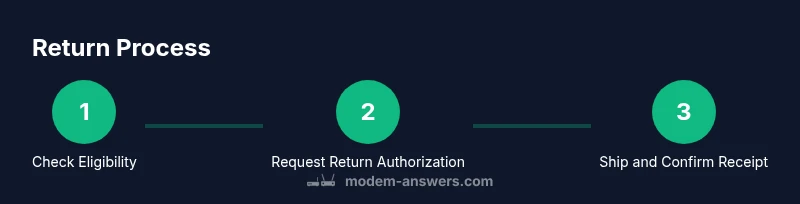
Check your account terms to confirm return requirements and collect all components (modem, power adapter, cables) and any provided packaging. This minimizes back-and-forth later.
Tip: Have your account number ready and note the device model and serial number. - 2
Request return authorization
Contact Spectrum or log in to your account to obtain a return authorization or prepaid label. Confirm the address and any deadlines for the return.
Tip: Keep a screenshot or printout of the authorization for your records. - 3
Prepare packaging
Choose an appropriately sized box, add cushioning, and place the modem securely inside. Include all cables that were originally provided where possible.
Tip: If you don’t have the original box, use a sturdy replacement and seal all edges well. - 4
Assemble and secure items
Place the modem in the center, wrap cables separately, and avoid loose parts. Attach the return label to the box’s flat surface away from folds.
Tip: Avoid over-tight taping that might bend the label’s barcode. - 5
Attach label and documentation
Ensure the label is legible and includes any authorization codes. Place a copy of the return notice inside the box as a failsafe.
Tip: Take photos of the sealed box with the label visible. - 6
Seal and seal again
Seal the box securely with tape on all seams. Double-check that no items are loose inside.
Tip: Use a tamper-evident seal if available for extra security. - 7
Ship and obtain tracking
Drop off the package or schedule pickup with the carrier. Save the tracking number and receipt.
Tip: Choose a trackable service and insure the shipment if the value justifies it. - 8
Confirm receipt and update records
Monitor for confirmation that Spectrum received the return and check for any credits or charges. Document the outcome.
Tip: If you don’t see a status update in a reasonable time, contact support with your tracking number.
FAQ
Do I have to return the power supply and cables with the modem?
In most cases, the modem and its included accessories are expected in the return. Check your return authorization for specifics. If an item is missing, contact Spectrum before shipping to avoid processing delays.
Usually you should include the modem and its accessories; check your authorization and contact Spectrum if anything is missing.
Can I return my Spectrum modem in-store instead of shipping?
Some Spectrum locations accept in-store returns, but policies vary by region. Call ahead to confirm availability and obtain any required receipt.
Yes, some stores take returns, but call ahead to confirm.
What should I do if the return label is lost or unreadable?
Contact Spectrum support to issue a new label or obtain a replacement authorization. Do not ship without proper labeling.
If the label is lost, contact Spectrum to get a new one before shipping.
How long does it take for a credit or refund after Spectrum receives the modem?
Processing times vary by location and workload. Expect updates within a few business days, and monitor your account for changes.
Credits typically take a few business days after receipt, depending on processing times.
What if I moved or no longer use Spectrum service?
Update your address and service status with Spectrum before returning. If the device was rented, ensure the return is still processed to avoid charges.
If you moved, update Spectrum and process the return to avoid charges.
I can’t find my original packaging. Can I still return?
Yes. Use a sturdy replacement box with ample padding and secure labeling. Original packaging is recommended but not always required.
You can use a sturdy replacement box with padding if the original box isn’t available.
Watch Video
Key Takeaways
- Verify eligibility before shipping the modem.
- Use the official authorization and a trackable label.
- Pack carefully and keep proof of delivery.
- Confirm receipt and any resulting account credits.