How to Get a New Modem from Spectrum: A Step-by-Step Guide
A practical, educational guide to obtaining a Spectrum modem, covering rental vs purchase, eligibility, ordering, activation, and setup. Authored by Modem Answers.


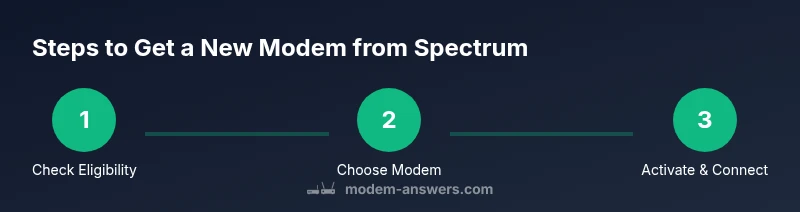
By following this guide, you will learn how to get a new modem from Spectrum, whether you rent or buy. You’ll verify eligibility, choose a Spectrum-approved model, place an order or request a swap, and complete activation. This process works whether you’re upgrading for faster speeds or replacing a faulty device, and it covers self-install steps and safety notes.
Understanding Spectrum's modem options
Spectrum offers both rental modems and approved buy-your-own models that work with your service. Your choice affects ongoing costs, maintenance responsibility, and performance features like Wi-Fi routing when you select a modem-router combo. In this section, we outline the key differences between renting and owning, identify common Spectrum-approved models, and explain how to compare features against your home network needs. You will learn which option best fits a budget, a desire for control, and the speed tier you subscribe to. This understanding helps homeowners and renters make an informed decision before moving forward. By the end, you will know whether renting a modem from Spectrum or purchasing an approved model is right for you and how to proceed with confidence.
Spectrum’s rental vs purchase policy: what to expect
Spectrum historically offers both rental modems and the option to buy approved devices outright. Rental units typically include ongoing monthly fees and customer support, while buying gives you a one-time cost and long-term ownership. The best choice depends on your usage pattern, how long you expect to stay with Spectrum, and whether you want to own a device that you can take to a future provider if you move. In this section, we explain how to assess total cost of ownership, how to evaluate firmware updates, and how to ensure your device remains compatible with Spectrum’s network standards over time.
Check eligibility and account readiness
Before ordering a new modem, verify that your Spectrum account is active and that you are eligible for an upgrade or swap. Log in to your account, review your current equipment, and check if you are on a plan that supports your preferred modem. Have your account number handy and a photo ID handy in case you need to verify identity with a representative. If you’re currently renting, ask about upgrade terms or swap options to minimize downtime. This preparation reduces delays and helps you move quickly through checkout or a phone call.
How to order a new modem from Spectrum
There are several paths to obtain a Spectrum modem. You can order a rental modem online through Spectrum’s store, reach out by phone for a swap, or purchase an approved modem at a retailer and have Spectrum provisioning it for service. When you choose, compare model specs (DOCSIS version, channel bonding, built-in Wi-Fi), confirm compatibility with your plan, and review any activation steps. If you plan to use your own device, confirm that it is on Spectrum’s approved list and understand any required provisioning steps.
Activation and setup: step-by-step guidance
Once your modem arrives or is provisioned, you’ll need to connect it to the coaxial line, power, and a router if you’re not using a modem-router combo. Follow Spectrum’s activation prompts via the web portal or phone system. If you’re using your own router, you’ll configure the gateway settings on the router and ensure the modem is recognized by Spectrum. Allow several minutes for the device to initialize, and verify the connection with a speed test and a basic network check.
Troubleshooting common swap issues
If activation stalls or the modem does not appear in the Spectrum app, perform a power cycle, check coax connections, and verify service status in your account. Ensure you’re using a Spectrum-approved model and that firmware is up to date. If problems persist, contact Spectrum support with your account details and device model. Document any error codes you see to speed up the troubleshooting process.
Choosing the right modem model for your home
Consider your speed tier, number of devices, and whether you need built‑in Wi‑Fi. A DOCSIS 3.1 modem with a newer chipset supports higher speeds and better efficiency in busy homes with many devices. If you want simple setup, look for a modem-router combo from the Spectrum-approved list. For households with smart home devices, prioritize reliability and easy firmware updates to maintain a smooth, secure network.
Long-term costs: renting vs buying and planning ahead
Renting gives you flexibility but ongoing charges. Buying a Spectrum-approved modem involves a larger upfront cost but avoids monthly fees and gives you complete ownership. When planning long-term, compare your expected usage, length of stay with Spectrum, and potential price increases. In some cases, renting may be cheaper in the short term, while buying makes more sense for a multi-year horizon.
Safe disposal and returning old equipment
If you’re upgrading, return any rented modem to Spectrum per their instructions to avoid ongoing rental charges. If you own the device, recycle it according to local guidelines and manufacturer recommendations. Proper disposal helps protect the environment and ensures you’re not paying for unused hardware.
Authority sources
For further reading and verification, consult authoritative sources. The Federal Communications Commission (FCC) offers consumer guidance on modems and home networking; learn more at https://www.fcc.gov. The Federal Trade Commission (FTC) provides consumer protection resources related to internet services and device purchases; explore at https://www.ftc.gov. The National Telecommunications and Information Administration (NTIA) discusses broadband policy, device standards, and spectrum issues at https://www.ntia.doc.gov. These sources help you understand equipment standards, safety, and consumer rights when upgrading or renting a modem. Always cross-check Spectrum's official materials to confirm policy details before making a purchase or swap.
Tools & Materials
- Spectrum account number(Have your Spectrum account number handy; you may need your service address.)
- Photo ID or account holder name(Driver's license or passport, or a name on the account.)
- Internet-enabled device(Laptop, tablet, or smartphone to access Spectrum’s online order page.)
- Proof of residence (optional)(Recent bill showing your address if requested.)
- List of preferred modem models (optional)(Review Spectrum-approved models and note the ones you want.)
Steps
Estimated time: Estimated time: 45-75 minutes
- 1
Verify eligibility
Log in to your Spectrum account and confirm service status. Check if a swap or upgrade is available for your current plan and equipment.
Tip: Have your account number and ID ready to speed up the process. - 2
Choose a Spectrum-approved modem
Review Spectrum’s approved modem list, compare DOCSIS versions, and pick a model that matches your speed tier and home needs.
Tip: If you want Wi‑Fi in the modem, consider a modem-router combo. - 3
Place the order or request a swap
Use Spectrum’s online store or call to place an order for a rental or to request a swap for your current device.
Tip: Confirm any ongoing rental terms and fees before finalizing. - 4
Confirm shipping or pickup
Choose home delivery or pickup as available; verify delivery address and times.
Tip: Provide clear delivery instructions to ensure successful receipt. - 5
Prepare for installation
Gather coaxial cables, power supply, and a router if you don’t buy a modem-router combo.
Tip: Have a spare coaxial cable handy in case of fit issues. - 6
Activate and connect
Connect the modem to the coax line, power, and your router; complete activation via Spectrum portal or phone.
Tip: Let the device initialize for several minutes and run a basic speed test. - 7
Test your connection
Run speed tests and verify stability across devices; ensure Wi‑Fi security with a strong password.
Tip: Update firmware if prompted and change the admin password.
FAQ
Do I need to own a modem or can Spectrum provide one?
Spectrum offers both rental modems and approved models for purchase. If you already own a modem, check compatibility with your plan before using it.
Spectrum provides rentals and approved models; verify compatibility before use.
Can I use my own modem with Spectrum service?
Yes, you can use your own modem if it’s Spectrum-approved and compatible with your plan; you may need to provision it.
Yes, as long as it’s Spectrum-approved.
Will Spectrum activate a new modem remotely or require a technician?
Most activations are remote via online setup or phone; a technician visit is rarely needed unless there are installation challenges.
Activation is usually remote; a technician only if needed.
What costs are associated with renting vs buying a modem?
Rental costs are ongoing; buying is a one-time cost. Compare long-term total cost based on how long you’ll stay with Spectrum.
Renting costs over time, buying is upfront; compare total cost.
How long does activation take after I get a new modem?
Activation typically completes within minutes after connecting and powering up the modem; contact support if it stalls.
Activation is usually quick; call support if you have trouble.
What should I do with my old modem?
Return rented modems to Spectrum per instructions to stop rental charges; if you own the device, recycle according to local guidelines.
Return rented gear; recycle owned equipment.
Watch Video
Key Takeaways
- Verify eligibility before ordering or swapping.
- Choose an approved Spectrum modem to ensure compatibility.
- Activation is usually quick; contact support if issues arise.
- Compare renting vs buying to fit long-term plans.
- Return or recycle equipment following Spectrum's guidelines.