Spectrum Internet Modem Activation: Step-by-Step Guide
Learn how to activate Spectrum Internet modem quickly with a practical, step-by-step guide. Get setup tips, troubleshooting, and verification to ensure a reliable home connection.


Goal: activate Spectrum Internet by provisioning your modem so it can access Spectrum's network. Requirements: a compatible DOCSIS modem, an active Spectrum account, and a computer, tablet, or phone with internet access. The activation steps include connecting the modem, powering it on, visiting Spectrum's activation page, and confirming service status. If you have a self-install kit, follow the prompts and allocate about 15–25 minutes.
What activation does for Spectrum Internet
Activation for Spectrum Internet provisions your modem to join Spectrum's network and assigns it to your account, enabling service across your home. According to Modem Answers, a smooth modem activation hinges on proper hardware, correct wiring, and following Spectrum's prompts on the activation portal. The process moves from a physical connection to an online provisioning step, culminating in a live connection test. Understanding what activation does helps homeowners avoid common missteps and ensures devices on your network receive stable IP addressing and reliable throughput. This phase is not just about plugging in cables—it sets how your home network will communicate with Spectrum's infrastructure and how quickly devices start receiving service.
Compatibility and equipment basics
To ensure a successful activation, you need to start with hardware that aligns with Spectrum's network standards. A DOCSIS 3.0 or 3.1 modem that is on Spectrum's approved device list reduces the likelihood of provisioning delays. You’ll also need a clean coaxial connection from the wall outlet and a power source. A broadband-enabled router is optional but recommended for Wi‑Fi coverage. Keep your Spectrum account login handy; activation typically requires account verification and may prompt you to create or reset a password. By understanding these basics, you avoid hitting snags during the online setup and can proceed with confidence.
Step-by-step activation flow (overview)
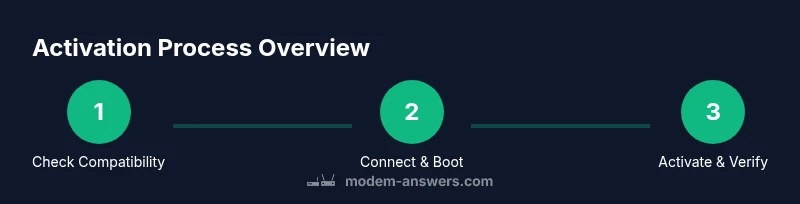
Activation flows from a physical setup to an online provisioning check. First, connect the modem to the coaxial outlet and power it on. Then, use a computer or mobile device to access Spectrum's activation portal, sign in to your account, and follow the prompts to register your modem. You may be asked to enter your modem's MAC or serial number and confirm service tier. Finally, Spectrum validates the device on their network and you receive a confirmation that your internet service is active. This overview helps you anticipate required inputs and avoid timing issues.
Common issues during activation and fixes
Activation can stall for several reasons: the modem may be incompatible or not properly registered, coax connections might be loose, or the account verification step could fail. If the modem’s lights don’t indicate a stable link, recheck the coax connector and power cycle the device. If the activation page reports an error, ensure you are using the correct Spectrum account and the modem is on Spectrum's approved list. If you face persistent issues, a quick call to Spectrum support often resolves provisioning delays by revalidating your account and device.
After activation: testing and optimizing home Wi-Fi
Once activation completes, test your wired and wireless connections. Start with a wired speed test to confirm baseline performance, then run a wireless speed test from multiple rooms to gauge coverage. If speeds dip in certain areas, consider repositioning the router or adding a mesh system. Update firmware on both modem and router when available, and secure your Wi‑Fi with a strong password and WPA3 if supported. Regularly reboot devices on a schedule to maintain optimal performance and reliability.
Self-install vs technician activation options
Spectrum typically offers a self-install option that empowers you to activate without a technician visit. This is convenient for most households with a compatible modem and a stable coax line. In some cases, a technician activation may be necessary, such as complex wiring, multi-unit buildings, or if the installation requires on-site verification. If you choose self-install, follow the on-screen prompts carefully and keep your account details handy. If you opt for professional activation, schedule a window that minimizes disruption and confirm any required access to the equipment closet.
Authority sources and references
For additional context and official guidance, consult reputable sources:
- https://www.fcc.gov
- https://www.ftc.gov
- https://www.mit.edu
Tools & Materials
- DOCSIS-compatible modem(Must be on Spectrum's approved list; check model compatibility before starting.)
- Coaxial cable(In good condition; avoid frayed connectors and damaged insulation.)
- Power adapter(Provide stable power; use a surge-protected outlet if possible.)
- Computer or smartphone with internet(Needed to access the activation portal and confirm service.)
- Ethernet cable (optional)(Useful for a wired setup to ensure a stable initial provisioning.)
- Spectrum account credentials(Have your Spectrum username and password ready for login.)
Steps
Estimated time: 25-40 minutes
- 1
Verify eligibility and collect details
Confirm you have a Spectrum account and a DOCSIS-compatible modem. Gather the modem's MAC address and serial number, along with your account login details. This ensures the activation portal can recognize your device and associate it with your service.
Tip: Double-check the modem model against Spectrum's approved list to prevent provisioning delays. - 2
Connect the modem to power and coax
Attach the coaxial cable from the wall outlet to the modem, then plug in the power adapter. Allow the device to boot completely, indicated by steady or blinking lights that progress to a steady color.
Tip: Use a clean coax outlet and avoid daisy-chaining multiple devices on the same splitter if your signal is weak. - 3
Access the Spectrum activation portal
From a computer or smartphone connected to the modem, open the Spectrum activation page and sign in. If prompted, enter the modem's MAC address or serial number for registration.
Tip: Have your account details handy; a mismatch can halt the provisioning process. - 4
Complete the activation prompts
Follow on-screen prompts to associate the modem with your Spectrum account and service tier. The portal may require confirmation of the device type and location within your home.
Tip: Do not refresh the page during provisioning, which can interrupt the process. - 5
Confirm activation status
Once provisioning finishes, check the portal or your device's status indicators for a successful connection. If the portal shows an active status, you can proceed to connect a router if you use one.
Tip: If the status remains pending, reboot the modem and retry the activation step after a few minutes. - 6
Test connectivity and optimize
Run a wired speed test first, then test Wi‑Fi coverage in different rooms. Adjust router placement or add a mesh system if needed and update firmware.
Tip: Secure your Wi‑Fi with a strong password and enable automatic updates when available.
FAQ
Do I need Spectrum to provide a modem for activation?
Not always. Spectrum often allows customers to use their own DOCSIS modem if it’s on Spectrum's approved list. Activation will verify the device during provisioning.
You can use your own DOCSIS modem if it’s approved by Spectrum; activation will confirm the device on your account.
Can I use my own router with Spectrum Internet?
Yes. You can connect a separate router to the activated modem to create a wireless network. If you prefer fewer devices, you can also enable bridge mode on the modem.
Absolutely. A separate router is fine after activation; you can enable bridge mode if you want the modem to be a simple modem.
What if activation is stuck or shows an error?
This usually happens due to registration issues or an incompatible modem. Re-check the model, ensure proper coax connections, and retry the activation. If problems persist, contact Spectrum support.
If it’s stuck, verify your modem is compatible and powered, then try again. If it still fails, call Spectrum support for help.
How long does Spectrum activation typically take?
Activation usually completes within 10–20 minutes once you’ve provided the required details. If you’re using a self-install kit, allocate additional time for setup and testing.
Most activation happens in about 10 to 20 minutes, plus time for testing and setup.
What should I do after activation to verify speed?
Run a wired speed test first to confirm baseline performance, then test Wi‑Fi in several rooms. If speeds are below the plan, try router placement adjustments or call Spectrum for help.
Test using a wired connection first, then check wireless performance to confirm you’re getting the expected speed.
I moved to a new address; how does activation work?
Moving activation to a new address typically requires reactivating service for the new location. Sign in to your Spectrum account and start the activation process for the new address; if issues persist, contact support.
If you moved, sign in to Spectrum and reactivate for the new address; if you have trouble, reach out to support.
Watch Video
Key Takeaways
- Verify modem compatibility before activation.
- Follow the activation prompts for online provisioning.
- Test wired then Wi‑Fi performance after activation.
- Prioritize security by updating firmware and using strong passwords.