How Long for Spectrum Modem to Connect
A comprehensive guide on Spectrum modem activation times, factors that affect connection, and practical steps to speed up the process for homeowners and renters in 2026.


Most Spectrum modems connect within a few minutes during activation, typically five to ten minutes after power is applied. In some cases, firmware updates or network negotiations can extend this to 20–30 minutes. Activation times vary by modem model and conditions, and the Modem Answers analysis notes that newer devices often provision faster while updates run in the background. For a clear, step-by-step path, see the full guide below.
Understanding Spectrum Activation Timing
Activation timing refers to the interval from when you power on the modem (or connect a replacement) to when the device establishes an online connection with Spectrum. Real-world times vary, but most households observe a short window within the first minutes after power-up and wiring are correctly set. The Modem Answers team notes that core steps—power-on, signal negotiation, device authentication, and provisioning—usually complete in minutes under typical conditions. Differences between rental modems and owned models can affect the exact timing because firmware levels and provisioning paths differ. Keeping expectations realistic helps homeowners and renters avoid unnecessary frustration during setup.
Factors That Influence Activation Time
There are several factors that influence how long Spectrum modems take to connect. Signal quality on the coax line, firmware updates, and overall network congestion are the primary drivers. A weak signal can slow the handshake by a few minutes; a firmware update can pause provisioning for several minutes; high network load can push the total time higher. The Modem Answers analysis indicates that modem model, age of the device, and whether updates run automatically all contribute to the pace. In practice, newer devices tend to provision quickly but can stall if updates are large or if the activation server is under load.
How Spectrum Modem Activation Differs by Model
Different modem models implement provisioning flows with varying complexity. Plug-and-play devices often complete the process in the first few minutes, while older or less-common models may require longer due to firmware checks or channel negotiations. When replacing an old rental with a new owned modem, allow a few extra minutes for the activation server to recognize the device and apply the appropriate settings. Always verify that the device is on a supported model list for Spectrum to minimize delays. The overarching rule is that model-specific provisioning governs timing more than plan type.
The Role of Firmware Updates in Activation
Firmware updates influence activation time because the modem may need to download and install updates during provisioning. In many cases this adds only a few minutes, but during busy update windows you could see 5–15 additional minutes. To minimize disruption, avoid initiating activation during known maintenance windows and ensure the modem remains powered and connected throughout the process. If an update is in progress, LED indicators will guide you; unplugging mid-update can corrupt the device. The Modem Answers Team emphasizes that such updates are common and typically do not invalidate a successful activation.
Step-by-Step Activation Checklist
- Confirm service is active on your Spectrum account. 2) Place the modem close to a power source and attach the power adapter. 3) Connect the coax cable securely from the wall outlet to the modem. 4) If using a separate router, connect it to the modem via Ethernet. 5) Power cycle the modem (unplug, wait 10 seconds, plug back in). 6) Allow 5–10 minutes for provisioning; check status lights and the Spectrum app. 7) If no connection after 15–20 minutes, reboot the modem and router. 8) If issues persist beyond 30 minutes, contact Spectrum support for remote activation checks.
Troubleshooting Common Activation Delays
- Ensure coax cables are tight and free of damage; loose connections are a frequent cause of slow activation. - Avoid power cycling too often; repeated restarts can reset the provisioning process. - Disable third-party devices that might interfere with the network during setup (e.g., bridging configurations). - Confirm you are using a Spectrum-supported modem model and that firmware is up to date. - If the activation light sequence is abnormal, consult Spectrum's support page or contact a technician for on-site diagnostics.
Rental Modems vs Owned Modems: Activation Time Considerations
Rental modems often come with pre-loaded firmware optimized for Spectrum provisioning, whereas owned modems may require firmware checks on first connect. In most cases the activation duration is similar, but the presence of updates on a new device can extend the window. If you’ve recently switched from rental to owned hardware, plan for an extra few minutes in case a background update is installed during activation.
Speeding Up Activation: Practical Tips
- Use a direct coax connection with a high-quality cable; avoid splitters during activation. - Place the modem in a central location with minimal interference and away from other electronics. - Keep all cables connected and avoid unplugging during provisioning. - Pause other bandwidth-heavy activities to reduce network contention while the modem authenticates. - If available, use Spectrum’s official activation tool or app to monitor progress in real time.
What To Expect After Activation and Verifying Connectivity
Once the modem registers online, verify connectivity by running a speed test and checking device status in the Spectrum app. Typical download speeds should align with your plan, and upload speeds will reflect upstream capacity. If speeds lag behind expectations, consider a router firmware update, re-conducting a basic network health check, or contacting Spectrum support for a line-quality test. Ongoing stability should be monitored for 24–48 hours after activation to confirm the connection is steady.
dataTable: null
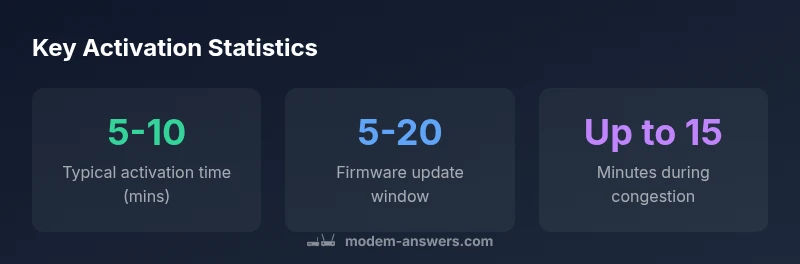
Spectrum modem activation timing overview
| Aspect | Typical Time | Notes |
|---|---|---|
| Activation time (new setup) | 5-10 minutes | Baseline for standard activations on Spectrum |
| Firmware update window | 5-15 minutes | During updates, provisioning may pause |
| Network congestion impact | up to 15 minutes | Higher traffic periods may slow activation |
| Rental vs owned devices | Similar process | Activation is model-driven, not plan-driven |
FAQ
What is the typical activation time for Spectrum modems?
Most activations complete in about 5-10 minutes under normal conditions. Firmware updates or high network demand can extend this window. If there are no signs of progress after 15 minutes, consult Spectrum support.
Usually five to ten minutes, sometimes longer if updates are happening. If it’s taking longer, follow the activation steps and check the lights on the modem.
What should I do if activation stalls?
Power cycle the modem, check all cables are secure, and reboot both modem and router. If the connection still doesn’t establish after 30 minutes, contact Spectrum for remote activation assistance.
Power cycle, verify cables, reboot devices, and call spectrum if it’s not connecting after half an hour.
Does the Spectrum plan affect activation time?
Activation time is driven more by hardware and network conditions than by your plan. Some plans may have different provisioning thresholds, but the process remains largely consistent.
Plans don’t usually change activation time; it depends on the hardware and network conditions.
Can firmware updates delay activation?
Yes. Updates can extend activation by several minutes. Ensure the modem stays plugged in and avoid interrupting firmware activity during setup.
Yes, updates can add a few minutes. Keep it plugged in and don’t unplug during updates.
Is activation different for rental vs owned modems?
The basic activation flow is similar, but firmware readiness and update timing can vary between rental and owned devices. Either way, following the setup steps helps.
Activation is similar; firmware updates may differ, but steps help speed things up.
How can I speed up activation?
Use a direct coax connection with a good cable, place the modem in a central location, and minimize other network activity during provisioning. If available, use Spectrum’s activation tool for real-time progress.
Connect directly, reduce other traffic, and monitor progress with Spectrum’s tool.
“Activation times are workload-dependent and highly influenced by firmware readiness and network conditions. Following a structured activation checklist minimizes delays and helps confirm a stable connection quickly.”
Key Takeaways
- Power cycle the modem to start activation.
- Secure all coax cables before starting.
- Expect 5-10 minutes for typical activation.
- Firmware updates can add 5-15 minutes.
- If activation stalls, contact Spectrum support after 30 minutes.