What Is Better: Modem or Router for Your Home Network?
Explore whether a standalone modem, a dedicated router, or a combined gateway best fits your home network. Learn how performance, security, and value differ across setups.


For most homes, the answer isn’t a single device but a combination: a separate modem and router usually deliver the best performance, control, and future-proofing, while a gateway can be perfect for simple setups and renters who want fewer devices to manage. Your choice hinges on your ISP, home size, and desired features.
The core question unpacked: modem vs router
In many consumer guides, people ask which is better, a modem or a router. The practical answer is that both roles are essential but do different things. A modem is the bridge between your home network and your Internet Service Provider, while a router distributes that Internet connection to multiple devices, creates Wi‑Fi networks, and manages traffic. For most households, understanding this division helps you decide whether you should pair a standalone router with a modem or opt for a gateway device that combines both functions. According to Modem Answers, the most reliable and flexible home networks often rely on separate devices, especially when you value performance tuning, future upgrades, and robust Wi‑Fi coverage across a large home.
What each device does and common misconceptions
Many people think a router alone can replace a modem or vice versa. In reality, a modem connects your home to the internet, while a router creates a local network and governs data flow between devices. A gateway claims to do both, but its performance depends on hardware and firmware support. Misconceptions abound: a higher Wi‑Fi standard on a gateway does not guarantee better coverage in every room, and a powerful router cannot compensate for a slow or unstable modem from your ISP. Modem Answers notes that the best setups align hardware capabilities with actual home layouts and usage patterns, not just marketing specs.
How the terminology matters in real setups
Terminology matters because it guides shopping and installation decisions. If you see “modem-only” and “router-only” labels, you know you’ll manage two devices and potentially a more complex network. If you see “gateway,” you’re looking at a single device that handles both roles, which can simplify arrangements but limit customization. In practice, the right approach depends on factors such as building size, the number of concurrent users, and the need for advanced features like guest networks, QoS, or mesh compatibility. The Modem Answers team encourages readers to map their usage: streaming, gaming, teleconferencing, and smart-home device counts all influence whether independence or integration yields better results.
Your home network architecture: where to place each device
Placement plays a big role in performance. If you opt for a separate modem and router, place the router in a central, elevated location away from thick walls and interference from microwaves or cordless phones. If you choose a gateway, position it in a central area but recognize that walls and floors can degrade Wi‑Fi signals; consider optional extenders or mesh satellites for larger homes. Cables should be tidy, power outlets reliable, and the modem’s coax or fiber line clean and secure. A good layout reduces dead zones and helps you maximize speed without chasing phantom bottlenecks.
Performance factors: speed, latency, and reliability
Performance is influenced by more than advertised speeds. The modem’s compatibility with your plan matters; a mismatched modem can cap speeds regardless of router capability. The router’s hardware—CPU, RAM, antenna quality, and support for MU‑MIMO or Wi‑Fi 6/6E—determines how well you handle multiple devices and bandwidth‑heavy tasks. Latency matters for gaming and video calls; practices such as enabling Quality of Service (QoS), using wired backhaul where possible, and updating firmware help keep latency low. In practical terms, a high‑quality router paired with a decent modem can significantly outperform a low‑end gateway in dense households.
Internet plans, ISP constraints, and device compatibility
ISP constraints are a reality. Some providers restrict the performance of third‑party devices unless you rent their equipment, while others honor flexible compatibility with any modem that is approved for the service tier. When you plan a purchase, verify which modems are listed as compatible with your service plan and whether you’ll benefit from features like bond‑rate upgrades or better upstream/downstream performance. Modem Answers emphasizes checking both compatibility and the plan’s advertised speeds to avoid paying for capabilities you can’t utilize.
Security and privacy implications
Security is a crucial reason to consider separate devices. Routers with strong firewall features, regular firmware updates, and well‑designed guest networks reduce the attack surface of your home network. Separate devices allow the router to specialize in security features and monitoring, while the modem focuses on bridging to the ISP. Gateways can also be secure, but they rely on a single vendor’s firmware lifecycle. Regardless of setup, keep firmware updated, use strong Wi‑Fi encryption (WPA3 where possible), and change default credentials to protect devices connected to your network.
Setup scenarios: renting vs owning, apartment vs house
Renters often favor gateways for simplicity and vendor support; owners tend to prefer separate devices for flexibility and long‑term value. In apartments with signal‑dense environments, a capable router with a good antenna setup and possibly a mesh system can deliver more uniform coverage than a single gateway. For houses with multiple floors, a two‑device approach or a mesh network often yields better performance with fewer dead zones. The choice should reflect your lease terms, upgrade expectations, and how much you value ongoing customization.
Cost of ownership and total value
Initial cost and ongoing maintenance are important, but total value matters more. A separate modem and router may require a higher upfront investment but can extend lifespans and allow upgrades as technology evolves, reducing long‑term costs. A gateway usually costs less upfront and provides convenience, but it can be more limiting when new standards or feature sets emerge. Modem Answers encourages balancing initial outlay with expected lifespan, upgradeability, and the level of control you want over network settings.
Choosing a combined modem-router vs separate devices
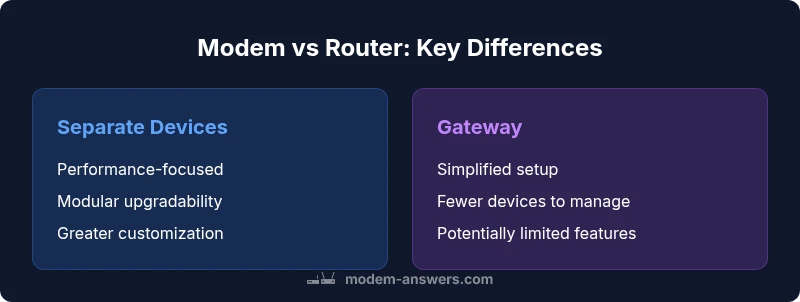
There is no one‑size‑fits‑all answer. Separate devices excel at performance, customization, and scalability, especially in larger homes or households with heavy usage. Gateway devices are attractive for small spaces, renters, and users who value a simple plug‑and‑play setup. If you anticipate expanding your network with mesh satellites or require precise QoS for gaming or streaming, separate devices are usually the smarter long‑term choice. Start with your primary use cases, then consider budget, space, and ISP constraints.
Practical step-by-step decision guide
- List all high‑demand activities (gaming, 4K streaming, video conferencing, smart‑home devices).
- Check your ISP’s equipment policy and compatible modem models for your service tier.
- If using two devices, select a router with robust coverage and modern features (Wi‑Fi 6/6E, MU‑MIMO, QoS).
- For small spaces, a gateway can suffice if it meets coverage expectations; test placement and consider a mesh if needed.
- Budget time: estimate the total cost of ownership, factoring in potential upgrades over 3–5 years.
- Implement security best practices: change defaults, enable WPA3, and schedule firmware updates.
- Reassess after 3–6 months to decide if a separate device setup would yield measurable improvements.
Common pitfalls and maintenance tips
- Buying based on marketing hype rather than real needs: match features to actual usage.
- Skipping compatibility checks: ensure your modem and gateway work with your ISP plan.
- Neglecting firmware updates: keep devices current to protect against vulnerabilities.
- Overlooking placement: poor placement can negate even high‑end hardware.
- Underestimating the value of wired connections: Ethernet often outperforms Wi‑Fi for stable speeds and low latency.
Comparison
| Feature | Modem + Router (separate devices) | Gateway (modem-router combo) |
|---|---|---|
| Setup complexity | Two devices; typically more complex to configure | Single device; simpler setup |
| Performance ceiling | High potential with a quality router and optimized network | Limited by gateway hardware and firmware |
| Upgrade path | Independent upgrades; replace or upgrade each component separately | Upgrade generally requires replacing the whole unit |
| Networking features | Advanced features: QoS, guest networks, mesh compatibility | Often fewer advanced options; some gateways support basics only |
| Space and clutter | More devices and cabling | Fewer devices; less clutter |
| Security & updates | Separate firmware for router and modem; potentially stronger security segmentation | Unified updates; security depends on vendor support and update cadence |
| Cost of ownership | Higher upfront; potential longer life with upgrades | Lower upfront; limited upgrade flexibility |
Positives
- More control over performance and features
- Easier to upgrade individual components over time
- Potentially faster, more reliable Wi‑Fi with a capable router
- Better security through separate firmware updates and segmentation
- Flexible placement and coverage with multiple devices
What's Bad
- Higher upfront cost
- More cables and power requirements
- Requires technical knowledge to optimize
- Two devices can introduce more points of failure
Separate modem and router generally offer the best performance and flexibility for most households.
Choose separate devices if you value performance, customization, and future upgrades. A gateway is preferable for simple setups or tight spaces where ease of use matters most.
FAQ
What is the difference between a modem and a router?
A modem connects your home network to the internet service, while a router creates your local network and manages data traffic between devices. A gateway attempts to do both, but performance depends on hardware and firmware. Understanding the distinction helps you decide between standalone devices and a single combined unit.
A modem links your home to the internet, and a router distributes that connection to your devices. A gateway tries to do both, but you may get more control with separate devices.
Can I use a gateway device with my ISP?
Many ISPs support third-party modems and routers; others restrict their service to rented equipment. Check your plan compatibility and device approvals before purchasing. If you want maximum freedom, confirm whether your ISP allows a separate modem and router.
You can often use a separate modem and router, but some ISPs require their own equipment. Check compatibility before buying.
When should I upgrade to a separate router?
Consider a separate router if you need stronger coverage, more settings, or better support for multiple devices and high‑bandwidth activities. Upgrading the router often yields most noticeable Wi‑Fi improvements, while the modem remains tied to your ISP plan.
Upgrade to a separate router when you want better coverage or more control over settings.
Is a mesh system better than a single router?
A mesh system can vastly improve coverage in large or multi‑story homes, but it adds cost and setup considerations. For smaller spaces, a high‑quality router may be sufficient. Mesh is most beneficial when dead zones persist after sensible placement.
Mesh helps with big homes or stubborn dead spots, but a strong router can be enough in smaller spaces.
Do firmware updates require internet downtime?
Firmware updates are typically brief and happen online overnight or during low usage periods. They help fix security vulnerabilities and improve performance. Always back up settings if possible before updating.
Updates usually take a short time online and improve security and performance.
What should I look for when buying a modem or router?
Look for modem compatibility with your plan, router standards (Wi‑Fi 6/6E), strong CPU/RAM for concurrency, security features, QoS, and good antenna design. If you have a larger home or many devices, prioritize mesh support or a robust router with multiple bands.
Check compatibility, Wi‑Fi standards, and processing power; for big homes, prioritize coverage features.
Key Takeaways
- Choose separate devices for performance and future-proofing
- Gateway devices simplify setup but may limit customization
- Check ISP compatibility and plan speeds before buying
- Plan placement to maximize coverage and minimize interference
- Keep firmware updated to maintain security and stability