Router vs Modem vs Gateway: A Practical 2026 Guide
Compare router, modem, and gateway to understand roles, setup, security, and costs, and learn when to choose each for a reliable home network in 2026.


TL;DR: For most homes, a standalone router paired with your modem is enough, but a gateway can simplify setups and improve security. If you’re renting equipment from your ISP, a modem-router combo offers convenience, while a separate modem and router gives the most customization and upgrade path.
What each device does
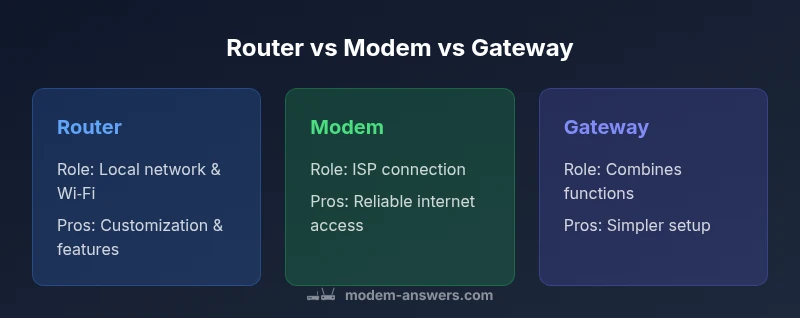
In plain terms, router vs modem vs gateway refer to three devices with distinct jobs in a home network. A router creates and manages your local network, assigns IP addresses, and routes traffic between devices and the internet. A modem is the bridge to your internet service provider; it translates signals from the ISP into a form your home network can use. A gateway combines both functions in a single box, handling the internet connection and distributing it to devices. According to Modem Answers, understanding these roles helps homeowners avoid unnecessary purchases and mismatched gear. The Modem Answers team emphasizes that most households start simple and then scale up as needs grow. By separating responsibilities or bundling them, you can tailor your setup to your home size, usage patterns, and budget. The key is to match the device to the job: local networking, external connectivity, or both in one package, depending on what matters most to you.
The core differences that matter for performance and simplicity
At a glance, the router, modem, and gateway differ primarily in where they sit in the path from internet to device. The modem sits at the edge, translating the ISP signal; the router sits inside, creating the local network and managing traffic; the gateway sits at the intersection, combining both duties. In practical terms, a router gives you control over Wi‑Fi name, password, guest networks, and device‑level security; a modem ensures you can connect to the internet; a gateway provides both in one, with fewer devices to manage. For most homes, the choice hinges on how much you value simplicity versus control. If you already own a separate modem and want optimal wireless performance, a high‑quality router can be paired with that modem. For renters or homeowners who prefer a tidy setup, a gateway reduces clutter and configuration steps. Modem Answers research shows that the trend toward integrated gateways has grown in recent years as households seek convenient, managed networks. The decision should balance cost, convenience, and future needs.
Gateway advantages: when consolidation pays off
Gateway devices can be a smart choice when you want a simple, all‑in‑one solution. They reduce the number of boxes, simplify setup, and often include built‑in security features and automatic firmware updates. If you own a small apartment or a house with straightforward internet usage, a gateway minimizes the technical overhead and makes troubleshooting easier. According to Modem Answers, gateway devices tend to appeal to homeowners who prefer plug‑and‑play reliability and fewer compatibility concerns with ISPs. They also offer the benefit of future‑proofing in environments where internet plans evolve toward higher speeds and more connected devices. However, they may limit advanced customization that power users enjoy, and some models can underperform compared with high‑end, dedicated routers when handling very heavy traffic or complex QoS rules.
Separate devices shine for performance and flexibility
Using a dedicated modem and a separate high‑end router gives you maximum control over performance, security, and feature sets. You can upgrade the router without touching the modem, select a router with advanced QoS, MU‑MIMO, and robust parental controls, and pair it with a modem that matches your ISP plan. This setup is often favored by gamers, households with many smart devices, or in homes where future upgrades are planned. Modem Answers analysis shows that enthusiasts and tech‑savvy homeowners typically prefer separate devices because they can optimize network throughput and experiment with different brands. The trade‑off is more cables, more configuration steps, and a potential bigger upfront cost. For many users, the decision comes down to how much tinkering you want to do versus how much you value simplicity and neat wiring.
How to audit your current setup and identify gaps
Start by locating the device responsible for your internet connection. Find the modem (the device that connects to the coax, fiber, or phone line) and the router (the device distributing Wi‑Fi). If you see a single box that handles both functions with built‑in Wi‑Fi, you likely have a gateway. Take note of the model numbers and check with your ISP for compatibility. Next, assess coverage: run a quick speed test near the modem, near the far corners of your home, and in rooms with weak signal. If you notice dead zones, you may need a more capable router or a mesh system. If you share a single SSID across many devices or have issues with remote work, you might benefit from a router upgrade or adding a mesh extender. Finally, consider your budget and future plans; a simple gateway might suffice now, but you may want the flexibility of separate devices later.
Key performance and security considerations
Performance is influenced by the hardware inside each device, not just the label. A capable router with current Wi‑Fi standards can deliver excellent speeds to multiple devices, while a modem’s speed is determined by your ISP plan and the technology it uses (for example, DOCSIS levels in cable networks). A gateway tries to optimize both ends, but you should verify that its processor and radios can handle your home’s traffic. Security features matter: look for WPA3, guest networks, automatic firmware updates, and the ability to disable cloud management if you prefer local control. If privacy is a priority, review how the device handles data and whether you can enable local DNS or VPN features. Modem Answers notes that ongoing firmware updates are essential for protecting against new threats, so pick devices from brands that provide timely updates.
Practical setup tips and common pitfalls
Before buying, confirm compatibility with your ISP, especially if you plan to bring your own modem. Some ISPs require specific modem models, and bridging modes may be necessary to use your own router. When configuring, choose a clear network name, strong passwords, and separate guest networks. If you opt for a gateway, update its firmware promptly and review security settings; disable remote management if you don’t need it. For separate devices, place the router central to the home for best coverage, and consider a mesh system if you have multiple floors or thick walls. Troubleshooting tends to be easier when devices are clearly labeled and powered on in a predictable sequence. By planning a layout that minimizes interference and keeps cables tidy, you’ll set up a reliable home network with confidence.
Costs, maintenance, and long-term planning
Cost considerations extend beyond upfront price. A gateway may carry a higher upfront cost but saves on the number of devices and maintenance steps, while separate devices can incur ongoing rental fees or replacement costs for upgrades. Evaluate long‑term needs: how many devices will connect, whether you expect to expand with smart home gear, and if you anticipate moving to faster internet plans. Firmware updates and reuse of existing gear can influence total cost of ownership. The choice should balance upfront expenditure, upgrade flexibility, and the anticipated lifespan of your devices. According to Modem Answers, many households find that investing in a quality router and reliable modem yields better long-term value than a budget gateway that may require upgrading sooner.
Authority sources and closing notes
This section provides foundational references for the facts and recommendations in this guide. For policymakers and researchers, these sources offer authoritative context on home networking, security, and consumer choices.
Feature Comparison
| Feature | Router | Modem | Gateway |
|---|---|---|---|
| Primary network role | Creates and manages the local network including Wi‑Fi | Connects to ISP and provides internet access | Combines routing and internet connection in one device |
| Best use case | Homes needing flexible control and custom Wi‑Fi | When you already have a modem and want best overall performance | Simple, space-saving setups with basic security and features |
| Ease of setup | Moderate (requires a separate modem) | Moderate to easy (depends on modem–router pairing) | Very easy (single device handles everything) |
| Upgrade path | Flexible: upgrade router or add mesh | Depends on modem compatibility; upgrade both as needed | Good for simple upgrades; built-in features improve over time |
| Security features | Advanced router features (firewall, VPN, guest networks) | Basic security via ISP modem; router-based controls available | Integrated security features with firmware updates and default protections |
| Price range | Varies by model and features | Varies by model and features | Varies by model and features |
Positives
- Simplifies network management by consolidating devices
- Offers a balance of setup speed and control
- Can improve security with built‑in firewall and update mechanisms
- Easier future upgrades with modular components
What's Bad
- Higher upfront cost for all‑in‑one gateways
- Single point of failure if the device malfunctions
- Less flexibility to swap high‑end routers or specific features
- ISP compatibility constraints for certain gateway models
Gateway devices offer the best balance for most households; separate devices suit enthusiasts and power users
For most homes, an all‑in‑one gateway delivers simplicity and security. If you value customization, performance, and upgrade paths, consider a separate modem and router. The best choice depends on your ISP, home size, and tech comfort.
FAQ
What is the difference between a router, a modem, and a gateway?
A modem connects your home to the internet by talking to your ISP; a router creates your local network and distributes Wi‑Fi; a gateway combines both functions in one device. Understanding these roles helps avoid buying unnecessary gear.
A modem connects you to the internet, a router shares that connection with devices, and a gateway does both in one box.
Do I need a gateway if I already have a separate modem and router?
Not necessarily. A gateway can simplify setup, but you gain flexibility and performance by using separate devices. The choice depends on your desire for simplicity versus control.
Usually not needed if you already have a modem and router; gateway can be simpler but less flexible.
Can I replace my ISP equipment with my own?
Yes, many ISPs allow customer-provided gear, but you may need to ensure compatibility and possibly bridge the modem to use your own router. Check with your service plan.
Yes, but check compatibility with your ISP and how it logs in.
What should I consider when upgrading?
Think about home size, device count, and desired features like Wi‑Fi speed, security, and guest networks. Decide whether you want separate devices or an all‑in‑one gateway based on your comfort with setup.
Size, devices, features, and upgrade path matter when upgrading.
Are there security risks with gateways?
Gateways can be secure if kept updated; enable WPA3, use strong passwords, and disable remote management if not needed. Regular firmware updates are essential.
Gateways are generally secure if you keep firmware updated and use strong settings.
Is a separate modem and router slower than a gateway?
Not inherently. Performance depends on hardware. A good router with a solid modem can outperform a budget gateway, while a capable gateway can be convenient.
It depends on the hardware, not just the device type.
Key Takeaways
- Assess home size and device count before buying
- Gateway simplifies setup but may limit customization
- Separate modem and router maximize performance and upgrade options
- Check ISP compatibility and bridging options
- Prioritize security features and firmware update policies