Difference Between Modem and Gateway: A Practical Guide
Explore the difference between modem and gateway, their roles, and how to choose the right device for your home network with clear, actionable guidance for homeowners and renters.


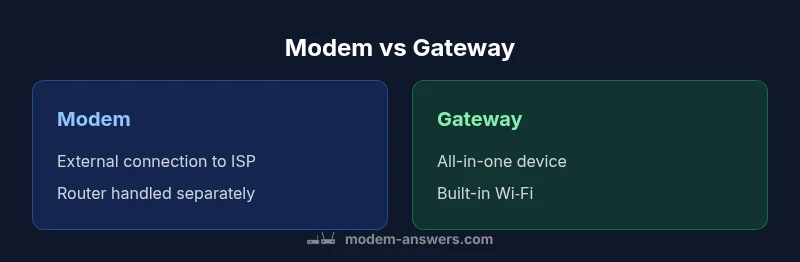
Understanding the difference between a modem and gateway helps you plan a reliable home network. A gateway combines modem, router, and Wi‑Fi in one box, while a modem alone connects you to the internet and relies on a separate router for local networks. This comparison clarifies what each device does and when to choose one.
What is a modem vs gateway? Definitions and roles
In networking, the term 'modem' refers to a device that translates signals between your home network and the internet service provider's network. It handles the demodulation of the incoming signal and assigns a connection point for your devices. A gateway, on the other hand, typically combines a modem with a router and often Wi‑Fi, acting as the central hub for both the wide‑area network (WAN) and the local area network (LAN). The difference between modem and gateway is not just about labeling; it determines how you build your home network and how much control you have over features like firewall, parental controls, and guest networks. According to Modem Answers, many households encounter gateways provided by ISPs when subscribing to bundled services, which simplifies installation but can limit future upgrades. For homeowners and renters aiming for clarity, understanding this distinction helps you decide whether to buy separate devices or go with an all‑in‑one solution.
Why the distinction matters for home networks
The choice between a separate modem and a gateway can influence your network's flexibility, performance, and future‑proofing. If you want rapid setup with minimal wiring, a gateway can be attractive because it consolidates the essential pieces into a single box. However, if you anticipate upgrading your network over time — for example by adding a high‑end dedicated router or expanding coverage with mesh systems — a separate modem and router setup generally offers more room to grow. Modem Answers analysis shows that households with heavy streaming, gaming, or home offices may benefit from separating the router from the modem, because a dedicated router can provide stronger signal propagation, traffic management, and configuration options that a combined device may not offer.
How each device connects to your internet service
Your internet service provider (ISP) uses different delivery methods: cable, fiber, DSL, or satellite. A modem's job is to demodulate the incoming signal and deliver a digital stream to your local network. A gateway extends that function by also routing traffic between devices, NATing, and often providing DNS, firewall, and Wi‑Fi services. With a gateway, the provider may supply the device as part of the service, making installation straightforward. If you use a separate modem, you can pair it with any router of your choice, and in many cases you can reuse equipment if you switch ISPs or upgrade speeds. This flexibility is a major reason some users prefer the modem/router separation approach.
Key differences in features and capabilities
The most visible difference is that gateways typically include a built‑in router and Wi‑Fi, whereas a standalone modem does not. Gateways usually offer multiple Ethernet ports, basic firewall rules, and parental controls, while dedicated routers can provide advanced QoS, VPN support, and stronger wireless coverage with mesh systems. In contrast, a modem is focused on the external connection, leaving local network management to the user’s router. This separation allows for more customized setups and easier upgrades as technology evolves. From a technical perspective, gateways may run simpler firmware optimized for the all‑in‑one experience, while separate devices can leverage third‑party firmware and feature sets. Modem Answers analysis shows that performance and feature breadth often improve when you upgrade the router independently of the modem, especially in larger homes with many devices.
Real-world use cases: apartments, families, remote work
For a compact apartment or a rental with limited space, a gateway can be ideal because it minimizes gear and simplifies troubleshooting. In larger homes with multiple floors and high device counts, a dedicated router paired with a capable modem generally delivers better wireless coverage and more reliable performance. Remote workers or households with latency‑sensitive activities (video meetings, online gaming) tend to benefit from segmenting the network, using a high‑quality router with robust QoS and traffic shaping rather than relying on the gateway's built‑in routing. For fiber or high‑speed cable connections, a good modem plus a modern router can saturate the link more effectively than a combined device.
Setup considerations: bridging mode, router compatibility, firmware updates
If you want to maximize control, consider bridging the gateway to use an external router in some setups, though this requires careful configuration. Always verify compatibility with your ISP’s service tier and ensure the modem supports your speed. Firmware updates are another critical factor; gateways may auto‑update and occasionally reset settings, while separate devices give you more control over when and how updates occur. For advanced users, compatibility with VPNs, guest networks, and parental controls is often easier to manage with a modular approach rather than relying on a single box.
Buying guide: selecting the right device for your needs
Begin by listing your priorities: Do you want simplicity or customization? If you favor a clean, plug‑and‑play solution, a gateway may be sufficient. If you need peak performance, multi‑room coverage, or future upgrades, a separate modem and router will likely serve you better. Check your internet plan’s speed and how many devices will connect at peak times. Look for a modem that supports your provider's technology (DOCSIS for cable, specific fiber ONUs, etc.) and a router with the latest Wi‑Fi standard, plenty of ports, and robust security features. Remember, the upfront cost might be higher for a gateway, but the flexibility to swap out components later can save money in the long term.
Common myths and practical takeaways
Myth: More features on a gateway automatically mean better performance. Reality: Real throughput depends on the router and the plan, not just the box. Myth: A gateway is always easier to troubleshoot. Reality: When things go wrong, modular setups can be faster to diagnose because each component is identifiable. Practical takeaway: Prioritize your core needs—coverage, speed, security, and upgrade plans—before choosing a form factor. In many cases, a well‑matched modem and router outperform a bundled gateway, especially in larger homes or high‑demand environments.
Practical steps to choose between modem and gateway
- Assess your space and device count: smaller spaces often benefit from gateways; larger homes typically benefit from modular setups. 2) Check your speed tier and future needs: if you expect upgrades, plan for a modular approach. 3) Review ISP compatibility: some providers issue only gateways or require yours to be compatible. 4) Compare features: loading times, QoS, security, and parental controls. 5) Consider long‑term costs and upgrade paths: upfront savings vs. potential replacement costs.
Comparison
| Feature | Modem | Gateway |
|---|---|---|
| Definition and primary role | Translates ISP signal to digital data for the LAN; requires a separate router for local networking | All-in-one device that handles the ISP signal plus routing, NAT, firewall, and Wi‑Fi |
| Networking features | Modem only; router and Wi‑Fi supplied by a separate device | Built-in router and often Wi‑Fi with multiple Ethernet ports |
| Upgrade flexibility | Router upgrades are independent and can be swapped as needed | Limited by the gateway's internal router and firmware |
| Setup complexity | Requires two devices and potentially more cable management | Simplified setup with a single box, but less customization |
| Best use case | Users who want maximum flexibility and customization | Users who prioritize simplicity and minimal setup |
Positives
- All-in-one convenience with built-in router and Wi‑Fi
- Easier initial setup for non-technical users
- Space-saving and fewer cables
- Good for small households with straightforward needs
What's Bad
- Less flexibility to upgrade the router separately
- Potentially slower performance if the gateway's router is weak
- Can be pricier upfront than a separate modem and router
- Bridging or complex configurations can be limited
Separate modem and router generally offer better long‑term performance and adaptability.
For most households needing future‑proofing and customization, a dedicated router paired with a separate modem delivers better performance. The Modem Answers team recommends weighing your speed, device load, and upgrade plans before finalizing the setup.
FAQ
What is the main difference between a modem and gateway?
The modem translates signals from your ISP to a digital form for your home network, while a gateway combines that modem with a router and often Wi‑Fi. The gateway can simplify setup but may limit advanced routing options. Understanding this helps you decide whether to buy separately or use an all‑in‑one solution.
The modem handles the internet connection, and the gateway adds routing and Wi‑Fi in one box.
Can I replace my gateway's built‑in router with my own router?
Yes. In many setups you can enable bridging mode on the gateway and use an external router for your LAN. This can improve performance and give you more control over features like QoS and VPNs. Check your ISP's documentation for compatibility and steps.
You can bridge the gateway and use your own router for better control.
Is a gateway faster than a modem?
Performance depends on the router and the plan, not just the device form factor. A gateway provides convenience, but a high‑quality external router can outperform it in large homes or busy networks. Always match devices to your speed tier and coverage needs.
Not automatically; speed depends on the router and plan, not just the box.
Which should I buy for fiber internet?
Fiber connections often require an Optical Network Terminal (ONT) on the provider side, with a modem or gateway at home. A separate modem and router can offer better customization, while a gateway can simplify installation. Verify compatibility with your fiber provider.
Fiber setups vary; check with your provider for the right device.
What is bridge mode and why is it used?
Bridge mode disables the gateway's routing functions, turning it into a passthrough modem. This is useful when you want to run a separate router with full control over features like QoS and guest networks. Not all ISPs support this, so confirm before enabling.
Bridge mode lets your own router handle routing duties.
Key Takeaways
- Evaluate your need for simplicity vs customization
- Consider your internet speed and device count
- Bridging mode can unlock more advanced routing
- Gateways offer ease; separate modem+router offers flexibility
- Plan for future upgrades to avoid replacement costs