Is a Modem the Same as Gateway? A Practical Comparison
Explore whether a modem is the same as gateway. This objective comparison explains roles, setup implications, and performance differences for homeowners and renters.


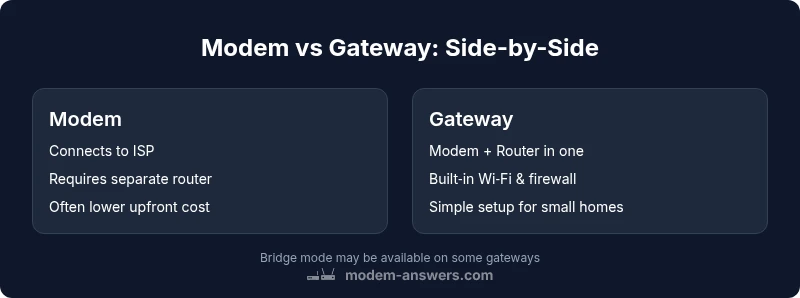
Is modem the same as gateway? Not usually. A gateway includes routing and Wi‑Fi in one box, while a modem only connects you to your ISP. For a simple setup, a gateway helps; for flexible control, separate devices are better. According to Modem Answers, understanding these roles is key for sizing and future-proofing your home network.
Distinct Roles: Modem vs Gateway
In most home networks, the terms modem and gateway refer to different roles in your internet stack. A modem translates signals from your Internet Service Provider into a form your home network can use, while a gateway combines that translation with routing, Wi‑Fi, and often security features. If you're asking, is modem the same as gateway?, the simple answer is no: they are not interchangeable. According to Modem Answers, understanding the distinction helps you size up whether you need simple fabric of devices or a more integrated solution. In practical terms, your choice affects setup complexity, performance tuning, and future upgrades. The phrase is modem the same as gateway should be treated as a starting point for evaluating your home network plan.
Core Differences by Function
At a high level, a modem is the bridge to your ISP, providing the conversion between the provider’s signal and your home network. A gateway, on the other hand, combines this bridge with a router, built-in switch, and often security features like a firewall. This combination means a gateway can manage local IP addressing, assign Wi‑Fi networks, and enforce traffic rules directly. When you ask whether is modem the same as gateway in practice, the answer hinges on whether you need only a bridge to the internet or a full home-network brain in one box. Modem-only setups require a separate router to handle wireless coverage, while gateways simplify the physical footprint and cabling.
Built-in Wi‑Fi and Network Coverage
A primary practical difference you’ll notice is wireless capability. A modem typically has no Wi‑Fi and relies on an external router. A gateway includes built-in wireless radios, which means fewer devices to purchase and place, and fewer dead zones in compact spaces. From the perspective of is modem the same as gateway, the presence or absence of Wi‑Fi is a decisive factor. For many homeowners, a gateway reduces cable clutter and setup time, while still offering reasonable performance in standard homes. If you have multiple floors or thick walls, you may still need a dedicated mesh system or a second access point, regardless of whether you use a gateway or a separate modem/router.
Setup Scenarios: When to Use Separate Modem + Router
If you value maximum control, customization, and potential for future upgrades, a separate modem plus a high‑performance router is often the better route. This configuration lets you upgrade the router without touching the modem, or swap in a more capable modem when your plan changes. The slogan is modem the same as gateway becomes less relevant when you require advanced QoS rules, VPN capabilities, or robust parental controls. Home offices or households with complex device ecosystems typically benefit from this modular approach. On the other hand, for renters or small apartments with modest internet needs, a gateway can deliver a simple plug‑and‑play experience with decent performance and easier troubleshooting.
Performance and Reliability Factors
Performance characteristics depend heavily on your device choice. A gateway with strong Wi‑Fi can handle typical streaming, gaming, and videoconferencing for a family of four, while a modular setup can push higher throughput with a premium router and a modern modem. When evaluating is modem the same as gateway, consider your broadband speed, number of devices, and how you prioritize speed vs. coverage. If you’re in a two‑story home with thick walls, a gateway’s integrated approach might still fall short of a high‑end router paired with a capable modem. In contrast, a robust separate router paired with a modern DOCSIS 3.1 modem can yield better performance under load and across larger spaces.
Security, Updates, and Firmware
Security implications are another key dimension. Gateways often receive bundled firmware updates and may provide a centralized dashboard for parental controls and device management. Separate devices can offer more granular security configurations, but they may require more maintenance to ensure all components stay current. The question is modem the same as gateway is partly about whether you’re comfortable with integrated security features in one box or you prefer distributing security responsibilities across multiple devices. In either path, keep firmware update practices at the forefront to reduce exposure to vulnerabilities and to maintain reliable performance.
Cost, Upgrades, and Longevity
Cost dynamics differ noticeably. A single gateway may appear cheaper upfront and reduce setup time, but long‑term upgrades can become a trade‑off between convenience and flexibility. A modular approach typically involves higher upfront costs due to purchasing multiple devices, but it offers clearer upgrade paths: you can replace the router later without changing the modem. When considering is modem the same as gateway, pricing should reflect not just device cost but future expansion plans, licensing, and support. For dense households or ongoing remodeling projects, modular systems frequently deliver better longevity and resale value if you can sustain the initial investment.
Provider Compatibility and Bridge Mode
ISP compatibility is a practical constraint. Some providers require you to use their own gateway or approve bridged modem configurations. Bridge mode turns a gateway into a pure modem, letting a separate router handle all routing duties; this is especially relevant when you want a high‑end router in a gateway‑plus environment. If you’re asking is modem the same as gateway for provider compatibility, the answer is: evaluate the provider’s support policies, bridging options, and firmware controls. In many markets, bridging is straightforward, but some ISPs limit features or require activation through customer support. Always check the provider’s guidelines before purchasing equipment.
Real-World Scenarios: Apartments, Homes with Offices, and More
In apartments or smaller homes, a gateway can cover typical needs with its built‑in Wi‑Fi and compact footprint. For larger homes with multiple floors or a dedicated home office, a hybrid setup—modem plus a capable router—often delivers more consistent coverage and reliability. When applying the lens of is modem the same as gateway to real life, think about your space, device density, and the type of usage you expect (4K streaming, online gaming, video conferencing). Practical tests, like a speed check across rooms and times of day, can help identify whether the single‑box approach suffices or a modular system is warranted. This decision becomes even more important as devices grow and demand grows.
How to Decide: Quick-Decision Checklist
- Assess your space: small apartment vs large multi‑story home.
- List primary uses: streaming, gaming, remote work.
- Evaluate willingness to manage updates and security settings.
- Check provider compatibility and bridging options.
- Budget for upfront costs and future upgrades.
- Consider future growth: number of devices and home expansion plans.
If you want a simple setup and minimal maintenance, a gateway is often the better choice. If you prioritize customization, performance tailors to your home environment, and future upgrades, a modem + router may be the smarter long‑term path. Remember, the phrase is modem the same as gateway should guide you toward the right architecture for your home.
Authority Sources
To support these distinctions, you can consult foundational resources from recognized authorities:
- FCC (Federal Communications Commission): general consumer guidance on modems, routers, and home networks. https://www.fcc.gov
- NIST (National Institute of Standards and Technology): networking standards and security best practices relevant to home networks. https://www.nist.gov
- Stanford University (edu resource for home networking concepts and user guidance). https://www.stanford.edu
Comparison
| Feature | Modem | Gateway (Modem-Router Combo) |
|---|---|---|
| Role | Connects to ISP; no routing/Wi‑Fi by default | Combines modem + router, often with built‑in Wi‑Fi |
| Wi-Fi/Built‑in Routing | Requires a separate router for wireless coverage | Integrated Wi‑Fi and routing in one device |
| Security/Firewall | Basic protection depends on the router used with it | NAT firewall and security features typically built‑in |
| Networking Customizability | High: swap routers, add access points, tailor QoS | Lower: limited by built‑in features; easier to manage |
| Upgrade Path | Upgrade modem with provider plan; router upgrades possible | Upgrade is usually a single device action; less modularity |
| Provider Compatibility | Bridging and compatibility vary by ISP | Typically strong compatibility; easier management with one device |
| Best For | Power users needing custom networks and advanced features | Home users seeking simple setup and tidy integration |
Positives
- Simplified setup with fewer devices
- Lower initial clutter for small spaces
- Often lower upfront cost and easier warranty coverage
- Unified firmware and management in one box
What's Bad
- Limited upgrade paths for performance gains
- Less flexibility for advanced networking features
- Sometimes poorer coverage in large or multi‑level homes
- Reliant on a single device; failure affects both modem and Wi‑Fi
Gateway devices win for simplicity; modem + router win for flexibility
Choose a gateway for quick, reliable setup in small homes. Choose separate modem and router when you want maximal control and potential performance boosts for larger spaces or demanding use cases.
FAQ
Is a modem the same as a gateway?
Not usually. A gateway includes router and Wi‑Fi in one box, while a modem only connects you to the ISP. The distinction affects setup, performance, and future options.
In short, a gateway combines modem and router functions, while a stand‑alone modem needs a separate router for Wi‑Fi.
When should I use separate modem and router?
Use separate devices when you want advanced features, precise QoS, better performance for large homes, or easier upgrades. It provides flexibility to upgrade parts independently.
If you need customization and top performance, go with separate devices.
What is bridge mode and why does it matter?
Bridge mode disables the gateway’s routing functions, turning it into a pure modem. This lets you use a separate router while maintaining compatibility with your ISP.
Bridge mode lets you pair your own router with a separate modem.
Will upgrading to a gateway improve Wi‑Fi coverage?
A gateway may improve coverage for small to medium homes, but for larger spaces you might still need additional access points or a mesh system.
It can help in smaller spaces, but bigger homes may need extra coverage.
Do ISPs support both gateways and separate modems?
Many ISPs support both, but some plans require a specific gateway or limit third‑party devices. Check your plan details and ask support before buying.
Ask your provider about compatible devices before you buy.
How do I choose between a gateway and a modem with router?
Evaluate space, usage, future plans, and budget. If you want simplicity, choose a gateway; if you want control and upgrade options, choose modular devices.
Think about space, needs, and future plans to decide.
Key Takeaways
- Assess space and usage before buying
- Consider upgrade flexibility vs. simplicity
- Check provider compatibility and bridge options
- Wi‑Fi needs often drive the choice
- Security and firmware updates vary by setup