Modem vs Router vs Gateway: A Practical Guide
Explore the differences between modem, router, and gateway, and learn how to choose the right device for a reliable home network. Clear definitions, setups, and tips for homeowners.


What each device does in a typical home network
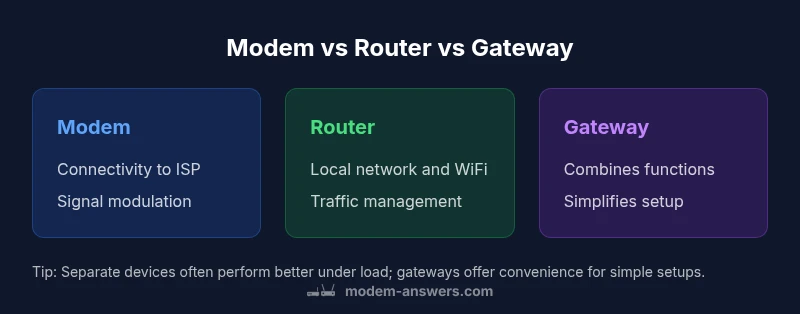
Understanding the roles of a modem, a router, and a gateway is the first step in a sane network setup. A modem is the interface to your internet service provider’s network. It modulates and demodulates signals so your home can communicate with the broader internet. A router takes the signal from the modem and creates a local network for your devices, manages traffic, and often provides Wi‑Fi. A gateway combines both functions in one box, offering a simplified, space‑efficient solution. The phrase modem vs router vs gateway is common because many households start with a single box, but as needs grow, separating duties often yields better performance and control. According to Modem Answers, the choice should line up with your plan, space, and how much you value configurability over simplicity.
- Modem: connects to the ISP and translates the signal for your home network.
- Router: builds your local network, handles routing, and broadcasts Wi‑Fi.
- Gateway: an all‑in‑one device that does both jobs.
If you’re unsure where to start, identify your internet plan and the size of your home. A gateway can be enough for a small apartment, while larger homes or households with heavy digital workloads often benefit from separate devices.
How signal flows from the internet to your devices
At the edge of your network, the modem links to the ISP using the appropriate physical medium (coax, fiber, or DSL). The router then creates a private network inside your home, directing traffic between devices and the internet. When a gateway is used, both tasks happen in one box, and all devices share a single connection point. A key concept that often appears in discussions of modem vs router vs gateway is routing versus bridging. In most standard setups, the router performs NAT (network address translation) to assign private IPs to devices, while the modem remains mostly a conduit to the external network. If you introduce a separate router, you may encounter double NAT unless you enable bridge or pass‑through modes on the modem. This is a common pitfall for beginners who mix devices without understanding their roles.
All-in-one gateway vs separate devices: Pros and cons
Choosing between an all-in-one gateway and separate devices hinges on several factors. An all-in-one gateway simplifies wiring, reduces clutter, and is often easier to manage when you have basic needs. However, it may limit customization, advanced features, and peak throughput in demanding environments. Separating the modem and router gives you room to upgrade the router for better Wi‑Fi coverage or to replace the modem if you switch providers or upgrade to a faster plan. It also makes troubleshooting easier because each device has a clearly defined role. In contrast, a gateway can be ideal for renters or busy households that prioritize convenience over peak performance. The Modem Answers team emphasizes balancing convenience with long‑term flexibility, particularly if you expect changes to your ISP or home network in the coming years.
Choosing based on your internet plan and home layout
Your internet plan and home layout drive the modem vs router vs gateway decision. For instance, fiber connections may require a different device configuration than cable or DSL, and some providers supply a gateway that is optimized for their network. If you seek strong wireless coverage across multiple rooms or floors, a dedicated router with high‑quality antennas and perhaps a mesh system can outperform a single gateway in larger homes. Conversely, if you live in a compact space and want minimal setup, an ISP‑provided gateway often delivers sufficient reliability with less effort. Always verify compatibility with your ISP and consider whether you might upgrade soon, as this will influence your long‑term value from a given setup.
Performance and coverage: what to expect
Performance is not determined by one device alone. The internet plan, modem capabilities, router technology, and the design of your home all shape outcomes. A modern router with strong signal quality can dramatically improve in‑home coverage and device responsiveness, especially in high‑traffic scenarios like streaming and gaming. If your plan includes high speeds, ensure the modem supports those speeds, and consider a router that can handle many simultaneous connections with efficient traffic management. Importantly, avoid outdated hardware that can bottleneck performance or introduce security vulnerabilities. Regular firmware updates and careful Wi‑Fi placement are essential regardless of whether you run separate devices or a gateway.
Security and maintenance: keeping things safe
Security starts with a solid foundation. Change default passwords, keep firmware up to date, and enable features like guest networks and firewall protections. With a gateway, these settings reside in a single interface; with separate devices, you’ll want to secure both the modem and the router. Regularly review connected devices and monitor for unusual activity. The simplicity of a gateway does not excuse lax security, and the modular approach of separate devices often makes it easier to isolate and manage risk across the network.
Common setup mistakes and how to fix them
- Ignoring bridge or pass‑through modes when using a second router, which can create double NAT and degraded performance.
- Placing the gateway or router in a dead zone or far from devices, limiting coverage.
- Overlooking firmware updates, leaving devices exposed to known vulnerabilities.
- Mixing equipment with incompatible standards, reducing speed or reliability.
- Skipping guest networks or device isolation, increasing security risk for visitors and smart devices.
Fixes include enabling bridge mode on the modem (when using a separate router), optimizing placement, scheduling firmware updates, and setting up a guest network for visitors. These steps help ensure the modem vs router vs gateway configuration delivers the intended benefits.
Quick-start decision framework
- If you value simplicity over customization, start with a gateway from your ISP or a provider that matches your plan.
- If you want maximum control, plan for a separate modem and router, and consider future upgrades to the router, mesh Wi‑Fi, or smart home devices.
- For multi‑story homes or spaces with Wi‑Fi dead zones, pair a capable router with strategic placement or a mesh system; avoid overloading a single gateway with too many devices.
Key benchmarks to check after setup
- Confirm that your devices can connect reliably across the home and that speeds align with what your plan promises.
- Verify that the firewall, guest networks, and parental controls function as intended.
- Monitor for double NAT issues if you use more than one network device and adjust bridge modes as needed.
A practical starter template for modem vs router vs gateway choices
- Small apartment: gateway or a simple modem + router with basic features.
- Single family home with modest smart home use: separate modem and router, plus a compact mesh if coverage is uneven.
- Large home or power user: high‑quality router with extended coverage; keep a separate modem for ISP connectivity, or use a gateway if you prefer fewer boxes.
Final thoughts on the modem vs router vs gateway question
The right choice balances your need for control, coverage, and ease of use. Start with your goals, test performance, and adjust as needed. A thoughtful setup that matches your home and plan will deliver a more reliable experience across devices and services.
What the modem does vs router differences at a glance
The three devices—modem, router, and gateway—serve distinct roles in a home network. The modem connects you to your internet service provider and handles signal modulation. The router builds and manages your local network, distributing traffic to devices via wired and wireless connections. A gateway combines these functions, offering a compact, single‑box solution. For most homeowners, the modem vs router vs gateway decision is about choosing simplicity or flexibility, and about recognizing how much control you want over your network.
Planning for growth: when to upgrade or expand
As needs evolve, you may outgrow an all‑in‑one gateway, especially if you require advanced features, higher speeds, or more robust Wi‑Fi coverage. Upgrading the router or adding mesh extenders can dramatically improve coverage in large homes. If you anticipate changes in your internet plan or a shift to higher speeds, keeping the option to upgrade separate devices can make future steps smoother and less disruptive. In contrast, a gateway may limit future expansion but offers ease of management for households that prefer a minimal setup.