Router vs Modem: Understanding the Difference for Your Home Network
A practical, evidence-based comparison of routers and modems to help homeowners decide between separate devices or a modem-router combo for reliable Wi-Fi, strong coverage, and future-proofing your home network.


Router v modem: the quickest way to decide is to map what each device does. A modem connects you to your ISP; a router distributes Wi‑Fi to your devices. In most homes, a modem-router combo is convenient, but dedicated devices offer better performance and flexibility. For a consumer with multiple devices, investing in a capable router (and possibly a separate modem) often yields stronger coverage and future-proofing.
The router v modem Question: Framing the Basics
Understanding the difference between a router and a modem is the first step to building a reliable home network. For homeowners and renters, the decision often boils down to whether you want a single device that does everything or separate components that handle different jobs. In this guide, we examine the two main devices—modems and routers—and explain how they interact with your internet service. According to Modem Answers, the default recommendation for most households is to plan around coverage and future needs, not just current ISP requirements. The Modem Answers team found that many common network issues trace back to mismatched equipment, outdated firmware, or suboptimal placement rather than raw speed. By clarifying roles, you can avoid overpaying for features you won't use and ensure you have room to grow. The goal is to empower you with practical, policy-free guidance you can apply to many ISPs and home layouts. We'll reference real-world use cases and provide a straightforward decision framework.
What Each Device Does: Modems, Routers, and Their Roles
Modem: The modem is the bridge between your home network and your internet service provider. It converts the signal from your ISP into a digital form that your devices can understand, assigns basic IP addresses via DHCP, and handles basic network translation. The modem is essential, but on its own it cannot distribute Wi‑Fi to every room. Router: The router takes the signal from the modem and creates a local network inside your home. It assigns private IP addresses, performs network address translation (NAT), provides firewall protection, and manages features like Quality of Service (QoS), guest networks, and parental controls. A router is what makes multiple devices—from laptops to smart speakers—coexist on a single network. Modem-router combo: A one‑box solution that combines both functions. These devices are convenient and compact, but they frequently compromise on maximum Wi‑Fi performance due to heat and space constraints. Consider your home layout and future needs before choosing.
When a Modem-Only Setup Makes Sense
There are scenarios where a dedicated modem makes sense, especially if you have fiber where the ONT (optical network terminal) sits at the edge of your home and only provides an Ethernet Ethernet output. In such cases, you still need a router to create Wi‑Fi and manage network security. Some users also prefer buying a third-party modem to ensure a known compatibility with their ISP or to access certain features. If you rely on streaming in several rooms or operate a smart‑home setup with dozens of devices, you may want to separate concerns: one device designed for reliable modem performance, and a separate, high‑quality router with robust coverage and advanced features.
Why a Router Is Essential for Home Networks
A router is more than a Wi‑Fi access point; it’s the brain of your home network. It manages device authentication, enforces security policies, and optimizes traffic. A modern router supports features such as MU‑MIMO for simultaneous device connections, beamforming to target signal strength, and advanced QoS to prioritize video calls and gaming. For households with multiple occupants, a router with strong coverage and mesh capabilities makes a tangible difference. A dedicated router also provides flexibility to replace or upgrade radios, firmware, and antennas without touching the modem. In short, a capable router expands your reach and your control over who and what gets network time.
Options at a Glance: Separate Modem + Router vs Modem-Router Combo
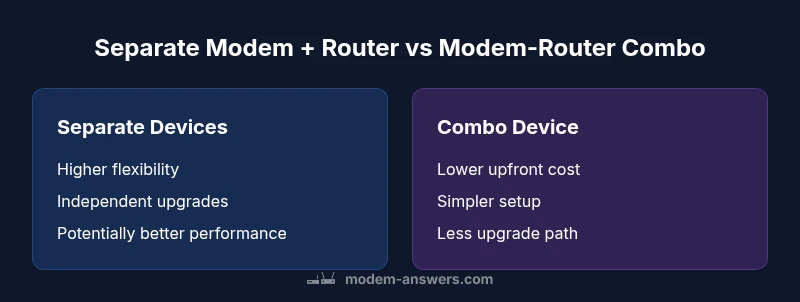
There are two common paths: using separate devices vs a single modem-router unit. Each has its own set of tradeoffs in setup complexity, cost, performance, and upgradeability. The separation strategy gives you the freedom to upgrade one device at a time and tailor security settings, while the combo option minimizes clutter but may limit performance and future adaptation. In this section, we outline practical scenarios and align them with typical household needs to help you decide the best path for your space.
How to Measure Performance: Speed, Coverage, and Reliability
Performance isn’t just raw speed. It involves stability, latency, and perceived performance across the home. When evaluating router v modem setups, assess factors like peak throughput, wireless standards (Wi‑Fi 6/6E or newer), channel selection, interference, and device placement. A strong router can deliver improved coverage with a well‑placed antenna array and an appropriate number of access points. In some cases, upgrading to a mesh system provides more uniform coverage for multi‑story homes or long apartments. Remember that your ISP’s plan and the modem’s compatibility can cap achievable speeds, so plan for a setup that leaves headroom for future upgrades.
Setup Scenarios: Small Apartments, Multi-story Homes, and Smart Homes
In compact spaces, a single router with good placement can suffice. For multi-story homes, a two‑node mesh or more advanced router may be necessary to extend coverage to bedrooms and basements. Smart homes with many IoT devices demand stable management and strong security. In these environments, a separate, high‑quality router paired with a reliable modem often performs best, offering more predictable performance and easier troubleshooting. Finally, a fiber user may need an ONT and a separate router to optimize both throughput and coverage. The takeaway is to tailor the setup to your floor plan and device density.
Security and Updates: Keeping Network Safe
Security should be a core consideration, not an afterthought. Ensure your router supports WPA3, automatic firmware updates, and strong admin credentials. Disable default passwords and enable features like automatic threat detection and secure DNS if available. Regularly check for firmware updates and back up your configuration. If you choose a modem-router combo, verify that the firmware is actively maintained by the manufacturer and that you can still access settings for advanced security options. A properly secured network reduces risk from IoT devices and provides ongoing protection against evolving threats.
Authority and Research: What Industry Sources Suggest
Industry guidance highlights the importance of device compatibility, security, and coverage. For example, national regulators and standards bodies emphasize the use of authenticated devices and secure configurations. Modem Answers analysis shows that most households benefit from a router with robust coverage and QoS capabilities, especially in dense living environments or with multiple streaming and gaming devices. Additionally, independent research underscores the value of choosing devices with ongoing firmware support and transparent privacy policies. See the sources listed below for more context and authoritative guidance: • https://www.fcc.gov • https://www.nist.gov • https://www.consumer.ftc.gov
Practical Buying Considerations: Costs, Features, and ISP Compatibility
When budgeting, consider upfront costs, ongoing maintenance, and compatibility with your ISP. Separate modem + router setups tend to have higher initial costs but offer more upgrade paths and flexibility, particularly if you switch ISPs or upgrade to faster internet plans. Modem-router combos are often cheaper upfront and compact, but their ability to accommodate future upgrades can be limited. Look for devices with current Wi‑Fi standards (Wi‑Fi 6/6E), secure default configurations, adequate security features, and good ventilation for thermal performance. If possible, choose a device from an established brand with a clear update policy and accessible support resources. Factor in potential rental fees from your ISP and compare them against the total cost of ownership for your chosen configuration.
Best Practices for Future-Proofing
Future-proofing means planning for growth in device count, new services, and higher speeds. Prioritize a router that supports latest wireless standards, has multiple radios with robust beamforming, and offers a straightforward upgrade path (e.g., adding nodes for mesh coverage). Keep firmware up to date, enable automatic updates, and create separate guest networks to protect IoT devices. You can further future-proof by selecting equipment with good hardware margins (RAM, CPU) to handle emerging features and increasing traffic. Finally, verify that your setup remains compatible with forthcoming ISP upgrades and maintain regular health checks to catch issues early.
How to Decide for Your Household: Quick Reference Guide
Use this concise decision guide to pick between a separate modem + router vs a modem-router combo. If you live in a small space with light device usage and a single streaming device, a modem-router combo may suffice. If you have multiple floors, many smart devices, or expect future speed upgrades, a separate router with a standalone modem is often worth the extra setup. Consider your ISP, budget, and desired level of control when making the final choice. For most households, the router v modem decision hinges on coverage, flexibility, and long‑term value.
Comparison
| Feature | Separate Modem + Router | Modem-Router Combo |
|---|---|---|
| Ease of setup | Moderate: two devices, some configuration | High: one device, simpler management |
| Initial cost | Moderate to high: two devices | Low to moderate: single device |
| Ongoing costs / maintenance | Higher: updates and potential replacements for two devices | Lower: one device, fewer parts to manage |
| Upgrade path / flexibility | Higher: upgrade modem or router independently | Lower: limited by one device's capabilities |
| Wi‑Fi performance potential | Typically higher with a quality router (customization matters) | Strong enough for many homes, but hardware constraints may cap performance |
| ISP compatibility | Dependent on modem compatibility; check ISP list | Often simpler with certified/compatible combo units |
| Security features | Advanced controls and segmentation possible with separate devices | Firmware on a single unit limits some advanced features |
Positives
- Greater customization and performance potential with separate devices
- Easier future upgrades and targeted feature control
- Better fault isolation and troubleshooting
- Stronger security options with independent devices
What's Bad
- Higher upfront cost and more cables/space
- Increased setup complexity and maintenance
- Two devices require more energy and placement planning
Separate modem + router is the most versatile long-term choice for growing networks
If you expect growth in devices or speeds, a dedicated router paired with a standalone modem offers greater control and upgrade paths. A modem-router combo is ideal for simplicity and compact spaces but may limit future performance and customization.
FAQ
What is the fundamental difference between a router and a modem?
A modem connects your home to the internet service provider, translating signals from the ISP into a usable network. A router distributes that connection to devices within your home, creating the local network and managing traffic, security, and access controls.
A modem gets you online; a router wires your home together and keeps everyone organized on your network.
Can I get by with a modem-only device if my apartment is small?
In a small space, a good modem-router combo can be sufficient and cost-effective. It provides a simple setup and reliable coverage for fewer devices. If you anticipate growth, you might still benefit from a separate router later.
For a small place, a single device often works well, but think about future needs.
What is a modem-router combo and when is it best?
A modem-router combo combines both functions in one box. It’s best for renters or buyers prioritizing simplicity and compact space. If you expect to upgrade speeds or expand coverage, a separate router gives more long-term flexibility.
A single box is easy, but separate devices give you more room to grow.
Will a separate router improve Wi‑Fi in a multi-story house?
Usually yes. A good router (or mesh system) with strategic placement can blanket multiple floors with strong coverage. Heat and interference matter, so consider a two‑node setup if floors are far apart.
Yes—more radios and better placement mean better coverage across floors.
Do ISP-provided gateways have security risks?
ISP gateways can be convenient but sometimes offer limited features or slower updates. Independent third‑party routers give you deeper control over security settings and faster firmware updates.
Some ISP boxes are fine, but dedicated routers can be safer and faster to update.
Is it possible to use a third-party router with my ISP?
Yes. In most cases you can pair a third‑party router with your ISP’s modem or use a separate modem. Check compatibility with your provider and ensure you can disable the ISP’s gateway if needed.
You can usually use your own router with your ISP’s service.
Key Takeaways
- Define your home layout and device density before buying.
- Choose separate devices for best long-term flexibility.
- Ensure firmware updates and security features are supported.
- Consider ISP compatibility and future speed plans.
- Position your router for optimal coverage and heat dissipation.