What is a modem vs router: A practical guide to home networking
Discover the essential differences between modems and routers, how they interact in a home network, and practical guidance for choosing the right setup.


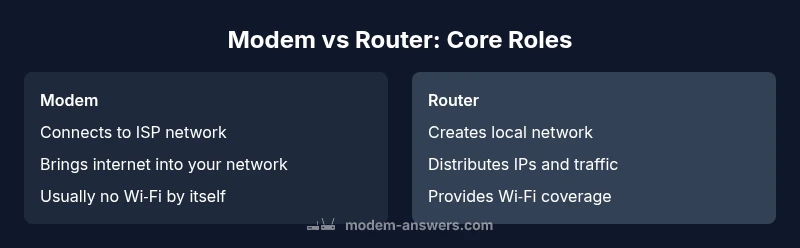
In a typical home network, a modem and a router perform distinct roles that work together to deliver internet access. A modem connects your home to the internet service provider and brings the online signal into your premises. A router then distributes that signal to all devices, creating a local network and managing traffic between devices. In short, the modem handles the external connection, while the router handles internal traffic and wireless coverage. This basic distinction matters for reliability, security, and future upgrades.
What is the difference in simple terms?
At its core, a modem translates the signal from your internet service provider into a form your home network can understand. A router takes that signal and creates a private network for your devices, assigning addresses and directing traffic. When you hear people talk about “modems” or “routers,” they’re usually referring to these two separate functions stitched together in a gateway, or kept separate in a two-device setup. According to Modem Answers, understanding this modular approach helps homeowners optimize for reliability and future-proofing. The distinction matters whether you’re troubleshooting a slow connection, upgrading Wi‑Fi, or planning to support smart devices across the home.
- Modem = external connection handler
- Router = internal traffic manager and wireless access point
- Gateway devices combine both functions but may trade flexibility for simplicity
Placement and topology: where do these devices sit?
In most homes, the modem sits near the point where the ISP line enters the house, often connected to a coaxial or fiber outlet. The router is placed centrally to maximize wireless coverage or near the modem for wired stability. When the two devices are separate, you can move the router for better signal or add a mesh system later. When a gateway combines both functions, you gain convenience but may have fewer options to swap the router later without replacing the whole unit. Modem Answers notes that physical placement can significantly impact speed consistency and wireless reach.
Feature Comparison
| Feature | Modem + separate Router | Modem-router gateway (built-in modem) | Bridge-mode with separate router |
|---|---|---|---|
| Device responsibilities | Modem handles external connection | Router handles internal traffic and Wi‑Fi | |
| NAT/DHCP handling | Router typically performs NAT and DHCP | Gateway often combines with NAT/DHCP in one box | Bridge mode can disable router functions on the gateway for the separate router |
| Setup and maintenance | Two devices require more wiring but easier upgrades | Single gateway is simpler to set up | Bridge mode requires understanding network topology |
| Reliability and upgrade path | Easier to upgrade router independently | Simpler all-in-one solution but less flexible | Separate devices offer modular upgrades |
| Best for | Users who want flexibility and strong Wi‑Fi | Simplicity and minimal troubleshooting in one box | Users who want to keep router separate for advanced features |
Positives
- Clear separation of responsibilities improves troubleshooting and upgrades
- Flexibility to upgrade or replace the router without touching the modem
- Better wireless performance with a higher-end router
- Easier to customize security and QoS settings across devices
What's Bad
- Requires more devices and cables, increasing setup complexity
- Potential for misconfiguration leading to double NAT or IP conflicts
- More points of failure if either device malfunctions
- Higher upfront cost if buying both devices (compared to a single gateway)
A two-device setup (modem + separate router) is usually the best balance of control, future-proofing, and performance.
Separating the modem and router gives you clearer upgrade paths and more control over security and Wi‑Fi. A gateway may suffice for small spaces or minimal complexity, but it sacrifices flexibility. Choose based on your home size, device count, and tolerance for setup complexity.
FAQ
What is the fundamental difference between a modem and a router?
A modem connects your home to the internet service provider and translates external signals into a usable form. A router creates a local network, assigns IP addresses, and directs traffic between devices. Together, they enable internet access and internal connectivity.
Think of the modem as the door to the internet and the router as the traffic cop inside your home.
Do I need a modem-router combo or separate devices?
If you value simplicity and fewer devices, a modem-router combo can be convenient. If you want better control, wireless performance, and easy upgrades, separate devices are usually the better long-term choice.
If you want to tinker or expand later, separate devices are generally the smarter setup.
What is bridge mode and when should I use it?
Bridge mode disables the router functionality on a gateway so you can use your own router for Wi‑Fi and advanced features. It’s useful when you need greater control over network settings or when the ISP-provided router doesn’t support your preferred equipment.
Bridge mode lets your own router take charge, avoiding conflicts between two routers.
Will a separate router slow down the internet?
No inherent slow-down occurs from using a separate router; performance depends on device quality and how traffic is managed. A good router can optimize wireless coverage and QoS for multiple devices.
A better router can actually improve performance with smarter traffic handling.
Can I buy my own modem to avoid rental fees?
Yes, buying a modem often saves ongoing rental fees and gives you control. Ensure the modem is compatible with your ISP and supports the needed DOCSIS standard or fiber terminal.
Buying your own modem can pay off over time if you pick the right model.
How do I know if my equipment is compatible with my ISP?
Check your ISP’s official list of approved devices or use their self-install tools. Modem/router compatibility depends on the technology they support and your plan requirements.
Most providers have a compatibility page; start there before purchasing.
Key Takeaways
- Split devices for maximum flexibility
- Use bridge mode to avoid double NAT when layering a second router
- Gateway solutions are simplest but less adaptable
- Upgrade path favors separate devices for long-term value