Difference Between Modem and Router with Example
A detailed, analytical comparison of modem vs router, with practical examples showing how each device functions in a home network and how to choose the right setup.


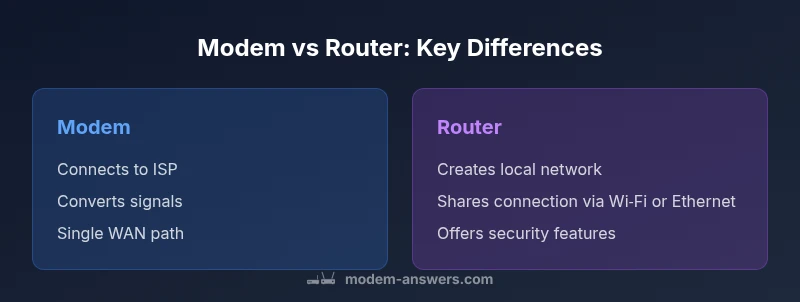
At a high level, understanding the difference between modem and router with example hinges on connectivity versus distribution. The modem connects your home to the Internet Service Provider and translates analog or fiber signals into a digital stream. The router then builds a local network and shares that connection with multiple devices via Wi‑Fi or Ethernet. In many setups a gateway combines both roles, but separating the devices often improves speed, control, and expandability in real-world homes.
Overview: Modem and Router Roles in a Home Network
Understanding the difference between modem and router with example starts with recognizing two distinct job titles in modern home networks. The modem is the gateway to the internet supplied by your ISP, converting analog or fiber signals into a digital stream your devices can understand. The router takes that stream and creates a local network, enabling multiple devices to share bandwidth via wired Ethernet or wireless Wi‑Fi. The distinction matters for performance, security, and future upgrade paths. According to Modem Answers, most households benefit from clarifying these roles before buying devices, especially when planning expansions or upgrades. In practice, you will encounter scenarios where a single gateway box combines both functions, but real-world setups often benefit from separating the two components to optimize speed, reliability, and control. The phrase difference between modem and router with example is helpful here because it anchors the concept in a concrete use case: your laptop or phone connects to the router, which in turn relies on the modem to reach the internet.
The Modem: What it does and how it connects to your ISP
A modem is the bridge between your home network and the broader internet. It communicates with your ISP using the appropriate physical layer (coaxial cable for cable, phone line for DSL, fiber optic, or wireless fiber services in some areas) and converts the signal into digital data that your devices can use. Depending on your service, the modem may also handle or allow you to configure authentication (such as PPPoE), VPI/VC settings, and modem-specific diagnostics. The key point for the difference between modem and router with example is that the modem speaks the language of the ISP and delivers an initial path to the internet; the router speaks the language of your home and devices.
The Router: Building a Local Network and Sharing Internet Access
The router takes the digital data from the modem and distributes it to all devices in the home, either through wired Ethernet ports or wireless Wi‑Fi. It creates a local network, assigns private IP addresses via DHCP, and often provides Network Address Translation (NAT) to let many devices share a single public IP. Routers also add security layers such as a firewall, guest networks, and parental controls. A modern router can handle features like QoS (Quality of Service), MU‑MIMO, beamforming, and mesh capabilities to improve coverage. When you analyze the difference between modem and router with example in practice, the router is the component that manages the day-to-day user experience and the performance you feel across devices.
Typical Home Setups: Separate Modem + Router vs Gateway (Modem-Router Combo)
There are two common configurations. A separate modem and router gives you maximum control over each device, lets you upgrade one without the other, and simplifies troubleshooting. A gateway or modem‑router combo is convenient, compact, and often provided by ISPs, but it may limit customization and future expansion. If your home has many devices or requires targeted coverage (e.g., a larger house or multi‑story layout), a separate router with a good mesh system is usually preferable. The difference between modem and router with example becomes most evident when you plan to upgrade or add features such as a dedicated guest network or advanced parental controls.
A Step-by-Step Real-World Setup Example
Imagine you’re setting up a small apartment. Connect your coax (or fiber line) from the wall to the modem. Then connect the modem to the router’s WAN/Internet port with an Ethernet cable. Power on both devices and follow the router’s initial setup wizard to configure the SSID, password, and security (WPA3 if available). Add any mesh nodes if your space is large or has dead zones. This concrete setup illustrates the difference between modem and router with example: the modem handles the ISP link, while the router creates your home network and distributes access to devices.
Common Pitfalls and How to Avoid Them
One common pitfall is double NAT, which can happen when both a gateway and a separate router perform NAT. If you encounter slow gaming or VPN issues, consider putting the gateway into bridge mode or using the router as the primary device and the modem in pass‑through. Another issue is poor firmware updates; neglecting updates can leave you vulnerable. Regularly updating firmware, changing default credentials, and segmenting guest networks are practical steps to minimize risk and improve reliability. Remember the difference between modem and router with example becomes actionable when you tailor the setup to your home layout and device count.
Security and Firmware: Keeping Your Network Safe
Security starts with a strong password and up-to-date firmware. The modem and router should not share default credentials, and you should enable automatic security updates whenever possible. A clear separation of duties also supports better security: the router can implement guest networks and parental controls without exposing the modem to every device. Regularly reviewing connected devices helps you spot unfamiliar clients early and revoke access if needed. The modem‑router distinction matters here because it lets you isolate sensitive devices on a separate subnetwork if you desire more granular control.
Performance and Coverage: What Matters for Speed and Range
Raw internet speed is set by your plan, but the perceived performance depends on the equipment. A capable router supports faster Wi‑Fi standards, strong antenna design, and features like beamforming to improve coverage. In larger homes, a mesh setup can eliminate dead zones, while a single high‑quality router may suffice for smaller spaces. The difference between modem and router with example becomes most evident in how efficiently they distribute bandwidth. Consider factors like the number of devices, streaming or gaming needs, and simultaneous connections when sizing your router or mesh system.
How to Choose the Right Setup for Your Home
Start with your space and device count: apartments with few walls and a couple of devices may be fine with a gateway, while larger homes with multiple floors benefit from a separate router or a mesh system. Evaluate your ISP compatibility and whether you need features such as guest networks, robust parental controls, or advanced QoS. A practical rule of thumb is to separate concerns: keep the modem focused on the ISP link and reserve the router for local network features and optimal performance. The difference between modem and router with example becomes a decision about where you prioritize expandability and control.
Troubleshooting Quick Wins for Modem and Router
When things go slow or drop, start with the basics: reboot both devices, check Ethernet cables, and ensure the modem lights indicate an active connection to the ISP. If Wi‑Fi is weak, reposition the router or add a mesh unit. If you suspect a double NAT, enable bridge mode on the gateway or configure the primary router as the main device and place the modem in passthrough. Documenting your setup helps you quickly identify what changed when issues arise.
Authority Sources and Practical Takeaways
This article references foundational information about home networking and device roles from authoritative sources to help you understand the practical differences between modems and routers. For deeper reading, consult official material from regulatory bodies and university resources on network fundamentals and consumer electronics best practices. The central lesson remains: know which device handles the broadband connection (modem) and which one manages your local network (router) to optimize performance and reliability.
Comparison
| Feature | Modem | Router |
|---|---|---|
| Primary role | Connects to ISP and converts signals | Distributes internet to devices and manages local network |
| Key functions | Signal conversion, compatibility with ISP | NAT, DHCP, firewall, wireless access, features like QoS |
| Typical ports | 1 coax/line input (varies by tech, e.g., DOCSIS or fiber ONT) | Multiple LAN ports, WAN port, often USB |
| Common deployment | Often integrated in gateway devices by some ISPs | Separate devices for greater customization and coverage |
| Best for | Better for matching ISP plan and bridge to gateway | Best for flexible coverage, security, and upgrades |
Positives
- Clear separation of responsibilities improves upgrade paths
- Greater flexibility for networks and mesh deployments
- Easier troubleshooting with isolated components
- Better security segmentation and guest networks
What's Bad
- More hardware to manage and heavier setup
- Higher upfront cost and more cables
- Potential for misconfiguration (e.g., NAT issues) if not careful
Separate modem and router generally deliver better control and scalability; gateways offer simplicity but limit customization.
For most homes with multiple devices and growing needs, a separate modem and router provide superior performance and upgrade paths. A gateway is convenient when space or setup speed matters but may constrain future enhancements.
FAQ
What is the fundamental difference between a modem and a router?
A modem connects your home to the internet and translates signals from the ISP into a usable digital format. A router creates a home network and shares that connection with devices via Wi‑Fi or Ethernet, while managing local traffic and security.
A modem gets you online; a router makes your devices talk to each other and stay secure.
Can I use a single device as both modem and router?
Yes. Many ISPs provide gateways that combine modem and router functions. For best flexibility and performance, especially with many devices, separate devices are often preferable.
Yes, you can, but separate devices usually give more control and upgrade options.
What is bridge mode and when should I use it?
Bridge mode disables the router function on your gateway so the modem behaves like a pass-through. This is useful to avoid double NAT when you connect a separate router.
Bridge mode lets your main router handle the network, avoiding double NAT.
How do I know if I need a new modem or router?
Consider your ISP plan, device age, Wi‑Fi coverage, and the number of connected devices. If you notice frequent drops or slow performance, a hardware upgrade is likely helpful.
Look at speed needs, coverage gaps, and device count to decide.
What is a gateway, and is it right for me?
A gateway combines modem and router in one unit. It’s convenient for small spaces but can limit customization and future upgrades.
A gateway is a combined box; it’s simple, but less adjustable.
Are there security risks with home networks?
All home networks face security risks. Regular firmware updates, strong passwords, and network segmentation reduce exposure.
Keep firmware updated and use strong passwords to stay safe.
Key Takeaways
- Know which device handles the ISP link vs. local network
- Choose separate devices for best long-term flexibility
- Consider home size and device count when deciding on a gateway
- Regularly update firmware and review security settings