Router vs a Modem: A Clear Side-by-Side Guide for Homes
Understand the router vs a modem comparison, when to use each, and how to optimize your home network with practical guidance from Modem Answers.


In a router vs a modem comparison, the modem connects you to your ISP’s network, while the router creates a home network and distributes Wi‑Fi. For most households, a separate router (or a modem-router combo) offers better coverage, control, and future-proofing. The Modem Answers team recommends starting with a capable modem and a dedicated router for reliable, scalable performance.
Router vs a Modem: Core Distinctions
According to Modem Answers, the fundamental difference between a router and a modem is not just where they sit in the network stack, but what they do for your household. A modem translates the service signal from your ISP into a digital connection that your devices can understand. A router, on the other hand, takes that single connection and creates a local network, enabling multiple devices to share bandwidth, print, stream, game, and work from home. This router vs a modem distinction informs every major decision about equipment, placement, and overall performance. In practice, most homes benefit from using the two devices in concert: a dependable modem paired with a capable router. This pairing supports growth, easier troubleshooting, and better security management.
- The modem handles the bridge to the provider’s network and converts external signals into usable data for your home.
- The router builds a private network, assigns local IPs, and manages traffic between devices.
- A gateway device combines both roles, which can be convenient but often sacrifices flexibility and advanced features.
Understanding these roles sets expectations for future upgrades, placements (near windows, away from obstructions), and the kind of troubleshooting you’ll encounter when speeds dip. In short, the router vs a modem debate often resolves to modularity versus simplicity: modular setups tend to deliver more long-term value.
Key Concepts: How a Modem and Router Work Together
A modem is the gateway between your home network and the internet service. It decodes the signal from your ISP and provides a single point of entry. A router then builds a local network (LAN), assigns devices IP addresses, and routes traffic efficiently. When you combine these roles in a gateway device, you simplify wiring but may limit customization. For most homes, using a modem and a separate router provides superior control over guest networks, parental controls, and performance across multiple floors.
- NAT and firewall features keep devices behind a shielded perimeter.
- The router handles Wi‑Fi distribution, channel selection, and device prioritization.
- A bridge mode on a gateway can bypass router functionality if you prefer a second device to handle routing.
Residents often underestimate the impact of proper placement and channel selection on speed and reliability. A well-placed router, free from interference, can significantly improve coverage in rooms far from the gateway. Modem Answers emphasizes that the right pairing hinges on your home size, layout, and device density.
When to Use Separate Devices vs a Gateway
For many homes, a separate modem and router setup offers more control and futureproofing than relying on a single gateway. A dedicated router lets you choose features such as mesh Wi‑Fi compatibility, advanced QoS (Quality of Service), and robust security updates. If your ISP provides a modern gateway that includes a strong built‑in Wi‑Fi signal and adequate performance for a small household, a gateway may suffice for a year or two. However, as households add smart devices, streaming in 4K, or remote work from multiple rooms, the need for a scalable, upgradeable network becomes clear. Modem Answers notes that starting with a high‑quality modem and a modular router is often the best path to long‑term reliability.
- For larger homes or multi‑story layouts, a dedicated router or mesh system improves coverage.
- In dense apartment buildings, a powerful router with proper channel management helps maintain stable speeds for all tenants.
- If you frequently upgrade devices or require advanced features (VPN, guest networks), modular components win out.
Networking Basics: LAN, WAN, and Wi‑Fi
A solid grasp of LAN (local area network) and WAN (wide area network) helps you design an efficient home network. The WAN is your internet connection, routed through the modem. The LAN is the private network created by your router, which assigns IP addresses and directs traffic between devices. Wi‑Fi, typically provided by the router, is the most visible aspect of the network for end users, determining how quickly devices can stream, game, or work remotely. The router’s placement, antenna design, and radio bands (2.4 GHz vs 5 GHz) influence coverage and speeds more than most people realize. To optimize the router vs a modem equation, consider a router with strong dual‑band performance, support for mesh expansion, and updated security features. Consistent, broad coverage reduces buffering and helps your smart home devices communicate reliably.
Performance Considerations: Speed, Coverage, and Congestion
Speed measurements are affected by many factors beyond the modem and router alone. The modem provides the maximum upstream and downstream capacity offered by your ISP, but real-world speeds depend on the plan, network congestion, and Wi‑Fi environment. A router adds value by efficiently distributing bandwidth, eliminating dead zones, and prioritizing traffic for latency‑sensitive applications such as video calls and gaming. When comparing router vs a modem, prioritize devices that support modern standards (Wi‑Fi 6/6E), robust multi‑user MANT (MU‑MIMO) technology, and strong processing power to handle multiple streams simultaneously. In larger homes, a mesh system connected to a capable modem offers the best mix of performance and reliability.
Security and Privacy in Home Networks
Security starts at the gateway: your modem or gateway device should be updated to support current security protocols. A router adds a second layer of defense with features like WPA3, guest networks, and the ability to segment devices (IoT vs. personal devices). Regular firmware updates, strong unique passwords, and disabling WPS are critical steps in maintaining a secure home network. The router vs a modem decision also affects how you implement firewalls and parental controls. A dedicated router often has more granular control over security settings, firmware release cadence, and logging, which can be crucial for households with multiple devices running sensitive tasks.
Setup Scenarios: When to Use Dedicated Devices vs Combo Devices
If you value plug‑and‑play simplicity, a gateway device offered by your ISP can be appealing. But if you want maximum control, plan to upgrade, or need a robust guest network, separate modem and router components are preferable. In rental properties or temporary setups, a gateway may be practical to minimize hardware and configuration steps. In upscale homes or tech‑savvy households, a dedicated modem paired with a high‑quality router (and possibly a mesh system) yields the most flexible and reliable performance. Consider your space, device density, and future needs when deciding between a modem-router combo and separate devices.
Cost and Value: Upfront vs Long‑Term
Upfront costs vary widely, but you can expect a modest modem to be in the $60–$150 range and a solid router in the $60–$250 range. A combined gateway tends to cost more upfront and can limit upgrades. Over time, modular setups generally offer better value because you can swap out one component without replacing the entire system. For households that anticipate growth—more devices, higher bandwidth requirements, or a moving schedule—a modular approach minimizes future costs and downtime. Modem Answers suggests budgeting for a router with future‑proof features (Wi‑Fi 6/6E, multi‑gig Ethernet, adequate RAM) to maximize longevity.
Practical Steps: How to Replace, Bridge, or Pair Devices
To upgrade a home network, start by selecting a compatible modem that supports your ISP’s technology (DOCSIS standard for cable, fiber ONT for fiber). Then pick a router with solid performance, appropriate Wi‑Fi standards, and security features. If you’re using a gateway today, consider placing the gateway in bridge mode and configuring a separate router to handle routing duties. When bridging, verify that both devices support bridge or passthrough modes to avoid double NAT issues. Finally, test speeds on different floors and adjust antenna placement or add a mesh satellite if needed. Small adjustments can yield noticeable improvements in reliability and coverage.
Troubleshooting Common Issues: Quick Wins
Slow speeds can stem from outdated firmware, crowded channels, or poorly positioned devices. Start with a firmware update for both modem and router, then run a speed test wired and wireless to identify bottlenecks. If Wi‑Fi is inconsistent, switch to the 5 GHz band where interference is lower, or reallocate mesh units to maintain even coverage. If you’re experiencing frequent disconnects, check for channel congestion and consider changing the wireless channel or enabling QoS to prioritize critical traffic. Remember to restart devices during troubleshooting and verify that no rogue devices are connected to your network.
Real-World Scenarios: Case Studies
A family with teens streaming 4K video in three rooms often benefits from a mesh system connected to a modern modem. A remote worker and a smart‑home enthusiast may require a high‑performance router with advanced QoS and robust security to handle VPN traffic and IoT devices. In an apartment with a dense router environment, selecting a router with strong antenna design and the ability to tune channels can significantly reduce interference. These examples demonstrate how the router vs a modem conversation becomes practical—it's about providing stable, scalable Wi‑Fi coverage that fits your layout and usage patterns.
What This Means for Your Home Network
The router vs a modem decision should be driven by your space, device count, and performance goals. For most households, a modem paired with a capable router provides the best mix of control, coverage, and future readiness. If simplicity is paramount and your ISP’s gateway already meets your needs, you can start there and upgrade later. The key is to choose devices that support current standards, offer secure defaults, and allow incremental improvements as your family’s internet usage evolves. With thoughtful placement and routine maintenance, your home network can remain fast, reliable, and secure for years to come.
Feature Comparison
| Feature | Modem-Only | Router-Only | Modem + Router (Separate) |
|---|---|---|---|
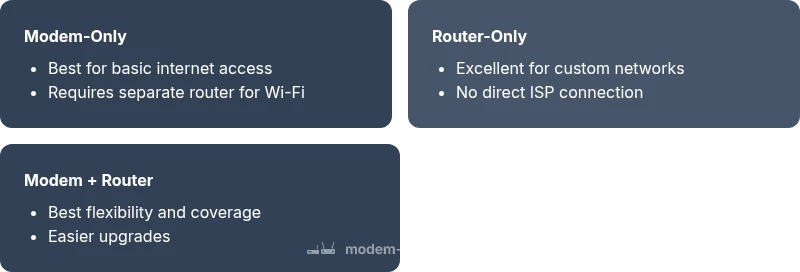
| Best For | Direct ISP connection with basic features | Customization and advanced controls | Flexible performance with easy upgrades |
| Wi‑Fi Coverage | N/A (depends on separate router) | Integrated Wi‑Fi varies by model | Excellent when paired with a capable router or mesh system |
| Setup & Maintenance | Minimal setup | Moderate; more settings to tune | Moderate to high depending on configuration |
| Cost Range (Upfront) | $50-$120 | $60-$180 | $110-$350 |
| Future-Proofing | Low to moderate | Medium to high with upgrade path | High with modular components |
| Provider Compatibility | Broad compatibility with standard gateways | Depends on bridging and features | Best when bridge mode is supported and used |
| Best For (Summary) | Budget-friendly baseline | Maximum control and features | Best balance of performance and upgradeability |
Positives
- Clear separation of roles improves troubleshooting
- Better future-proofing with modular upgrades
- More control over security and guest networks
- Stronger performance in larger homes with mesh systems
What's Bad
- Higher upfront cost for separate devices
- More setup time and ongoing configuration
- Requires some technical comfort to optimize
- Potential compatibility considerations with legacy devices
Modem + Router (Separate) is the most versatile choice for most homes
A modular setup delivers the best balance of performance, security, and upgradeability. Use a dedicated modem for ISP compatibility and a high-quality router (or mesh) to optimize Wi‑Fi coverage and control. Only opt for a gateway if simplicity and minimal maintenance are your top priorities.
FAQ
What is the main difference between a router and a modem?
A modem connects you to your internet service provider’s network, translating the signal into data your devices can use. A router creates and manages your home network, distributing that data to multiple devices and providing Wi‑Fi. The router vs a modem distinction matters for coverage, control, and future upgrades.
A modem gets you online; a router makes your home network work smoothly with multiple devices.
Do I need a router if I have a gateway from my ISP?
A gateway combines modem and router functions in one device. You can use it as-is, but you may gain more control and better performance by adding a separate router or upgrading to a mesh system if you have a large home or lots of devices.
If you want better control and coverage, add a separate router even with a gateway.
Can a router boost internet speed?
A router doesn’t increase the baseline internet speed from your plan, but it can optimize how that speed is distributed, reduce bottlenecks, and improve wireless performance through newer standards and better antenna design.
A router helps you use the speed you pay for more efficiently.
What is bridge mode and when should I use it?
Bridge mode disables the router functionality of a gateway so another router can handle routing duties. Use bridge mode when you want to avoid double NAT and maximize control over your network.
Bridge mode hands routing control to your own router.
Is a mesh system worth it for a large home?
For larger homes with many walls or floors, a mesh system provides seamless coverage and fewer dead zones, improving overall network reliability.
Mesh systems can dramatically improve coverage in big spaces.
What should I look for in a new router?
Look for Wi‑Fi 6/6E support, adequate CPU/RAM, multiple ethernet ports, MU‑MIMO, robust security features, and good app-based management for easy control.
Prioritize modern standards and security features.
Key Takeaways
- Choose a modular setup for long-term flexibility
- Prioritize Wi‑Fi performance when coverage matters
- Bridge modes can unlock better routing options
- Regular firmware updates improve security and speed
- Plan for future growth with mesh-ready hardware