Spectrum Router vs Modem: Which Is Right for Your Home Network?
An analytical comparison of Spectrum router vs modem, covering setup, performance, security, and cost to help homeowners decide between gateway devices and separate gear for home networks.


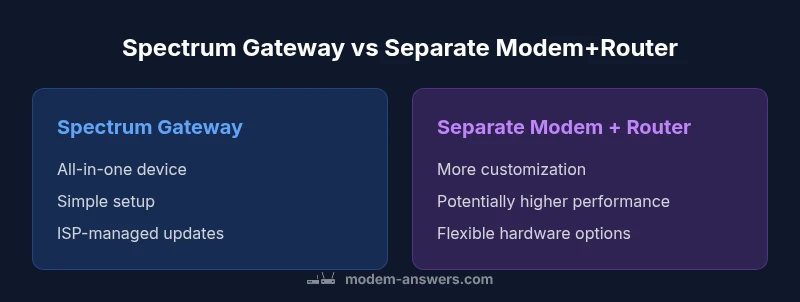
According to Modem Answers, a Spectrum gateway (modem-router combo) is easiest to set up, while separate modem and router offer more control and potentially higher performance. For most homes, the gateway is sufficient, but power users may prefer independent devices for customization and future-proofing. See our detailed comparison chart for specifics.
Spectrum Router vs Modem: The Core Difference
Understanding the distinction between a Spectrum router and a modem is the first step in deciding whether a gateway device or separate gear better serves your home network. In most contexts, Spectrum's terms refer to two devices: a modem that connects to the internet service, and a router that distributes that connection to your devices. Spectrum also offers a combined gateway that handles both functions in a single box. According to Modem Answers, the real-world impact of this choice hinges on placement, household size, and usage patterns. The central question is: do you value simplicity or maximum control? This section outlines the criteria we’ll use to compare the gateway approach against a dedicated modem-plus-router setup.
When Spectrum Gateway Really Makes Sense (Modem-Router Combo)
For many households, a Spectrum gateway is the most sensible choice. The all-in-one device reduces clutter, simplifies installation, and minimizes compatibility concerns with Spectrum's network and support. With a gateway, you typically manage settings through a single app or web interface, receive automatic firmware updates, and enjoy built-in Wi‑Fi without needing to synchronize multiple devices. If your home layout is modest, your internet activities are relatively uniform (browsing, streaming, video calls), and you prefer a hands-off experience, the gateway provides dependable performance with low setup friction. Spectrum’s customer support streamline is another practical advantage for homeowners who want a single point of contact for issues. For renters or busy households, the gateway’s convenience can save time and reduce troubleshooting complexity. In short, gateway devices excel in simplicity and reliability, especially for users who don’t want to tinker with networking gear.
Quick note on placement and expectations
Proper placement can influence even a high-quality gateway’s performance. Central locations, elevated positions, and avoiding interference from thick walls or dense furniture will help you get the most from whatever device you choose. Modem Answers’ evaluation underscores that real-world results depend on factors such as building materials, device count, and usage patterns.]
organizationNotePlaceholder
Comparison
| Feature | Spectrum Gateway (Modem-Router) | Separate Modem + Router |
|---|---|---|
| Equipment Type | All-in-one gateway provided by Spectrum | Two separate devices from different vendors |
| Networking Control | Simplified, with limited customization | Extensive customization and features (QoS, guest networks) |
| Performance Headroom | Good for average households | Higher performance potential with dedicated hardware |
| Wi-Fi Coverage | Integrated Wi-Fi in gateway | Standalone router with broader/mesh options |
| Firmware & Updates | Automatic updates via Spectrum | Manual/automatic updates via own equipment |
| Cost Model | Rental or upfront gateway purchase | Upfront modem + router cost; potential ongoing fees avoided |
| Support & Troubleshooting | One-stop Spectrum support | Separate support paths; own devices may require multiple vendors |
Positives
- Fewer devices means simpler setup and fewer cables
- One-stop support from Spectrum can simplify troubleshooting
- Smaller footprint and fewer cables
- Automatic firmware updates via Spectrum improve security with less user effort
- Low upfront setup friction helps quick activation
What's Bad
- Less customization and fewer advanced networking features
- Potential ongoing rental costs or limited upgrade paths
- Performance ceiling for tech enthusiasts or high-traffic homes
- Bridging to use a separate router can be non-trivial and may require advanced steps
Gateway devices win on simplicity for most homes, while separate modem and router win on performance and control for power users.
Choose the Spectrum gateway if you want quick setup, minimal equipment, and reliable ISP support. Opt for a separate modem and router if you need maximum control, higher throughput, and expandability for large households or gaming. The Modem Answers team endorses this guidance based on typical home networking needs.
FAQ
What is the main difference between Spectrum router and modem?
A modem connects your home network to the internet service, while a router distributes that connection to devices within your home. Spectrum’s gateway combines both functions in one box, whereas a separate modem and router use two devices. The choice affects setup, speed potential, and customization options.
A modem connects you to the internet, the router shares that connection with devices in your home. Spectrum often offers a combined gateway, but you can also use separate devices for more control.
Can I use my own router with Spectrum service?
Yes. You can use your own router with Spectrum by enabling bridge mode on the gateway or configuring the network so your router handles routing tasks. This can unlock advanced features but may require more setup and occasional Spectrum guidance for best results.
Yes, you can use your own router, usually by setting the gateway to bridge mode so the router handles the network traffic.
Is a separate modem and router better for gaming?
Often yes, because a dedicated router can offer advanced Quality of Service (QoS) settings and more robust hardware. Results vary with your ISP plan and equipment, but power users typically see smoother performance and lower latency when using separate devices compared to a single gateway.
Dedicated gear often helps with gaming thanks to better hardware and QoS features.
Do I need to rent Spectrum equipment?
No. You can own compatible modem and router, provided they work with Spectrum’s network. Owning gear can reduce ongoing costs, but you’ll miss Spectrum’s centralized support for those devices. Confirm compatibility with Spectrum before purchasing.
No, you don’t have to rent—own compatible devices, but check compatibility with Spectrum first.
How do I set up bridge mode on a Spectrum gateway?
To use your own router, enable bridge or pass-through mode on the Spectrum gateway. Connect your router to the gateway, disable NAT on the gateway, and configure your router’s WAN settings. Follow Spectrum’s official steps for bridge mode to ensure compatibility and security.
Bridge mode lets your own router control the network, but you’ll disable the gateway’s routing features.
Key Takeaways
- Choose gateway for simplicity and fewer devices
- Separate modem + router suits performance-heavy or tech-savvy households
- Check provider compatibility and bridging options before buying
- Consider total cost: ongoing rental vs upfront hardware purchases