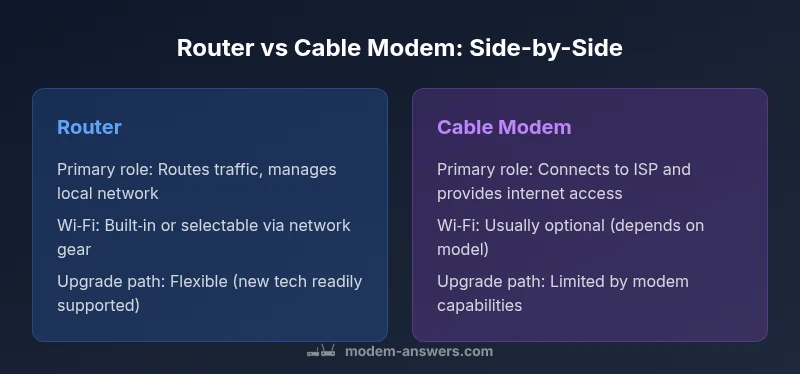
Router vs Cable Modem: Side-by-Side Comparison
In this in-depth guide, we compare router vs cable modem to help homeowners decide between separate devices or a gateway. Learn which setup suits your home, budget, and future needs with a clear feature-by-feature analysis and practical recommendations.


TL;DR: For most homes, using a dedicated router with a separate cable modem delivers the best network control, Wi‑Fi performance, and upgrade flexibility. A modem-router combo is convenient for small setups but can limit optimization and future upgrades. The best choice depends on your home size, device count, and whether you value simple setup or advanced features.
What are router and cable modem?
In modern home networks, the distinction between a router and a cable modem is fundamental. A cable modem is the bridge between your local network and your Internet Service Provider (ISP) — it translates the signal from the coaxial or fiber line into a data stream your devices can understand. A router, on the other hand, manages traffic inside your home, assigns local IP addresses, and distributes Wi‑Fi to phones, laptops, smart speakers, and more. According to Modem Answers, understanding these roles helps homeowners plan for performance, security, and future upgrades. The names are often used interchangeably in marketing, but the practical function remains clear: one device connects you to the internet; the other distributes that connection to your devices.
When you evaluate router vs cable modem, the key question is whether you need just access to the internet or a managed, scalable home network. A modem alone cannot route traffic, and a router alone cannot connect to the internet without a modem or a bridging setup. The best solution often combines both, but the balance depends on your household needs and tech comfort level.
Why the distinction matters in home networks
For most households, the difference between router and cable modem translates into control, coverage, and future-proofing. A modem is essentially a gateway to your ISP, with limited ability to manage devices or optimize wireless performance. A router introduces features like NAT (Network Address Translation), DHCP (dynamic IP assignment), firewall protections, and Wi‑Fi management, which collectively determine how well your devices communicate and stay secure. In practical terms, using a dedicated router allows you to tailor your network: prioritize video calls during work hours, create guest networks for visitors, or implement parental controls. The Modem Answers team emphasizes that the right mix can dramatically affect reliability and user experience, especially in homes with multiple smart devices and streaming needs.
From a security perspective, routers can offer robust firmware updates and configurable protections, while standalone modems typically rely on ISP-provided firmware with fewer customization options. Your decision should also consider future upgrades: a separate router supports newer Wi‑Fi standards more readily than most integrated gateway devices.
How each device functions in practice
A cable modem’s job is straightforward: convert the incoming signal (coax, fiber, or another media) into a data stream your devices can parse. It does not create local networks by default. Some modems ship with basic Wi‑Fi, but that is not universal and may be insufficient for busy households. A router’s job is to create a local network, assign IP addresses, manage traffic, and broadcast Wi‑Fi. Routers also offer advanced features such as Quality of Service (QoS), guest networks, VPN compatibility, and sophisticated parental controls. When combined, a modem and router form a complete system to both access the internet and manage a household network. The choice between a single gateway device and separate components becomes a trade-off between convenience and granular control.
Common deployment patterns
Two common deployment patterns dominate homes: a modem-router combo and a separate router paired with a dedicated modem. A combo device is simplest to set up and manage for small households or renters who want minimal tinkering. However, you trade some control and upgrade flexibility. A separate modem and router often yields stronger Wi‑Fi coverage, more consistent performance across multiple devices, and easier upgrades as standards evolve (for example, newer Wi‑Fi bands or mesh networking options). For many users, the upgrade path—especially for high‑speed internet—favors a separate router to avoid bottlenecks and to keep room for growth. Modem compatibility with your ISP is a critical consideration.
When to choose a separate router
Choose a separate router when you have multiple devices, a larger living space, or a demand for consistent Wi‑Fi across rooms. Separate routers generally offer better performance in dense environments with many streaming devices, video conferencing, and smart home hubs. They also provide more reliable firmware updates and security configurations. If you anticipate quick growth in devices or want to implement advanced features like mesh networking, a stand-alone router is often the better long-term investment. The Modem Answers team notes that planning for future upgrades—like expanding coverage or boosting throughput—pays off in the long run.
When a cable modem with built-in Wi‑Fi is enough
A modem with built‑in Wi‑Fi can be sufficient for small households with a limited number of devices or for renters who need a simple setup. These devices reduce the number of components and cables, which can simplify maintenance. However, built‑in Wi‑Fi tends to be less robust for larger homes or high-bandwidth needs, and upgrading the Wi‑Fi performance later often requires replacing the entire gateway. If your home layout is open and device count is modest, a gateway device may be a practical choice. For most modern needs, consider at least a capable router if you foresee adding devices or increasing usage over time.
How to set up a separate router and modem
Setting up a separate router typically involves placing the modem in a central location, connecting it to the router via an Ethernet cable, and configuring the router’s SSID, password, and security settings. If your ISP provides a bridged modem, you can disable the modem’s routing features and let the stand-alone router handle NAT and DHCP. This setup often yields better performance and easier upgrades. A few practical steps:
- Verify compatibility with your ISP.
- Update firmware on both devices before configuring.
- Disable double NAT when bridging to avoid network conflicts.
- Set a strong admin password and enable automatic updates.
- Consider a mesh system if Wi‑Fi coverage is inconsistent.
Bridge mode can simplify things, but it sometimes requires extra steps. Follow the manufacturer’s instructions to avoid common misconfigurations and to maximize security.
Performance considerations and feature trade-offs
Performance depends on many factors, including the speed of your plan, the layout of your home, and the devices you connect. A dedicated router often delivers better wireless performance due to higher-end antennas, beamforming, MU‑MIMO, and better QoS controls. You will typically see more stable streaming and video calls, especially on multiple devices. Modems, when paired with capacity‑adequate routers, contribute to a robust overall experience, but bottlenecks can occur if the modem is not compatible with higher-speed tiers or if the router’s capabilities are surpassed by heavy usage. Consider your needs for features such as guest networks, parental controls, VPN support, and automated backups when evaluating options.
Security considerations and firmware updates
Security should influence your decision. Routers with active firmware updates and security features (firewall rules, intrusion prevention, and frequent patching) help protect devices connected to your network. A separate router also means you can retire older hardware without replacing your modem, potentially improving security posture over time. If you choose a gateway, ensure the ISP provides timely firmware updates and consider additional protections via a dedicated firewall or network security appliance if your threat model requires it. Regularly updating firmware on both devices, enabling automatic updates where possible, and using strong, unique passwords are essential security practices. Modem Answers emphasizes proactive maintenance as a cornerstone of reliable network security.
Cost and value considerations
Budgeting for router vs cable modem is about balancing upfront costs with long-term value. A separate router plus an independently sourced modem can demand higher initial expenditure but often yields better performance, broader feature sets, and longer useful lifespans. A gateway device reduces clutter and setup time, which can be appealing for small households or tenants who prioritize simplicity. Think about device ownership, potential rental fees, the desire for future-proofing, and whether you expect to upgrade your internet speed soon. The total cost of ownership grows with device reliability, annual firmware updates, and the time you’ll save managing a more robust network.
Real-world deployment patterns
In practice, many households adopt a hybrid approach: a reliable modem connected to a mid‑range router, with a mesh satellite if coverage is uneven. In multi‑story homes with thick walls, a mesh system can dramatically improve coverage without rewiring. For small apartments, a modern gateway may suffice, especially if you want minimal troubleshooting and a single point of contact for ISP support. Businesses and power users, meanwhile, often deploy a dedicated router and potentially a separate firewall or security appliance to maintain a controlled environment. The choice should reflect not only current needs but also your tolerance for future upgrades and maintenance.
Myths and misconceptions about router vs cable modem
A common misconception is that a flagship router automatically guarantees better speed than any gateway. In reality, speeds are constrained by your ISP plan, the modem’s DOCSIS standard, and how the router handles traffic. Another myth is that bridge mode is always simple; while it can reduce double NAT problems, it sometimes introduces setup complexity. Finally, some assume more antennas always mean better coverage; placement, interference, and the overall home layout significantly impact results. A careful evaluation of your space, device count, and usage patterns usually yields a clearer path than marketing claims.
Practical decision checklist for choosing your setup
- List your devices and typical usage (streams, gaming, work calls).
- Measure your space and note Wi‑Fi dead zones.
- Check your ISP’s compatibility and equipment options.
- Decide whether upgrade flexibility or simplicity matters more.
- If in doubt, start with a reliable modem and router combo later upgrade to a mesh system if needed.
This checklist helps translate long-form guidance into concrete next steps, aligning your choice with real-world usage and future needs.
The bottom line: a quick decision framework
For most households with multiple devices and modern internet needs, a separate router paired with a capable modem provides the strongest balance of performance, security, and upgrade path. For renters or small spaces, a gateway device may deliver enough speed with the least hassle. Use this framework to tailor your choice to your home’s size, device count, and your willingness to manage a more complex setup. In all cases, prioritize security updates, correct placement, and a setup that minimizes interruptions to your daily routines.
Comparison
| Feature | Router | Cable Modem |
|---|---|---|
| Primary function | Routes traffic, manages local network, broadcasts Wi‑Fi | Connects to ISP signal and provides internet access without routing control |
| Built-in Wi‑Fi | Usually includes Wi‑Fi as the gateway | Typically no routing features; may require bridge mode for full use |
| Network features | DHCP server, NAT, firewall, QoS, guest networks | NAT on modem, bridging options; often fewer advanced features |
| Upgrade path | Can adopt newer Wi‑Fi standards and mesh systems | Limited upgrade options; depends on modem capabilities |
| Setup complexity | Requires configuring both devices for optimal performance | Simpler if using a bundled gateway; less flexible |
| Cost impact | Higher upfront if buying separate devices; long‑term flexibility | Lower upfront; rental options often exist with ISPs |
| Best for | Large homes, many devices, future-proofing | Small homes, renters, minimal setup |
Positives
- Greater control over network settings and Wi‑Fi performance
- Easier to upgrade Wi‑Fi as needs grow
- Better security via separate devices and regular firmware updates
- Clear upgrade path when internet speeds increase
What's Bad
- Higher upfront cost and more equipment to manage
- More complex setup and ongoing maintenance
- Requires more space and power consumption
- Potential compatibility considerations with ISPs when bridging
Separate router + modem generally offers the best balance of performance and future-proofing
For households with multiple devices or demanding Wi‑Fi needs, a dedicated router provides stronger performance and upgrade potential. A cable modem with integrated Wi‑Fi is convenient for small spaces but may limit customization and long‑term growth. The best choice hinges on your space, device count, and willingness to manage a two‑device setup.
FAQ
Can I use a router with any cable modem, or do I need a specific modem?
In most cases you can pair a router with a compatible modem, but you should confirm compatibility with your ISP and the modem’s DOCSIS standard. Some ISPs require approved gateways or specific firmware to ensure service reliability. Checking the modem’s compatibility list and requesting ISP approval can prevent setup issues.
Most routers work with a wide range of modems, but always verify compatibility with your ISP before buying.
What is a modem-router combo, and when should I consider one?
A modem-router combo combines both functions in a single device. It is convenient for smaller spaces and simpler setups, but it offers less flexibility for upgrades and feature customization. If you anticipate needing stronger Wi‑Fi in a larger home or want advanced network controls, a separate router is usually the better option.
A combo is easier to set up, but less flexible for future upgrades.
Do I need bridge mode, and when should I use it?
Bridge mode disables the modem’s routing functions so your separate router can handle NAT and DHCP. It’s useful to eliminate double NAT and improve performance when you’re using a dedicated router. Not all devices handle bridging the same way, so follow the manufacturer’s instructions for your exact model.
Bridge mode helps when you want your router to manage the network.
Will a separate router improve my Wi‑Fi in a large home?
Often yes. A separate router lets you choose a high-performance model and place it strategically to optimize coverage, sometimes complemented by mesh nodes. For very large or multi‑story homes, a mesh system paired with a capable router tends to deliver the most consistent results.
Yes, you’ll usually see better Wi‑Fi coverage with a separate router and, if needed, a mesh system.
Are there security risks with a standalone modem vs router?
Both devices must be kept up to date with firmware. A standalone router typically offers more configurable security options, while a modern gateway from an ISP should also provide safety features. Regular firmware updates and strong passwords are essential in either setup.
Keep firmware up to date and use strong passwords for best security.
What’s the bottom line for most households?
For most homes with multiple devices, a separate router plus modem offers the best balance of performance and upgrade potential. If simplicity is paramount and your devices are few, a gateway can suffice, provided it meets your speed and coverage needs.
Separate devices work best for most households, but gateways can be fine for simple setups.
Key Takeaways
- Separate router and modem often deliver better performance
- Gateway devices are simpler but less flexible
- Bridged/modem-only setups require careful configuration
- Plan for future upgrades and potential mesh expansion
- Prioritize firmware updates and strong security practices