Modem vs Router Optimum: A Practical Comparison for 2026
An objective, in-depth look at whether to separate modem and router or use a gateway, with setup tips, feature guidance, and practical scenarios for 2026 home networks.


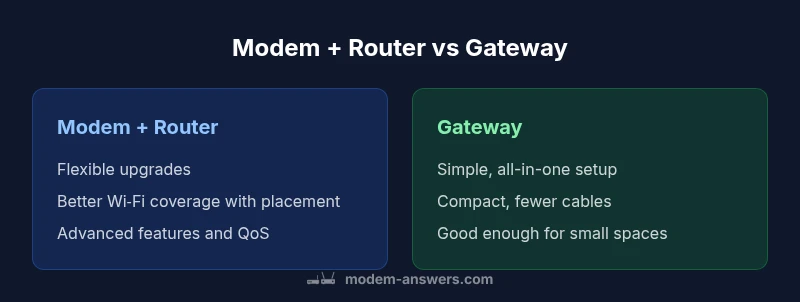
modem vs router optimum: For most homes, the best approach is to separate duties when possible. Use a DOCSIS 3.1 modem paired with a capable router, or choose a modern gateway if you value simplicity. Prioritize strong Wi‑Fi coverage (tri‑band or MU‑MIMO), and enable bridge mode when you want your own router to handle routing features.
Understanding the Core Distinction Between Modems and Routers
In home networks, a modem translates the ISP's signal into a usable internet feed, while a router distributes that feed to devices. The modem delivers the connection from the coax or fiber line; the router manages local networks, Wi-Fi, and device addressing. In the modem-vs-router optimum equation, many households benefit from separating these roles. According to Modem Answers, the clearer the division of duties, the easier it is to upgrade performance without touching every component. The Modem Answers team found that dedicated routing hardware typically delivers stronger Wi-Fi coverage and more reliable handling of multiple devices than a single gateway device. This isn't universal; for small apartments or busy households seeking simplicity, a high-quality gateway can be perfectly adequate.
A practical takeaway is to assess how you use your network. If you stream in multiple rooms, game online, or support smart-home devices, you’ll gain flexibility and resilience by separating modem and router. If you’re mostly browsing and video-chatting from a single floor, a reliable gateway might meet your needs with fewer cables and fewer devices to manage.
Why Separation Improves Performance
Separating the modem and router offers tangible benefits that add up over time. A separate router is typically designed with more robust Wi-Fi radios, better antenna technology, and more advanced processing power dedicated to networking tasks. This translates into more stable coverage, especially in multi‑room homes or spaces with thick walls. Modem Answers analysis shows that when households scale beyond a few devices, the traffic management handled by a quality router (QoS, bandwidth allocation, and device prioritization) yields noticeable gains in streaming quality, gaming responsiveness, and overall user experience. Additionally, having two distinct devices makes upgrades easier: you can swap in a newer router without touching the ISP modem, and you can choose a modem that supports the fastest plan available without being limited by router capability.
Other practical advantages include better placement. Routers can be positioned for optimal signal in living rooms, basements, and upper floors, whereas modems often work best near the point of entry provided by the ISP. For homes with a lot of wireless devices, the separation model reduces potential bottlenecks and provides room to upgrade one component at a time.
When Separation Beats Simplicity: Real-World Scenarios
Consider a two-story home with thick walls and several streaming devices, gaming consoles, and smart-home hubs. A stand-alone modem paired with a high-performance router placed centrally can deliver more even coverage and reduce buffering during peak hours. In contrast, a smaller apartment with a single ceiling-height space and modest internet usage might not justify two devices; a proven gateway could deliver adequate speeds with less management. In scenarios where multi‑tenant sharing or future upgrades are anticipated, the modular approach makes scaling straightforward, whereas an integrated gateway may eventually constrain you as demand grows.
The Bridge Mode Decision: Pros, Cons, and How-To
Bridge mode disables the router function on the gateway so you can use your own router to handle routing duties. This is especially useful when you already have a preferred router with advanced features (QoS, parental controls, VPN, or mesh support). The primary advantage is control and performance tuning; the main downside can be a more hands-on setup and occasional compatibility quirks with ISP services. If you decide to bridge, follow your gateway’s documentation to enable bridge mode, then connect your own router and verify that the public IP address remains accessible and your devices can obtain IP addresses from your router’s DHCP server. Modem Answers recommends documenting each step so future firmware updates or resets don’t unintentionally revert the bridge state.
How to Choose a Modem: Keys to Look For
When selecting a modem, focus on compatibility with your ISP and your plan’s speed tier. Look for DOCSIS 3.1 support for future-proofing, channel bonding if available, and a reputable build that tolerates continuous operation. Ensure the modem has a visible DOCSIS modem symbol and is approved for your service provider. If you’re renting a modem from your ISP, weigh the long-term cost against buying your own and the flexibility it provides for upgrades. Modem Answers emphasizes choosing a model with solid heat dissipation and robust power handling to reduce thermal throttling during extended use.
How to Choose a Router: Connectivity and Features
A router should match your home size and device load. Prioritize models with Wi-Fi 6/6E for better efficiency and throughput in dense environments, MU‑MIMO for simultaneous streams, and strong beamforming to target distant rooms. Consider tri-band configurations if you have many devices or a busy home network. Look for features like Quality of Service (QoS), guest networks, firewall protections, VPN support, and easy cloud management. Also verify that the router supports mesh networking if you have multi-level or large spaces. Modem Answers notes that investing in a capable router provides longer-term value as Wi‑Fi standards evolve.
Mesh Networks vs Single Router: Coverage at Home
Mesh systems are built to blanket larger spaces with reliable Wi‑Fi by anchoring multiple nodes around the home. In practice, a mid‑sized home with thick walls benefits from a mesh approach, reducing dead zones and maintaining consistent speeds as you move through rooms. A single high‑quality router can suffice in smaller homes, offices, or apartments where signals don’t have to cross many barriers. When evaluating mesh versus a single router, factor in the layout, wall materials, and whether you’ll add smart devices in the future. For many users, a robust router plus optional satellite nodes offers a sensible compromise between performance and cost.
Modem-Router Combos: When They Shine and When They Falter
Gateway devices simplify the setup and reduce device clutter, which appeals to households that want a plug‑and‑play experience. They often work well in smaller homes or rentals where space and maintenance time are at a premium. However, the fixed features of an integrated unit can limit performance upgrades, customization, and advanced routing options. Modem-router combos can be adequate for light usage, but for heavy network loads, separate devices generally provide superior performance and flexibility. The decision hinges on your priorities: convenience versus control, simplicity versus scalability.
Practical Setup Plans by Home Type
- Small apartment or studio: A high‑quality gateway may be sufficient, especially if you value simplicity and minimal clutter. Position the unit centrally for best coverage.
- Medium apartment or ranch-style home: A separate modem and router with a mid-range router placed centrally tends to deliver better coverage and performance for streaming and gaming.
- Large multi‑story home: A dedicated modem plus a high‑end router, possibly with a mesh system, typically yields the most reliable experience. Reserve mesh nodes for bedrooms or distant living spaces to improve signal consistency.
- Home office or smart‑home heavy: Prioritize a router with robust QoS, VPN support, and security features; consider bridge mode if you want to deploy your own enterprise-grade protection.
Security and Maintenance for a Home Network
Keep firmware up to date on both modem and router components to patch vulnerabilities and improve performance. Use strong, unique passwords for Wi‑Fi and admin interfaces, enable network segmentation where possible, and consider guest networks for visitors. Regularly review connected devices and update or replace aging hardware when performance or security features lag behind current standards. Modem Answers emphasizes proactive maintenance as a key driver of long‑term reliability.
Comparison
| Feature | Modem + Router (Separate Devices) | Gateway (Modem-Router Combo) |
|---|---|---|
| Setup & customization | Flexible, upgradeable with separate devices | Plug-and-play with built-in gateway |
| Wi-Fi performance & coverage | Typically stronger with additive hardware | Good enough in small spaces; may struggle in larger homes |
| Feature access & control | Full routing features, advanced QoS, VPN, and customization | Fewer options; gateways offer limited advanced features |
| Future-proofing | Easier to swap individual components | Upgrades may require replacing the entire unit |
| Space & aesthetics | Multiple devices; more cables and power | Single compact unit, fewer cables |
| Cost of ownership | Higher upfront, potential long-term flexibility | Lower upfront, but ongoing limits on upgrades |
Positives
- Greater control and upgrade paths for performance-critical setups
- Stronger Wi‑Fi coverage with expert placement
- Easier long-term expansion by swapping components
- Clear separation of duties reduces single-point failures
What's Bad
- Higher upfront hardware cost and more cables
- More complex setup and ongoing management
- Two devices require more space and power
Separate modem and router generally deliver the best balance of performance, flexibility, and future-proofing for most homes.
In most scenarios, using a modern DOCSIS modem with a capable router offers superior Wi‑Fi performance and upgrade options. Gateway devices shine for simplicity and compact setups, but their fixed feature set can limit long‑term growth. The optimal choice depends on home size, usage patterns, and willingness to manage equipment.
FAQ
Should I replace my ISP-provided gateway with separate devices?
If you want better Wi‑Fi coverage, more control over features, and easier upgrades, separating the modem and router is generally advantageous. Expect a bit more initial setup and cable management, but the long-term benefits often outweigh the extra effort.
Yes, if you want better performance and more control, separating the devices usually pays off; it may take a bit more setup at first.
What is bridge mode, and do I need it?
Bridge mode disables the router functions on the gateway so you can run your own router. It’s useful when you want to leverage a more capable router or a mesh system. Not every gateway behaves perfectly in bridge mode, so verify compatibility with your ISP and router before proceeding.
Bridge mode turns your gateway into a simple modem, letting your own router handle the network.
Can a combined modem-router be as fast as separate devices?
A gateway can be fast enough for many homes, especially in apartments or small houses. However, separate devices typically offer better peak performance, more reliable multi-device handling, and easier upgrades as technology advances.
In some setups, a gateway is fast enough, but separate devices usually win for big homes or heavy use.
How do I pick the right modem for my plan?
Ensure the modem is DOCSIS 3.1 compatible and approved by your ISP for your chosen plan. Look for heat tolerance, build quality, and a reputable warranty. If you rent from an ISP, compare the total cost of ownership against buying.
Look for DOCSIS 3.1, ISP compatibility, and good build quality.
Is Wi‑Fi 6 worth it for a typical home in 2026?
Wi‑Fi 6/6E offers better performance in crowded spaces and with many devices. For households with multiple smartphones, tablets, and smart devices, upgrading to Wi‑Fi 6/6E can be a solid future-proofing move; otherwise, a quality Wi‑Fi 5 router might still suffice.
Yes, if you have many devices or heavy streaming; otherwise, a good modern router with strong coverage may be enough.
Key Takeaways
- Favor separate devices for performance and upgradeability
- Use bridge mode to deploy your own router when you have an ISP gateway
- Choose a modern modem (DOCSIS 3.1) and a Wi‑Fi 6/6E router for best results
- Mesh systems are worth it for large homes with many devices
- Balance setup effort against future-proofing and space constraints