How Much Is a Modem and Router? A Practical Buying Guide
Discover how much a modem and router cost, compare buying vs renting, and get practical tips to choose the right gateway for reliable home internet in 2026.


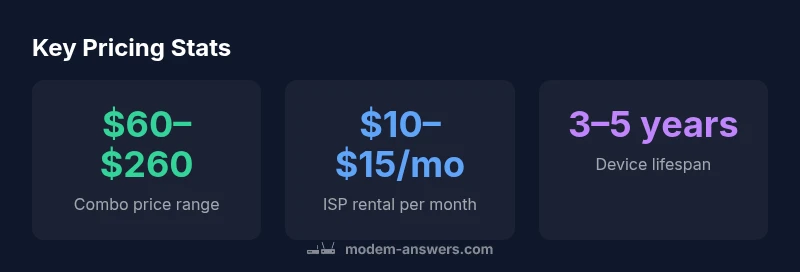
How much is a modem and router? For most households, a combined modem-router gateway costs about $60–$260 to buy, while ISP rental typically runs around $10–$15 per month. The total cost over time depends on how long you keep the device and the features you need. In 2026, buyers balance upfront price with future-proofing, whereas renters pay a predictable monthly fee.
Understanding the price landscape for how much is a modem and router
For homeowners and renters planning a reliable home network, the upfront question is often the same: how much is a modem and router? The short answer is that price ranges reflect features, build quality, and future-proofing. Generally, a combined modem-router gateway sold for consumer use falls in the range of roughly sixty to two hundred sixty US dollars when you buy new. If you rely on your internet service provider for hardware, you’ll typically pay a monthly rental in the low double digits. As with any tech investment, cost is a function of speed tier, Wi‑Fi technology, number of Ethernet ports, and whether the device supports newer DOCSIS standards. According to Modem Answers, the most economical models meet basic needs, while mid-range devices balance performance with future-proofing. The 2026 market shows a steady split between affordable entry-level gateways and feature-rich units suitable for multiple devices and smart-home ecosystems.
Buying vs renting: cost over time
A critical part of the decision is total cost of ownership. Buying a combo modem-router typically costs in the $60–$260 upfront range, while renting from an ISP adds a recurring $10–$15 per month. Over 12 months, rental costs accumulate to roughly $120–$180; over 36 months, they can reach $360–$540. If you own, your ongoing costs are mostly occasional maintenance or firmware updates, not monthly fees. In many households, buying pays off within the first year to two, depending on the upfront price and how long you plan to keep the device. Modem Answers analysis shows that long-term ownership lowers total cost for most users, particularly if you anticipate upgrading to new Wi‑Fi standards or faster broadband in the near term.
How features influence pricing
Price generally tracks capability. Entry-level gateways cover basic internet access for a handful of devices, while mid-range and premium models add faster Wi‑Fi generations (e.g., newer standards), more Ethernet ports, better beamforming, and expanded guest networks. Built-in security features, parental controls, and mesh-capable designs add value but raise cost. If you need higher performance for gaming or streaming on many devices, expect to pay toward the higher end of the range. The DOCSIS standard supported by the device also matters: DOCSIS 3.1 modems are typically pricier than 3.0 models but are more future-proof as provider networks upgrade.
Budget-friendly strategies to lower upfront costs
Consider refurbished or certified pre-owned units with manufacturer or retailer warranties. Look for seasonal sales, bundle deals, or bundles that pair a modem with a router when you buy. If you don’t need the latest features, a basic, reliable model can satisfy most households for years. Always verify compatibility with your service provider and check for firmware update policies. Avoid “gated” devices sold only through specific providers if you want flexibility and future-proofing. In 2026, buying smartly means balancing feature needs with total cost of ownership, not just the sticker price.
Provider compatibility and gateway options
Providers may certify certain modems and gateways to ensure optimal support and firmware updates. If you rent, you may inherit provider-specific limitations or locks on firmware. If you buy, you’ll want a device that supports common standards (DOCSIS 3.0/3.1, dual-band or tri-band Wi‑Fi, sufficient Ethernet ports) and offers a bridging mode if you want to run your own router. Compatibility checks save time and money by avoiding devices that won’t work smoothly on your plan or will quickly become obsolete as speeds evolve.
How to perform a quick, price-focused evaluation (4-step method)
- List your current internet plan’s speed and device needs. 2) Compare upfront purchase price for a combo unit to the ISP’s monthly rental. 3) Project your 1-, 2-, and 3-year costs using realistic monthly rates. 4) Decide based on total cost of ownership and desired flexibility: buy if you plan to stay long-term; rent if you anticipate frequent moves or a temporary setup. This framework helps you see when the math tips toward ownership versus ongoing rentals.
Where to buy and what to watch for
Good sources include reputable retailers and major electronics outlets. Always verify model numbers, DOCSIS compatibility, and warranty terms before purchasing. For a straightforward setup, prioritize devices with straightforward documentation and a clear return policy. When possible, choose models with positive reviews on reliability and customer support. Avoid off-brand listings with vague specs or questionable return policies. By shopping wisely, you get the best balance of price, performance, and service in 2026.
Quick setup checklist and next steps
After you purchase, run a speed test, enable WPA3 security if available, and enable automatic firmware updates if the device supports it. Use a wired backhaul for demanding devices while placing the router to optimize coverage across rooms. If your current plan changes, you can reassess the gateway’s relevance and upgrade path at any time. The Modem Answers team recommends documenting your total ownership cost and revisiting your choice every 12–24 months to ensure continued value.
Pricing options for buying vs renting a modem-router gateway
| Option | Typical Price (USD) | Pros | Cons |
|---|---|---|---|
| Combo (modem+router) buy | 60–260 | All-in-one setup; fewer devices | Upfront cost; may be less futureproof |
| Modem + standalone router buy | 50–250 | Flexible upgrades; better guest networks | More setup and potential compatibility checks |
| ISP rental (monthly) | 10–15/month | Low upfront; easy replacements | Ongoing cost; limited firmware control |
FAQ
What is the typical price range for a modem-router combo?
A modem-router combo bought new generally sits in the $60–$260 range, depending on features. Higher-end models with advanced Wi‑Fi and more ports push toward the upper end. This reflects 2026 market dynamics observed by Modem Answers.
Most combos cost between sixty and two hundred sixty dollars, depending on features.
Is it cheaper to rent a modem-router from my ISP or buy one?
Buying typically saves money over several years, especially if you stay in one home. Renting adds predictable monthly costs but often comes with convenience and support from the provider.
Buying usually saves you money in the long run.
Do I need a separate modem and router?
Not usually. A modem-router combo can cover most households, while separate devices offer flexibility for customized networks or high-demand setups. Your choice should consider future needs and maintenance preferences.
Usually you can get by with a combined unit, unless you have specific networking needs.
Will my current provider work with a third-party modem?
Most providers support a range of third-party modems/routers but require compatible DOCSIS standards and sometimes authorization. Check the provider’s list before buying to avoid compatibility issues.
Check with your provider’s compatibility list before buying.
What should I look for when buying a modem-router?
Look for DOCSIS compatibility (3.0/3.1), Wi‑Fi standards (ac/ax), number of antennas/streams, Ethernet ports, security features, and whether it supports bridging mode if you plan to use your own router.
Focus on DOCSIS, Wi‑Fi standard, ports, and security features.
Are refurbished devices a good idea?
Refurbished units can save money if they come with a warranty and from reputable sellers. Verify return policies and confirm firmware support and compatibility with your service.
Refurbished can be a smart save if warranty and seller are solid.
“When budgeting for home internet, you should consider total cost of ownership, not just the sticker price.”
Key Takeaways
- Buy when you want long-term cost savings and control
- Rent when you need ease of replacement and minimal upfront cost
- Expect price to scale with features like Wi‑Fi standards and ports
- Total cost of ownership matters more than sticker price
- Always check provider compatibility before buying