Router Modem Price: A 2026 Buying Guide
Explore router modem price ranges in 2026, from entry-level bundles to premium setups. Learn how features, rentals, and bundles affect total cost and value.


Typical router-modem price ranges from about $40 to $400, depending on device type and features. Entry-level modem-router combos sit at the low end, mid-range standalone routers push the high end, and premium models with Wi‑Fi 6/6E and tri-band support can exceed $350. Provider rentals can alter the math, so buyers should compare upfront purchase costs vs. monthly rental over time.
Why price ranges vary in router-modem hardware
Pricing for router-modem price points varies widely because buyers are choosing between integrated devices (modem-router combos), stand-alone routers, and premium Wi‑Fi 6/6E models. According to Modem Answers, the price landscape breaks down into three broad tiers, each with different performance profiles, warranty terms, and long-term value. Entry-level packages target basic internet service with modest speeds; mid-range devices balance coverage and speed for typical households; premium models emphasize advanced features, multi-room reliability, and future-proofing. Geography, retailer channel, and whether you buy outright or rent from an ISP also shift the sticker price. The 2026 market shows that even in the same city, a consumer may see price variation due to promotions, stock, and bundled services. When you search for router modem price, you’re not just comparing upfront costs—you’re weighing how features translate into real-life speed, stability, and long-term costs. This is where careful budgeting and an honest assessment of needs pays off.
Price bands explained: entry-level to premium
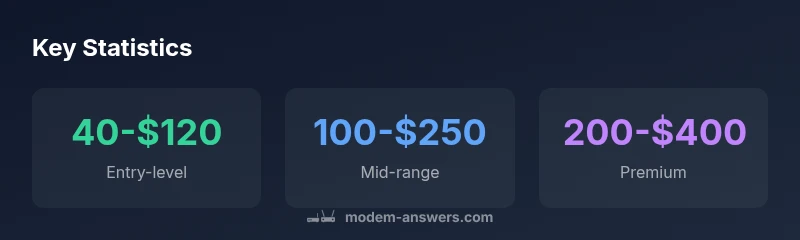
The market typically segments into three broad price bands. Entry-level modem-router combos commonly sit in the $40–$120 range, offering essential networking basics and support for modest internet plans. Mid-range routers cost roughly $100–$250 and usually deliver faster wireless speeds, broader coverage, and better device handling under typical home conditions. Premium, high-end devices—often Wi‑Fi 6/6E, tri-band architectures, or mesh-ready systems—range from about $200–$400 and are aimed at larger homes, power users, or setups with many smart devices. It’s important to note that prices will vary depending on promotions, retailer, and whether the device is sold as a single unit or as part of a bundle with a service plan. These price bands act as a rough guide, not a guarantee of performance, so your choice should align with your speed tier, number of connected devices, and desired reliability.
Feature-driven price deltas
While price is a gateway to capability, the specific features drive the delta. A basic modem-router combo usually supports DOCSIS 3.0 or 3.1 and modest Wi‑Fi coverage; upgrading to a mid-range router often adds MU‑MIMO, beamforming, and dual-band or tri-band options that keep current devices running smoothly as you add streaming, gaming, and work-from-home traffic. Premium devices tend to offer Wi‑Fi 6/6E, multi-user and multi-antenna architectures, robust security features, and advanced QoS. Additionally, mesh-ready configurations allow seamless roaming across multiple rooms. If you’re in a rental-heavy market, some providers push higher prices for lock-in bundles, while independent retailers may offer more customization. When evaluating router modem price, map features to real needs: how many concurrent streams you actually require, your home size, and whether you expect future upgrades.
Renting vs buying: total cost of ownership
One of the most important price-related questions is whether to rent from your internet provider or buy your own equipment. Renting can appear cheaper upfront, but the long-term cost often exceeds the purchase price if you stay with a single provider for years. A typical rental price might fall in the single digits per month, compounding over time, which means the total cost of ownership can surpass the upfront price of a mid-range or premium device after a year or two. Buying outright gives you full control, firmware updates directly from the manufacturer, and the ability to reuse the hardware when upgrading internet plans. If you’re planning to stay with a provider for more than a year, buying usually becomes financially wiser, especially when you factor in occasional promotions or sale events. Modem Answers analysis suggests doing a simple two-year cost comparison to decide between renting and buying for your specific situation.
Bundles, promos, and seasonal discounts
Price is highly sensitive to promotions. Retailers frequently run seasonal discounts around Black Friday, back-to-school, or end-of-quarter clearance events. If you’re shopping for router modem price, consider timing your purchase to coincide with promotions that apply to both hardware and service plans. Some providers offer bundled pricing that lowers the monthly bill when you sign up for service or commit to a longer contract, effectively reducing the overall cost of ownership. However, bundles can carry caveats: leasing terms, mandatory upgrades, or limited device choice. It’s essential to read the fine print and, whenever possible, compare a standalone purchase price against a bundled option. A strategic approach is to earmark a maximum budget, then track price drops across several trusted retailers for a 2–6 week window before deciding.
Provider compatibility and price impact
Not all prices are created equal. Some providers require you to rent their modem-router endpoints, particularly in markets with fiber or coaxial networks where they own the gateway hardware. In these cases, you might see lower upfront prices but higher monthly costs, plus rental fatigue if you don’t replace the device when needed. Independent users can often find more flexible options, including self-owned devices that still work on the same network. When evaluating router modem price, verify compatibility with your service plan, supported docsis standards, and firmware update policies. A device that’s perfectly priced for one provider may be less valuable if it lacks future-proofing for another network or if firmware updates are delayed.
How to measure value: TCO and return on investment
A practical way to compare prices is to compute the total cost of ownership (TCO) over a fixed horizon—typically 24 to 36 months. Start with the upfront price, add expected monthly rental or service fees, and account for energy use and potential future accessories. Then weigh this against the device’s expected lifespan and performance gains: faster throughput, better coverage, fewer dropouts, and improved security. For many households, a mid-range solution delivers the best balance of cost and capability; premium devices are worth it only if you have demanding workloads or a large home. When you’re evaluating router modem price, also consider resale value or whether the device can serve multiple generations of internet plans.
Top mistakes to avoid when shopping for router-modem price
Common errors include chasing the lowest upfront price without considering performance, failing to check provider compatibility, and ignoring firmware update policies that affect long-term security. Some buyers assume newer Wi‑Fi standards always justify higher prices, while in practice, a fair mid-range option can meet most households’ needs. Another pitfall is overestimating how many devices will connect simultaneously; many buyers end up paying more for features they won’t use. Finally, neglecting bundles or promotions that could lower annual costs is a missed opportunity.
Practical buying steps: a quick checklist
- Determine your speed tier and coverage needs based on household size and device count.
- Decide between buying outright or renting, and perform a 2-3 year TCO comparison.
- List must-have features (Wi‑Fi standard, MU‑MIMO, number of bands, mesh compatibility).
- Compare at least three credible retailers and check for promotions.
- Verify compatibility with your internet service provider and DOCSIS standard if you’re buying a modem.
- Read warranty terms, firmware update policies, and return options.
- Plan for future upgrades and ensure the device can grow with your network.
This checklist helps keep the router modem price discussion focused on actual value rather than just sticker cost.
What to watch in 2026: price trends and guidance
In 2026, prices for router-modem combos and standalone routers are likely to diverge based on new Wi‑Fi standards, hardware acceleration, and improved security features. As device lifecycles extend and internet plans accelerate, buyers should monitor price parity between standalone devices and provider bundles, especially when promotions align with service contracts. Consumers can expect occasional price dips around major shopping events, not uniform declines. The Modem Answers team recommends building a flexible budget, focusing on essential performance over pure speed, and considering long-term costs like energy use and future compatibility when evaluating the router modem price.
Typical price bands for router-modem devices
| Device Type | Typical Price Range | Notes |
|---|---|---|
| Entry-level modem-router combo | $40-$120 | Ideal for basic internet plans |
| Mid-range router | $100-$250 | Better coverage and higher speeds |
| Premium tri-band router | $200-$400 | Best for large homes or demanding setups |
FAQ
What is the typical price range for a new router-modem combo?
Prices cluster into three broad bands: entry-level from about $40–$120, mid-range roughly $100–$250, and premium devices from $200–$400. Your choice should reflect speed needs, home size, and future plans.
Prices typically fall into three bands: entry, mid-range, and premium based on features and home size.
Is it cheaper to rent from my internet provider or buy outright?
Buying outright generally saves money over 2–3 years compared with ongoing rental fees, and you gain control over firmware updates. Renting might be cheaper upfront but can add up over time if you stay with the same provider.
Buying usually saves money long term, though renting can be cheaper upfront.
Do prices reflect Wi‑Fi 6 or 6E support?
Yes. Devices with Wi‑Fi 6/6E often command higher prices due to faster speeds and better efficiency, but not every user needs the latest standard. Match the standard to your internet plan and device usage.
Wi‑Fi 6/6E often raises price but should match your needs.
Are bundles worth it?
Bundles can lower total costs when you need both service and hardware, but read the fine print for leasing terms and upgrade options. Compare bundled price to buying separately.
Bundles can save money if they fit your needs and terms.
What features justify higher prices?
Higher prices often reflect Wi‑Fi standards (6/6E), more bands, better range, stronger security, and advanced QoS. Assess whether you’ll benefit from these in real-world use.
Better standards, more bands, and security justify higher cost when you’ll use them.
Should I consider refurbished devices?
Refurbished devices can save money and still come with warranties, but confirm seller credibility and firmware support. For critical networks, prioritize new hardware from reputable brands where possible.
Refurbished gear can save money if backed by solid warranties.
“Value comes from how well a device meets your home network needs, not just the sticker price.”
Key Takeaways
- Know your price bands and required features before buying
- Weigh upfront costs against long-term ownership
- Check provider compatibility and bundle promotions
- Mid-range devices often offer the best value
- Read warranties and update policies before purchase