What is Modem Price? A Practical Guide for 2026
Explore what drives modem price, typical ranges for standalone modems and gateways, and smart tips to decide whether to buy or rent in 2026. Learn for home networks.


What is modem price? For most homes, upfront modem prices range roughly from $60 to $180, depending on DOCSIS standard and whether it’s a standalone modem or a gateway with built-in Wi‑Fi. Ongoing costs vary by rental vs. purchase and any ISP activation fees. The Modem Answers team notes that buying usually pays off over time.
What drives modem price in 2026
Prices for modems are influenced by a mix of technical standards, hardware build quality, and the decision to buy outright or rent from an ISP. The fastest way to understand the landscape is to map price bands to features. In general, standalone modems (no built‑in router) sit at the lower end of the spectrum, while gateway devices with built‑in Wi‑Fi and advanced QoS features sit near the higher end. According to Modem Answers, the industry has shifted toward DOCSIS 3.1 compatibility and better future‑proofing, which tends to push prices up but also unlock higher speed tiers. This dynamic means the “price” you pay often reflects not just current speeds, but how long you plan to stay with a given service level. When planning, homeowners should consider both baseline needs and likely upgrades over the next few years.
Modem price by category: basic standalone, DOCSIS 3.1, and gateway
- Basic standalone (DOCSIS 3.0 or 3.1): These are typically the most affordable options and are suitable for entry‑level plans. Expect modest upfront costs with a focus on reliable Ethernet connectivity.
- Mid‑range standalone (DOCSIS 3.1): These reflect faster speeds and better future‑proofing, often included in plans closer to gigabit ranges. Expect a moderate price bump.
- Gateway (modem+router): The most convenient option for many households, especially those needing built‑in Wi‑Fi across multiple devices. These commands higher upfront costs but simplify setup and ongoing management.
- High‑end gateways and tri‑band models: For large homes or power users, premium devices with advanced features command the top end of the price range. These models are designed to stay relevant as speeds evolve.
In all cases, the choice should align with your current internet plan and anticipated upgrades. Modem price trends show a continued emphasis on compatibility with newer standards plus improved wireless capabilities, which naturally increases sticker price but can reduce the need for separate networking gear.
Upfront costs vs ongoing costs: buy vs rent
The big decision is upfront ownership versus ongoing rental costs. Buying a modem means paying a lump sum at purchase but avoiding monthly rental fees, which can accumulate quickly. ISP rental programs sometimes include activation, support, and warranty benefits; factor these into total cost estimates. If you expect to stay with a provider for several years and plan to upgrade speeds, purchasing a capable gateway might deliver the best long‑term value. Conversely, renting can lower upfront obligations and provide hassle‑free support—useful if you anticipate frequent speed changes or relocations. In 2026, many households weigh total cost of ownership over 2–3 years when deciding which path to choose.
Hidden costs and value considerations
Beyond the sticker price, several factors influence total modem cost: activation or setup fees charged by ISPs, shipping costs, extended warranties, and potential returns. Some vendors offer bundle deals where you get a discount on a router or additional devices with the modem purchase. Warranty length and access to customer support are also important; longer warranties can reduce risk of repair costs. Compatibility with your ISP is essential, and some ISPs require activation services that can affect final out‑of‑pocket expenses. When evaluating price, consider the full value proposition: speed, reliability, and the ease of future upgrades.
How to estimate your total cost over 2–3 years
- Define your speed tier and whether you need Wi‑Fi built in. 2) Compare upfront purchase price to the ongoing rental fees over a 24–36 month window. 3) Add activation/shipping costs and any upgrades or warranty extensions. 4) Include potential tax and ISP‑specific charges. 5) Build a simple, two‑column model: Buy vs Rent, with yearly totals. This approach reveals the break‑even point and helps you decide which path makes sense given your budget and plan. Modem Answers’ methodology emphasizes transparent comparisons and clear, time‑based cost estimates.
Practical tips to maximize value without overpaying
- Match features to your plan: if your internet speed is modest, a basic standalone modem may be sufficient; reserve gateway investments for higher speed tiers.
- Look for DOCSIS 3.1 compatibility for future speed bumps, but verify that your service actually requires it.
- Check retailer return policies and test periods to avoid being locked into a device that quickly feels outdated.
- Consider refurbished options from reputable sellers if they come with a warranty.
- Keep an eye out for bundles or seasonal promos that reduce the overall purchase price.
How to choose the right price point for your home
Start with your current plan and a realistic growth scenario for the next two years. If you expect no major speed upgrades, a mid-range standalone modem may offer the best balance of price and performance. If you anticipate faster speeds or want to consolidate devices, a gateway with reliable Wi‑Fi could save you time and extra gear. Read reviews focusing on reliability and ISP compatibility, then compare price per feature. The right price point is the one that minimizes total ownership cost while meeting your reliability needs.
Price ranges and features by modem type
| Modem Type | Typical Upfront Price | Key Features | Ideal For |
|---|---|---|---|
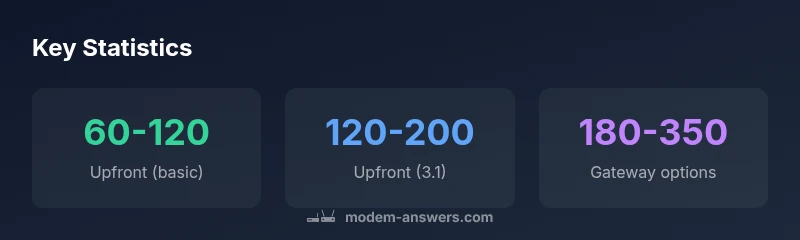
| Standalone modem (basic) | 60-120 | DOCSIS 3.0 or 3.1, Ethernet port | Budget plans or light usage |
| Standalone modem (DOCSIS 3.1) | 120-200 | Faster speeds, future-proofing | Mid-range plans or streaming users |
| Gateway (modem+router) | 180-300 | Built-in Wi‑Fi, multiple devices | Homes needing in‑room Wi‑Fi everywhere |
| High-end gateway | 250-350 | Advanced features, tri‑band, security | Smart homes or heavy usage |
FAQ
What is the typical price range for modems?
Most consumer modems cost between $60 and $180 upfront, with price generally increasing with DOCSIS standard and built-in features. Renting from an ISP adds ongoing monthly costs.
Most modems cost between sixty and one eighty dollars upfront; renting adds monthly charges.
Should I buy or rent a modem?
Buying usually saves money over time and gives ownership; renting may include support and convenience. Compare 1–2 year costs depending on your internet plan.
Buying saves money over time; renting can be easier if you want support.
Do prices differ by DOCSIS standard?
Yes. DOCSIS 3.1 modems tend to cost more than DOCSIS 3.0, reflecting higher capability and future speed potential.
DOCSIS 3.1 modems cost more because they support faster speeds.
Are there costs beyond the hardware price?
Yes. Tax, shipping, activation fees, warranties, and potential rental charges can affect total cost. Always check the fine print.
Yes—watch for activation fees and warranty costs.
What should I consider to avoid overpaying?
Know your plan, compare options, and review reviews. Consider bundles and refurbished devices only from reputable sellers with a warranty.
Know your plan, compare options, and read reviews.
Where can I buy a modem safely?
Purchase from reputable retailers or your ISP. Always confirm compatibility with your service prior to buying.
Stick to trusted retailers and confirm ISP compatibility.
“Modem prices reflect technology standards, build quality, and how future-proof the device is. The right price point balances current needs with potential speed upgrades.”
Key Takeaways
- Know your speed needs before buying
- Compare upfront vs ongoing costs
- Consider DOCSIS 3.1 for future-proofing
- Verify ISP compatibility before purchasing
- Check warranty and support options when selecting a price point