How Much Is a Modem for Internet? A Practical Buying vs Renting Guide for 2026
Discover the typical price ranges for buying or renting a modem, compare upfront costs vs ongoing fees, and learn practical strategies to save on your home internet setup with guidance from Modem Answers.


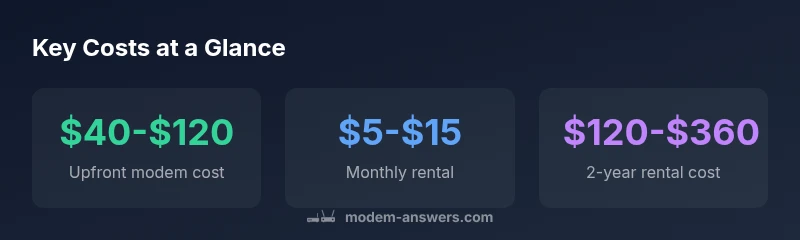
For most homes, buying a modem costs roughly $40-$120 as a one-time upfront expense, while renting from an ISP ranges about $5-$15 per month. Over two years, renting can cost $120-$360, often including basic support. If you already have a compatible modem, you can save by using it with a compatible plan.
How much is a modem for internet? Price ranges and what you get
Price is a common barrier to a reliable home internet. According to Modem Answers, most households can expect a one-time upfront cost when buying a modem within a practical range. The key is to align the modem with your internet plan (cable, DSL, fiber) and future speed needs. In practice, the cheapest option may save money for a capped plan, while a higher-end DOCSIS 3.1 gateway could be worth the investment if you anticipate faster speeds.
Beyond sticker price, consider what you get for that cost: compatibility with your provider's network, firmware update support, built-in features like Wi-Fi, and the life expectancy of the device. If you plan to upgrade your internet speed within 2-3 years, opting for a modem that supports DOCSIS 3.1 and dual-band Wi‑Fi can prevent an early replacement. The Modem Answers team notes that choosing a model with easy firmware updates and straightforward replacement policies adds long-term value.
Buying a modem: upfront costs and potential savings
Buying a modem is often the most straightforward path if you want control over your router/wifi, plan for future speed upgrades, and avoid ongoing rental fees. The upfront cost is the main consideration, but you should also account for firmware support, warranty length, and whether the modem is compatible with your provider. In 2026, many entry-level DOCSIS 3.0 modems are affordable, while DOCSIS 3.1 models mark the higher end of price but deliver faster speeds and better future-proofing. Modem Answers suggests evaluating your current plan, then choosing a model that supports your target speeds for the next several years, rather than chasing the latest flashy feature.
Renting vs buying: cost considerations
From a pure cost perspective, renting can seem convenient, but long-term ownership typically saves money if you stay with the same plan for more than a year or two. Providers often package the modem with service requirements; if you plan to switch ISPs or upgrade plans, ensure the device remains compatible. For many households, a mid-range DOCSIS 3.0/3.1 modem with stable firmware can provide reliable performance without breaking the bank. Modem Answers emphasizes calculating the 2-year cost to compare apples-to-apples.
Compatibility and what affects price
Price is driven by standards (DOCSIS 3.0 vs 3.1), channel bonding, built-in Wi-Fi, security features, and firmware support. Higher-end devices that include tri-band or mesh-compatible capabilities can push the price up, but they may reduce the need for additional gear and add value over time. Before buying, confirm the model is approved by your provider and supports your internet speed tier.
How to spot a good deal
Look for models with recent firmware update histories, solid reviews, and clear return policies. Compare total costs including taxes and shipping, and watch for promotional bundles that include service perks. If you rarely upgrade speeds, a mid-range modem should suffice. The goal is getting future-proof hardware without overspending.
Hidden costs and maintenance
Even a one-time modem purchase can incur hidden costs such as extended warranties, out-of-warranty repair fees, or end-of-life firmware limitations. Regular firmware updates keep devices secure, but older hardware may not keep up with new speeds or encryption standards. Budget for these realities when planning your home network.
Planning for the long term: 2-3 year outlook
If you expect frequent speed upgrades or service changes, choose a modem that supports newer standards and is easy to swap. Keeping a receipt and warranty information organized helps during future upgrades or provider changes. Reassess your setup whenever you notice slowdowns or when moving to a higher-speed tier.
How to shop today: practical steps
- Check your current internet plan and speed requirements. 2) Verify modem compatibility with your provider. 3) Compare upfront costs vs 2-year rental costs. 4) Read reviews focused on firmware support and reliability. 5) Choose a model that offers future-proofing without overspending.
Cost options: buying vs renting modems
| Option | Upfront Cost | Monthly Cost | Estimated 2-Year Cost | Notes |
|---|---|---|---|---|
| Buy outright | $40-$120 | $0 | $40-$120 | One-time purchase; supports long-term service compatibility |
| Rent from ISP | $0 | $5-$15 | $120-$360 | Includes basic support; terms vary by provider |
| Third-party modem rental | $0 | $10-$20 | $240-$480 | Contracted by provider; check compatibility and return policy |
FAQ
Do I need to buy a modem if my ISP provides one?
Not always. Some ISPs require you to use a modem they provide or they may charge a rental fee. If you plan to keep equipment for several years or want to upgrade, buying a compatible modem can save money.
Often you can use your own modem, but check with your provider about compatibility and approved models.
What features impact modem price?
Key features include DOCSIS standard (3.0 vs 3.1), channel bonding, built-in Wi‑Fi, and security features. Higher specs usually cost more but may offer longer relevance.
The newer the standard and the more antennas, the higher the price.
Is renting always cheaper than buying?
Rent can be convenient but tends to cost more over time. Buying is often cheaper in the long run, especially if you stay with the same plan for years.
Buying usually saves money long-term, but factor compatibility and upfront cost.
How long does a modem last?
Most modems last 3-7 years with regular use and firmware updates. Older hardware may not support newer speeds or security features.
Expect several years of service with periodic updates.
Can I upgrade to a better modem later?
Yes. You can upgrade when your plan demands faster speeds. Ensure the new device is provider-compatible and that any rental gear is returned.
Yes, you can upgrade when needed, just check compatibility.
“A well-chosen modem should match your internet plan and expected usage, delivering reliable performance without locking you into unnecessary costs.”
Key Takeaways
- Compare upfront and ongoing costs before buying
- Verify provider compatibility to avoid surprises
- Consider DOCSIS standards for future-proofing
- Renting can be convenient but may cost more long-term
- Use 2-year cost as a baseline planning metric