How Much Do Modems Cost in 2026
Learn how much modems cost in 2026—buying vs renting, price ranges by feature, and practical tips to save. Modem Answers explains the costs clearly for homeowners


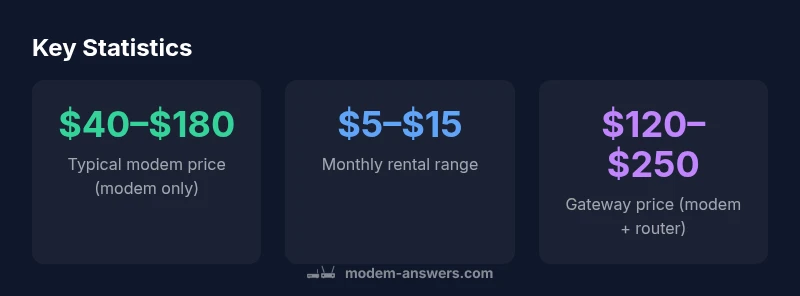
Modems typically cost between $40 and $180 to buy, with higher-end DOCSIS 3.1 gateways ranging to $120–$250. If you prefer renting, expect about $5–$15 per month from most providers. Your total first-year cost depends on whether you buy or rent and whether you also need a separate router.
How much do modems cost
Understanding the price range starts with recognizing two pathways: buying the modem outright and renting from your provider. In 2026, prices vary widely by features, speed tier, and whether the device is a simple modem or a gateway with integrated router. For many households, a basic modem-only device costs roughly $40–$100, while mid-range devices with built-in Wi-Fi range from about $80–$180. High-end gateways that combine modem and router can reach $120–$250. According to Modem Answers, this spread reflects differences in DOCSIS support, wireless standards, port options, and warranties. If you only need a temporary setup or want to test service, renting usually costs about $5–$15 per month; the long-term math depends on how long you stay with the service. A thoughtful approach is to forecast total cost over 1–2 years and compare buying vs renting under your expected usage. The Modem Answers Team emphasizes that choosing based on projected stay length helps homeowners avoid frequent hardware swaps.
What drives modem prices
Modem prices are driven by several interrelated factors. The DOCSIS version (3.0 vs 3.1 or 4.0) affects raw throughput and the modem’s efficiency; built-in Wi-Fi adds substantial value but also cost; the number of channels, ethernet ports, and USB options influence price; vendor features like energy efficiency, heat management, and warranty terms affect total cost. Accessories and packaging can push the initial price higher, though many retailers offer bundles. Another big driver is provider compatibility: modems that work with major cable operators must meet certification and firmware standards, which can increase price. Finally, the presence of a dedicated router or a gateway increases cost but often saves you from buying a separate device. For cost-conscious buyers, shopping during promotions or bundling with service can provide savings, but beware of long renewal price increases. In practice, analyze both the upfront price and ongoing costs to understand the real owner cost over time.
Buying vs renting: a side-by-side look
Buying a modem typically costs $40–$180 for the modem alone, with all-in-one gateways ranging $120–$250. Renting from a provider often runs $5–$15 per month, meaning annual costs can accumulate quickly. If you stay with the same service for 12 months or longer, buying usually yields lower total spend when you account for continuous use and firmware control. For households with more demanding networks (3–6 devices streaming, gaming, or smart home hubs), investing in a gateway with Wi-Fi 6 can prevent bottlenecks and reduce the need for additional equipment. Modem Answers suggests calculating your break-even point as: upfront cost divided by monthly rental, to determine how many months you should stay to justify buying. Always verify compatibility with your provider before purchasing, as some networks require specific models or firmware versions.
Features that justify higher prices
Price increases are often tied to features that improve reliability, speed, and future-proofing. A modem with DOCSIS 3.1 support and faster channel bonding will handle gigabit plans more smoothly, reducing throttling during peak times. Built-in Wi-Fi 6 helps multiple devices connect concurrently, improving performance for smart TVs, home assistants, and gaming consoles. Ports (2.5G Ethernet, USB-C) and advanced security features (auto firmware updates, guest networks, parental controls) can also justify premium pricing. Energy-efficient designs reduce running costs, particularly for always-on devices. Brand reputation and warranty length are indirect price multipliers, but they provide peace of mind for long-term use. If you’re evaluating used, refurbished, or open-box models, ensure there is still a valid return window and a warranty to protect against early failures. The key is to map features to your household’s needs; higher upfront costs may pay off if you rely on high-speed plans and many devices.
Budget shopping strategies
To keep costs reasonable, compare multiple retailers, including manufacturer-direct stores and major electronics retailers. Look for seasonal promotions, and consider refurbished or certified devices with remaining warranty. Check for compatibility with your service provider and confirm the modem’s supported speeds against your plan; avoid paying for faster features than you can use. If you choose to rent, negotiate a longer-term contract or bundle your modem with service to reduce monthly fees. For those comfortable with DIY, buying a modem separately and using a separate router gives flexibility to upgrade parts without replacing the whole system. Finally, estimate the total cost of ownership by calculating upfront price, monthly payments, and expected lifetime; this helps you avoid surprise costs as service terms change.
Setup considerations that can affect value
Correct setup ensures you get the promised speeds, so even cheap modems can perform well if configured properly. Use approved cables, place the device optimally away from interference, and keep firmware updated. If you run a many-device home network, you may benefit from a mesh or more capable router in addition to your modem. When evaluating modems, also consider energy use; some models are rated to consume less power and can lower electricity costs slightly over time. If switching from a rental, arrange to transfer service or schedule a smooth swap with your provider to avoid downtime. The right choice aligns with your plan, devices, and expected stay length, and the Modem Answers team recommends planning for at least a 2–3 year horizon when choosing a modem to minimize future changes.
Data sources and methodology
Price ranges cited in this article come from aggregated retailer data and general market knowledge for 2026, with guidance from the Modem Answers Analysis, 2026. To ensure accuracy, we cross-check provider certifications and public guidance on device compatibility, including consumer privacy and security considerations. For readers seeking deeper data, additional sources providing context include federal and major publications cited in the article. Where possible, figures reflect typical consumer purchases rather than edge-case sales or promotions.
Typical modem price ranges and rental costs
| Option | Typical Price Range | Notes |
|---|---|---|
| Basic modem (no Wi-Fi) | $40–$100 | Entry-level, simple features |
| Mid-range modem (Wi-Fi built-in) | $80–$180 | Decent speeds for standard households |
| Router/gateway (modem + router) | $120–$250 | All-in-one with newer Wi-Fi |
| Renting from provider | $5–$15/month | Ongoing cost; may exceed purchase over time |
FAQ
Is it cheaper to buy or rent a modem?
Generally, buying is cheaper over the long run if you plan to stay with the service for 12 months or longer. Renting spreads the cost but can exceed the price of buying after several months.
Buying usually saves money in the long run if you’ll stay with the service.
Do I really need a separate router with my modem?
Not always; if you need reliable Wi-Fi across many devices, a gateway may simplify setup, but buying a separate router gives more flexibility for upgrades and features.
A separate router is optional if you want flexibility.
What does DOCSIS mean and why does it matter for cost?
DOCSIS is the data standard for cable modems. Higher versions (3.1/4.0) support faster speeds but cost more upfront.
Newer DOCSIS versions cost more but boost speeds.
Can I use my existing router with a rented modem?
Yes, many providers allow using your own router with a rented or owned modem. Check your provider’s policy and compatibility.
Often you can pair your own router with a rented modem.
Are refurbished modems safe?
Refurbished units from reputable sellers can be safe and affordable, especially with a warranty and return window.
Refurbished can be fine if backed by warranty.
“In most homes, purchasing a modem yields lower total costs over 1-2 years when used continuously; a gateway can be more cost-effective for households with multiple devices.”
Key Takeaways
- Buy when you plan to use the modem long-term
- Rent if you expect a short stay or testing period
- Always verify provider compatibility before buying
- Consider future-proof features like DOCSIS 3.1 and Wi‑Fi 6