How Much Is the Price of Modem? A 2026 Buying Guide
A practical, data-driven guide to modem pricing in 2026. Learn typical price ranges for standalone modems vs gateway devices, how features affect cost, and total ownership considerations.


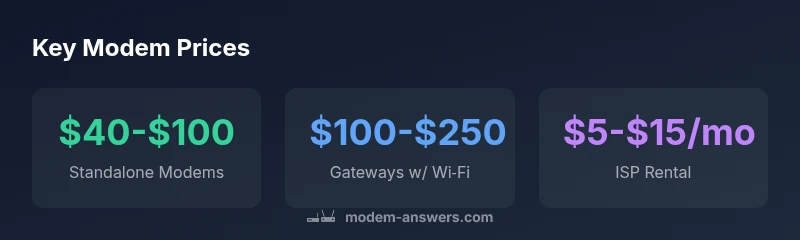
According to Modem Answers Analysis, 2026, standalone cable modems usually price between $40 and $100, while modem-router combos run about $100 to $250. ISP rental adds roughly $5–$15 per month, equating to about $60–$180 per year. Prices vary with speed, DOCSIS version, and built-in Wi‑Fi; buying often saves money over time.
How much is the price of modem?
Prices for modems in 2026 reflect a mix of simple, single-function devices and feature-rich gateways. According to Modem Answers Analysis, 2026, standalone cable modems typically cost between $40 and $100, while modem-router combinations range from about $100 to $250. ISP rental adds a recurring cost, commonly $5 to $15 per month. When you consider speed tiers, DOCSIS standard, and included Wi‑Fi capabilities, the gap between buying and renting becomes clearer. If you only need basic internet for a small apartment, a standalone modem is usually sufficient. For larger homes or activities like streaming and home offices, a gateway with built-in Wi‑Fi can offer better value and convenience. The price you pay is a function of both performance needs and future-proofing, so factor in potential plan upgrades over the device’s lifespan.
Price ranges explained by type and features
To understand how much you’ll pay, separate price bands by device type: standalone modems, gateways (modem-router combos), and rental. Standalone modems emphasize compatibility with your internet plan and future-proofed DOCSIS versions. Gateway devices add Wi‑Fi and often additional ports, which explains the higher price. As speeds increase—especially with DOCSIS 3.1 and Wi‑Fi 6/6E—gateway devices edge upward in price, whereas older DOCSIS 3.0 modems stay at the lower end. A quick rule of thumb: if you need strong wireless performance in multiple rooms, plan for the gateway range; if you’re wired-only or have a separate router, the standalone option is usually cheaper.
What features drive modem price
Several features push the price of a modem higher. DOCSIS version (3.0 vs 3.1) affects compatibility with gigabit plans. Built-in Wi‑Fi standards (Wi‑Fi 5, Wi‑Fi 6/6E) determine range and speed. The number of channels (download/upload) and Ethernet ports can add cost. Brand and warranty also matter—premium brands often price higher but may offer longer warranties or better customer support. Note that some features, like multi-gigabit support, are overkill for slower service tiers, so choose a device that aligns with your plan to avoid paying for unused capacity.
Real-world scenarios and budgeting
For a couple in a small apartment with a 500 Mbps plan, a standalone modem within the $40–$70 range combined with a separate router may be the most cost-effective route. A family of four streaming in 4K across multiple rooms might opt for a gateway in the $150–$250 range to ensure stable coverage. Those renting from an ISP should calculate annual costs: a $5 monthly rental becomes $60 per year, and over a typical two-year period, you could spend $120–$360 in rent alone, which often surpasses the purchase price of a good gateway device. These scenarios illustrate why many households prefer buying instead of renting when their internet needs are stable and predictable.
Cost of ownership: buy vs rent
Buying a modem often reduces long-term costs compared to renting. A typical purchase in the standalone/modem category is $40–$100, while a gateway is usually $100–$250. If your monthly rental is $5–$15, the break-even point usually falls between 12 and 24 months. After that, ownership cost continues to be lower with a purchased device, provided you don’t exceed the warranty window and you choose a device compatible with your plan. If you anticipate frequent plan changes or moving homes, factor in potential upgrade costs at those transition points. The key is to model your own usage against the device’s lifespan and the provider’s rental terms.
Smart shopping strategies to maximize value
- Compare standalone modems with gateways for your household size and usage. If you don’t need strong Wi‑Fi, a cheaper standalone modem plus a separate router can save money.
- Check compatibility with your internet plan and provider’s approved device list before buying.
- Look for DOCSIS 3.1 devices if you expect gigabit-level service; they’re more future-proof and shield you from a premature upgrade.
- Watch for seasonal sales, open-box or refurbished models from reputable sellers, and extended warranties if you’re buying used.
- Calculate total cost of ownership by adding up upfront price and estimated rental costs over 2–3 years to compare against buying.
Buying checklist to ensure value and compatibility
- Confirm DOCSIS version compatibility with your plan (3.1 preferred for gigabit)
- Decide between standalone modem + separate router vs gateway based on Wi‑Fi needs
- Verify provider compatibility with your plan and device on their approved list
- Check warranty length and customer support quality
- Assess energy efficiency, heat, and size for your living space
- Consider future-proofing features like multi‑Gig internet capability and security updates
Common modem price categories
| Type | Typical Price Range | Notes |
|---|---|---|
| Standalone Cable Modem | $40-$100 | DOCSIS 3.0/3.1; no built-in Wi‑Fi |
| Gateway (modem-router) | $100-$250 | Built-in Wi‑Fi; more features; larger footprint |
| ISP Rental | $5-$15 per month | Convenience; ongoing cost; no ownership |
FAQ
Is it cheaper to buy a modem than to rent one from my ISP?
In most cases, buying saves money over time. The payback period typically falls between 12 and 24 months, depending on your rental rate and plan. After that, ownership reduces ongoing costs.
Yes. Buying usually saves you money over time, with a typical payback period of about 1–2 years.
What features should I prioritize to avoid overpaying?
Prioritize DOCSIS version (3.1 for gigabit plans), built-in Wi‑Fi only if you need it, and enough Ethernet ports. Avoid paying for features you won’t use.
Focus on the DOCSIS version and Wi‑Fi needs to determine value.
Can I use a used or refurbished modem safely?
Yes, if the device is compatible with your provider and comes with a warranty. Check the seller’s return policy and confirm firmware update options.
Used or refurbished can save money if you verify compatibility and warranty.
What speed should I buy a modem for if my plan plans to upgrade soon?
Choose a modem that supports your current plan and offers room to grow, ideally DOCSIS 3.1 with gigabit-ready features.
Pick a modem that handles your current speed and leaves room for upgrades.
Do ISP rental fees ever go away with a upgrade or promo?
Promotions can reduce or waive monthly rent temporarily, but you’ll still pay over time if you stick with renting long-term.
Promotions exist, but they’re typically temporary.
Are there hidden costs when buying a modem?
Consider taxes, shipping, and potential extended warranties. Some devices require you to pay for a firmware update service or activation fees by the provider.
Watch for extras like taxes and shipping when buying.
“Choosing the right modem is less about the sticker price and more about matching features to your plan and home layout. Over time, buying the right device saves more than renting or upgrading prematurely.”
Key Takeaways
- Buy upfront when you have a fixed plan to save money over rental.
- Choose gateway if you need better Wi-Fi coverage in multiple rooms.
- Match your device to your plan; don’t pay for capabilities you won’t use.
- Consider total cost of ownership over 12–24 months to evaluate value.
- Look for sales and refurbished options from reputable sellers.