How to Remove Coax Cable from Modem
Learn how to remove the coax cable from a modem safely with a clear, step-by-step guide. This article covers safety, tools, and practical tips to avoid damage and downtime.


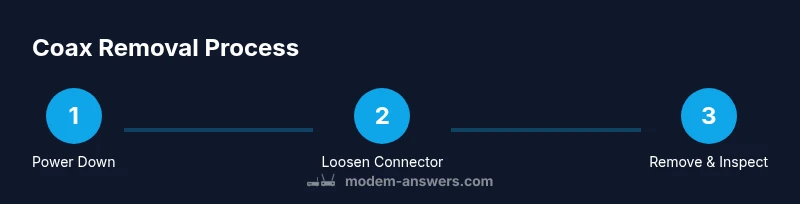
By following these steps, you’ll safely remove the coax cable from a modem without damaging ports or the connector. Power off the device, unplug it, and twist the connector counterclockwise to loosen it. This quick guide covers what you’ll need and how to avoid forceful twisting, static shocks, or cable damage.
Why removing coax cable from a modem matters
In modern home networks, the coaxial cable is the vital link between your service provider and your router or modem. There are times when you’ll need to remove it: relocating equipment, upgrading to a newer modem, replacing a faulty connector, or performing troubleshooting after a service issue. The phrase how to remove coax cable from a modem often appears in guides, and the most important principles are safety and preserving connectors. When you disconnect the coax, you reduce the risk of accidental damage to the RF port, minimize the chance of static discharge, and prepare the device for reconfiguration. This section explains the practical reasons for removal and how a careful approach can save you time and frustration during maintenance.
Understanding coax connectors and ports
A typical coax connection uses an F-type threaded connector that screws onto a corresponding RF port on the modem. The outer shell provides shielding and grounding, while the central conductor carries the signal. Connectors are designed for hand-tightening, but overtightening can strip threads or deform the port, which may require professional repair. If your setup includes a wall outlet, a surge protector, or a splitter, take note of which side you’re disconnecting. Before you proceed, inspect the modem’s RF port for any visible damage, corrosion, or bent threads; these issues can complicate removal and reattachment.
Safety first: power down and prepare
Safety is the top priority when removing any cable from a powered device. Start by turning off the modem and unplugging the power cord from the wall outlet. If possible, ground yourself and work on a dry, stable surface. Avoid pulling on the cable itself; instead, grip the connector body and turn to loosen. Have a soft cloth handy to wipe away dust around the RF port after removal. If you’re in a shared space or apartment, coordinate with other occupants to minimize disruption while you work.
Handling different wall outlets and splitters
In homes with splitters or surge protectors, you may disconnect the modem-side coax while leaving the wall-side connected. This can be convenient if you’re replacing the modem or relocating equipment but still want internet for other devices. If you need to completely remove the cable, do both ends in the correct sequence: modem end first, then the wall end. When reconnecting later, ensure you thread the connector clockwise and tighten by hand until snug, avoiding any forcing that could bend the connector or damage the port.
Tips for reattachment or replacement
To help with future maintenance, take a quick photo of the port layout or label the cables so you remember which wall socket goes where. If a cap or dust cover is available, place it on the port when the cable is removed to prevent dust entry. When you’re ready to reconnect, start with a finger-tight twist to preserve the threads, then perform a small additional turn if needed. If you notice increased signal loss or poor speed after reattachment, power cycle the modem and re-test.
Common mistakes to avoid and troubleshooting tips
Common errors include yanking the cable, grabbing the insulation rather than the connector, or forcing a tight twist past the threads. Never reuse damaged coax; it can degrade signal quality or cause interference. If you see bent threads, corrosion, or the connector doesn’t thread smoothly, replace the cable assembly. When in doubt, consult your provider’s guidelines or reach out to Modem Answers for a quick, clear recommendation.
Keeping cables tidy after removal
After removal, coil the coax loosely to avoid kinks, and store it in a safe place away from heat or moisture. Label the end that attaches to the wall so reinstallation is straightforward. Consider placing a small dust cap on the modem port to minimize dust ingress when the cable is not connected. Maintaining a neat setup reduces the risk of damage during future maintenance and helps you complete tasks faster next time.
Tools & Materials
- Coaxial cable(The coax cable you intend to disconnect from the modem)
- Small flat-head screwdriver (optional)(If the connector is tight; use gently to avoid damage)
- Soft cloth or towel(Place under connector to catch dust)
Steps
Estimated time: 8-12 minutes
- 1
Power down and unplug the modem
Turn off the modem and unplug it from the electrical outlet. Wait 5-10 seconds to allow any residual power to dissipate before handling connectors.
Tip: Always unplug the power before touching RF ports to prevent shock. - 2
Identify the coax port at the modem end
Locate the coax connector attached to the modem. Confirm you’re disconnecting the modem-side end, not the wall outlet or splitter, to minimize downtime and avoid accidentally disconnecting other devices.
Tip: If there’s a splitter, note which end goes to the modem so you don’t confuse the connections. - 3
Grip the connector body, not the cable
Wrap your fingers around the metal connector body and hold it steady while preparing to loosen. Do not pull on the cable itself, which can damage the cable or port.
Tip: Holding the base protects the cable from bending and reduces torque on the port. - 4
Loosen the connector by turning counterclockwise
With a gentle, steady twist, rotate the connector counterclockwise until the threads begin to disengage. Do not force past the first sign of resistance.
Tip: If it resists, pause to recheck alignment and avoid cross-threading. - 5
Remove the coax from the modem port
Continue loosening until the connector is free from the modem port. Gently pull the connector away to separate the port from the cable.
Tip: Keep the port facing up to prevent debris from entering. - 6
Inspect the modem RF port for damage
Check for bent threads, corrosion, or residue inside the port. Any damage may require professional attention or a cable replacement.
Tip: If you see damage, stop and plan a replacement rather than forcing reattachment. - 7
Cap, store, or prepare for reattachment
Place a dust cap on the modem port if available. Coil and store the coax cable in a safe place or set it aside for reattachment later.
Tip: Label or photograph the setup to simplify future reinstallation. - 8
Test reattachment or proceed with your plan
If you’re planning to reconnect, refer to the original layout and re-tighten by hand first, then use tools only as recommended by your equipment’s manual.
Tip: After reattachment, power cycle the modem and verify an active connection.
FAQ
Do I need to unplug the modem before removing coax?
Yes. Always unplug the modem from power before touching any connectors to prevent shock or damage. This also prevents the device from powering on while you work.
Yes. Unplug the modem first to stay safe and avoid damage.
Can I remove the coax cable while the modem is powered on?
No. Removing while powered risks electrical damage and static discharge. Power down and unplug before disconnecting.
No, power down and unplug before disconnecting.
What if the connector is stuck?
If it won’t loosen by hand, stop and try a gentle twist with a cloth-wrapped tool. Avoid pinching or bending the cable.
If it’s stuck, don’t force it. Try gentle rotation with a cloth-wrapped tool.
Will removing the coax disrupt my internet permanently?
Removing the coax will disconnect your modem from the network, causing service to stop until reconnected. Plan for downtime accordingly.
It will disconnect your internet until you reconnect.
Should I store or cap the modem port after removal?
Yes, store the coax safely and replace the port dust cap if available to keep dust out.
Yes, cover or cap the port to keep dust out.
Watch Video
Key Takeaways
- Power down before touching hardware.
- Loosen connectors by turning CCW; never yank.
- Inspect the modem port for wear or damage.
- Store the coax safely or cap the port when removed.
- Reattach with care if needed; avoid forcing threads.