Which comes first modem or router in a home network
Learn which comes first modem or router in a home network, how to order devices, and practical guidance for reliable, secure, and future-ready setups.


In a typical home network, the modem comes first. It connects to your Internet Service Provider and translates the signal into a usable data stream. The router then sits behind the modem to create a local network, distribute Wi‑Fi, and manage multiple devices. Exceptions exist with gateway devices or bridge mode, but the standard order is modem -> router.
Which comes first modem or router in a home network?
The ordering question is more than a matter of labeling. In most homes, the modem sits closest to the incoming internet connection, and the router sits behind it to build a shared network. According to Modem Answers, the sequencing matters for performance, security, and ease of management. The modem handles the signal from your provider and assigns IP addresses to devices, while the router creates the local network, assigns private IPs, and controls traffic between devices and the internet. This initial setup determines how effectively you can scale, troubleshoot, and secure your home network as devices multiply and new services appear.
Understanding the core roles: Modem vs Router
A modem is the bridge between your household and the wider internet. It modem-encodes the data from your ISP and passes it along as a digital signal your home network can use. A router, by contrast, is the traffic director inside your home. It manages IP addressing, routes data between devices, and creates Wi‑Fi coverage for phones, laptops, smart home gadgets, and more. While some devices blend these roles into a gateway, the traditional separation—modem first, router second—remains the most flexible approach for performance and control.
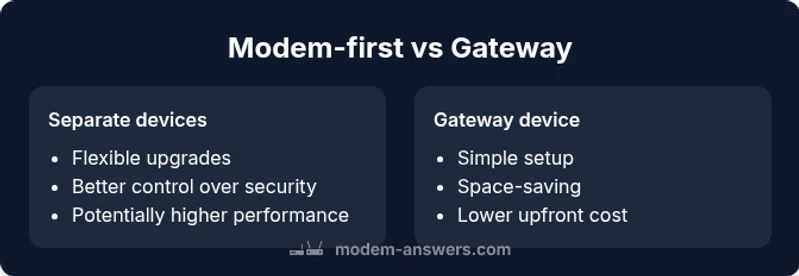
Separate devices: Modem first, then router
Using two devices gives you granular control over every layer of your network. You can upgrade the router for faster wireless standards or add access points to extend range without touching the modem. This separation reduces single-point failures and makes troubleshooting easier, since issues can be isolated to either the modem or the router. It also simplifies security updates: you can patch firewall and QoS settings on the router while keeping the modem’s bridge or DOCSIS functionality intact.
Gateway devices: Modem-router combo
A gateway device combines both modem and router into a single box. This setup offers simplicity and a compact footprint, which can be ideal for small homes or renters who want a plug-and-play solution. However, you trade some flexibility: upgrading one component without affecting the other can be harder, and you may be limited by the device’s available ports, capabilities, and security features. Double-check how the gateway handles firewall rules, DNS, and guest networks before committing.
Security considerations in order
A clean modem-first architecture makes it easier to segment networks and apply strict firewall rules at the router level. In contrast, gateway devices can consolidate features, but you should verify that automatic firmware updates are timely and that the device supports robust security options like guest networks and automatic phishing protections. If you’re in a shared or sensitive environment, separate devices provide you with more precise control over every facet of security.
Performance implications you should expect
Performance depends on both the hardware and the software stack. A separate modem-plus-router setup can deliver superior performance if the router supports advanced features such as QoS, band steering, and MU‑MIMO, and if you place the access points to optimize coverage. A gateway device can deliver solid performance for typical households but might cap peak throughput if the built-in router lacks the latest wireless standards or enough processing headroom for heavy multitasking.
Setup and maintenance: step-by-step guidance
For separate devices, start by connecting the modem to the incoming line, then connect the router to the modem via Ethernet. If you plan to use bridge mode, enable it on the modem to avoid double NAT and in turn allow the router to handle NAT. For gateway devices, follow the manufacturer’s quick-start guide, but consider enabling bridge mode only if you plan to replace the router as a performance upgrade. Regularly check for firmware updates on both devices, and keep a simple map of your network topology for troubleshooting.
How to decide based on household needs
Small apartments with light-cite device usage can benefit from gateway devices to minimize setup time. In larger homes or spaces with multiple devices and demanding applications, a separate modem and router approach is usually better. Consider future-proofing: if you expect to upgrade to faster internet tiers or add many IoT devices, plan for a router with strong security features and ample ports. Your decision should balance convenience, cost, and long-term flexibility.
Troubleshooting common issues and best practices
When problems arise, isolate the fault by testing each device independently. If you experience double NAT after adding a separate router, enable bridge mode on the modem or configure the router to handle NAT adequately. Ensure the DNS settings on the router are correct and consider a dedicated guest network for visitors. If using a gateway, and you encounter performance drops, check for firmware updates and assess whether the integrated features are meeting your needs or if you should replace the unit altogether.
Maintenance, performance, and future-proofing
A well-maintained network keeps pace with evolving standards. Invest in a router that supports the latest Wi‑Fi standard your devices can utilize, and ensure your modem is compatible with your ISP’s service level. Regular security audits, firmware updates, and password hygiene protect your home network. In the Modem Answers view, upgrading the router rather than replacing the modem can often yield more tangible improvements for your day‑to‑day usage.
Quick-start checklists and next steps
- Map your current devices and plan a topology: modem first, then router (or gateway) based on space and needs. - Verify your ISP compatibility: confirm the modem’s DOCSIS or equivalent standard. - Create a simple network map and label cables to reduce confusion later. - Set up a guest network and strong admin passwords. - Schedule periodic firmware checks for both devices and back up your configuration.
Comparison
| Feature | Separate devices (modem then router) | Gateway device (modem-router combo) |
|---|---|---|
| Setup complexity | Moderate to advanced setup with manual router configuration | Low setup with single device and minimal wiring |
| Expandability | Easily add access points and upgrade router later | Limited expansion options; built-in router only |
| Security features | Independent updates; granular firewall and guest networks | Integrated security; depends on firmware cadence |
| Cost range | Moderate upfront cost for separate devices | Lower upfront cost, potential long-term upgrade limits |
| Best for | Users wanting control, customization, and future-proofing | Small spaces or renters seeking convenience and simplicity |
Positives
- Greater control over performance and security
- Independent component upgrades keep tech fresh
- Flexible feature sets (QoS, guest networks, firewall rules)
- Reduces single-point failures and debugging complexity
What's Bad
- Higher upfront cost and more equipment
- More cables and potential space requirements
- More complex setup and ongoing maintenance
- Requires more knowledge to optimize for best results
Separate devices offer greater flexibility and future-proofing; gateway devices suit simplicity and small spaces
If you value long-term adaptability and granular control, use separate modem and router. If you prioritize a clean, hands-off setup and limited space, a gateway can be a practical choice.
FAQ
Should I always choose a gateway device over separate modem and router?
Not always. Gateways are best for quick setup and small spaces, but separate devices give you more control, better upgrades, and potentially stronger performance for larger households. Your decision depends on space, budget, and your comfort with network settings.
Gateways are great for ease, but separate devices give you more control and stronger long-term options.
What is double NAT and why does it matter?
Double NAT occurs when two devices perform network address translation, typically a modem and a router both doing NAT. It can cause problems with gaming or VPNs. Bridging on the modem or setting the router to handle NAT can fix this.
Double NAT happens when two devices translate addresses. It can break some apps; bridging or adjusting NAT helps.
Can a modem-router combo be upgraded later?
Upgrading a gateway device is straightforward, but expanding features or performance by swapping only one component is harder. If you expect rapid growth in devices or speeds, a separate router may be wiser.
You can upgrade gateway devices easily, but upgrading a single part can be harder.
What is bridge mode and when should I use it?
Bridge mode disables the router function on your gateway so your dedicated router handles routing. Use it when you want to avoid double NAT or to extend control over security and QoS.
Bridge mode lets your own router handle routing, avoiding double NAT.
How many devices should I expect in a typical home network?
Most homes now include multiple smartphones, laptops, smart TVs, IoT devices, and a few smart speakers. Plan for at least a handful of simultaneous connections, with room to grow.
Homes usually have many devices; plan for future growth and more concurrent connections.
Do ISP rented modems/routers affect performance?
Rented devices can be convenient but may limit control over firmware and performance. Owning your own equipment often yields better customization and longer-term cost savings.
Rentals are easy, but owning gear usually gives you more control and value over time.
Key Takeaways
- Identify your priorities: flexibility vs. simplicity
- Separate devices reduce NAT-related issues with careful configuration
- Gateway devices are convenient but less upgrade-friendly
- Plan for future standards (Wi-Fi evolution, higher speeds)
- Consider total cost of ownership and ISP compatibility