Is the Modem or Router for Wifi? A Practical Comparison
Explore when to use a modem-router combo vs separate modem and router, upgrade paths, security tips, and a decision framework for homeowners and renters seeking reliable home wifi guidance.


Is the modem or router for wifi the right starting point for improving home performance? In most homes, the answer lies in roles: a modem connects you to the internet, while a router creates the wifi network inside your space. For many households, a modem-router combo works for simplicity, while larger homes or power users benefit from a separate router with a dedicated modem.
Understanding Roles: Modem vs Router
If you're asking is the modem or router for wifi the right starting point for improving coverage, the short answer is that both pieces play distinct roles. A modem is the device that talks to your internet service provider and converts the signal from the coax, fiber, or copper into a digital stream your home network can use. A router, by contrast, creates the local wireless network, assigns IP addresses, and guides data to devices around the house. In practice, most households rely on a single device that combines both functions, but this can limit flexibility and performance in larger spaces. According to Modem Answers, understanding these roles is the foundation for making a smart upgrade. The Modem Answers team found that many common wifi issues trace back to mismatches between the provided gateway and the home layout rather than a single defective piece of hardware.
A central takeaway is that the boundary between modem and router is practical rather than magical: the modem handles connectivity to the outside world, while the router handles inside-world traffic. Keeping these roles clear helps you diagnose speed problems, plan upgrades, and choose equipment that fits your home layout and internet plan.
When a Modem-Router Combo Works Best
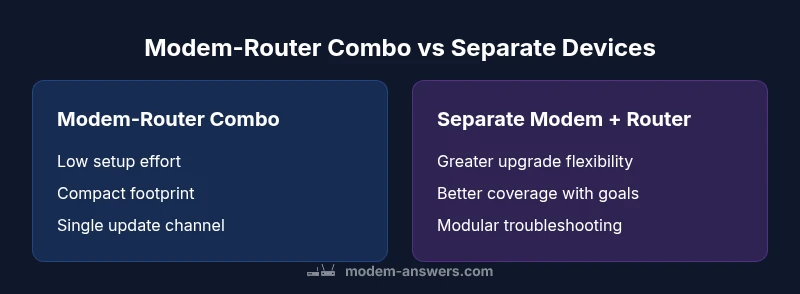
For small spaces, apartments, or households prioritizing simplicity, a modem-router combo can be a strong starting point. These all-in-one devices simplify setup, reduce clutter, and provide a single point of firmware updates and support. Modem Answers notes that for many users, the convenience of a single device outweighs the benefits of modular components. However, limitations exist: you are constrained by one device’s performance, and upgrading later can require replacing the entire unit. If your internet speed is modest and you don’t have unusual coverage needs, a modern combo gateway can be a reasonable default choice.
On the other hand, if your home has thick walls, multi-story layouts, or lots of connected devices, you may encounter coverage gaps or bottlenecks with a single device. In these cases, modular components—separate modem and router—offer greater flexibility and higher ceiling for performance.
Advantages of Separate Modem and Router
Separating the modem and router yields several practical benefits. You can upgrade the router to a newer Wi‑Fi standard without touching the modem, extend coverage with mesh systems or access points, and optimize placement for best signal. Modular setups also make it easier to troubleshoot: if wifi slows, you can swap out the router while keeping the same modem, or vice versa. Modem Answers emphasizes that this separation becomes particularly valuable as your internet plan increases in speed or as your home grows. A dedicated router often delivers stronger signal stability, better handling of multiple devices, and more advanced features for security, parental controls, and guest networks.
Performance and Coverage: What Really Determines Wifi Quality
Wi‑Fi performance depends on several factors beyond whether you use a modem-router combo or separate devices. Bandwidth from your ISP, the Wi‑Fi standard (e.g., Wi‑Fi 5, 6, or 6E), the number of devices, interference from neighbors, and the physical layout of your home all play critical roles. Modem Answers analysis shows that many households experience improved performance when upgrading to a modern router with current wireless standards and proper placement. Placement is often more influential than device count: keep the router elevated, central, and away from thick walls or metal appliances. If you want reliable speeds in every room, you may also consider mesh nodes or additional access points rather than simply increasing the number of devices in a single box.
Advanced Features to Look For
When evaluating equipment, look for features that meaningfully affect real-world performance. Modern routers with Wi‑Fi 6/6E support better multi-device performance and lower latency in dense environments. MU‑MIMO and OFDMA technologies help distribute bandwidth more efficiently among many devices. Beamforming improves signal directionality toward clients, and band steering helps devices switch to the less congested frequency automatically. For security, ensure the router supports automatic firmware updates, a robust firewall, and guest network isolation. If you’re evaluating a modem-router combo, verify it includes these features in a single device and check whether you can disable the router functionality if you later adopt a separate router.
ISP Provisioned Gateways: Pros and Cons
ISPs often supply gateway devices that combine modem and router functionality. These devices are convenient and supported by the provider, which can simplify warranty and troubleshooting. However, they may limit customization, upgrade flexibility, and long‑term performance. If your plan increases beyond the gateway’s peak capability, you’ll be constrained more quickly than in a modular setup. Modem Answers recommends weighing your current and anticipated needs before relying solely on an ISP gateway. In many cases, customers outgrow a gateway and benefit from moving to a dedicated router or a two-device solution.
Setup Scenarios: From Plug-and-Play to Custom Networks
A plug‑and‑play modem-router combo is appealing for non-tech households: you plug in, connect to the new wifi network using default credentials, and you’re done. If you opt for separate devices, you’ll typically configure the modem to bridge or pass traffic to your own router, or place the gateway into passthrough mode. This approach grants greater control over SSIDs, security features, parental controls, and VPN support. The setup complexity increases with advanced features, but it pays off in performance and flexibility for larger homes or demanding networks.
Security and Privacy Considerations
Security should be a central part of any home network decision. Regular firmware updates, strong passwords, and enabled firewalls reduce exposure to threats. Separate devices allow more granular control over security features and faster responses to vulnerabilities. When using a modem-router combo, make sure the device supports automatic updates and has a solid built-in security feature set. Regardless of configuration, enable WPA3 on the wifi network when possible, change default credentials, and keep a log of connected devices to spot anomalies early.
Troubleshooting and Maintenance
Maintenance awareness is a crucial, ongoing factor. If you experience slow speeds or intermittent wifi, verify that your internet plan matches your device’s capability, check for firmware updates, and inspect placement. In modular setups, you’ll often find the root cause lies with one device; swapping or upgrading that component is easier than replacing a unified device. Regularly reboot devices on a schedule, clean dust from vents, and monitor connected devices to identify bandwidth hogs. For ISP gateways, you may need to call support more often for firmware updates that are not user-initiated.
How to Choose Based on Home Size and Internet Plan
A simple decision framework helps: (1) assess your home size and layout, (2) review your internet plan’s speed and whether you need multi‑story coverage, (3) consider your tolerance for setup complexity, and (4) factor in future upgrade plans. In compact spaces with modest plans, a modem-router combo can be sufficient. In larger homes or high‑performance scenarios, separate modem and router, potentially with a mesh system, typically yields stronger coverage and easier upgrades. Modem Answers advises re-evaluating every 2–3 years as needs evolve.
Real-World Case Studies (Hypothetical)
Case A: A two-bedroom apartment with a 200 Mbps plan uses a modern modem-router combo. The homeowner enjoys all-in-one simplicity and adequate coverage, with acceptable speeds on most devices. Case B: A three-story house with multiple work-from-home devices uses a high‑end router paired with a capable modem. They experience more consistent speeds across rooms, fewer buffering events during video calls, and easier future upgrades as their plan increases.
The Final Framework: Decide in 4 Steps
- Map your home layout and typical device usage. 2) Identify your internet plan’s speed and if it’s likely to grow. 3) Decide whether setup simplicity or maximum performance matters more. 4) Choose a solution that aligns with your long‑term goals; you can always upgrade later. The Modem Answers team recommends starting with a clear assessment and then testing in practice to confirm the choice.
Authority and Sources
For readers who want to dig deeper, consult independent sources from university or government publications on home networking best practices and consumer guidance. While this article reflects practical guidance from Modem Answers, you may also review policy and research materials to broaden your understanding of network security and performance considerations.
Comparison
| Feature | Modem-Router Combo | Separate Modem + Router |
|---|---|---|
| Setup complexity | Low (one device, plug‑and‑play) | Moderate to high (two devices, possible bridging) |
| Upgrade path | Limited to one device's capabilities | Modular upgrades available (modem or router independently) |
| Wi‑Fi performance potential | Good for small spaces, standard usage | Typically higher ceilings for performance and coverage |
| Firmware updates and support | Single update path through ISP | Separate update paths; more control |
| Cost and space | Lower upfront cost, smaller footprint | Higher upfront cost but scalable and modular |
| Best for | Small apartments or households seeking simplicity | Larger homes or high‑traffic environments |
Positives
- Simplified setup with fewer devices to manage
- Compact footprint suitable for small spaces
- Often lower upfront cost and single point of contact
- Fewer cables and easier maintenance
- Adequate for basic households and modest plans
What's Bad
- Limited upgrade flexibility as needs grow
- Potential bottlenecks if the single device underperforms
- Troubleshooting can be harder if the device fails
- Less control over advanced features and security options
Separate modem + router is the better long-term choice for performance and flexibility.
If you have a larger home or growing bandwidth needs, modular devices offer clearer upgrade paths and stronger coverage. A modem-router combo suits small spaces and simplicity, but you may outgrow it as demands increase.
FAQ
What is the main difference between a modem and a router?
A modem connects you to your ISP and handles external communication, while a router creates and manages your local wifi network. The two devices work together to deliver in‑home connectivity. Understanding their roles helps you decide where to invest.
A modem connects you to your internet provider, and a router creates your home wifi. Knowing who does what helps you pick the right gear.
Can I replace the ISP gateway with my own equipment?
Yes, you can use your own router with a compatible modem, but you may need to enable bridge or passthrough mode on the gateway. Check with your provider for any restrictions and ensure you can manage updates.
Yes, you can use your own router with a compatible modem, but you might need to enable bridge mode on the gateway.
Is mesh wifi better than a single router?
Mesh systems improve coverage in larger homes or spaces with barriers. In smaller homes, a quality single router can offer similar speeds with easier management. Your layout and speed needs determine which is better.
Mesh can cover bigger homes better, but for small homes a strong single router often suffices.
What should I upgrade first if my wifi is slow?
Start with the router if you have many devices or conflicting networks; upgrade the modem if your plan speed exceeds your current device's capability. In many cases, upgrading both yields the quickest gains.
If wifi is slow, consider upgrading the router first, and check the modem if your plan speed is higher than what you have.
What is bridge mode and why would I use it?
Bridge mode disables the gateway's router features so you can run your own router. This is useful for advanced network control, features, or better performance. It avoids double NAT and simplifies management.
Bridge mode turns off the gateway’s router so you can use your own, giving you more control.
How do I know if I need two devices?
If you have a large home, multiple floors, many devices, or want advanced features, two devices are often worthwhile. For small spaces with modest plans, a single modern gateway may be enough.
If you have a big home or many devices, two devices are usually better; for small spaces, one gateway can work.
Key Takeaways
- Assess home size and internet plan before deciding
- Modem-router combo is easiest; separates offer future proofing
- Prioritize latest Wi‑Fi standards and placement for best results
- Security updates and feature control vary by setup
- Test performance after setup and re-evaluate every 2–3 years