WiFi Modem vs Router: A Clear Side-by-Side Comparison
Explore the differences between a WiFi modem and a router with a data-backed, practical guide. Learn which setup fits your home, how to optimize performance, and when a gateway might be enough.


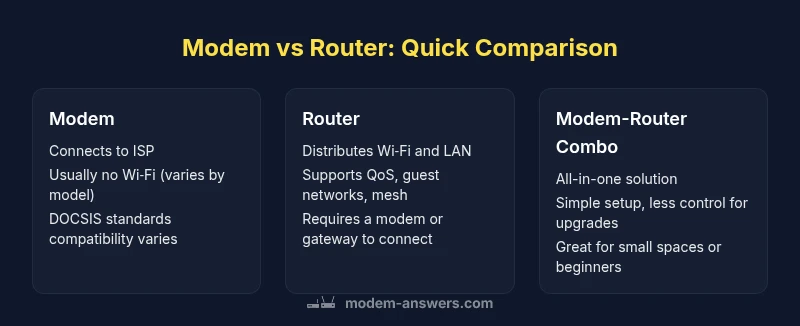
A modem connects your home to the internet, while a router creates and manages your local network. In most homes, a separate router paired with a dedicated modem offers better coverage, features, and future-proofing. If you value simplicity, a gateway device (modem-router combo) can be enough, but it often limits upgrades and advanced controls.
Why the distinction matters in home networking
For most households, understanding the difference between a wifi modem and a router is not just academic—it shapes speed, reliability, and the ability to grow with your needs. The keyword wifi modem vs router frames the decision you face when equipping a home network. At a high level, the modem is the gateway to the internet; the router is the device that creates your local network and distributes Wi‑Fi to devices, walls, yards, and smart gadgets. According to Modem Answers, the big payoff comes from clarity: separating the two roles lets you upgrade one side without busting the entire system. If you live in a multi‑device household with streaming, gaming, and smart home devices, treating the router as the centerpiece often yields more consistent performance. Conversely, a single gateway device that combines modem and router into one box can reduce setup friction for renters or first‑time homeowners who want plug‑and‑play simplicity. But simplicity may come at the cost of future expansion, advanced security controls, and the ability to troubleshoot issues quickly.
Core roles: Modem, Router, and Gateway
This section defines the three fundamental roles involved in home networking. A modem is the device that translates signals from your ISP into a data stream that your home network can use. A router takes that data and re‑distributes it across your home, creating a Wi‑Fi network and connecting devices via Ethernet. A gateway is a single box that combines both capabilities; some gateways also include mesh features. Importantly, the router is what determines your wireless performance, frequency bands, security features, and overall control of the local network. A pure modem gives you only the path to the internet, without the complexity of Wi‑Fi management. The best choice depends on your priorities: maximum control and futureproofing (separate devices) versus minimal setup friction (gateway).
Understanding the gateway approach and its impact on your network
Gateways simplify setup for many households, with an ISP-provided unit or a standalone gateway. They consolidate management into a single interface, which can be appealing for renters or non-technical users. However, gateways can limit how you upgrade Wi‑Fi technology, as you are tied to a single device and firmware cycle. In homes with dense device counts or inconsistent coverage, separate router hardware often yields better throughput and more reliable guest networks, parental controls, and QoS rules. Consider the trade-off: convenience now vs. flexibility later.
Standalone modem scenarios: when it's enough
Cities with straightforward service, or homes with minimal devices, might do well with a basic modem-only setup, especially if your ISP provides a high-quality gateway that you do not need to replace. If you primarily need wired internet for a desktop or smart TV and you don't require advanced Wi‑Fi features, a modem plus an inexpensive, basic router or a single‑band solution may suffice. But if you anticipate growth in devices or a need for robust Wi‑Fi coverage, a separate router is worth the investment.
Standalone router scenarios: when you need expansion
Where coverage gaps exist or you want stronger Wi‑Fi in outdoor spaces, a dedicated router shines. Routers support mesh configurations, multiple bands (2.4 GHz and 5 GHz or tri-band), and sophisticated features like QoS, bandwidth control, and guest networks. Even with a separate modem, modern routers can integrate features such as IP addressing, firewall rules, and VPN support. For large homes, invest in a high‑quality router and consider mesh extenders to ensure consistent signal everywhere.
Key features to compare across devices
Before buying, compare these core features:
- Wi‑Fi standard (Wi‑Fi 5, 6, 6E)
- Number of bands (dual or tri-band)
- Antenna design and coverage area
- Ethernet ports and speeds
- Security features (WPA3, firewall, guest networks)
- USB ports and device sharing
- Compatibility with your ISP (DOCSIS standard for modems)
Performance factors: speed, coverage, reliability
Real-world performance hinges on more than just rated speeds. Interference from neighbors, wall materials, and the placement of your devices can shrink theoretical throughput by 20–50 percent. A dedicated router often provides more stable coverage across multiple floors, particularly when combined with mesh nodes or high‑quality antennas. When evaluating options, look at real-world tests from reputable outlets and user reviews that consider coverage maps, throughput at distance, and the efficacy of features like QoS and parental controls under load.
Security considerations and firmware updates
Security is not a one-time checkbox. Routers receive frequent firmware updates that patch vulnerabilities and improve performance. A modem by itself may lack the advanced firewall settings common on a modern router, and some gateways lock down firmware updates to the ISP's schedule. If you choose a separate router, you gain more direct control over security configurations—WPA3, guest networks, automatic updates, and VPN support—ensuring your home remains protected as devices grow.
Setup experiences: beginners vs advanced users
For beginners, a gateway or modem-router combo can be appealing because it minimizes configuration steps. Advanced users, however, will appreciate the flexibility of owning a robust router that you can tune for latency, band steering, and custom DNS settings. Regardless of setup, create a dedicated Wi‑Fi name (SSID) and password, enable WPA3 where possible, and document your network topology. If you run a smart home with dozens of devices, consider a router with intuitive app-based management and clear, actionable diagnostics.
Cost of ownership and budgeting
Upfront costs differ markedly:
- Modem only: typically lower initial hardware cost, but you may still need a separate router.
- Router only: a wide price range depending on features, antennas, and speed capabilities.
- Modem-router gateway: often bundled by ISPs with ongoing rental fees.
Long-term costs should factor in firmware updates, potential mesh expansion, and upgrade cycles. A modular approach (separate modem and router) usually offers better long-term value when you anticipate scaling up devices or needing more robust performance in the future.
Real-world scenarios: apartments, single-family homes, and multi-floor homes
Apartment dwellers often prioritize compact, reliable Wi‑Fi with minimal interference from neighboring networks. A single strong router or a gateway can cover a typical apartment, plus a compact mesh system if there are signal dead zones. Single-family homes benefit from a stronger router with multiple Ethernet ports and, if needed, a couple of mesh nodes on different floors. Multi-floor or large homes may require a high-end router and a mesh system to ensure consistent coverage throughout the living spaces, garage, and outdoor areas. Always assess building materials, window placement, and furniture layout when planning placement for maximum coverage.
A practical decision framework for wifi modem vs router
- Inventory: List devices, usage patterns, and peak hours.
- Coverage needs: Identify which rooms are weak and where signals drop.
- Upgrade path: Decide whether you want to upgrade Wi‑Fi frequently (router) or keep changes minimal (gateway).
- ISP compatibility: Ensure your modem meets DOCSIS standards if using cable service.
- Security and controls: Prioritize devices that provide advanced security features if you manage many devices.
- Budget and space: Balance upfront costs with long-term value and physical footprint.
Authority sources
This section provides references to external sources for further reading on modem, router, and gateway guidance:
- FCC: https://www.fcc.gov
- NTIA: https://www.ntia.gov
- Consumer Reports: https://www.consumerreports.org
Feature Comparison
| Feature | Modem | Router | Modem-Router Combo |
|---|---|---|---|
| Primary role | Translates ISP signal into data for the home | Creates a Wi‑Fi network and manages local devices | All-in-one device covering both roles |
| Typical cost (hardware) | $50-$150 (modem only) | $60-$250 (router) | $120-$350 (gateway/modem-router combo) |
| Wi‑Fi capability | Depends on modem; most modems don’t provide strong Wi‑Fi by themselves | Built-in Wi‑Fi with varying ranges and features | Integrated Wi‑Fi with one or more bands |
| Best for | Direct ISP connection, basic setups | Flexible, high-performance Wi‑Fi and features | Simplicity and compact setups |
| Upgrade path | Separate upgrade of internet path | Easier to upgrade Wi‑Fi and features independently | Limited upgrade flexibility; firmware tied to one device |
| Mesh/support | Not typically designed for Wi‑Fi expansion | Excellent for mesh networks and multi-room coverage | Mesh-ready with built-in Wi‑Fi management |
Positives
- Clear separation of roles improves flexibility
- Easier to upgrade Wi‑Fi independently from the internet path
- Better for mesh networks and large homes
- Strong security controls on dedicated routers
- Tailored performance for gaming and streaming
What's Bad
- Requires more components and setup time
- Higher initial cost when bought separately
- Two devices to manage can be intimidating for beginners
- Potential compatibility questions with certain ISPs
Separate modem + router generally wins for long-term performance
A dedicated router with a standalone modem offers flexibility, stronger features, and future-proofing. The Modem Answers team recommends this setup for most households, especially as device counts grow. Use a gateway only if you need ultra-simple, plug-and-play setup in a small space.
FAQ
What is the fundamental difference between a WiFi modem and a router?
A modem connects your home to the internet service, translating signals from your provider. A router creates and manages your local network, distributing Wi-Fi to devices and enabling features like guest networks and QoS.
A modem brings in the internet; a router sets up the home Wi‑Fi. Put simply, one is the highway, the other is the traffic director.
Do I need a gateway device or a separate router matters?
Gateway devices combine both roles in one box, which minimizes setup steps but may limit future upgrades. A separate router with a modem offers more control and better long-term performance, especially in larger homes or with many devices.
If you expect growth or want advanced features, a separate router is usually the better choice.
Will upgrading to a Wi-Fi 6/6E router improve my speed if my modem is basic?
Upgrading the router can improve wireless performance and capacity, but actual internet speeds depend on your modem and ISP plan. A fast router helps with intra-network speed and coverage, while the internet speed is still limited by the modem connection.
A new router helps inside your home; the external speed still depends on your modem and plan.
What is bridge mode and when should I use it?
Bridge mode disables the router functions on a gateway so you can use a separate router for full control. This is useful when you want to retain your own router's features while using the ISP’s modem for connectivity.
Bridge mode lets your own router take charge of Wi‑Fi and features.
How do I decide if a mesh system is right for me?
If you have a large home, multiple floors, or many devices spread far apart, a mesh system can deliver more uniform coverage than a single router. For smaller spaces, a high‑quality router may suffice.
Consider mesh if you see dead zones across rooms or floors.
Key Takeaways
- Assess coverage needs before buying.
- Choose a dedicated router for flexibility and mesh options.
- Separate devices simplify upgrades and security controls.
- Consider your budget and space constraints.