Modem and WiFi Router Combo: A Practical Comparison for Homes
Explore the tradeoffs of modem and wifi router combo devices—speed, reliability, setup, and value. A balanced, actionable guide for homeowners and renters.


A modem and wifi router combo offers a simple, space-saving solution that’s ideal for renters or small homes. It provides easy setup and consolidated management, but may limit customization and upgrade paths compared with separate devices. For many households, a combo works well for everyday internet use, while larger or speed-focused homes benefit from a separate modem + router. See our detailed comparison below.
Why a modem and wifi router combo matters for homes
According to Modem Answers, many households benefit from a single device that handles both the internet connection and wireless coverage. A modem and wifi router combo reduces clutter, simplifies setup, and minimizes the number of firmware interfaces you need to monitor. For homeowners who want a clean, plug-and-play experience, it can be a practical gateway into home-networking without investing in multiple devices. The main trade-off is control: while a combo can deliver solid throughput for typical internet plans, it offers fewer knobs for advanced tuning. Understanding your internet speed tier, the size of your home, and the number of devices you regularly connect helps determine whether a combo will meet expectations. In practice, most modern combos support common Wi‑Fi standards and offer guest networks, parental controls, and simple QoS presets. If you’re moving into a smaller apartment or want a low-maintenance setup, a modem-router combo is worth serious consideration.
Examining the core differences: combo vs separate devices
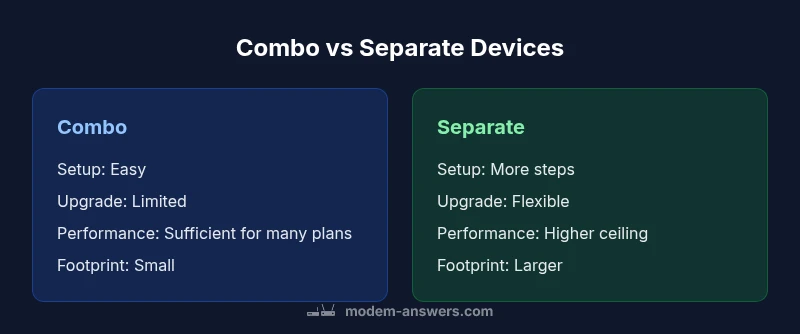
A modem and wifi router combo integrates two essential functions into a single unit. The primary advantage is convenience: one box to set up, one power supply, and a single management interface. The trade-off is modularity: upgrade paths depend on a single device, and you may be limited when you want to push more advanced features or capabilites. By contrast, a separate modem and router give you the freedom to upgrade only the part you need (for example, a faster router with better coverage or a newer modem supporting higher DOCSIS standards). For homes with diverse connectivity needs—work-from-home setups, smart home hubs, gaming consoles—separate devices can offer more headroom. However, this approach also increases complexity and cable clutter. In short, the choice hinges on your priorities: simplicity and space vs. flexibility and future-proofing.
Performance fundamentals: speed, range, and stability
In most cases, a modem-router combo provides adequate performance for typical household internet plans. The key determinant is your plan’s speed versus what the device can deliver wirelessly. Modern combos support the latest Wi‑Fi standards and can handle multiple devices streaming, gaming, and video calls—but there is a ceiling. If your plan exceeds the combined device’s wireless capacity or if you need robust MU-MIMO, beamforming, or tri-band performance in a large home, a dedicated router paired with a capable modem usually performs better. Real-world speed is also influenced by interference, channel selection, and device placement. The Modem Answers analysis suggests that optimizing placement (central location, away from walls and metal objects) often yields more noticeable gains than chasing incremental hardware upgrades. For most households, a combo suffices, but demanding setups benefit from a split configuration.
Setup and installation: ease, constraints, and common pitfalls
A major selling point of the modem-router combo is plug-and-play setup. You plug it in, connect a single coax/phone line, and follow the on-screen prompts. This can save hours compared with configuring two devices from scratch. Pitfalls to watch for include older devices that don’t receive firmware updates frequently enough, or a built-in modem that doesn’t support your plan’s maximum speed. If you have existing smart home hubs, you’ll want to verify that the combo’s router supports the latest security standards and that you can easily create guest networks and parental controls. For many users, the one-box approach reduces troubleshooting complexity—you’re adjusting a single device rather than coordinating multiple interfaces.
Coverage and placement strategies
Placement is critical for any home network, but it matters most for a combo device because you’re limited by a single radio system. Aim for a central, elevated location away from thick walls, metal furniture, and large appliances. In multi-story homes, you may still experience dead spots; in such cases, consider a mesh system extension or a dedicated access point to augment the built-in router. If you live in a sprawling residence or have a dense wireless environment with many devices, you could encounter bandwidth contention in crowded channels. A well-placed combo can minimize interference, but you’ll still want to audit channel usage and enable Quality of Service (QoS) rules to prioritize latency-sensitive tasks.
When a combo makes sense: scenarios for renters and space-limited homes
For renters or residents in compact living spaces, the modem-router combo can be a practical, cost-effective gateway into home networking. It reduces the number of devices and cables, which simplifies both daily use and potential repairs. In short-term living arrangements or studios where space is at a premium, the simplicity and clean setup are compelling advantages. The Modem Answers perspective emphasizes that the trade-off—limited expansion and customization—often aligns with the needs of lighter users who aren’t pushing maximum internet speeds or advanced configurations.
Potential drawbacks to watch out for
The most common drawback of a modem-router combo is the single point of failure: if the device malfunctions, you lose both internet access and Wi‑Fi coverage. Another concern is performance ceiling: high-speed plans or smart-home-heavy households may outgrow the device more quickly than separate components. Also be mindful of firmware update cadence; if the vendor stops updating the device, security and performance can degrade over time. If you anticipate upgrading your internet speed in the near term, verify that the combo supports the higher speeds and newer standards you expect to need. Finally, if you value deep customization (port forwarding rules, advanced firewall options, or multiple guest networks), you might find the all-in-one approach limiting.
How to choose the right model: a buyer’s checklist
Start with your internet tier and coverage needs. Look for a device that supports the latest Wi‑Fi standard, at least dual-band operation, and solid range in typical floor plans. Check for features you care about: guest networks, parental controls, device prioritization, and user-friendly management apps. Consider future-proofing by selecting a model with a higher RAM/CPU capability and more frequent firmware updates. If you expect to upgrade your internet plan soon, verify that the device can handle higher speeds without bottlenecking performance. Finally, compare customer reviews focusing on real-world reliability, heat management, and long-term firmware support.
Alternatives and hybrid approaches
If you’re unsure about committing to a single-device solution, start with a hybrid approach: keep a decent modem and add a separate router or mesh system to extend coverage. This gives you the best of both worlds—solid core connectivity with room to grow. Some users run the combo in its default mode and then enable bridge mode to use a preferred router for advanced features. This approach can offer a smoother transition if you later decide to upgrade to a dedicated router without discarding the existing modem. A staged approach like this aligns with practical budgeting and gradual feature adoption.
Maintenance and firmware updates
Regular firmware updates are essential for performance, security, and compatibility with evolving internet standards. With a combo device, updates affect both modem and Wi‑Fi functionality in one package, which can be convenient but also requires careful attention to release notes. Enable automatic updates if available, and periodically check the vendor’s support page for known issues or critical patches. If you rely on specific port configurations or VPN settings, confirm that firmware updates won’t reset your custom rules. A proactive maintenance habit helps ensure the device remains secure and reliable over time.
Security considerations and features you should expect
Security features—such as WPA3 encryption, firewall options, and automatic security updates—are essential in any home network. A combo device should offer a straightforward interface to manage these settings, including guest networks to isolate devices and parental controls for family safety. If you need advanced security, verify that the device supports a robust set of features and provides timely firmware updates. Additionally, consider whether bridge mode is available, allowing you to pair an external router for enhanced security or specialized configurations if your home network grows more complex.
Budgeting and ownership costs over time
Upfront costs for modem-router combos can be modest, especially when bundled with service providers. Over time, costs accrue through potential upgrades, rental fees, and the need for newer hardware to keep up with faster internet speeds. Compare total cost of ownership by factoring in plan speed compatibility, anticipated upgrade cycles, and potential future-proofing needs. If you anticipate frequent upgrades or require high-speed gaming and streaming, you may find that a separate modem and router offers better long-term value by allowing targeted component upgrades instead of replacing an entire single-box device.
Comparison
| Feature | Modem+Router Combo | Separate Modem + Router |
|---|---|---|
| Setup and installation ease | High (single device) | Moderate (two devices) |
| Upgrade flexibility | Limited by one device | Greater customization potential |
| Performance headroom | Adequate for average plans | Better for high-speed plans and future upgrades |
| Reliability and redundancy | Single point of failure | Split devices offer more resilience and easier troubleshooting |
| Cost over time | Typically lower upfront, longer upgrade cycles | Higher upfront but flexible upgrades over time |
| Power usage and footprint | One device, smaller footprint | Two devices may use more power and space |
Positives
- Space-saving design for small homes
- Simplified setup with one device
- Unified management through a single interface
- Potential upfront cost savings in bundles
What's Bad
- Limited customization and advanced features
- Single point of failure affects both modem and Wi‑Fi
- Performance ceilings for high-demand homes
- Less future-proofing compared to separate devices
Combo devices excel in simplicity and space; separate devices win on performance and upgrade flexibility
For renters or small households, a modem and wifi router combo is an efficient, space-saving choice. If you value high throughput, broad customization, and easier long-term upgrades, consider a separate modem + router setup.
FAQ
What exactly is a modem and wifi router combo?
A modem-router combo integrates the modem and Wi‑Fi router into a single device. It streamlines setup, reduces cables, and provides a unified management interface. This is ideal for spaces where simplicity matters, but it may limit advanced customization.
A single box that handles both internet coming in and Wi‑Fi distribution, great for simplicity but with fewer knobs for tweaking.
When should I avoid using a combo device?
Avoid a combo if you anticipate needing advanced routing features, frequent upgrades, or high-speed performance beyond the device’s capabilities. In larger homes or households with many high-demand devices, separate devices typically perform better.
If you need lots of advanced features or plan to upgrade quickly, a separate setup is usually wiser.
Can I upgrade the router in a combo separately?
In most cases, you cannot upgrade just the router portion of a combo without replacing the entire unit. If router performance is your priority, consider a separate router paired with a compatible modem to keep options open for future upgrades.
Usually not—you’d swap the whole box or switch to a different setup.
What is bridge mode and why would I use it with a combo?
Bridge mode disables the router function in the combo so a separate, more powerful router handles Wi‑Fi. This can be useful if your home needs advanced networking features or better coverage, but check compatibility and setup steps beforehand.
Bridge mode lets you use your own preferred router while keeping the modem part.
How do I update firmware on a combo device?
Firmware updates improve security and performance. Most combos support automatic updates, but you should periodically check the manufacturer’s site for notes and ensure the device remains compatible with your internet plan.
Keep the device updated to stay secure and perform well.
Are combo devices secure by default?
Modern combos come with standard security features like WPA3, guest networks, and basic firewall controls. Review settings to enable the strongest encryption and enable automatic security updates where possible.
They usually are secure, but you should review and optimize the settings yourself.
Key Takeaways
- Choose the combo for simplicity and space savings
- Match device capabilities to your plan speed and home size
- Consider future-proofing if you expect speed upgrades
- Evaluate security features and firmware support
- Explore hybrid setups if you want gradual upgrades