Difference Between Modem and WiFi Router: A Practical Comparison
Explore the difference between a modem and a WiFi router with a clear, practical comparison. Learn how each device works, their key features, and how to choose for home use.


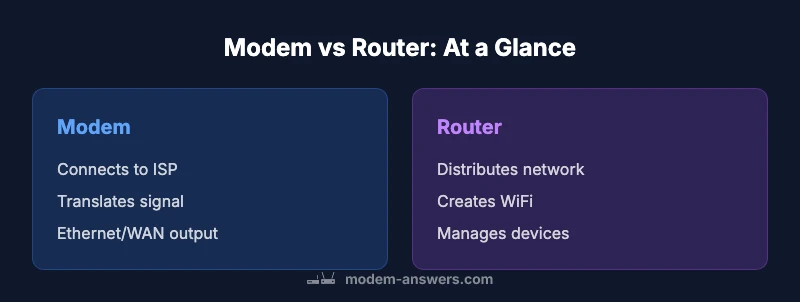
A modem is the device that connects your home to your internet service provider by modulating signals; a WiFi router distributes that connection wirelessly to devices in your home. In many setups, a single device combines both functions, but understanding the distinction helps you plan upgrades, placements, and security. The two roles are complementary, not interchangeable.
What each device does: modem vs router
In modern home networks, the modem and router perform distinct duties that together enable internet access and local connectivity. The modem connects to your internet service provider’s network and converts the external signal into data your home devices can handle. The router takes that data and creates a local network, assigning IP addresses to devices, routing traffic, and enabling wireless access. This separation empowers homeowners to tailor performance, coverage, and security. According to Modem Answers, recognizing these roles from the outset helps homeowners plan upgrades, placements, and security measures. Practically, you can picture the modem as the gateway to the internet, while the router acts as the traffic manager inside your home. When you separate these roles, you gain flexibility—upgrade one component without discarding the other. Many households opt for a simple modem-router combo, which can lower clutter and simplify support, but may limit future scalability for heavy networks.
The anatomy of a modem
A modern modem is the bridge between the service provider and your home network. It houses the demodulator and interfaces required by the external network, such as coaxial or fiber inputs, and one or more Ethernet ports to connect to a router or a single computer. The exact technology depends on your service (DOCSIS for cable, GPON/EPON for fiber, or VDSL for certain DSL services). A key decision point is whether the modem supports the speeds you’re paying for and whether it’s compatible with your provider’s network. If you rent from your ISP, you may have less control over firmware and features. A standalone modem prioritizes compatibility and speed, but will require a separate router for wireless coverage and internal networking tasks.
The anatomy of a WiFi router
The router’s core job is to create a reliable local network and to manage traffic among all devices inside your home. Most routers include wireless radios (2.4 GHz and 5 GHz), multiple LAN ports for wired devices, and built-in security features such as firewalls and guest networks. Higher-end models offer features like QoS to prioritize video calls or gaming, parental controls, and advanced settings for VPNs. Some routers come with mesh capabilities, which enable broader coverage by placing multiple units around the house. The router’s performance is heavily influenced by antenna design, signal processing technology, and firmware quality. When paired with a robust modem, a capable router can maximize throughput and reduce dead zones across rooms and floors.
How they work together in a home network
Ideally, the modem provides a stable external connection, while the router distributes that connection wirelessly and over wired Ethernet to devices around the home. If you have a separate modem and router, you can optimize placement by locating the router centrally, away from interference from appliances and walls that can impede signals. A modem-router combo reduces clutter but may constrain you if you later need a higher-end router with mesh networking or more refined control over traffic rules. For most homes, the choice hinges on coverage needs, the number of devices, and whether you anticipate expanding features like smart home hubs or gaming optimization. Properly configured, both devices should work in harmony to deliver fast, reliable internet throughout the living space.
Common configurations: separate devices vs combo units
Two common configurations dominate residential setups. The first is separate devices: a dedicated modem plus a separate router. This arrangement offers flexibility and resilience—upgrade the router to improve speed or expand coverage without touching the modem, or vice versa. The second is a modem-router combo, which integrates both functions into a single box. Combos are space-saving, beginner-friendly, and often simpler to manage with a single point of contact for support. Modem Answers notes that hybrids can suit small to medium homes with standard usage—browsing, streaming, and light video conferencing. However, power users with demanding networking needs may benefit from separating the roles to tap into advanced features and superior coverage. In all cases, ensure devices are up-to-date and properly secured to protect your home network.
Performance implications: speeds, latency, and coverage
Performance is shaped by both the external connection (modem) and how the internal network is managed (router). A high-quality router with modern wireless standards (for example, Wi‑Fi 6/6E) can significantly improve throughput, reduce latency, and handle multiple devices more efficiently across a home. Separating the devices enables precise placement: your modem can remain near the service entry, while the router sits in a central location or uses mesh nodes to blanket large spaces. A combo device may suffice for smaller homes or light usage, but may limit features such as advanced QoS or guest networking. Modem Answers analysis shows that the most noticeable improvements arise when upgrading the router portion for performance, expansion, and coverage, especially in homes with many devices and physical obstacles like walls and furniture.
Security and privacy: protecting your home network
Security begins with keeping firmware current on both devices and choosing strong, unique passwords for the network and admin interfaces. A properly configured router provides essential protections: a firewall, automatic updates (where available), and features like guest networks to isolate IoT devices. If you maintain a modem-router combo, you still rely on the same security basics, but you’ll have fewer knobs to tweak. For those who opt for separate devices, you can tailor security on each piece—updating the modem’s bridge mode settings when necessary and enabling robust router-level protections. Regularly auditing connected devices and network activity can catch unusual access patterns early, reducing the risk of compromise across your home ecosystem.
Setup and placement: practical tips
Placement matters more than many homeowners realize. A central, elevated location for the router minimizes obstructions and maximizes signal distribution to bedrooms, offices, and living areas. If you have a two-story home, place the router on a higher floor or near the center, avoiding closets or basements where signals can degrade. Use the 2.4 GHz band for broad coverage and the 5 GHz band for higher speeds near workstations or entertainment setups. In larger homes or with thick walls, mesh systems or additional access points can dramatically improve consistency. When installing a separate modem, verify compatibility with your service tier and consider whether your provider’s modem is a bottleneck. For combo devices, follow the manufacturer’s recommended mounting and placement instructions to optimize cooling and signal quality.
Upgrading and future-proofing: when to replace or upgrade
Technology advances rapidly, but practical considerations guide upgrade timing. If you consistently measure slower speeds than your plan’s maximum, or if you need better coverage in bedrooms or outdoor areas, upgrading your router (or adding mesh nodes) often yields the greatest benefit. If the modem struggles to support the service tier you subscribe to, upgrading the modem is necessary to unlock higher speeds and lower latency. A sensible approach is to pair a modern modem with a high-performance router, then add mesh extenders if your home has many rooms or thick walls. Finally, keep firmware up to date and review ISP requirements to ensure continued compatibility and optimal performance.
Comparison
| Feature | Separate devices | Modem-router combo |
|---|---|---|
| Function | Modem handles the external connection; router distributes within the home | One box handles internet access and local network |
| Ease of setup | Two devices require more wiring and placement planning | Single box simplifies setup and reduces cable clutter |
| Upgrade path | Flexible: upgrade modem or router independently | Less flexible: upgrades affect both functions |
| Performance potential | Potentially higher with a high-end router and mesh options | Good for small to medium homes, but may limit advanced features |
| Security features | Separate devices allow independent security updates per device | Integrated security features may be adequate but less customizable |
| Cost range | Moderate upfront costs for two devices; broader options | Typically lower upfront cost for a single device |
Positives
- Greater flexibility and upgrade options
- Potentially better coverage with mesh systems
- Isolation of IoT devices improves security
- Easier to replace aging components without affecting the entire network
What's Bad
- Two devices require more cables and space
- Higher upfront cost for separate devices
- More complex setup and maintenance for beginners
Separate devices usually offer better long-term flexibility and performance, but a modem-router combo can be perfectly adequate for smaller homes.
If you value customization and future-proofing, go with separate devices. If you want simplicity and a clean setup, a combo device can suffice for modest needs.
FAQ
What is the main difference between a modem and a router?
A modem connects your home to your internet service provider, translating signals for your network. A router creates and manages your local network, distributing that internet connection to devices, either wired or wirelessly.
A modem connects you to the internet, while a router creates your home WiFi. They often work best when used together, either as separate devices or a single combo.
Can I use a single device for both modem and router functions?
Yes. Many households rely on a modem-router combo. This arrangement is simple and compact, but you may trade some upgrade flexibility and advanced features compared with separate devices.
Yes, many people use one box for both jobs. It’s simple, but you might trade some control and future-proofing.
What should I consider when upgrading?
Think about network size, number of devices, and coverage needs. If you have a large home or many smart devices, a high-quality router (possibly with mesh) is often worth the investment; upgrade the modem if your connection speed requires it.
Consider the size of your home and how many devices you have. A good router and possibly mesh can boost coverage; you may need a newer modem for faster service.
What about security features?
Ensure devices receive firmware updates and support features like guest networks and parental controls. A separate router gives more control over firewall settings and network segmentation.
Make sure your devices get updates and offer guest networks and good firewall options.
Do providers restrict which modems I can use?
Yes, many providers require approved modems or offer rented equipment. If you own your modem, check compatibility with your specific service tier and equipment.
Some providers lock you to approved models. Check compatibility before buying.
When should I consider mesh WiFi?
If you have dead zones or a large home, a router with mesh capabilities can spread coverage more evenly, improving speeds in distant rooms.
Mesh networks help fill in coverage gaps in larger homes.
Is bridge mode relevant here?
Bridge mode allows you to turn off the router function on a gateway device so a separate router can manage the network. It’s useful in certain setups but adds configuration steps.
Bridge mode turns off routing on the gateway so your own router handles it.
Key Takeaways
- Identify your home layout and coverage goals
- Separate devices offer modular upgrades
- Combo devices simplify setup and reduce clutter
- Prioritize firmware updates and security
- Consider mesh networks for large homes