Is Modem Better Than WiFi? A Practical, Analytical Comparison
An analytical, practical comparison of modem versus Wi‑Fi networks to help homeowners decide whether to rely on a modem, a router, or a blended setup for optimal home internet in 2026.


Modem vs Wi‑Fi isn’t a simple one-device verdict. A modem terminates your ISP signal, while Wi‑Fi is the wireless network that carries data to devices. For most homes, the most reliable setup combines a modem (or a modem-router gateway) with a capable router to blanket your space. In short: use both, with the router optimizing your wireless coverage.
Is modem better than wifi? Understanding the distinction
In plain terms, a modem is a device that translates signals from your internet service provider into a digital connection your home network can use. Wi‑Fi, on the other hand, is the wireless standard that lets devices like laptops, phones, and smart thermostats talk to that network. When people ask is modem better than wifi, they’re usually pitting a hardware function against a wireless technology. The more precise framing is: do you need a modem (and typically a router) to establish a reliable home network, or can you rely on a wireless option that integrates both roles? For most households, the strongest path to stable, fast internet is a combination: a modem (or modem-router gateway) connected to a robust Wi‑Fi router to blanket the home with signal. In this article, we’ll compare the two concepts, highlight where they overlap, and show how to pick the right setup for your space. According to Modem Answers, understanding this distinction helps homeowners avoid overpaying for features they don’t need and choose configurations that scale with their internet plan.
Core differences in architecture and purpose
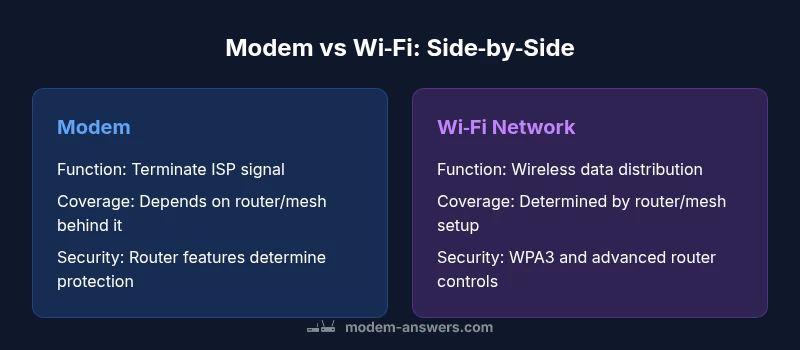
The core difference hinges on function: the modem is a termination point for the ISP signal, converting external data into a format your home network can use. Wi‑Fi is the wireless medium that delivers that data to devices. A home network typically uses both: the modem (often combined with a router in a gateway device) provides the wired and/or wireless backbone, while the router or access points create the distributed wireless signal. In other words, the modem handles signal compatibility with your ISP, and the router extends that capability wirelessly across your living space. This distinction matters because it clarifies where bottlenecks arise: if your router’s wireless performance is weak, you won’t get the full speed even with a fast modem, and vice versa. Modern setups increasingly favor a dedicated router with beefy Wi‑Fi hardware, while using a modem that supports your service tier and future speeds. As you consider options, remember that the best home networks leverage both components in harmony rather than relying on a single device for everything.
Speed and reliability: how each component affects performance
Speed is a product of multiple factors, not a single device. The modem’s role is to convert the ISP’s signal into usable data and to negotiate the highest compatible speed with your plan. If the modem is outdated or not compatible with your service tier, you may be limited right at the source. Wi‑Fi performance, meanwhile, depends on the router, its antenna design, the number of streams, frequency bands (2.4 GHz vs 5 GHz), channel width, interference from neighbors, and the physical layout of your home. The synergistic effect is what matters: a modern, capable modem paired with a robust router will generally outperform a low-cost modem or a budget router alone. In real-world terms, you’ll experience more consistent throughput, better handling of simultaneous devices, and reduced latency when both components are modern and properly configured. Modem Answers’ analysis emphasizes that alignment between service plan, modem capability, and router performance yields the most reliable speeds for streaming, gaming, and remote work.
Real-world scenarios: when a pure Wi‑Fi setup suffices vs when you need a modem
In small apartments or homes with a simple layout and light device load, a modest gateway device with decent Wi‑Fi might be enough. A single integrated unit can simplify setup and maintenance, and for basic browsing and streaming, this can be sufficient. However, as soon as you introduce multiple devices, 4K streaming, online gaming, and smart home automation, you’ll benefit from a dedicated router with stronger mesh capabilities or multiple access points. If your ISP requires a specific modem model, or if you hit a performance ceiling because the router can’t handle the traffic efficiently, upgrading the router or adding access points will often yield a better return than replacing the modem. The goal is to ensure your network can scale with your plan and household growth, not just today’s needs.
Setup and customization options: bridging, routing, and combinations
Setup choices range from a simple non‑routing gateway to a full-blown multi‑AP mesh system. A modem-only device combined with a separate router allows greater customization of security features, guest networks, and parental controls. Enabling bridge mode on a gateway can let a third‑party router manage all NAT and firewall rules, which is advantageous for advanced users seeking granular control. If you aren’t comfortable tweaking settings, a modern modem-router combo with a strong built‑in feature set can still deliver solid performance with minimal configuration. The key is to balance ease of use with the level of control you want over your network, and to ensure compatibility with your ISP’s service level and plan.
Security and privacy considerations: protecting your home network
Security isn’t about one device; it’s about a layered approach. Routers typically provide robust firewall rules, encryption options (WPA3), and guest networks to isolate devices. A modem alone offers limited protection beyond basic routing features. If you opt for a separate router, keep firmware updated and enable automatic updates where possible. Security also benefits from regular password changes, disabling WPS, and monitoring connected devices. In larger homes, a mesh network’s automated handoffs improve security by maintaining consistent, protected connections across space. Modem Answers stresses that pairing updated hardware with strong security settings yields the lowest risk of unauthorized access or data compromise.
Cost considerations and value proposition: upfront vs long-term value
Hardware costs come in waves: a basic modem can be affordable, but a top‑tier router or mesh system may cost more upfront. The overall value depends on coverage needs, device density, and how much you value features like guest networks, parental controls, and QoS prioritization. If you anticipate upgrades to higher internet speeds, choosing a modem and router that support future standards will reduce the need for a full replacement later. In practice, a mid‑range router paired with a modem that is compatible with your ISP’s plan often provides the best balance of performance and long‑term value. Modem Answers recommends planning for upgrades by focusing on hardware capable of supporting multiple devices, high traffic, and security features rather than chasing peak raw throughput alone.
Practical steps to optimizing your home network
- Assess floor plan and device density to determine whether you need more coverage or a stronger central router.
- Test speeds at different rooms and consider wired backhaul where possible to reduce wireless interference.
- Update firmware on both modem and router, and enable auto‑update if available.
- Enable WPA3 security, create a strong guest network, and review connected devices regularly.
- Consider mesh extenders or additional access points for large homes or multi‑story layouts.
- If you’re upgrading, check compatibility with your internet plan to avoid bottlenecks at the modem or router level.
Authority sources and further reading
- Official appliance and service guidance: https://www.fcc.gov
- National standards and security guidelines: https://www.nist.gov
- Educational reference on network fundamentals: https://www.cornell.edu
Final tips: deciding between a modem, router, or both
Think about space, device load, and future growth. If you want simple setup and clean aesthetics, a gateway device may suffice. If you prioritize reliable wireless performance, invest in a strong router or mesh system and use the modem just for signal termination. The right blend—modem with a capable router—typically delivers the most reliable, scalable home network. The Modem Answers team encourages homeowners to focus on compatibility with their ISP, coverage needs, and security features when choosing hardware.
Comparison
| Feature | Modem | WiFi Network (Router/Access Point) |
|---|---|---|
| Primary function | Terminate ISP signal into your home network | Provide wireless access to devices within range |
| Coverage & scalability | Limited by device location; extend with wired backhaul or mesh | Depends on router placement and mesh nodes; scalable with additional units |
| Speed consistency | Depends on modem compatibility with service plan | Affected by distance, interference, and channel congestion |
| Setup & management | Typically plug‑and‑play with ISP‑provided configuration | Requires configuring SSID, password, security; may need admin access for advanced features |
| Security features | Basic firewall with ISP integration | Advanced firewall rules, WPA3, guest networks, parental controls |
| Cost range | $50-$120 for standalone modem | $100-$400 for a good router/mesh system |
| Best for | Simple, compact setups or fixed plans | Flexible coverage and high‑performance wireless networks |
Positives
- Clear differentiation helps avoid overpaying for unnecessary features
- Highlights the strengths of a router for wireless coverage
- Encourages a scalable setup that grows with your plan
- Promotes optimizing placement and security settings
What's Bad
- May complicate setups for very small homes if multiple devices are required
- Requires additional hardware cost and ongoing maintenance
- Possibly confusing for non‑tech users who prefer all‑in‑one devices
- Overemphasis on separation can be unnecessary for basic needs
A blended modem + router setup is the recommended approach for most homes.
Using both a modem and a capable router provides reliable speeds, broader coverage, and stronger security. A single device may suffice in small spaces, but as device counts grow, a dedicated router (or mesh system) offers better performance and control. Modem Answers' guidance favors starting with a solid modem that supports your plan and pairing it with a strong router to maximize value and flexibility.
FAQ
What is the key difference between a modem and a Wi‑Fi router?
A modem terminates the ISP signal and converts it for your network, while a router distributes that signal wirelessly to devices. A home network typically uses both: a modem (or gateway) plus a router to provide reliable coverage and features.
A modem handles the internet signal; a router gets that signal to your devices over Wi‑Fi. Most homes benefit from using both.
Is modem better than Wi‑Fi for speed?
Speed depends on the plan and hardware. The modem must support your plan’s maximum speed, and the router must provide strong wireless performance to realize that speed across the home.
Speed comes from both parts—modem compatibility and router wireless strength.
Can I use Wi‑Fi without a modem?
Not really. Wi‑Fi is a wireless network. Without a modem (or a gateway that includes a modem), there is no internet signal to distribute.
Wi‑Fi needs a modem or a gateway to bring internet into your home.
What is bridge mode and why would I use it?
Bridge mode lets a second router manage the network by bypassing the modem’s built‑in routing. This can improve control, performance, and features like guest networks and advanced QoS.
Bridge mode puts the internet through your preferred router, which can help with features and coverage.
Are there security risks with using public Wi‑Fi vs home network?
Public Wi‑Fi networks pose greater risks due to shared infrastructure. A home network with strong Wi‑Fi security, regular updates, and a dedicated router is generally safer for daily use.
Public Wi‑Fi can be risky; a well‑secured home network is safer for everyday use.
How should I decide between a modem, router, or a combined device?
Consider space, device count, and future needs. If you want simple setup, a gateway might work; for performance and customization, choose a standalone router with a compatible modem.
Think about coverage, security, and future growth when choosing hardware.
Key Takeaways
- Assess your space to determine coverage needs
- Prefer a separate router for stronger wireless performance
- Invest in a reliable, future‑proof router setup with mesh options
- Regularly test speeds and optimize Wi‑Fi placement
- Enable strong security and keep firmware updated