How Many Modems Can You Have in a House? A Practical Guide
Learn how many modems you can have in a house, including single-ISP setups, multi-ISP options, bridging tips, and practical network design guidance.


There is no universal limit on how many modems you can have in a house. In practice, most homes use one modem per active internet connection, but you can run two or more modems if you have multiple ISP lines or dedicated business services. Always check with your provider for account limits and licensing.
Understanding the core question: how many modems can you have in a house
When people ask how many modems they can have in a house, the first thing to clarify is what counts as a 'modem' in modern networks. In everyday language, a modem is the device that talks to your internet service provider. In practice, many homes use a single modem that also provides routing and Wi‑Fi, often labeled as a gateway. Others deploy separate devices: one modem connected to a dedicated router, or even multiple modems connected to separate networks. The simple answer is that there is no universal cap. The number you can or should run depends on your service arrangements, your home's physical layout, and how you want to manage IP addresses, performance, and security. If you search for 'how many modems can you have in a house', you’ll see a wide range of setups from modest single-modem households to complex multi-ISP configurations. The key is to design a plan that aligns with your goals: reliable Wi‑Fi coverage, predictable performance for streaming and gaming, and straightforward maintenance.
Typical scenarios: single-ISP homes
For most households, a single internet service connection is enough. In these environments, one modem is the common starting point. The modem may also serve as a router (a gateway) or be paired with a separate router to create a larger Wi‑Fi footprint and better device management. In these setups, the number of physical modems is intentionally minimal, usually just one. You may occasionally encounter a second modem in the same home—for example, to replace a failing device quickly, or to separate traffic between different floors or user groups—but this is less common. The important takeaway is that even with one service, you can still tailor your network architecture to your needs: place a primary router where it delivers strong coverage, use mesh extenders for dead zones, and configure guest networks for visitors. If you’re evaluating whether you need a second modem, map your home’s dead zones, the number of connected devices, and your typical bandwidth usage. The goal is to maximize reliability without overcomplicating the setup or creating unnecessary maintenance overhead.
When you might need more than one modem
There are several legitimate reasons to run more than one modem in a house. If you subscribe to two different internet service providers, each with its own plan and home network, a separate modem for each service is the cleanest approach. Some homes have a dedicated line for a home office, media room, or remote-learning setup, where one modem serves a high-bandwidth workspace while the other handles general use. Another scenario is a large home with thick walls or multiple stories; though you can extend coverage with mesh networks, a second modem connected to its own router can sometimes reduce latency for gaming or streaming on a specific floor. Finally, some households use a secondary modem strictly for a guest network, to keep guest traffic segregated from primary devices. In all cases, plan your topology with your conclusions in mind: where will you put equipment, how will you route traffic, and how will you handle IP addressing and firewall rules? Remember that simply duplicating hardware doesn’t automatically improve performance—it can complicate management if not designed carefully.
ISP policies and practical limits
ISPs typically govern how many devices you can connect to a single account and how, or if, you can deploy multiple modems. Some providers permit multiple modems under a single residential plan, while others require separate service lines or business accounts. In many cases, you’ll need to register each modem’s MAC address or obtain a separate activation for the second device. Bracing for technical realities, you should also consider how many IP addresses you’ll receive and whether your internal network will need static routes or dynamic routing. If bridging is the goal, keep in mind that bridging a modem disables its built‑in router, so you’ll rely on your own router for the network. If you’re unsure about policy or cost, contact your provider and request a clear statement about limits, fees, and whether your planned topology is supported. The key takeaway is to plan ahead and document the configuration to avoid service interruptions in the future.
Technical constraints: coax, signal, and network design
This is the part of the conversation where hardware realities matter. If you’ve got coax lines delivering DOCSIS service, the quality of splitters and the overall signal budget can limit how many modems you can effectively manage on a single run. Every split reduces signal strength, and excessive splitting or long runs can degrade performance for all devices. If you introduce a second modem on the same line, you may need a separate amplifier, a separate line from the provider, or a different topology to maintain signal integrity. In wireless terms, the main effect of adding extra modems is usually on routing rather than raw bandwidth. Double NAT can cause issues for gaming, VPNs, and some streaming services, which is why many setups opt for bridging or use a second router with its own IP range. If you’re not comfortable with cabling and signal testing, enlist a technician or a knowledgeable friend to audit the wiring and ensure there are no hidden bottlenecks.
Setting up multiple modems: bridging, routers, and best practices
Set up a clear blueprint before you buy a second modem. If you want to keep a single gateway and add a second modem for a separate network, you can place it behind a separate router to minimize interference. The typical method is to place the second modem in bridge mode if possible, and connect your own router downstream to handle DHCP, NAT, and Wi‑Fi. If bridging isn’t available, use a second router in a double-NAT configuration, and ensure you segment networks using VLANs or separate SSIDs. Label cables, document MAC addresses, and maintain a consistent naming convention for devices and subnets. Finally, consider cybersecurity: each active device is a potential entry point, so keep firmware up to date and use strong, unique passwords. In practice, a well-designed setup with two modems can provide robust performance across a large property, but only if each piece is properly integrated with your home network plan.
Cost, energy use, and ongoing maintenance
More hardware means higher upfront costs and ongoing maintenance. If you’re balancing budget against performance, start with a two-modem approach only if you truly need it. Power consumption for electronics adds up over time, so consider energy-efficient devices and automatic sleep modes where available. Maintenance includes updating firmware, monitoring performance, and ensuring compatibility with your ISP’s provisioning steps. If you lease equipment from a provider, review the rental terms and potential charges for additional modems. On the upside, a multi-modem configuration can improve reliability, guest access, and segmentation of high‑traffic devices, which is valuable for homes with several family members or a home office.
A practical decision framework for most households
To decide how many modems you need, start by mapping your home network. Create a floor plan, note the rooms with weak Wi‑Fi, count how many devices routinely stream or attend meetings, and identify whether you require two independent internet lines. Then compare the cost and complexity of adding a second modem against a robust mesh Wi‑Fi system or a higher‑end single-modem gateway with coverage extenders. In many cases, a single modem with a strong router and mesh extension provides more reliable coverage than a DIY multi‑modem setup. If your goals include strict isolation of guest traffic or separate work networks for family members, a second modem may be justified, but be methodical about the plan, testing, and documentation.
Common mistakes to avoid when adding modems
Avoid assuming more hardware automatically means better performance. Failing to bridge properly, misconfiguring IP addresses, or neglecting firmware updates can lead to double NAT, IP conflicts, and inconsistent Wi‑Fi. Also, don’t overlook physical constraints: too many splits, poor cabling, or inadequate signal levels can undermine everything you install. Finally, don’t skip policy checks with your ISP. A quick call to verify account terms and activation requirements can prevent days of service disruption.
Examples of common modem counts across home network setups
| Scenario | Typical Modem Count | Notes |
|---|---|---|
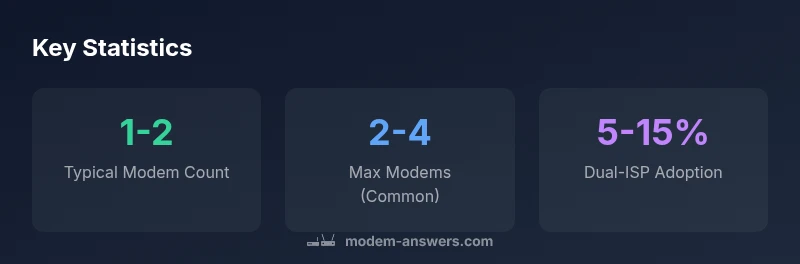
| Single-ISP Home | 1-2 | Modem behind a router; one network |
| Two-ISP Home | 2-4 | One modem per ISP; bridging recommended |
| Business-line or guest networks | 2-3 | Dedicated lines; higher management complexity |
FAQ
Can I legally have multiple modems in a house?
Yes, it is possible to have multiple modems in a house, provided your ISP terms allow it and you have the necessary service accounts activated. Some providers require separate accounts or business service; bridging or using separate routers is advisable to avoid conflicts.
Yes, you can have multiple modems, but you should verify your provider's terms first.
Do I need two separate modems if I have two internet providers?
Usually yes, one modem per provider; configure them as separate networks or use bridging to keep traffic cleanly separated.
Typically you’ll want a modem for each provider with clear network separation.
How do I connect multiple modems to one home network?
Connect each modem to its own router and decide whether to bridge or use a second router with careful subneting. Label cables and maintain separate IP ranges to avoid conflicts.
Wire the modems to separate routers or bridge one to a primary router.
What is bridging mode and when should I use it?
Bridging disables the modem’s built‑in router, letting you use your own router for network control. Use it when you want a clean, centralized routing setup and to avoid double NAT.
Bridge mode hands control to your own router.
Are there any limits imposed by ISPs on the number of modems per home?
Yes, some ISPs cap devices per account or require extra charges or separate accounts for additional modems. Always confirm terms before expanding.
ISPs may limit devices; check terms before adding.
Can a single modem support multiple networks within the same home?
Yes, many modems support guest networks or VLAN tagging to segregate traffic. The capability depends on the device and firmware; check features before relying on it.
You can often segment networks with features like guest networks.
“There isn't a universal cap on how many modems a home can use; the right number depends on your ISP terms and your network goals.”
Key Takeaways
- Assess your needs before buying additional modems.
- Most homes function with a single modem per service.
- Check ISP terms before adding more modems.
- Use bridging or separate routers to avoid double NAT.
- Document configurations for easy maintenance.