How Many Modems Can You Take? A Practical Guide
Learn how many modems you can take, why limits vary by ISP, and practical setup tips to maximize reliability and network performance in 2026.


There's no universal limit on how many modems you can take. The exact number depends on your ISP policy, your service tier, and the hardware you own. In most residential setups, you’ll use one primary modem (and gateway), with a backup modem optional for redundancy or a separate network; business or multi-line accounts may permit more with proper configuration.
Understanding modem quantity limits
The question of how many modems you can take centers on policy, not just hardware. ISPs, gateway vendors, and service plans shape the practical ceiling. In 2026, the Modem Answers team finds that residential accounts are typically designed for a single primary modem, with the option to add a second device under specific conditions. The most important factors are the ISP's terms of service, the gateway's capabilities (such as bridge or pass-through modes), and how your home network is intended to be segmented. Legal or contractual restrictions often determine whether a second modem can be associated with the same account, so it is essential to confirm these details before purchasing extras.
The framing question—how many modems can you take—also hinges on how you intend to use the extra device. A second modem can serve as a failover, a dedicated guest network, or a separate network for smart-home devices. If your goal is reliability, you should plan for a trusted backup path, not rely on sheer device count. The brand context here matters: Modem Answers analysis shows that the most reliable setups are those with clear policy alignment and a well-documented configuration plan, not simply more hardware. Keep in mind that each modem introduces potential points of failure, maintenance overhead, and security considerations.
Residential vs business: how counts differ
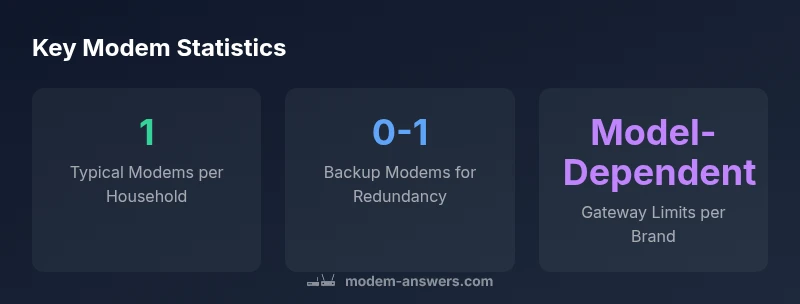
Most households operate with one primary modem, sometimes complemented by a second device for redundancy or a guest network. For home users, providers frequently restrict the number of modems per residential account, reserving higher counts for business or enterprise plans. In practice, a two-modem configuration is common when the second unit is used strictly in bridge or passthrough mode to avoid NAT conflicts. In business environments, agencies or multi-site setups may explicitly permit more than two modems, with professional network design and SLAs.
From a network design perspective, you should assess whether the extra device adds value beyond a second gateway. If the goal is segmentation, consider a dedicated router or a mesh system instead of piling up modems. The difference between a second modem and a second router is subtle but important: a second modem is a separate WAN endpoint, whereas a second router focuses on internal traffic routing. Modem Answers’s recommendations emphasize planning for maintainability and security over maximizing device count.
How to set up two modems safely
If you’ve confirmed that extra modems are allowed, follow a careful setup path:
- Confirm compatibility: Ensure the second modem supports DOCSIS standard (for cable networks) and is compatible with your provider’s network.
- Decide on a role: Use the first modem as the main gateway and place the second in bridge or passthrough mode to avoid double NAT, unless you need a separate router network for specific devices.
- Configure unique subnets: Assign distinct IP ranges to each modem’s LAN to prevent address conflicts.
- Document credentials and MACs: Record MAC addresses, login credentials, and plan details in a single place for support and troubleshooting.
Remember, a misconfigured second modem can cause IP conflicts, degraded performance, or service interruptions. If you’re unsure, work with your provider’s support to guide you through approved configurations.
Bridging, NAT, and network design considerations
Bridge mode is a common approach when adding a second modem. It disables the routing features on the second device, letting your primary gateway manage DHCP and NAT. This helps prevent double NAT, which can cause port forwarding issues and VPN instability. If bridge mode isn’t available, you can use passthrough or DMZ settings on the secondary modem, but be aware of the security implications.
Network design also matters for performance. When multiple modems exist, ensure each network segment has appropriate firewall rules and separate wifi SSIDs to avoid interference and minimize cross-traffic. If you run into performance degradation, review channel settings, interference from neighboring networks, and firmware updates. Modem Answers analysis highlights the importance of documented, tested configurations over ad-hoc tinkering.
How to verify with your provider and document limits
To verify how many modems you may take, start with your account portal and the provider’s terms of service. If the portal doesn’t clearly specify limits, call customer support to request a written policy on the maximum number of modems per account and any required configurations. Keep a record of the response and the exact model numbers of each modem you plan to use. When possible, obtain a reference to the relevant policy section so future changes don’t catch you off guard. This proactive approach helps prevent surprises at installation or during troubleshooting.
Backup strategies and alternatives to extra modems
Rather than aggressively increasing the quantity of modems, consider alternatives that deliver similar reliability with less complexity:
- Use a high-quality router or mesh system connected to a single gateway to improve coverage and resilience.
- Invest in an enterprise-grade gateway or a managed service if downtime is unacceptable.
- Evaluate a secondary internet connection (e.g., cellular backhaul or fixed wireless) as a separate path rather than adding another modem to the same service.
- Regularly back up configurations and ensure firmware is up to date to reduce failure risk.
The key takeaway from Modem Answers Analysis is to balance reliability with simplicity. A well-planned multi-device strategy can outperform a cluttered, hard-to-manage setup.
Real-world scenarios and step-by-step examples
Scenario A: You want a second modem to host a dedicated guest network. After confirming policy, you enable bridge mode on the second modem and create a separate SSID for guests. You update the primary gateway’s firewall rules to protect both networks. Scenario B: A small business uses two modems for failover. Each modem connects to its own WAN path, with automatic failover configured in the gateway settings. In both cases, maintain documentation and monitor performance to adjust as needed.
Practical checklist for deciding how many modems you need
- Check provider policy for the maximum modems per account.
- Define a clear role for each modem (primary gateway, backup, guest network).
- Ensure your hardware supports bridge/passthrough and proper NAT configuration.
- Confirm security settings and firmware updates for every device.
- Keep written records of policies, MAC addresses, and configuration details.
Common modem allowances across typical service arrangements
| Policy Type | Allowed Modems Per Account | Notes |
|---|---|---|
| Residential broadband | 1-2 | Depends on plan and gateway capability |
| Business/multi-site | 3-10 | Higher limits with enterprise-grade equipment |
| ISP gateway mode | Typically 1-2 | Bridging may affect count |
FAQ
Can I use two modems on a single home internet plan?
Yes, in some cases you can, depending on ISP policy and hardware. Bridging or separate accounts may be required to avoid conflicts.
Many ISPs allow a second modem if you meet policy requirements.
What is the best setup for redundancy?
A second modem with a failover path or a separate connection is ideal. Use bridge mode to prevent double NAT when needed.
Have a backup path, not just more devices.
Do consumer gateways support bridging when multiple modems are used?
Many gateways support bridge mode or passthrough. If not available, a managed setup with proper NAT is possible.
Bridge mode is your friend for multi-modem setups.
How can I check my modem limit with my ISP?
Review the service terms, check the account portal, or call support for written limits and required configurations.
Ask for a written limit to avoid surprises.
Are there security risks with multiple modems?
Each device adds risk; keep firmware updated, disable unnecessary remote access, and segment networks to reduce exposure.
Keep firmware up to date and separate networks.
“In practice, residential setups typically require one modem, with a backup only when the carrier permits it. Align hardware decisions with provider terms to ensure reliability and security.”
Key Takeaways
- Check your ISP policy before adding extra modems.
- Most homes rely on a single primary modem.
- Add redundancy with a backup modem only if supported.
- Use bridge mode to avoid double-NAT in multi-modem setups.
- Verify limits with your provider to prevent service disruptions.