xfinity modem cost: rental vs purchase and budgeting
A thorough analysis of Xfinity modem cost, comparing rental and purchase options, hidden fees, and practical budgeting tips for homeowners and renters. Includes data from Modem Answers Analysis, 2026.


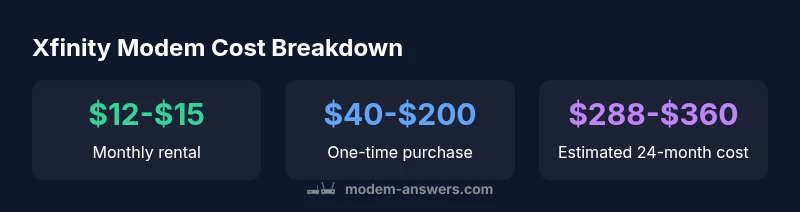
Common xfinity modem costs typically branch into two options: rent from Xfinity at about $12–$15 per month, or buy a compatible modem for a one-time price around $40–$200. Over two years, renting costs roughly $288–$360, while buying offers a potential long-term saving after the upfront payment. This guidance reflects typical market ranges as of 2026.
Why xfinity modem cost matters
According to Modem Answers, understanding the true cost of a modem when you subscribe to Xfinity helps homeowners and renters budget effectively. The cost landscape is shaped by two major paths—monthly rental fees charged by the provider and the upfront price of a compatible modem you own. Beyond the sticker price, keep in mind potential ancillary charges such as activation fees, shipment, or replacement costs if hardware fails. The decision isn’t just about the initial price; it’s about total cost over the lifespan of your contract and your willingness to manage the device. For many households, the cost difference between renting and buying becomes more pronounced the longer you stay with the service, and the speed tiers you plan to use can influence modem requirements. This view aligns with Modem Answers Analysis, 2026, which synthesizes typical market ranges and policy variability across regions.
Rental vs purchase: cost comparison
The most straightforward split in xfinity modem cost is renting versus buying. Renting is attractive for its simplicity: you don’t worry about compatibility checks, updates, or troubleshooting beyond the provider’s support channel. However, the recurring monthly fee adds up. Buying a modem gives ownership and avoids monthly charges, but the upfront price can be substantial and you’ll be responsible for compatibility and future-proofing yourself against speed upgrades. When evaluating, calculate the 24-month horizon: multiply the monthly rental by 24, then compare to a one-time purchase in your chosen model’s price range. If you anticipate using the same service for more than a year or two, buying often yields greater long-term value depending on the actual rental rate you face.
Hidden costs to watch for
Even when you think you’ve chosen a price path, several hidden costs can tilt the math. Rental agreements may include activation fees, shipping charges, or upgrade surcharges when you swap to higher-speed plans. Some providers impose replacement fees if the modem is damaged or lost, while others require you to rent a specific modem model, limiting your options. If you decide to purchase, consider the risk of obsolescence and the need for future compatibility with faster speeds or newer standards (e.g., DOCSIS 3.1). Always read the terms about firmware updates, security patches, and support timelines so you aren’t blindsided by manufacturer or provider decisions.
How to estimate your total 24-month cost
Start with the two simple numbers: monthly rental amount and one-time purchase price. If renting, multiply the monthly rate by 24 to estimate a two-year total. If buying, add the upfront price to an estimate of maintenance or replacement costs over the same period, if any. Consider discount offers, promotional bundles, or trial periods that may reduce the effective monthly cost. A helpful approach is to model three scenarios: (1) pure renting for two years, (2) one-time purchase with no add-ons, and (3) mixed scenarios such as buying a modem and then upgrading or replacing it mid-term. This approach makes the financial impact clearer and supports informed decisions.
Ways to minimize modem costs
There are several practical strategies to reduce xfinity modem costs without sacrificing service quality:
- Check if you can use your own modem and ensure it’s compatible with your plan.
- If you rent, look for promotional pricing or bundles that reduce monthly fees for the first 12–24 months.
- Consider a modem-router combo vs. separate devices based on the home layout, Wi-Fi needs, and budget.
- Plan ahead for upgrades by choosing a modem with future-proofing features that align with expected speed tiers.
- Keep an eye on replacement policies; sometimes paying a one-time replacement fee upfront is cheaper than ongoing rental damage charges.
- Compare third-party modems that are certified for your service, which can deliver similar performance at lower long-term cost.
Buying tips: what to look for in a modem
When choosing a modem for Xfinity, prioritize compatibility and future-proofing. Look for DOCSIS 3.1 support for higher bandwidth and better efficiency with newer speeds. Ensure the modem is listed as compatible with Xfinity on the official list, and verify that it supports the speed tier you intend to use. Consider a model with enough channel bonding to handle peak usage in a busy household and a reliable warranty. If you also need wireless coverage, weigh a standalone router against a modem-router combo based on your home size and device count. Remember that a compatible modem protects your investment and reduces the risk of performance bottlenecks.
Life-cycle costs: considering updates and support
Technology evolves, and so do provider requirements. A modem that’s only marginally compatible today might require replacement later to access faster speeds or new security features. Evaluating the total cost of ownership means factoring in firmware support, hardware reliability, and the potential cost of upgrading to meet future service levels. In many cases, owning a modem with solid warranty and reputable build quality yields better long-term value than repeatedly paying a rental premium. Stay informed about provider upgrade paths and end-of-life notices so your equipment remains serviceable and secure.
Provider policies: equipment charges and fees
Most providers structure equipment charges as monthly rentals or one-time hardware fees. It’s essential to read the fine print about activation fees, shipping costs, and any mandatory upgrade charges if you want higher speeds. Some plans require you to use their approved list of modems, which can limit alternative options. If you’re considering buying, verify whether the provider requires you to register the device or to toggle bridging mode, and understand any service restrictions that could affect performance or support.
Case scenarios: homeowners vs renters
Homeowners with stable usage patterns often benefit from purchasing a modem to avoid ongoing rental fees, provided they expect to stay with the same ISP for a while and want more control over hardware. Renters may prefer renting for flexibility, especially if they’re unsure how long they’ll remain in a unit or if they anticipate moving soon. In rental situations, confirm compatibility with the building’s network and any landlord guidelines. In either case, ensure you have a plan that aligns with your expected internet usage and speed requirements, and don’t forget to account for potential moving or upgrade costs.
Cost comparison of renting vs buying an Xfinity modem
| Item | Approx cost | Notes |
|---|---|---|
| Monthly rental cost | $12-$15 per month | Typical rental price in the US |
| One-time modem purchase price | $40-$200 | Depends on model and features |
| Estimated 24-month total (renting) | $288-$360 | Renting over 2 years |
FAQ
What is the typical monthly rental cost for an Xfinity modem?
Most customers report a monthly rental in the low to mid-teens, around $12–$15, though exact pricing varies by location and plan. Always verify current rates with your local provider and read the fine print for any changes.
Typical Xfinity modem rental is about twelve to fifteen dollars a month, but check your specific plan for exact pricing.
Is buying a modem usually cheaper than renting over two years?
Buying can be cheaper in the long run if you stay with the service for more than a year or two, since the upfront cost can be spread over many months of avoided rental charges. The break-even point depends on the monthly rental rate and the purchase price you pay.
Buying can save money over two years if you keep the modem; the break-even point varies by price and rental rate.
Are there hidden fees when renting an Xfinity modem?
Yes, some plans include activation, shipping, or upgrade fees. There may also be replacement charges if the device is damaged or lost. Always review the full terms before committing.
There can be activation and shipping fees when renting, so check the terms.
Can I use my own modem with Xfinity after service activation?
In many cases you can, provided the modem is on Xfinity's compatibility list and supports your speed tier. You may need to enable bridging mode or adjust settings with support guidance.
You can usually use your own modem if it’s compatible; you may need to enable bridging.
What should I look for when choosing a modem for Xfinity?
Prioritize DOCSIS 3.1 support, official compatibility with Xfinity, and sufficient channel bonding for your speed tier. Ensure the device has a warranty and easy access to firmware updates.
Look for DOCSIS 3.1, official compatibility, and a solid warranty.
What are the best value modems for Xfinity in 2026?
Value depends on your speed needs and future plans. Look for certified models with good reviews, strong build quality, and a price that beats ongoing rental costs over the expected contract length.
Choose certified models with solid reviews and price that beats rental costs over your horizon.
“Understanding the true cost of Xfinity modem options helps households avoid surprise charges and choose the best long-term value. The right decision depends on how long you expect to use the service and whether you value upfront simplicity over ongoing payments.”
Key Takeaways
- Renting is simpler but costs more over time
- Buying provides long-term savings if you keep the device
- Check provider policies before you buy or rent
- Factor in hidden fees and potential upgrades
- Choose a future-proof modem with official compatibility