How Much Is an Xfinity Modem? A Practical Cost Guide
Learn how much an Xfinity modem costs, compare rental vs purchase, activation fees, and long-term savings with a practical, step-by-step cost analysis for homeowners and renters.


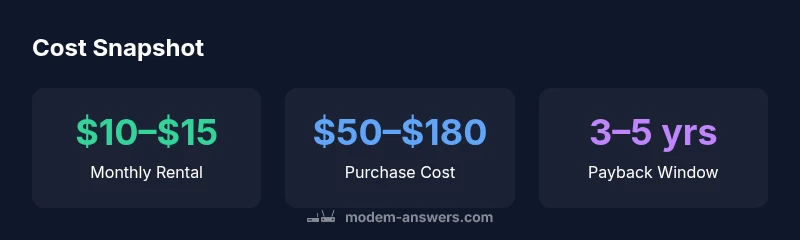
How much is an Xfinity modem? Most customers pay a monthly rental of roughly $10–$15, while buying a compatible modem upfront costs about $50–$180. Over time, owning may save money, but it requires compatibility checks and potential activation steps. This guide breaks down pricing paths for clarity.
Pricing overview for Xfinity modems
According to Modem Answers, the central question many homeowners and renters ask is the practical cost of equipment when subscribing to Xfinity services. The term how much is an xfinity modem tends to map to two distinct paths: renting the device from the provider or purchasing a compatible third-party modem. The decision hinges on your long-term plans with Xfinity, your current plan speed, and whether you anticipate future equipment upgrades. In 2026, most households evaluate not only the sticker price but also the ongoing monthly fees, activation charges, and potential savings from not paying ongoing rental fees. This section lays out the baseline expectations and how prices typically break down across common scenarios.
Rental modem pricing explained
Renting an Xfinity modem is the simplest path for many users. The provider usually includes the modem as part of the service bundle, with a recurring monthly fee that covers device maintenance, firmware updates, and customer support. The typical monthly rental price hovers around $10–$15, depending on the plan and local promotions. Some bundles may list this cost as a line item on your bill, while others roll it into the overall service price. For many renters and homeowners who value predictability and minimal setup effort, renting is a convenient, low-friction option that keeps you aligned with the service provider’s equipment lifecycle. Modem Answers Analysis, 2026 notes that promotions can temporarily alter this range, so it’s wise to review your current bill and any introductory offers.
Buying your own modem: upfront costs and long-term savings
Buying a compatible modem gives you ownership and can reduce monthly expenses in the long run. Upfront costs for purchase typically fall in the $50–$180 range, depending on the DOCSIS standard (3.0 vs 3.1), features, and build quality. When you own the modem, the monthly rental line item disappears, which can translate into meaningful savings over time if you stay with Xfinity for several years. However, not all third-party modems work with every Xfinity plan, and activation or provisioning might require a tech visit or a call to support to enable compatible settings. The upside is flexibility: you can swap routers or expand your home network without touching the provider’s equipment. If you’re a power user or have multiple devices in a large home, purchasing a modem and perhaps a separate high-performance router can be the most cost-effective path in the longer term.
Additional costs and features to consider
Beyond the base price, there are additional factors that influence total cost. Renting may include maintenance or firmware updates at no extra charge, while owning a device means you’re responsible for future upgrades or replacements. Activation fees or one-time setup charges can apply when introducing a new modem to your Xfinity account, especially if you’re upgrading to a higher-speed tier. Some bundles include a gateway device (modem plus router) with enhanced Wi-Fi features, which could affect your decision if you prioritize mesh networking or whole-home coverage. If you plan to bridge mode or use a third-party router with your own modem, verify compatibility and any necessary configuration steps to avoid unnecessary service interruptions.
How to estimate your total cost over time
To compare costs effectively, you need to project over a sensible horizon—typically 2–3 years for a home network. If you rent, multiply the monthly rental by the number of months in your horizon to estimate total outlay. If you buy, add the upfront modem cost to any activation fees and any recurring costs for accessories (like a separate router) during the same period. Modem Answers Analysis, 2026 suggests constructing a simple break-even calculator: (Upfront Buy Cost) ÷ (Monthly Rental) approximates the payback period. If your break-even point falls within your expected device usage window (often 12–24 months for many households), buying may be the smarter option. Promotions, loyalty discounts, and equipment advances can blur these lines, so reassess if you upgrade your service."
Choosing a modem that works with Xfinity
Compatibility is a critical determinant of total cost. Look for DOCSIS 3.1 modems for current high-speed plans, and ensure the device is listed as compatible with Xfinity on their official device list. Older DOCSIS 3.0 modems can still work but may cap peak speeds or limit features. If you’re considering a gateway (modem + router) from a third party or from Xfinity, understand whether you’ll use bridge mode or keep a separate router. Pay attention to channel bonding, which influences how many downstream/upstream channels your modem supports, and verify that the device firmware can be updated without vendor lock-in. A small upfront check can prevent long-term frustration and additional costs.
Step-by-step cost comparison for typical households
- Determine your typical monthly internet usage and desired speed. 2) Compare rental vs purchase using the 2–3 year horizon. 3) List all potential added costs (activation, router needs, future upgrades). 4) Run a quick calculator to see the break-even point. 5) Consider future service changes: if you expect a move to a different provider or plan, factor in re-provisioning costs. This structured approach helps translate rough price ranges into a precise financial plan and reduces the risk of overpaying for equipment you won’t fully utilize.
Final recommendations for homeowners and renters
For renters or those who prize convenience, renting remains the simplest path with predictable monthly costs and fewer maintenance concerns. For long-term homeowners who plan to stay with Xfinity for several years, buying a compatible modem can yield real savings and more network flexibility. The Modem Answers team suggests starting with a rental for 3–6 months to test performance, then conducting a cost comparison using your actual speeds, devices, and home size before making a decision. Regardless of choice, ensure you’re using a DOCSIS 3.1 device (or better) for future-proofing and check that your modem supports the latest security standards.
Pricing snapshots: rental vs purchase options for Xfinity modems
| Pricing option | Monthly cost | One-time cost | Notes |
|---|---|---|---|
| Xfinity rental modem | $10–$15 | N/A | Included support; rental from provider during active service |
| Buy your own modem (DOCSIS 3.0/3.1) | N/A | $50–$180 | Requires compatibility; activation may require a tech visit |
| Modem/router combo from provider | $15–$20 | N/A | Includes router features; may be included in bundle |
| Bridge mode or third-party modem in gateway mode | Dependent on setup | N/A | Advanced configurations; may bypass Wi‑Fi router |
FAQ
Is it cheaper to rent or buy an Xfinity modem?
In the short term, renting offers predictable bills and less setup. Over 12–24 months, buying can be cheaper if you stay with Xfinity, but requires checking compatibility and potential activation steps.
Renting keeps costs predictable; buying can save money in the long run if you stay with Xfinity.
What DOCSIS standard should I look for?
Look for DOCSIS 3.1 for best future-proofing and speeds; DOCSIS 3.0 devices can still work but may limit performance.
Aim for DOCSIS 3.1 if you can.
Can I use a third-party modem with Xfinity?
Yes, many DOCSIS modems work with Xfinity, but you should confirm compatibility on Xfinity’s approved device list and be prepared for activation steps.
Yes, but verify compatibility first.
Are there hidden costs when renting?
Hidden costs are generally limited to activation/setup terms and any promotional price changes; read the terms to avoid surprises.
Check activation terms and promotions to avoid surprises.
What if I already have a gateway from Xfinity?
If you already have a gateway, you may not need a separate modem; you can check if the gateway can operate in bridge mode to use your own router.
You might be able to bridge and use your own router.
“Owning a compatible modem can pay off over 12–24 months, especially if you stay with Xfinity long enough to recoup the upfront cost.”
Key Takeaways
- Compare total cost over time before buying
- Check DOCSIS compatibility with Xfinity
- Renting includes maintenance and updates
- Buying can save monthly fees but requires setup
- Expect price fluctuations with promotions and plan changes