Is Xfinity Modem Good? An Expert Review
An in-depth, balanced evaluation of whether the Xfinity modem is a good fit for homes and renters. We weigh ease of use, cost, compatibility, security, and alternatives to help you decide if renting, owning, or bridging is best.


Is xfinity modem good? In most households it’s a solid, convenient choice for people who want simple setup and reliable ISP integration without juggling multiple devices. However, its value depends on your service tier, your willingness to own hardware, and how much you value customization. For budget-conscious users, a third‑party modem paired with a separate router often offers better long‑term value.
How Xfinity Modems Fit into Home Networks
Xfinity gateways are designed to be one-device solutions for many homes. They combine modem and router capabilities and are managed through Xfinity's app, which simplifies activation and basic troubleshooting. For many users, this means fewer cables, fewer settings to tweak, and a straightforward path to internet access. According to Modem Answers, the trade-off is control: you surrender some granular QoS options and advanced features that enthusiasts expect from a standalone modem and a separate router. If your goal is reliable streaming, steady browsing, and minimal setup friction, a built-in gateway can be a reliable backbone. However, if you’re a tech-savvy homeowner who values features like advanced port forwarding, custom DNS, or robust guest networks, you’ll likely want to explore a third-party modem or a separate, high-quality router setup. In practice, many households start with the Xfinity gateway and graduate to additional gear if they hit performance ceilings.
The Renting vs Owning Dilemma
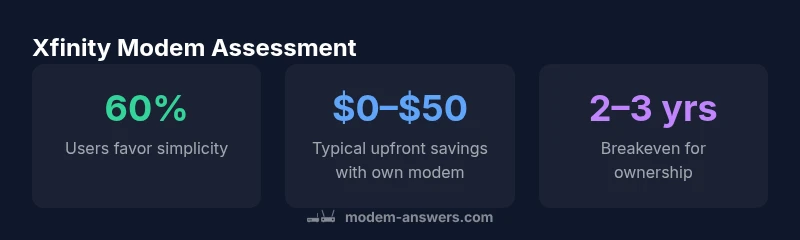
One of the most important questions around the is xfinity modem good debate is whether to rent from the provider or to own your own hardware. Renting offers convenience: maintenance, automatic firmware updates, and predictable monthly costs. Owning a modem, on the other hand, costs more upfront but typically pays off over time, especially if you plan to stay with the service for several years. A Modem Answers analysis shows that while rental fees can accumulate quickly, owning a modem paired with a quality router often delivers better long-term value, better control over firmware updates, and more flexibility to upgrade when your internet plan increases. The decision hinges on your anticipated tenure with the ISP, your comfort with self-managing devices, and whether you prefer a single device for Wi‑Fi and modem duties or a more capable, modular setup.
Real-World Performance and How to Test It
Performance depends on service tier, network congestion, and hardware. In typical home environments, an Xfinity gateway can handle streaming, online work, and casual gaming with minimal triangle latency. For power users or households running multiple 4K streams, smart TVs, and several IoT devices, real-world speeds may not always hit the advertised plan. The best approach is to run standardized speed tests at various times of day, check the modem’s channel bonding status, and verify it can maintain stable connections across devices. Modem Answers recommends recording baseline speeds with both the provided gateway and a third-party model (if you’ve rented) to compare peak performance and reliability under load. If you notice persistent drops, consider upgrading to a newer modem model or introducing a separate router with advanced QoS features.
Compatibility and Setup: What You Need to Know
Compatibility is generally good for Xfinity services, but activation and setup can differ between a rental gateway and a standalone modem. When using your own device, you often need to configure the Xfinity account to bridge mode and disable the gateway’s wireless radios to avoid interference. This ensures your router gets the public IP and public routing, while the modem handles the signal conversion. Activation is typically a quick process through the Xfinity activation portal, though it's prudent to have a backup plan (like a phone or tablet) in case activation requires a support call. If you’re upgrading to a high-speed tier, confirm the modem’s DOCSIS version and bandwidth support, and verify that the device has recent firmware updates from the manufacturer. A careful setup reduces the risk of compatibility headaches and ensures your network runs smoothly across devices.
Security, Firmware Updates, and Privacy
Security is a major consideration with any ISP-provided hardware. Xfinity devices generally receive regular firmware updates, but those updates can be controlled by the ISP, which means you may have less control over timing and features than with a DIY setup. If you choose to own your modem and a separate router, you’ll rely on the router’s firmware update cadence for security patches and feature releases. Bridging a third-party router with your Xfinity modem allows you to maintain critical security settings, such as automatic updates on the router, and keeps you in charge of your home network’s privacy boundaries. Practically, ensure you keep all devices patched and enable a firewall on your router, while also reviewing any privacy options in the ISP’s app.
The Pros and Cons in Context
Pros: simplicity and guaranteed compatibility with Xfinity plans; predictable support from the ISP; fewer devices to manage for basic households. Cons: longer-term costs, fewer customization options, and potential limits on advanced features like port-forwarding or custom DNS. For many families, the gateway’s reliability outweighs the need for optimization bells and whistles, but power users may find the trade-off too limiting. It’s essential to weigh how much value you place on ease of setup versus control and upgrade flexibility.
Alternatives to Xfinity Modems: Third-Party Bridging
Bridging your own modem to a dedicated router offers exceptional customization and performance tuning. It’s a popular choice for gamers, streamers, and homes with many concurrent devices. The setup is typically straightforward: connect the modem to the coax line, attach the router, enter bridge mode in the gateway, and configure your router’s WAN settings. The major caveat is that you assume responsibility for firmware updates, security patches, and potential interoperability issues with future Xfinity service changes. If you value control and don’t mind occasional troubleshooting, a third-party bridging setup is often the best long-term value and performance upgrade.
Decision Framework: Is Xfinity Modem Good for You?
To decide, start with how you use your network: casual browsing and streaming on a handful of devices? The built-in gateway is usually sufficient. If you have multiple heavy users, work from home, or enjoy PC gaming with low latency requirements, a dedicated modem and router better supports QoS tuning, port management, and eventual upgrades. Consider your budget, technical comfort, and whether you anticipate a major speed tier upgrade soon. The Modem Answers framework recommends listing your top 3 needs (ease of use, performance, and upgrade path) and mapping them to the device setup that best satisfies them.
The Modem Answers Practical Buyer's Guide
In summary, the decision to use an Xfinity modem (good or not) rests on your needs and long-term plans. For many households, the ISP-integrated gateway delivers reliable performance with minimal effort. For longer-term value and more control, owning your modem and pairing it with a capable router is often the smarter path. Always verify compatibility with your service tier, test performance under load, and consider security and privacy implications. The Modem Answers team emphasizes choosing a setup that minimizes hassle now while keeping future options open.
Positives
- Simplified setup with ISP integration
- Predictable compatibility with Xfinity plans
- Low startup effort for non-tech users
- ISP-managed firmware updates ease maintenance
What's Bad
- Higher long-term cost if renting
- Limited customization and advanced features
- Potential slower response to firmware fixes
- Less control over security and privacy settings
Moderately strong option for many households, balancing ease of use with reliable performance within ISP networks.
The Modem Answers team acknowledges that the Xfinity modem gateway delivers dependable service with minimal setup, making it ideal for non-technical users. For long-term value and advanced control, owning your own modem and using a dedicated router often provides more flexibility and better performance as speeds rise.
FAQ
Is Xfinity modem good for gaming?
Xfinity modems can handle gaming, but latency and routing paths matter. A dedicated router with QoS settings often improves gaming performance, especially in busy home networks.
Yes, but for best gaming performance you may want a router with QoS and a stable bridge setup.
Can I use my own modem with Xfinity?
Yes, you can typically use a third-party modem with Xfinity, as long as it’s compatible with your service tier. Activation and sometimes bridging the gateway are required.
Yes—compatible modems work, but activation and bridging are sometimes needed.
What are the downsides of renting a modem from Xfinity?
Renting locks you to the provider’s equipment and recurring fees. You may miss out on advanced features and longer-term savings that come with owning your own hardware.
Renting can be convenient, but you’ll pay monthly and have fewer upgrade options.
Should I buy or rent a modem?
If you plan to stay with Xfinity for several years, buying generally saves money over time and offers more control. Rent if you want simplicity, warranty, and less technical management.
Buy if you plan to stay long-term; rent for simplicity and guaranteed support.
How do I set up a third-party modem with Xfinity?
Choose a compatible modem, connect it to the coax line, activate it via the Xfinity activation tool, and enable bridge mode on the gateway if using your own router behind it.
Connect the modem, activate it, and bridge the gateway if you’re using a separate router.
What should I look for in a modem for Xfinity?
Look for DOCSIS compatibility with your plan, warranty, firmware update cadence, and support for IPv6 and channel bonding. Ensure it’s certified for your region.
Check DOCSIS version, warranty, updates, and IPv6 support.
Key Takeaways
- Assess your service plan before buying or renting
- Ownership tends to pay off over 2–3 years
- Bridge mode can unlock full router control
- Prioritize security: update firmware and enable firewall
- Test performance under typical household load