When to Buy a New Modem: A Practical Guide
Discover when to buy a new modem, compare owning vs renting, and choose a future-proof model to keep your home network fast, stable, and secure. Learn signs of aging hardware, plan costs, and follow a clear buying-and-setup process.


According to Modem Answers, you should replace your modem when performance becomes unreliable, speeds fall short of your plan, or the hardware shows age and compatibility gaps. If problems persist after troubleshooting, or your provider requires a newer model for service, it’s time to upgrade. Consider ownership vs rental costs and future-proofing features like DOCSIS 3.1 and Wi‑Fi 6.
Assessing Your Current Setup
Start by noting your internet plan, typical speeds, and how you use the connection day-to-day. If streaming, gaming, or home office work rely on stable throughput, you may need more headroom than your current modem provides. Check your current device for age, overheating, or frequent resets, which are signs the hardware is near failure. Gather your ISP account details and the model number of your current modem so you can compare features and compatibility at a glance. A quick speed test over Ethernet will give a clean baseline for reference. If your existing hardware struggles to meet the benchmark even with a reset, it’s time to evaluate replacements. Remember: the goal is not to chase peak numbers, but to sustain reliable performance for your typical household load.
Key Signs It's Time to Replace
There are several telltale signals that point toward replacement. Repeated connection drops, buffering in high-definition streaming, or devices unable to maintain stable Wi‑Fi coverage suggest the modem is limiting your network. If you notice firmware is no longer being updated, or your provider requires a newer model for service, these are strong indicators. Age matters too: while there’s no hard rule, hardware that has seen several years of service tends to underperform with modern plans. Finally, if you’ve tried troubleshooting, factory resets, and swapped cables with no improvement, there’s little benefit in further repairs.
Lifespan and Technology Upgrades
Technology evolves quickly in home networks. A modem with older standards may not exploit newer ISP services or work efficiently with faster speeds. Upgrading to a DOCSIS 3.1 modem with modern Wi‑Fi features can dramatically improve throughput, stability, and range. Consider future-proofing by prioritizing devices that support current and upcoming standards, as well as security updates from manufacturers. Remember: not every upgrade requires the absolute newest model, but choosing a device that matches or exceeds your plan’s capabilities reduces the likelihood of another upgrade soon.
Renting vs Owning: Cost and Convenience
Renting a modem from your ISP can simplify setup and warranty coverage, but ongoing monthly fees add up. Owning a modem often leads to lower long-term costs and more control over features and firmware updates. To decide, compare total costs over a 2–3 year horizon and factor in potential upgrades. If you move frequently or dislike repairs, renting may feel more convenient; if you value long-term savings and flexibility, buying is usually better.
How to Choose the Right Modem for Your Plan
Begin with your current plan and anticipated upgrades. Check your provider’s official supported device list to ensure compatibility, and select a modem that supports the latest DOCSIS standard recommended by your provider. Look for features like channel bonding, reliable Ethernet ports, and adequate CPU power to handle multiple devices. If you also want built‑in Wi‑Fi, decide whether you need a modem-router combo or a separate router for stronger coverage and easier upgrades in the future.
Compatibility and Features to Consider
Beyond DOCSIS, verify the modem supports your speed tier and supports multi‑Gbps plans if you anticipate speed increases. A stable, modern Wi‑Fi radio (Wi‑Fi 5/6) helps with wireless devices, but ensure your devices can take advantage of the protocol. Consider device size, heat dissipation, and power usage, as well as warranty terms. If you rely on smart home gadgets, a modem with robust security updates and good manufacturer support can save time and stress.
Steps to Buy and Setup Your New Modem
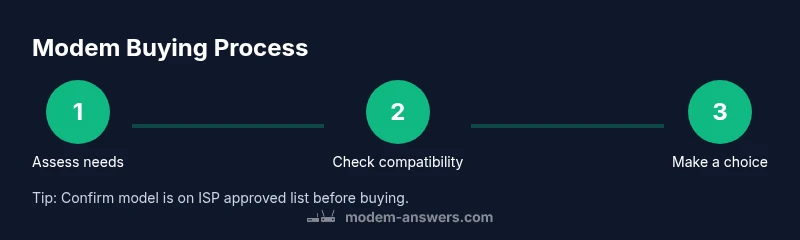
Plan your purchase around a clear budget and compatibility checks. Confirm the modem is on your ISP’s approved list and meets speed requirements. After purchase, connect the modem to the main line, power it on, and run initial configuration via your browser or the companion app. Test speeds on Ethernet first, then configure Wi‑Fi if you’re using a router or a modem-router combo. Save receipts and activation details in a safe place.
Common Pitfalls and How to Avoid Them
Avoid buying a model that’s several generations behind your plan, which can bottleneck performance. Don’t assume all features are included—read the spec sheet and confirm compatibility. Be wary of aggressive discounting on used gear; warranties and return policies matter. Finally, don’t skip the speed tests before and after setup to quantify improvement and confirm you achieved the expected performance.
Final Checklist Before You Buy
Define your must-have features (DOCSIS version, Wi‑Fi standards, number of Ethernet ports). Check provider compatibility and confirm total cost of ownership. Compare new vs refurbished options from reputable sellers and review warranty terms. Plan for setup, testing, and ongoing maintenance to ensure long‑term network reliability.
Tools & Materials
- New or owned modem(Ensure hardware supports your plan and provider compatibility)
- Ethernet cable (Cat5e or better)(For testing speeds and wired devices)
- Router (optional)(If you want a separate Wi‑Fi network from the modem)
- ISP account details(Have your account number and service details handy)
- Power supply and a stable power outlet(Ensure uninterrupted testing and setup)
Steps
Estimated time: 45-90 minutes
- 1
Evaluate your needs and budget
Define must-haves, nice-to-haves, and a realistic budget. Consider your household’s typical usage and whether future-proofing should influence the model you pick.
Tip: Set a firm maximum price to prevent overspending. - 2
Check plan compatibility and provider rules
Look up your current speed tier and confirm the provider’s approved modem list. Ensure the chosen model supports your plan and any required services.
Tip: Use the ISP compatibility checker if available. - 3
Compare ownership vs rental costs
Calculate the total cost of owning a modem over 24–36 months versus renting. Include potential upgrade fees and warranty considerations.
Tip: Memorize a 2–3 year horizon for an apples-to-apples comparison. - 4
Choose a future‑proof modem
Select a model with the latest DOCSIS standard and solid Wi‑Fi performance. Higher channel bonding and dual‑band capabilities improve multi‑device performance.
Tip: DOCSIS 3.1 is generally recommended for modern plans. - 5
Purchase from a reputable retailer
Buy from authorized sellers with clear warranties and return policies. Save the receipt and product details for easy activation.
Tip: Check the return window and ensure warranty coverage. - 6
Set up and test your connection
Connect the modem to the coax line, power it up, and activate it with your ISP. Run speed tests on a wired connection first, then configure Wi‑Fi if using a router.
Tip: Document baseline speeds to compare against future performance.
FAQ
How long should a modem last?
Modems last several years with proper care; there isn’t a fixed lifespan. If performance declines or compatibility issues arise, consider replacement.
Modems last several years; look for stable performance and ongoing support.
Is it better to own or rent a modem?
Owning can reduce long-term costs and give you control over features, while renting offers convenience and easy upgrades. Compare total costs over time.
Owning saves in the long run, but renting is simpler for some households.
Do I need a DOCSIS 3.1 modem?
DOCSIS 3.1 is widely future-proof and recommended for most plans, but always verify compatibility with your provider.
DOCSIS 3.1 is generally the right choice for future-proofing.
What if my provider requires a specific model?
Check your ISP’s approved modem list. You may need to rent or choose a model from their list to ensure service.
Check the provider’s approved list before buying.
Can I buy a used modem?
Used or refurbished modems can be risky due to limited warranty and unknown history. If you buy used, do so from a trusted source with some warranty.
Used modems can be risky; buy only from trusted sellers with warranty.
Watch Video
Key Takeaways
- Assess needs before buying to avoid overspending.
- Choose modern standards (DOCSIS 3.1, Wi‑Fi 6) for future ease.
- Weigh ownership vs rental costs with a long-term view.
- Verify compatibility with your ISP to prevent setup delays.