Modem or Router First: A Practical Home Network Guide
Discover whether you should buy a modem or a router first, with a clear side-by-side comparison, setup tips, and a practical decision flow for most homes. Learn about bridging, NAT, and how to align hardware with your ISP and space.


When deciding whether to buy a modem or a router first, start with the device that offers the most immediate value for your space and usage. In many homes, a capable router first provides stronger Wi‑Fi and future flexibility, while a single modem-router gateway can simplify setup for small spaces. Use the decision flow in this guide to tailor the choice to your ISP and living situation.
Understanding the central question: modem or router first
The question “modem or router first” breaks down into two competing purchase paths: a modem-first approach (often paired with a standalone router or a gateway device) and a router-first approach (where you buy a separate router to pair with your modem). The choice isn’t about a single best device; it’s about how the pieces fit your space, ISP constraints, and long‑term goals. In practice, the decision hinges on whether you value setup simplicity and a compact hardware footprint (modem-first) or Wi‑Fi performance, expandability, and control (router-first). For many readers, the key is to think about how you use the internet daily: streaming, gaming, working from home, and the number of devices that connect simultaneously. Throughout this guide, we’ll keep returning to the core question: how can you optimize reliability and coverage while staying within your budget and space constraints? The phrase modem or router first will recur as a practical framing device to compare your options side by side. The Modem Answers team emphasizes practical, budget‑aware planning to help you avoid overbuying or under‑provisioning.
The science of home networks: how devices work together
At a high level, a modem translates your internet service from the provider into a signal your devices can use. A router distributes that signal to your devices—wired and wireless—often creating a local network with its own security, IP addressing, and routing rules. When you choose modem-first, you lean on the gateway’s combined capabilities or accept an extra device (a router) to manage wireless and local networking. With router-first, you gain granular control over Wi‑Fi bands, guest networks, and parental controls, but you’ll deal with two devices, two power sources, and potentially more cables. In either path, latency and stability depend on the path from your ISP to your home interior: the quality of the device(s), the placement of the router, and the presence of interference or dead zones. The keyword here is balance: you want dependable internet access that’s easy to maintain, in a configuration that scales if your household grows or your needs change. Modem or router first should always be evaluated against your living space and usage profile.
When a modem-first approach is ideal
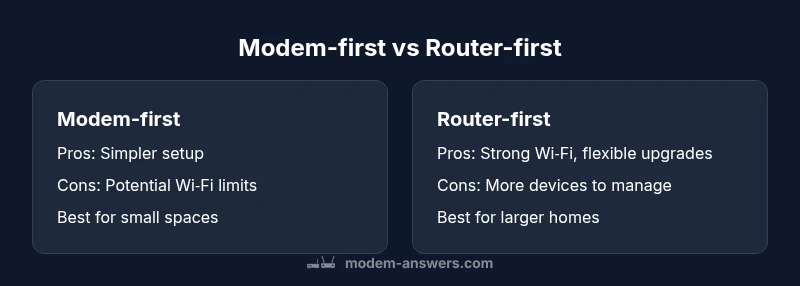
Modem-first is particularly appealing when you live in a small apartment or a single‑floor condo where space is tight and the number of wireless clients is modest. A gateway or a basic modem-router combo can reduce clutter and simplify setup, letting you get online without juggling multiple devices. If your ISP provides a reliable gateway with strong Wi‑Fi performance and you don’t need frequent network customization, a modem-first path can deliver a clean, straightforward experience. This approach can also be attractive for renters who prefer minimal changes to their setup and for households that don’t want to manage advanced routing features. The downside is that the built‑in router may not deliver top‑tier coverage in larger homes or homes with thick walls. In these cases, you might end up upgrading the router later anyway.
When a router-first approach shines
Router-first is the natural choice for larger homes, multi‑story layouts, or households with many devices and demanding use cases. A high‑quality standalone router (or a mesh system) provides superior Wi‑Fi coverage, better signal uniformity, and enhanced features such as QoS, device prioritization, and guest networks. You’ll often see better performance when you use a capable router with a modest modem, especially if you prefer customizing your network or setting up advanced security. The router-first path scales well as your needs change—adding access points, upgrading to new Wi‑Fi standards, or configuring parental controls for a busy household. The trade‑off is greater setup complexity and a higher upfront cost due to two devices, cables, and potential bridging considerations with certain ISPs.
Space, ISP constraints, and speed alignment
Your living space and ISP constraints should drive the decision. In dense apartments with a strong ISP gateway, modem-first may suffice. In larger homes or properties with many walls, a standalone router (or mesh system) often yields better coverage and stability. Speed alignment matters: if your plan sits at a distance from the max modem supported by your ISP, you’ll likely gain more by investing in a solid router, which can maximize wireless performance within your home. If you’re unsure, start with a router-first approach for two to three weeks to judge coverage and reliability. If the Wi‑Fi holds up and your ISP gateway meets your needs, you may keep it; if not, you can retrofit.
Bridging, NAT, and network architecture explained
Two common network concepts affect the modem vs. router decision: NAT (network address translation) and bridging. In a typical home network, the router handles NAT, assigning internal IP addresses to devices. If you use your own router with a supplied modem, you might need to enable bridge mode on the modem to prevent double NAT, which can degrade performance. Bridge mode disables the modem’s routing features so the connected router becomes the primary device for routing and NAT. If bridging isn’t available or fails, you’ll run into double NAT issues, manifested as degraded gaming performance or VPN instability. When you combine a modem and router in one gateway device, bridging concerns disappear, but you lose some granular control. The router-first approach often makes it easier to implement DMZ, port forwarding, and other advanced settings.
A practical decision flow for most households
- Assess your space and Wi‑Fi needs: Do you have dead zones or a large square footage to cover? 2) Check ISP compatibility: Does your ISP require a gateway or support third‑party routers without bridging? 3) Consider your upgrade path: Will you want mesh or additional access points later? 4) Prioritize control vs. simplicity: Do you value advanced settings or a plug‑and‑play setup? 5) Decide on a test window: Try a router-first setup for a few weeks; if coverage is inadequate, switch to modem-first or add mesh nodes. This flow guides you to the most sensible choice for modem or router first, given your unique constraints.
Common pitfalls and how to avoid them
- Overlooking coverage gaps: Large homes or thick walls can render a single router inadequate; plan for mesh or repeater solutions. - Underestimating bridging requirements: If you buy a third‑party router, verify bridge compatibility with your ISP modem. - Ignoring device density: Busier households with many devices require routers with robust CPU power and memory. - Skipping future‑proofing: Choose devices with support for newer Wi‑Fi standards and easy firmware updates. - Rushing the decision: Allow yourself a trial period; you can still switch strategies if your initial choice doesn’t meet your expectations.
Real-world setups: examples you can adapt
Example A: A one‑bedroom apartment uses a gateway device provided by the ISP. The setup is straightforward: connect the gateway, enable basic Wi‑Fi, and start streaming. If you later encounter dead zones, consider a small mesh system or a dedicated access point to expand coverage. Example B: A two‑story family home with multiple devices benefits from a two‑device approach: a reliable modem (or gateway with strong modem functionality) paired with a high‑performance router. Place the router centrally, and add one or two access points if needed to maintain strong coverage on every floor. In both cases, assess whether bridging is needed and ensure network security basics are configured (strong password, guest network, firmware updates).
The checklist: actionable plan before you buy
- Map your space: note square footage, walls, and potential interference sources. - List devices: number of phones, laptops, streaming devices, and consoles. - Define your priorities: coverage, speed, security, or ease of setup. - Check ISP constraints: bridge mode availability and compatibility with third‑party gear. - Set a budget and choose devices that match your needs and upgrade paths. - Decide on a trial period to test the chosen approach before finalizing.
AUTHORITY SOURCES
This article references established guidance from governmental and reputable organizations to help readers make informed choices without relying on marketing claims. The following sources offer foundational information about home networking, device compatibility, and security best practices:
- FCC: Understanding home networks and device compatibility: https://www.fcc.gov/
- NIST: Networking and security guidelines for small networks: https://www.nist.gov/
- CNET: Modem and router buying guides and reviews: https://www.cnet.com/topics/modems/
Comparison
| Feature | Modem-first approach | Router-first approach |
|---|---|---|
| Setup Complexity | Low to moderate if using a gateway; fewer devices | Moderate to high due to two devices and potential bridging |
| Wireless Coverage | Often adequate for small spaces with built-in Wi‑Fi | Typically superior through standalone router or mesh |
| Future-proofing | Depends on gateway capabilities; limited expansion | High, with flexible upgrades and better customizations |
| ISP Compatibility & Bridging | Simplified when gateway handles bridging; potential double NAT risk otherwise | Requires bridge-mode awareness; easier to tailor NAT/Firewall rules |
| Cost to Start | Moderate if using a gateway; lower device count | Higher upfront due to two devices; ongoing upgrade options |
| Control & Customization | Limited by gateway features | Extensive with advanced router settings |
| Troubleshooting Ease | Simpler with a single device | More complex but more diagnostic options |
| Space & Wiring | Compact, minimal cables | More space needed for two devices |
Positives
- Modem-first reduces device count and simplifies initial setup
- Modem-first can be cost-effective with a gateway or integrated device
- Router-first enables stronger Wi‑Fi coverage across the home
- Router-first offers flexible upgrades and better customization over time
What's Bad
- Modem-first may limit Wi‑Fi performance if the built‑in router is weak
- Two devices increase potential points of failure and cable clutter
- Bridging and ISP compatibility can complicate setups with third‑party gear
- Router-first can incur higher upfront costs and more complex initial setup
Router-first generally offers better Wi‑Fi coverage and futureproofing, especially in larger homes.
Choose router-first if you need scalable, reliable wireless across multiple rooms. If you value simplicity and space, modem-first is often sufficient, but be prepared to upgrade later if Wi‑Fi performance becomes a bottleneck.
FAQ
Should I buy a separate modem and router or a gateway?
If you live in a small space and want simplicity, a gateway (modem-router combo) can be ideal. For larger homes or more control over Wi‑Fi, a separate router paired with a modem provides better coverage and customization. Your choice depends on space, usage, and whether you anticipate future upgrades.
For small spaces, a gateway is often best. For bigger homes or more control, a separate router is usually the better path.
Is bridging necessary if I use my own router?
Bridging is sometimes required to avoid double NAT when combining a third‑party router with an ISP modem. If bridging isn’t available or fails, you may experience issues with certain apps. Always check your ISP’s guidance and test a bridged setup before committing.
Bridging helps prevent double NAT. If in doubt, test or consult your ISP's guidance.
Do ISPs restrict using third-party gear?
Most ISPs permit use of third‑party routers with a compatible modem, but some policies require bridging or use of the provided gateway. It’s best to confirm with your provider and ensure your planned setup won’t breach service terms.
ISPs vary. Check with your provider before buying advanced gear.
What about mesh Wi‑Fi; does it affect the decision?
Mesh systems are commonly used with router-first setups to extend coverage. If you anticipate expansion, a router-first approach pairs well with mesh. If space is compact, a capable gateway with strong built‑in Wi‑Fi may suffice.
Mesh works best with a router-first path for wide coverage.
How can I tell if my current modem is compatible?
Check your ISP’s approved device list and verify that the modem supports your plan and speeds. If you plan to replace the router later, ensure the modem’s bridge options or compatibility with third‑party gear.
Look up your ISP’s approved devices and test for bridge compatibility.
What is NAT, and why does it matter?
NAT translates private IP addresses to a public one. Double NAT, which can occur when using two routing devices, may cause issues with gaming or VPNs. Understanding NAT helps you decide between bridging or using a single router with your modem.
NAT handles local addresses; avoid double NAT for smoother gaming and VPN use.
Key Takeaways
- Assess space and Wi‑Fi needs before buying.
- Check ISP compatibility and bridging requirements early.
- Router-first benefits larger homes and future upgrades.
- Modem-first works well for small spaces and simple setups.
- Plan for growth with upgrade-friendly devices.