Modem-Like Devices: A Practical Comparison for Home Networks
Explore a practical side-by-side comparison of dedicated modems vs modem-like gateways. Learn how bridge mode, built-in Wi‑Fi, and provider compatibility impact home network reliability and future-proofing.


A device labeled as 'modem like' blends modem functionality with routing or gateway features, aiming for simplicity in home networks. However, the term hides important trade-offs: dedicated modems usually offer clearer ISP compatibility and upgrade paths, while modem-like devices can reduce clutter but may limit future speed upgrades. This comparison highlights when each approach makes the most sense for a typical household.
What the term 'modem like' really means in modern homes
In the context of home networks, a device described as "modem like" usually combines one or more of these roles: a modem, a router, and sometimes a gateway or access point. The idea is to simplify cabling and provisioning by providing multiple functions in a single chassis. For homeowners, this can reduce clutter and simplify setup, but it also introduces ambiguity: is the device truly a modem, or is it acting as a router behind a separate modem? The Modem Answers team has found that the distinction often comes down to how the device handles ISP authentication, bridging, and NAT. If a device cannot bridge to a true modem or if it requires its own ISP-specific configuration, it may be better described as a gateway with modem-like behavior rather than a pure modem substitute. When evaluating options, ask: Does the device expose bridge mode or pass-through behavior? Can you disable NAT when desired? These questions help determine whether the device will behave as a compatible modem or simply as an enhanced router.
Why the distinction matters
- True modems connect to the ISP network with a defined interface (DOCSIS, DSL, or fiber) and expose a predictable data path. This clarity often yields more predictable performance, easier troubleshooting, and longer compatibility across firmware updates.
- Modem-like devices may include routing intelligence, firewall features, and sometimes Wi‑Fi in one box. The convenience is palpable, especially in small apartments or houses with limited space, but the pairing of a router inside the same device can complicate future upgrades if the router component becomes outdated.
- Bridging and pass-through behavior are critical. If you need your own high-performance router behind a dedicated modem, ensure the modem-like device can operate in bridge mode with minimal overhead and without double NAT issues.
In short, the term signals a blended role; the practical impact depends on features, firmware, and how you intend to manage the network over time.
Common terms you’ll see with modem-like devices
- Bridge mode: When enabled, the device passes the public IP to your own router, effectively acting like a traditional modem.
- PPPoE authentication: Some ISPs require this, and not all modem-like devices support seamless PPPoE pass-through.
- NAT and firewall: Built-in NAT can simplify local networks but may create bottlenecks if your router’s performance is weaker than a dedicated model.
Understanding these terms helps you map device capabilities to your home network goals.
How to approach the decision for a typical household
If you value a clean setup and space savings, a modem-like device may be the right fit, provided it supports bridge mode and strong security features. If you anticipate needing higher-throughput plans or frequent upgrades, a dedicated modem paired with a separate, capable router generally offers clearer upgrade paths and more consistent performance over time. The decision hinges on your ISP requirements, desired network topology, and future-proofing needs.
Comparison
| Feature | Dedicated Modem | Modem-Like Gateway |
|---|---|---|
| Bridge mode support | Yes (where supported by device/ISP) | Limited to device capabilities; may require workaround |
| Integrated Wi-Fi | No (requires separate router) | Yes (built-in Wi‑Fi) |
| Ease of setup | Separate modem + router setup | Often a single device; simpler for basic setups |
| Provider compatibility | Broad compatibility across ISPs with standard firmware | Depends on firmware and ISP support; some features may vary |
| Performance potential | High throughput when paired with a strong router | Performance depends on integrated router hardware |
| Upgrade paths | Independent upgrades for modem and router | Upgrades require replacing the whole unit or firmware updates |
| Cost range | $50-$150 | $120-$300 |
| Energy usage | Typically lower with fewer components | Higher due to integrated router functions |
Positives
- Consolidates devices to save space and simplify wiring
- Often reduces cable clutter and upfront setup time
- Can include built-in Wi‑Fi and security features for convenience
- Potential cost savings by avoiding rental fees
What's Bad
- Limited upgrade paths for performance; may require replacing the entire unit
- Firmware and feature updates can lag behind dedicated devices
- All-in-one devices may underperform a high-end separate router
- Reliance on a single box can be a single point of failure
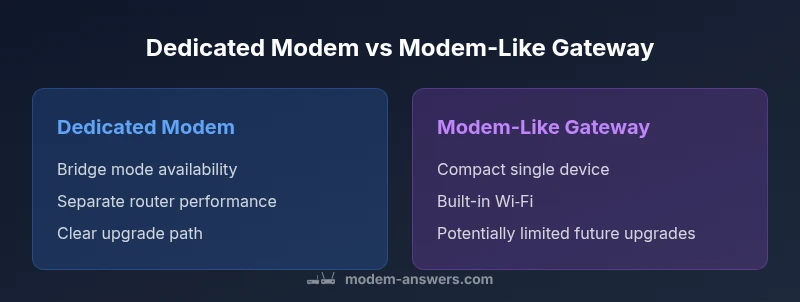
Dedicated modem + router is best for performance and upgradeability; modem-like gateways are best for simplicity and space.
If you prioritize peak speed, reliability, and future-proofing, choose a separate modem and router. If you need a compact setup with fewer devices and simpler management, a modem-like gateway can be appropriate, provided bridge mode and firmware support meet your needs.
FAQ
What does 'modem like' mean in home networking, and why does it matter?
Modem-like devices blend modem functionality with routing or gateway features. This matters because it affects how your network handles ISP authentication, bridging, NAT, and future upgrades. The right choice balances simplicity with the ability to grow as speeds improve.
Modem-like means a device that combines several networking roles in one box. It can simplify setup, but you should confirm bridge mode and upgrade options to avoid future limits.
Is a modem-like gateway always better than a dedicated modem?
Not always. Modem-like gateways are convenient, but dedicated modems paired with a robust router often yield better performance and upgrade paths, especially for higher speeds or complex networks. Your choice should reflect current needs plus future plans.
No. If you want the best performance and future flexibility, a dedicated modem with a separate router is usually better.
Will my ISP support a modem-like gateway in bridge mode?
Bridge mode support varies by device and ISP. Check the device firmware notes and your ISP requirements to ensure you can pass the public IP to your own router without double NAT.
Bridge mode depends on the device and your ISP. Verify this before buying to avoid networking headaches.
How should I decide whether to buy or rent a modem device?
Consider long-term costs, upgrade prospects, and the need for control over firmware. Buying a modem or modem-like device is often cost-effective over time, but a rental may be convenient if you want minimal maintenance.
Think about total cost and control: buying usually pays off, renting is easier but can cost more over time.
What security considerations come with modem-like devices?
Ensure the device receives timely firmware updates, supports robust firewall rules, and enables secure remote management. An all-in-one device may expose more attack surfaces if poorly configured.
Security hinges on updates and configuration. Keep firmware current and disable features you don’t use.
How can I optimize a modem-like setup for home wifi performance?
Place the device centrally, update firmware, enable modern Wi‑Fi standards, and consider a separate high-performance router if needed. If the device has limited wireless capabilities, a dedicated router can boost coverage.
Position it well, update firmware, and use strong Wi‑Fi settings. If coverage is weak, add a separate router or mesh system.
What are common pitfalls when using modem-like devices?
Double NAT, limited bridge mode, inconsistent firmware updates, and over-reliance on a single device for both internet and Wi‑Fi can degrade performance. Plan for a fallback router or explicit bridge configuration if issues arise.
Watch for double NAT and bridge mode problems. Have a plan to separate your router if needed.
Key Takeaways
- Assess ISP requirements before purchasing any modem-like device
- Prioritize bridge mode support if you want true modem behavior
- Weigh built-in Wi‑Fi versus separate router hardware
- Plan for upgradeability to keep pace with faster speeds
- Consider total cost of ownership and energy use over 3–5 years