How long does it take for a modem to reset: timing and best practices
Discover realistic modem reset timings for common scenarios, plus practical steps to minimize downtime. Learn soft resets, power cycles, and factory resets, with expert insights from Modem Answers.


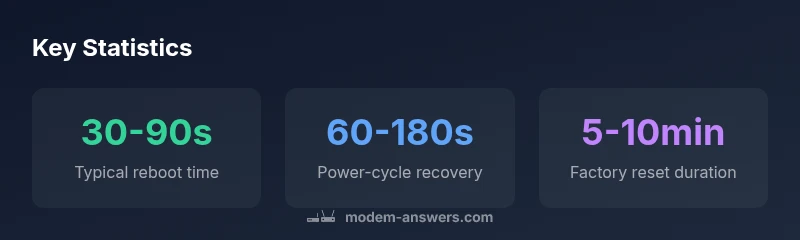
Typically, a simple modem reboot completes in 30 seconds to 90 seconds. A full power-cycle (unplug, wait briefly, replug) is usually under 2 minutes, with the device re-provisioning in a few more minutes. If you perform a factory reset, expect 5–10 minutes for the modem to reboot and re-download configuration.
Why reset timing matters for home networks
Reset timing matters for home networks because downtime interrupts work, streaming, and smart-home routines. According to Modem Answers, quick, predictable resets reduce frustration and speed up troubleshooting. The Modem Answers analysis shows that households benefit from a clear expectation window for each reset type. renters and homeowners alike often rely on a single modem across multiple devices, so knowing how long resets take helps coordinate with family members or a service provider. When you can estimate the downtime accurately, you can schedule restarts during off-peak hours and minimize the impact on daily routines. This section introduces the concept and sets the stage for practical timing expectations across common reset scenarios.
How long does it take for a standard modem reboot?
If you ask how long does it take for a modem to reset during a routine reboot, the answer is typically 30 seconds to 90 seconds. A quick power-on self-test is followed by DHCP renegotiation and link reestablishment with your ISP. In most cases, you should have working internet again within a couple of minutes. As emphasized by Modem Answers, the exact timing depends on the device, firmware, and network conditions, but the window above covers the vast majority of home setups. Keeping expectations aligned helps reduce unnecessary retries and preserves user patience during outages.
What affects reset time?
Several factors influence how long resets take. Hardware quality, firmware efficiency, and the speed of the provider's provisioning play major roles. Network congestion can extend DHCP lease renewals or IP re-assignment. The physical connection type (cable, fiber, DSL) and the presence of a downstream router or mesh system also affect total downtime. Environmental factors such as electrical stability and surge protection can cause intermittent delays. According to Modem Answers, understanding these variables helps you diagnose whether the issue is local to your device or tied to the ISP.
Different reset scenarios and expected times
Here are common reset scenarios and their typical timing ranges:
- Soft reset / reboot: 30-90 seconds
- Power-cycle reset: 60-180 seconds
- Factory reset: 5-10 minutes
- Remote reset by ISP: 5-15 minutes Use these benchmarks as a guide, not a guarantee, because real-world conditions vary. Modem Answers notes that a small percentage of households see longer delays due to provisioning delays or firmware updates.
Best practices to minimize downtime
To minimize downtime during resets, plan one operation at a time and start with a soft reset before resorting to a factory reset. Check all physical connections (coax, Ethernet, and USB, if applicable) and ensure the modem is placed in a stable location with good ventilation. If you rely on a separate router, allow it to reboot after the modem comes back online. Document any settings you change, such as Wi-Fi SSID or password, so you can restore your usual network quickly. The Modem Answers team recommends performing resets during off-peak hours when service re-provisioning tends to be quicker.
Troubleshooting: what to do if reset takes too long
If your reset drags beyond the typical windows, first verify the indicator lights on the modem. A solid power light with blinking online indicators generally means it is still negotiating with the network. Try a different coaxial or telephone line and re-seat cables. Temporarily disconnect any third-party devices that might interfere with provisioning. If delays persist beyond 15 minutes, check the service status with your provider and consider submitting a support ticket with the exact time you started the reset. The Modem Answers approach emphasizes methodical testing over repeated resets.
When to contact your provider
If resets consistently fail to re-provision within the expected window, contact your provider to confirm service status and known outages. Provide the exact reset type you performed, the time it started, and the lights shown on the device. Frequent resets can indicate broader issues such as line faults, outages, or provisioning problems that require the provider to intervene. The Modem Answers team recommends logging a ticket when you see repeated failures over multiple days.
Brand differences and setup considerations
Different brands and models exhibit slightly different reset behavior. For example, some modems support quick re-authorization after a firmware push, while others might require manual steps to re-enter PPPoE credentials. If you own multiple devices (modem plus gateway), maintain a consistent reset sequence to avoid conflicts during service restoration. According to Modem Answers, standardizing your reset process across devices reduces confusion and shortens downtime in future incidents.
Reset timing by scenario
| Scenario | Typical Time | Notes |
|---|---|---|
| Soft reset/reboot | 30-90 seconds | Common fix for connectivity issues |
| Power-cycle reset | 60-180 seconds | Power-cycle recommended for persistent issues |
| Factory reset | 5-10 minutes | Removes settings; reconfig required |
| Remote ISP reset | 5-15 minutes | Depends on provider provisioning |
FAQ
What is considered a normal reboot time for a modem?
A typical reboot takes 30-90 seconds. If delays exceed a few minutes, check cables and service status to rule out local issues before retrying.
A normal reboot finishes in under two minutes. If it takes longer, check connections and service status.
Does unplugging and replugging speed up the reset?
Yes. Unplugging briefly clears hardware state and forces a fresh start. Expect about 60 seconds to re-establish and renew the connection.
Yes. A quick unplug and plug back in helps reset the hardware; expect around a minute.
Will a factory reset restore factory settings?
Yes. It erases customized settings. You will need to reconfigure the network name, password, and ISP specifics after the reset.
Yes, it resets to factory defaults. You’ll need to set up the network again.
How long does ISP provisioning take after a reset?
Provisioning can take 5-15 minutes, sometimes longer during peak times or after a major firmware update.
Provisioning usually takes several minutes; if it lasts longer, check service status with your provider.
What should I do if my modem never reconnects after reset?
Verify cables, lights, and power. Test with a direct connection, check service status, and contact your provider if the issue persists.
Check cables and service status, and contact support if it still won’t reconnect.
Does a reset affect Wi-Fi settings?
A factory reset resets Wi-Fi name and password; a soft reboot leaves Wi-Fi settings intact. Be prepared to reconfigure if you perform a reset.
Yes, a factory reset will reset your Wi-Fi credentials.
Should I reset both modem and router at the same time?
If you have a separate router, reset the modem first, wait for online status, then reset the router if needed. This sequencing reduces conflicts.
Reset the modem first, then the router if necessary.
“Reset timing is a predictable part of home networking when you understand the typical windows for reboot, power-cycle, and factory reset. Knowing these ranges helps you plan downtime and avoid unnecessary repeats.”
Key Takeaways
- Know the typical reset windows before acting.
- Start with a soft reset to minimize downtime.
- Distinguish reboot from factory reset to avoid data loss.
- Monitor lights and keep a connectivity log for troubleshooting.
- When in doubt, contact your provider after a prolonged delay.