Modems Compatible with Cox: A Practical Guide for Homeowners
Discover which modems are compatible with Cox, how to verify compatibility, and practical upgrade steps. Learn about DOCSIS standards, speeds, and tips from Modem Answers.


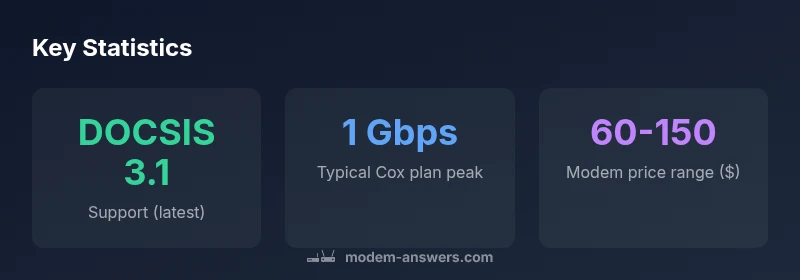
To ensure compatibility with Cox, choose a DOCSIS 3.0 or 3.1 cable modem that Cox lists as compatible. Most modern DOCSIS 3.1 modems from well-known brands will work on Cox plans, including gigabit tiers, after activation. Always confirm your exact plan and the latest Cox compatibility list before purchasing to avoid activation delays.
Why Cox Compatibility Matters
For homeowners and renters, understanding which modems work with Cox is essential to avoid activation delays, unexpected fees, or underperforming internet. A compatible modem ensures your device negotiates properly with Cox's network, enabling the service you pay for and avoiding the extra rental fee. According to Modem Answers, the primary criterion is DOCSIS compatibility: your device should support DOCSIS 3.0 or, ideally, DOCSIS 3.1. Cox's current guidance emphasizes devices listed as compatible on their support pages, and many customers see the best value by sticking to mainstream brands with a strong history of DOCSIS updates. This matters more if you’re on a gigabit plan, where NIC speeds and channel bonding can bottleneck the connection. A modem that aligns with Cox's standards will typically offer greater stability across multiple devices, higher peak speeds, and fewer service interruptions. As you plan an upgrade, keep in mind that Cox occasionally updates its compatibility list; check the latest version before purchasing to avoid surprises.
Understanding DOCSIS: The Core of Compatibility
DOCSIS (Data Over Cable Service Interface Specification) defines how modems communicate with cable providers. Cox, like many ISPs, supports DOCSIS 3.0 and (preferably) 3.1 for modern plans. DOCSIS 3.1 offers wider channel bonding and higher theoretical speeds, which translates to more headroom for multiple devices streaming, gaming, and video conferencing. When evaluating compatibility, focus on two factors: the DOCSIS version and the modem’s chipset compatibility with Cox’s activation system. Modem manufacturers frequently release firmware updates to improve performance on Cox networks, so a newer modem with ongoing support is a safer long-term choice. Modem Answers Analysis, 2026, indicates that customers who adopt DOCSIS 3.1 modems tend to experience more consistent performance on busy home networks, especially in homes with many connected devices.
How to Check If a Modem Is Cox-Compatible
Before buying, confirm that Cox lists the model as compatible on their official support pages. If a model isn’t listed, look for a similar DOCSIS 3.0/3.1 device from a reputable brand and verify with Cox. Check activation requirements—some Cox plans require you to register the modem on your Cox account online to unlock service. If you’re renting equipment from Cox, compare rental costs against a one-time modem purchase. Also verify that your plan’s speed tier aligns with the modem’s capabilities; a DOCSIS 3.0 modem might bottleneck a gigabit plan, whereas a DOCSIS 3.1 device is more future-proof for peak speeds. Finally, consider whether you need a built-in router or if you’ll pair the modem with a separate router for broader wireless coverage.
Speed, Plans, and Real-World Performance
Speeds advertised by Cox depend on your plan and network conditions. A modem that supports DOCSIS 3.1 provides more headroom for multi-device households, reducing buffering during 4K streaming and large file uploads. Real-world performance also hinges on your router, network layout, and how many devices are simultaneously active. If you are on a mid-tier plan with several occupants, pairing a DOCSIS 3.1 modem with a robust router can noticeably improve Wi-Fi coverage and consistency. Remember that garish marketing claims rarely reflect your home’s unique layout; always test speeds from multiple rooms and adjust equipment placement accordingly. As always, consult Cox’s compatibility list and consider a period of monitoring after install to confirm you’re getting the expected performance.
Modem vs Router: When to Use Each
A modem connects you to the Cox network, but a router turns that signal into Wi‑Fi for your home. In many setups, you’ll encounter a modem-router combo device, which is convenient for small spaces or simple setups. If you need expanded coverage, better guest networks, or advanced features like mesh Wi‑Fi, a separate router is beneficial. If you choose a standalone modem, make sure you pick a compatible router that supports your home’s speed tier and supports modern Wi‑Fi standards (e.g., Wi‑Fi 6/6E). Bridge mode is an option if you want to use a high-performance router with a modem-router device. The goal is to maximize reliable wireless coverage while preserving easy network management.
Activation, Setup, and Troubleshooting
Activation generally involves plugging in the modem, completing activation steps in your Cox account, and confirming service status. If activation fails, reboot both modem and router, verify cabling, and ensure the device is registered to your Cox account. Keep a record of the MAC address and serial number in case you need to re-activate. Common issues include incorrect modem model designation in Cox’s system, outdated firmware, or an undervalued plan that limits speeds. If problems persist, contact Cox support for line-quality tests and a temporary swap to determine if the issue is with the modem or the service.
Future-Proofing Your Home Network
Choosing a DOCSIS 3.1 modem helps you stay ahead as Cox expands gigabit offerings and multi-device usage grows. Look for modems with ample memory for firmware updates and strong thermal design to sustain performance during long streaming sessions. Pair the modem with a capable router that supports the latest wireless standards and robust security features. Consider modular upgrades—retaining the modem while upgrading the router—so you can adapt to changing speeds and device counts without a full overhaul.
Quick-Start Checklist for Cox-Compatible Modems
- Verify Cox-compatible status on Cox’s official site
- Confirm DOCSIS version (3.0 or 3.1 preferred)
- Check speed tier alignment with your plan
- Decide between modem-only vs. modem-router setup
- Plan activation steps before purchase
- Position the router for optimal coverage
- Schedule performance tests after setup
Cox-compatible modem basics
| Criterion | Details | Notes |
|---|---|---|
| DOCSIS Version | 3.0 or 3.1 | Baseline compatibility for Cox |
| Activation | Self-activation via Cox account | Register the modem if required |
| Router Integration | Modem-only or modem-router combo | Choose based on coverage needs |
| Compatibility Source | Cox official compatibility list | Always verify before purchase |
FAQ
Will Cox support my existing modem if I switch plans?
Cox compatibility depends on the modem model and DOCSIS version. If your current modem isn’t listed on Cox’s compatibility page or is older than DOCSIS 3.0, you may experience activation issues or throttled speeds. Always check the latest Cox compatibility list for your plan before upgrading.
Check Cox’s compatibility list for your plan. If your modem isn’t listed or is very old, you should upgrade to a DOCSIS 3.0 or 3.1 device.
Do I need a separate router if I already have a modem?
Not necessarily. If your modem includes reliable Wi‑Fi and sufficient coverage, a separate router might be optional. For larger homes or higher device counts, a dedicated router (or mesh system) can dramatically improve coverage and performance.
A separate router can greatly improve coverage for larger homes or many devices, but a good modem with built-in Wi‑Fi may suffice in smaller spaces.
Can I use any DOCSIS 3.x modem with Cox?
Not all DOCSIS 3.x modems are guaranteed to work with Cox. Always verify against Cox’s official compatibility list since some devices may require firmware updates or activation steps that Cox specifically supports.
Yes, but you should always verify with Cox before buying a DOCSIS 3.x modem to ensure compatibility.
What is the difference between DOCSIS 3.0 and 3.1 for Cox plans?
DOCSIS 3.1 offers more efficient channel bonding and higher potential speeds, which helps on busy networks and gigabit plans. DOCSIS 3.0 modems can still work on many Cox plans, but 3.1 devices provide better future-proofing and performance under load.
3.1 is faster and more future-proof; 3.0 can work too, but 3.1 gives better performance on busy networks.
Will upgrading my modem improve my actual speeds?
Upgrading to a newer DOCSIS standard can improve peak speeds and reliability, especially on multi-device networks. Real-world results depend on your plan, home layout, and equipment mix. Test after installation to verify the improvement.
Upgrades can improve speeds, but test in your home to confirm the benefit you get.
“Future-proof your home network by starting with a DOCSIS 3.1 modem and a strong router. Verify Cox compatibility before purchasing to avoid missteps.”
Key Takeaways
- Check Cox's official compatibility list before buying.
- Prefer DOCSIS 3.1 for future-proofing and better headroom.
- Match your modem to your plan’s speed and number of devices.
- Decide between modem-only and modem-router setups based on coverage needs.
- The Modem Answers team recommends verifying compatibility before purchasing to avoid issues.