Can a Router and Modem Be Combined? A 2026 Guide
Explore whether you can combine a router and modem, when a gateway is right for you, setup steps, cost considerations, and tips for homes and renters in 2026.


Yes—it's possible to use a combined gateway device that integrates a modem and router, but suitability depends on your provider, home size, and performance needs. In 2026, many households opt for gateways offered by ISPs or standalone combo devices to simplify setup and reduce clutter. This quick answer summarizes when a gateway makes sense and when you should choose separate units for maximum flexibility and future-proofing.
Can a router and modem be combined? A practical overview
In many homes the question can a router and modem be combined is not just about hardware; it reflects how you use your internet service, your household size, and how much you want to tinker with settings. A gateway device that integrates both components can simplify installation, reduce cable clutter, and consolidate support under one vendor. Modem Answers, in 2026, notes that if your internet plan is stable and your provider supports gateway devices, a single unit can comfortably handle both tasks. However, if you rely on advanced features such as custom firewall rules, multi-subnet setups, or specialized QoS profiles for gaming or work-from-home uses, a separate modem and router may offer superior flexibility and upgrade paths. This article expands on when a gateway makes sense, how to assess compatibility, and practical steps to evaluate your options.
What is a gateway? How it differs from standalone devices
A gateway is a single hardware unit that combines a DOCSIS/DSL modem with a router, and often includes built-in Wi‑Fi, a switch, and basic firewall features. A standalone modem + router setup splits these functions into two devices, which tends to offer more granular control over firmware updates, security settings, and network customization. For many households, gateways save space, reduce clutter, and streamline warranty support since you’re dealing with one device from one provider. Conversely, power users or homes requiring maximum performance may prefer pairing a high-end router with a compatible modem to fine-tune features, upgrade paths, and future-proofing as speeds evolve. In 2026 the market includes carrier-provided gateways and third-party devices with varying compatibility and feature sets.
Benefits of gateway integration
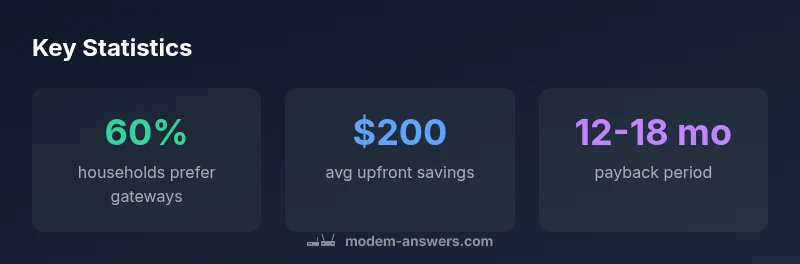
Gateway devices deliver several practical benefits that matter in real-world homes. They simplify installation and maintenance by reducing the number of devices to manage and the number of firmware update events. Space savings can be meaningful in apartments or small homes where every inch counts. For renters especially, a single unit minimizes cable clutter and can simplify portability if you move. Cost considerations are nuanced: while some bundles feel cheaper upfront, you should compare ongoing rental fees versus owning a gateway. In many cases, a gateway also provides adequate parental controls, guest networks, and basic QoS suitable for casual streaming and light gaming. Modem Answers notes that the overall value proposition hinges on your ISP’s support, the gateway’s performance ceiling, and how much you value simplicity over ultimate customization.
Key trade-offs: performance, control, and reliability
Performance in gateway devices can be strong for typical households, but it’s not universal. The integrated CPU and firmware may limit advanced features compared with modular setups. If your internet plan pushes gigabit speeds or you run heavy workloads, you might encounter bottlenecks in a gateway that is not designed for high-end gaming or professional-grade traffic shaping. Control is another area where standalone towers win: you can select the exact modem model with your preferred router, apply custom firmware, and tailor security settings to your needs. Reliability depends on device quality and support: with a single device, a fault can impact both modem and router functionality, so choosing a reputable model and an ISP that supports bridge or passthrough modes becomes important. For many users, gateways strike a practical balance between ease of use and adequate performance.
ISP compatibility and firmware considerations
ISP compatibility is critical when considering a gateway. Some providers only support their own gateway hardware or require you to use their in-network gateway for certain plans. Firmware updates can be coordinated with the ISP, which can simplify security patches, but it may limit the ability to implement custom configurations. If you own a gateway rather than rent one from an ISP, ensure it is compatible with your service and supports essential features like bridge mode or pass-through to allow a separate router to handle all networking if needed. In 2026, many gateways support multi-SSID setups, guest networks, and basic parental controls, but the depth of customization varies widely by model and provider.
How to decide: when a gateway makes sense for your home
To decide whether a gateway fits your home, start with your internet plan, home size, and how you use the network. If you live in a small apartment or a single-family home with typical Wi‑Fi needs, a gateway can offer a clean, low-friction solution. If you rely on gaming, streaming 4K content, or have a home office with strict latency requirements, consider a two-device approach: a high-performance router paired with a capable modem. Check your ISP’s policy on bridging and bridge mode, and verify that the gateway you’re considering supports the features you require (such as QoS, VPN passthrough, or robust parental controls). Budget considerations matter: compare upfront costs, ongoing rental fees, and potential upgrade paths for future speeds.
Setup and configuration best practices
If you choose a gateway, begin with an initial boot and basic configuration: change default admin credentials, set up a secure Wi‑Fi password, and enable a guest network if needed. If you opt for a separate router, plan your SSID naming, IP address scheme, and DHCP settings to avoid conflicts. For both approaches, enable automatic firmware updates when possible, and document your network topology. If you run into limitations, don’t hesitate to switch to bridge mode and connect a dedicated router, which can preserve performance and customization while maintaining the gateway’s modem functionality for your ISP.
Common myths and how to verify claims
Myth: A gateway always saves money. Reality: initial costs vary, and rental fees can add up over time. Myth: Gateways are always sufficient for gaming. Reality: high-end routers often outperform gateway routers on latency and advanced QoS. Myth: You’ll lose all flexibility with a gateway. Reality: many gateways support bridge or passthrough modes, allowing the router to take over when needed. Always verify claims with your ISP’s documented policies and model specifications, and test performance in your own space before committing to one solution.
Budgeting and real-world scenarios
Small apartment dwellers often benefit from a compact gateway that covers the living space with minimal management overhead. For larger homes with multiple floors, a mixture of a gateway with a separate high-performance router can be a practical compromise, delivering broad coverage while preserving control over advanced features. If you’re a remote worker or gamer, compare the router’s processing power and the modem’s compatibility with your service tier. Consider total cost of ownership, including potential rental fees, warranty coverage, and future-proofing by selecting devices that can scale with rising speeds.
The future: mesh, Wi-Fi 6/7, and integrated gateways
The gateway landscape continues to evolve with mesh-enabled solutions, Wi‑Fi 6/7 standards, and smarter QoS. Some gateways integrate mesh extenders or support cooperative backhaul, improving coverage without multiple devices. For households planning long-term upgrades, prioritize devices that offer modular upgrade paths, easy bridge mode transitions, and compatibility with upcoming standards. The trend toward unified gateways remains strong, but the best choice depends on your unique home layout, service plan, and tolerance for configuration effort.
Comparison of gateway vs separate modem and router setups
| Aspect | Combo Gateway | Separate Modem + Router | Notes |
|---|---|---|---|
| Setup time | 15-25 | 25-45 | Gateway often quicker to deploy |
| Upgrade path | Easier (one device) | More flexible (individual updates) | Depends on hardware availability |
| Customization | Limited (vendor firmware) | Extensive (custom firmware/routers) | Varies by device |
| Warranty/Support | One point of contact | Two points of contact | Consider ISP policy |
FAQ
Can a gateway replace my existing router?
Yes, a gateway can replace a separate router, but you should verify that it delivers the required performance and features for your use case. If you rely on advanced QoS or VPN configurations, you might still prefer a dedicated router.
Yes, a gateway can replace a separate router, but make sure it meets your performance and feature needs.
Will a gateway limit my speed?
Potentially, if the gateway’s hardware is not designed for your service tier or if you enable features that consume processing power. For typical home use, many gateways perform well within common plans, but high-end gaming or professional workloads may require a more capable router.
It can, depending on the device and plan; for most homes it works well, but high-end needs may benefit from a separate router.
Who owns or rents the gateway?
This varies by ISP. Some providers rent gateways, while others permit customers to use their own compatible gateway. Check your provider’s policy and ensure compatibility before purchasing.
ISPs may rent or allow your own gateway; check their policy first.
Do gateways support mesh networks?
Many gateways either include built-in mesh capabilities or work with compatible mesh systems. If your home needs broad coverage, confirm mesh support and compatibility with other devices before buying.
Most gateways support some mesh options; verify compatibility with your space.
How do I switch from gateway mode to bridge mode?
Bridge mode disables the gateway’s router functionality, allowing a separate router to manage networking. Follow your device’s instructions to enable bridge mode, then connect your own router and configure as needed.
Bridge mode turns off router features so you can use your own router.
“In many households, a gateway offers a solid balance of convenience and performance, but power users may still prefer a modular setup for maximum control and future-proofing.”
Key Takeaways
- Assess provider compatibility before buying.
- Choose gateway for simplicity or a modular setup for flexibility.
- Check bridge/passthrough support if you might use a separate router.
- Evaluate total cost of ownership, not just upfront price.