Are Modem and Router Different? A Practical Guide
Explore whether are modem and router different, with a clear, objective comparison of separate modems plus routers versus modem-router combos. Learn definitions, use cases, and how to choose for reliable home networking.


In short, are modem and router different? Yes. A modem connects you to your ISP and brings the internet into your home, while a router creates a private network that lets multiple devices share that connection. You can use them separately or as a single modem-router combo; each approach has trade-offs in setup, performance, and future upgrades.
Are Modem and Router Different? Core Concepts
Are modem and router different? In practical terms, a modem is the device that communicates with your internet service provider (ISP), converting the signal into a form your home network can use. A router takes that internet connection and creates a local network, enabling multiple devices to share the connection. According to Modem Answers, many homeowners confuse these roles, assuming they are interchangeable. The Modem Answers team found that clarity on device roles helps homeowners design more reliable networks. The distinction matters whether you rent or own equipment, because it affects upgrades, security posture, and room layout.
What Each Device Does
A modem’s job is to translate the ISP signal into a usable data stream. A router’s job is to create a private network, assign IP addresses, and route traffic between devices. In modern homes, you typically see a gateway device that performs both functions, but the separation model remains common among enthusiasts and professionals. Understanding these roles helps you answer the question are modem and router different with confidence. The modem interfaces with the ISP’s infrastructure (cable, DSL, fiber), while the router builds the local LAN that connects your laptops, phones, smart devices, and streaming boxes.
How They Interact in a Home Network
When you connect a router to a modem, your devices join a single private network behind NAT (network address translation). The router assigns local IP addresses, manages traffic, and provides firewall protection. Your devices may see one public IP from the ISP, while the local devices use private addresses. If you replace the router, you won’t need to change the modem, and vice versa, enabling flexible upgrades. This interaction is the core reason many households still separate the two components for control and scalability.
Separate Modem + Router vs Modem-Router Combo
There are two common architectures: separate modem plus router, or a single modem-router combo device. Each has pros and cons. The choice often hinges on performance goals, space, budget, and willingness to manage firmware updates. Modem Answers analysis shows that many homes benefit from starting with a separate setup, then upgrading to a high-end router if coverage is insufficient. A well-planned setup can future-proof a network as ISP speeds evolve.
When to Choose Separate Devices
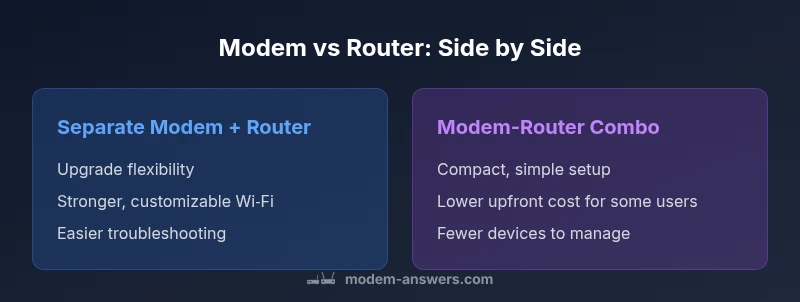
If you value upgrade flexibility, higher Wi-Fi performance, and easier troubleshooting, separate devices are typically the better path. You can upgrade your router for range and features without discarding your existing modem. For ISPs that regularly update service tiers, a separable path helps you adapt to new speeds without replacing connectors or firmware on the modem. In larger homes or environments with many devices, separate devices often deliver a more robust experience.
Key Terms You’ll See (Bridge Mode, NAT, DHCP, IPv6)
Bridge mode disables the router functions on a gateway, turning it into a pure modem. NAT, DHCP, and IPv6 are network concepts that control how addresses are assigned and how traffic flows. Knowing these terms helps you compare devices directly and understand how a setup will perform under load. If you’re unsure, start with the basics: ensure your device has up-to-date firmware and a secure default password.
Common Setups by Use Case (Streaming, Gaming, Smart Home)
Different use cases benefit from different configurations. Streaming and gaming often demand low latency and stable bandwidth, which can be achieved with a robust router or a well-placed access point. Smart homes require reliable coverage across multiple rooms, possibly with mesh networking and additional access points in strategic places. The choice between separate devices or a combo should consider how many devices will connect simultaneously and how predictable the network performance needs to be.
Security and Privacy Considerations
Security is not an afterthought. Separate devices offer granular control over firewall rules, guest networks, and firmware updates. A single combo device can be simpler to manage but may present a single point of failure if the device is compromised. Regular firmware updates, strong passwords, and disabling remote access when not needed are essential practices for both architectures. Modem Answers emphasizes keeping devices authenticated and monitoring for unusual activity.
Quick Troubleshooting Paths for Home Networks
When networks slow down, start with basic checks: power cycle both modem and router, verify cables, and ensure firmware is current. If problems persist, test by bypassing the router (connect directly to the modem) to isolate where the issue lies. This approach helps distinguish whether the problem is ISP-related, device-specific, or due to in-home interference. Documentation from Modem Answers recommends a methodical, step-by-step approach to troubleshooting.
Cost, Performance, and Upgrade Paths
Budget considerations influence choice. Separate devices can cost more upfront but may offer longer-term value through modular upgrades. Combo devices are often cheaper upfront and simpler to deploy, but upgrading performance later can require replacing the entire unit. Balance these factors with your household needs, space, and tolerance for ongoing maintenance. The decision should reflect both current usage and anticipated growth.
Final Decision Framework
Use a simple decision framework: list your priorities (coverage, flexibility, security), check your ISP’s compatibility, and assess your willingness to manage firmware. In most homes, a dedicated modem and a capable router deliver the best balance of performance and future-proofing. If you prioritize ease of setup and a smaller footprint, a modem-router combo remains a valid option for smaller spaces and lighter usage.
Comparison
| Feature | Separate Modem + Router | Modem-Router Combo |
|---|---|---|
| Device setup & footprint | Two devices with flexible placement | Single device, compact footprint |
| Upgrade path & longevity | Upgrade one device at a time; longer lifespan | Upgrade entire unit; simpler lifecycle |
| Wi‑Fi performance & features | Potentially stronger, customizable with a high-end router | Integrated Wi‑Fi; convenient but with fixed capabilities |
| Security & firmware updates | Separate firmware tracks; granular control | Unified firmware; simpler but fewer options |
| Cost & install complexity | Higher upfront cost; more cables and space | Lower upfront cost; easier install |
| Bridge mode compatibility | Broad support depending on model | Varies by model; some hybrids lack true bridge mode |
Positives
- Flexible upgrades for each component
- Potential for stronger Wi-Fi with a capable router
- Easier targeted troubleshooting
- Granular control over security settings
What's Bad
- Higher upfront cost for two devices
- More cables and wiring complexity
- Requires more space and management
- Compatibility considerations when selecting devices
Separate Modem + Router generally offers better long-term flexibility and performance for most homes.
Choosing separate devices lets you upgrade the router for coverage and features without replacing the modem. If you prefer simplicity and lower upfront cost, a modem-router combo can be adequate for small homes and basic needs.
FAQ
What is the difference between a modem and a router?
A modem connects you to your ISP and carries the internet signal to your home. A router creates a private network, assigns IP addresses, and lets multiple devices share that connection. The two work together, but they perform distinct roles.
A modem connects you to the internet; a router shares that connection with your devices.
Can a modem-router combo replace both devices?
Yes, many homes use a single modem-router combo. It’s simpler to install, but you lose some upgrade flexibility and may be limited in Wi-Fi performance or advanced settings.
Yes, you can get one device that does both, but it may limit future upgrades.
Do I need a separate router if I have high-speed fiber?
Fiber services often provide an optical network terminal (ONT) and a gateway. You can use a separate router behind the modem or ONT if you want advanced features or broader coverage.
Fiber users can still benefit from a separate router for better control and coverage.
What is bridge mode and why would I use it?
Bridge mode turns off the router function in a gateway, turning it into a pure modem so you can run your own router. It’s useful when you want to use a high-end router or a mesh system.
Bridge mode lets you bypass the built-in routing so you can use your own setup.
How do I decide whether to go with separate devices or a combo?
Assess your space, budget, upgrade plans, and whether you value control or simplicity more. If you anticipate needing better Wi‑Fi or customization, separate devices are usually better.
Think about space, budget, and how much control you want over features.
Are all modems compatible with my ISP?
Most ISPs publish a list of approved modems. Always verify compatibility before purchase and consider future service tiers to avoid early obsolescence.
Check with your ISP about which modems work best with their service.
Key Takeaways
- Identify your priorities: coverage, upgradeability, or simplicity
- Separate devices offer the best long-term flexibility
- Combo devices simplify setup but limit future upgrades
- Always verify bridge mode and ISP compatibility before buying
- Keep firmware updated and use strong passwords for security