What Is a Modem or Router? A Practical Comparison Guide
Learn the difference between modems and routers, how they work together, and how to choose the right home-network setup. This guide covers standalone vs combo devices, setup basics, troubleshooting, and security considerations for homeowners and renters.


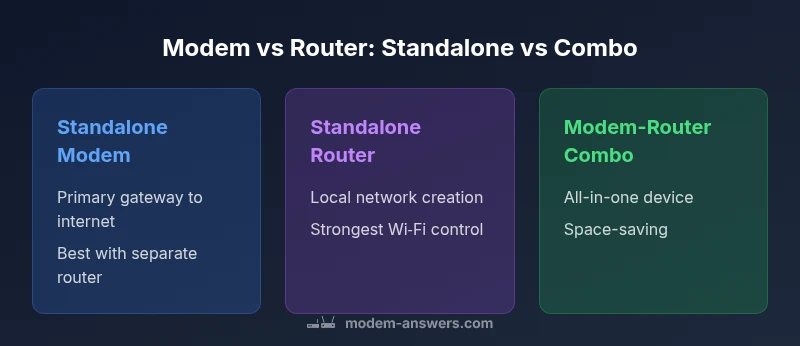
Choosing between a standalone modem and router versus a modem-router combo is a core decision for a reliable home network. In this comparison, we examine three options—Standalone Modem, Standalone Router, and Modem-Router Combo—highlighting how each approach affects performance, setup, upgrades, and future-proofing. Use this TL;DR to guide a deeper read.
What is a modem and what is a router?
A modem is the device that connects your home to the internet service provider's network. It translates the provider's signal into a digital form that your devices can interpret. A router, on the other hand, creates and manages your home network, directing data traffic between devices and the internet. In many homes, the two roles are performed by separate devices, while some products combine both functions into a single box. Understanding these roles is essential for making smart hardware choices, because the performance, upgrade path, and security posture of your network depend on which device handles which functions. According to Modem Answers, clarity about these roles helps homeowners plan for coverage, speed, and reliability. This section lays the groundwork by defining terms like DOCSIS (for cable modems), Ethernet, and Wi-Fi, and by setting expectations for what each device contributes to the home network.
What is a modem and what is a router?
A modem is the device that connects your home to the internet service provider's network. It translates the provider's signal into a digital form that your devices can interpret. A router, on the other hand, creates and manages your home network, directing data traffic between devices and the internet. In many homes, the two roles are performed by separate devices, while some products combine both functions into a single box. Understanding these roles is essential for making smart hardware choices, because the performance, upgrade path, and security posture of your network depend on which device handles which functions. The Modem Answers team notes that the separation of concerns often yields clearer diagnostics and easier upgrades over time.
What is a modem and what is a router?
For homeowners, the practical takeaway is that a modem handles the ISP connection while a router distributes that connection to devices, either via Ethernet cables or wireless Wi‑Fi. This distinction matters when you think about network upgrades, troubleshooting, or expanding coverage. If you show up at the store with the mindset that a single box must do both, you may miss opportunities to optimize throughput or address weak spots in signal. Modem and router choice should be guided by your home layout, the size of your property, and the number of devices that will rely on the network.
What is a modem and what is a router?
In summary, a modem is the gateway to the internet, and a router is the traffic cop at home. The Modem Answers team emphasizes that recognizing when to upgrade each component can save time and money in the long run. This foundational understanding enables you to design a network that scales with new devices, higher speeds, and different ISP configurations.
The Modem Answers analysis shows that many households benefit from a modular approach, where the modem stays current with the ISP, and a separate router handles Wi‑Fi and local networking. This separation often results in better signal management, easier troubleshooting, and more flexible upgrades as technology evolves.
Why this distinction matters in practice
If you have a large home or several devices streaming simultaneously, a high-quality router with robust wireless features can dramatically improve coverage. If your ISP updates speeds or changes provisioning, having a separate modem means you can swap it without touching your wireless gear. The bottom line is that modem-plus-router configurations typically offer better performance tuning and long-term value, while combo devices shine when space, cost, and simplicity are your primary concerns.
Feature Comparison
| Feature | Standalone Modem | Standalone Router | Modem-Router Combo |
|---|---|---|---|
| Primary function | Connects to ISP network; passes data to a separate router | Generates the home network, handles Wi‑Fi and local routing | Combines modem and routing in one device |
| Connectivity options | Coaxial or fiber input; Ethernet output to router | Wi‑Fi 6/6E, multiple Ethernet ports; optional MU‑MIMO | Coaxial input; built-in Wi‑Fi; Ethernet ports |
| Setup complexity | Moderate; requires provisioning of modem and router settings | Moderate; depends on ISP compatibility and features | Low to moderate; a single device to configure |
| Upgrade path | Separate upgrades for modem and router | Router upgrades while modem remains, or vice versa | One device upgrades cover both functions |
| Best for | Performance-focused homes with room for upgrades | Homes needing strong Wi‑Fi and simple setup | Small spaces or minimal wiring, prioritizing ease |
| Cost context | Often higher upfront due to two devices | Typically mid-range to high depending on features | Usually lower up-front, but may limit future upgrades |
Positives
- Clear separation of duties enables targeted upgrades
- Easier troubleshooting with isolated components
- Flexibility to mix and match best-in-class hardware
- Better long-term value when upgrading over time
What's Bad
- More cables and space required for multiple devices
- Higher upfront cost compared with a single box
- More complexity during initial setup and configuration
Standalone approach offers the best long-term value; combo devices favor simplicity.
If you prioritize performance, future-proofing, and easier upgrades, go with separate modem and router. If you want a compact setup with minimal wiring and fewer devices, a modem-router combo is the better choice. Your environment and patience for setup will drive the best fit.
FAQ
What is the difference between a modem and a router?
A modem connects your home to your internet service provider and translates the signal for your network. A router creates your local network and directs data traffic between devices and the internet. Many homes use both, while others rely on a single combo device.
A modem is the gateway to the internet, and a router is the traffic manager inside your home network.
Can I use a separate router with my modem?
Yes. Using a separate router with a compatible modem often delivers stronger performance and easier upgrades. It also lets you choose the best Wi‑Fi tech without changing the modem.
Yes, you can pair a good router with a compatible modem for better range and speed.
Is a modem-router combo better for small apartments?
For compact spaces, a modem-router combo can reduce clutter and simplify setup. If you anticipate future upgrades or need the strongest coverage, separate devices may still be worth it.
In small spaces, a combo device is convenient, but separate gear can give you more power later.
Do I need a router if my modem has built-in Wi‑Fi?
If the built-in Wi‑Fi meets your needs now, you can start with the modem plus its Wi‑Fi. If you outgrow it or want better coverage, add a dedicated router later.
You can start with a modem that has Wi‑Fi, then upgrade to an external router if your needs grow.
How do I know if my current modem is compatible with my internet plan?
Check your ISP's supported device list and confirm DOCSIS standard compatibility. If speeds increase or your plan changes, you may need a newer modem.
Look up your plan with your provider and compare it to your modem’s specs.
What factors affect Wi‑Fi speed beyond the router?
Room layout, interference from other devices, channel selection, and the number of connected devices all influence speed. A high-quality router with proper placement and settings makes a big difference.
Layout, interference, and device count matter as much as the router itself.
What is bridge mode and when should I use it?
Bridge mode disables the router function of a gateway device, letting a separate router handle all routing. Use it when you want to introduce a high-performance router into an existing setup.
Bridge mode hands over control to your own router for better customization.
Key Takeaways
- Assess home size and device count before choosing.
- Separate devices provide upgrade flexibility and control.
- Combo devices simplify setup and save space.
- Security and firmware updates should drive your decision.
- Consider future internet speed goals when planning