What to Do With Old WiFi Modem: A Practical Guide
Practical steps for handling an old wifi modem: reset securely, repurpose as an access point, donate, recycle, or return to your provider. Safe, simple guidance for homeowners and renters.


With an old wifi modem, you have safe disposal, donation, or repurposing options. Start by a factory reset to erase personal data, then check compatibility with any new router. Decide whether to recycle, donate, resell, or reuse as a bridge/access point. This quick answer outlines practical, step-by-step choices for homeowners and renters.
Why dispose or repurpose an old wifi modem
According to Modem Answers, many households accumulate old wifi modems that linger in drawers or closets instead of getting used or properly recycled. This habit creates clutter and unnecessary electronic waste. An idle modem also poses a privacy risk if it still stores configuration data. When you choose to discard, repurpose, or donate, you reduce environmental impact and free up space. Whether you keep a backup device, bridge it with a newer router, or pass it along to someone who needs it, thoughtful handling matters. For homeowners and renters, understanding the options helps you make a smart, eco-friendly decision that aligns with local rules and ISP requirements. In the sections below, you’ll find practical criteria to guide your choice, plus concrete steps you can follow today.
How to assess your device
Start by identifying the model number and hardware version. Check the label on the bottom or back of the unit and locate the manual online if needed. Next, verify ISP compatibility if you plan to reuse the device or return it. Some ISPs require specific modems for service, and others allow third-party devices only in bridge mode. Consider the age of the modem and its firmware state; older firmware may lack security patches. Finally, decide whether you own the device outright or it’s rented from an ISP—this affects whether you can keep, sell, or exchange it. Modem Answers analysis shows that understanding these details upfront saves time and prevents future service issues.
Factory reset and data safety
Factory resetting your modem wipes custom settings and stored credentials. Locate the reset button (often recessed) and press it with a paperclip for 10–15 seconds, or follow the manufacturer’s procedure. After reset, reconnect to the admin page using the default IP and credentials to confirm the reset succeeded. Remove any linked accounts or cloud services from the device, and disconnect from any NAS or smart home hubs if applicable. Finally, power down, store for later use, or prepare for recycling. This reduces privacy risk and ensures the device is in a clean state for its next owner.
Reuse options: bridging, access point, and router combinations
If you plan to reuse the device, consider bridging mode to let a newer router handle Wi‑Fi while the modem provides a broadband connection. In bridge mode, disable the modem’s wireless radios to avoid network conflicts. Alternatively, repurpose the device as a dedicated access point or wired gateway for a home office or media center. Note that not all modems support bridge mode, and some have limited configuration options. If you do reuse, document the new network settings and update your router’s firmware when possible to maintain security and performance.
Donating or selling: what to consider
If the device is still functional, donating to a school, community center, or a charity that refurbishes electronics can extend its life. Check local donation guidelines and ensure sensitive data is cleared. Selling locally or online is another option, but be transparent about the device’s age, model, and condition. Include photos, reset confirmation, and any accessories when listing. Always verify that the buyer can use or legally repurpose the device in their locale. This route can offer a modest return while reducing waste.
Recycling and disposal: end-of-life handling
When a modem is beyond repair or no longer compatible with current services, recycle it responsibly. Look for certified e-waste recyclers or municipal take-back programs. Do not throw electronics in the household trash, as components can leak harmful substances. Remove any labels or serials if required by local guidelines, and bring along any power adapters. For privacy, ensure data is erased before drop-off. By using approved facilities, you help divert hazardous materials from landfills and support responsible industry recycling.
ISP exchange programs and equipment buyback
Many providers offer return or trade-in programs for older equipment. Contact your ISP’s support or visit their equipment return page to learn about eligibility, shipping instructions, and any fees. Some programs credit service accounts or provide discount vouchers toward new equipment. If your device isn’t accepted, you can still pursue donation or recycling options. Always keep proof of return or donation for your records and potential tax documentation if applicable.
Quick-start guide: repurpose in under an hour
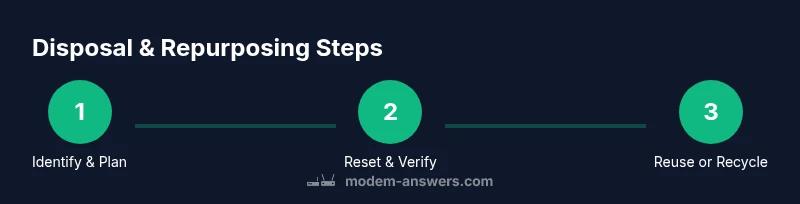
- Identify model and ISP compatibility. 2) Factory reset and verify data removal. 3) Decide on reuse (bridge/AP) or disposal. 4) If reusing, configure bridge mode or connect to a new router; disable modem Wi‑Fi. 5) If recycling, locate an approved facility and bring the device along with accessories. 6) Document actions and keep receipts for your records.
Common mistakes and how to avoid them
- Forgetting to reset the device, leaving personal data on board. - Skipping ISP compatibility checks before repurposing. - Mixing old equipment with new routers in an unmanaged network. - Disposing via regular trash instead of a certified recycler. - Not obtaining receipts or proof of recycling/donation. Following these precautions minimizes privacy risks and environmental impact.
Tools & Materials
- Account access details (ISP username/password)(Needed to check compatibility and disable services tied to the modem)
- Computer or smartphone with internet access(To verify ISP lists and to log into admin pages after reset)
- Factory reset instructions for your model(Consult the manual or manufacturer site)
- Certified electronics recycling drop-off information(Bring device, cables, and accessories)
- Proof of ownership and purchase details(Helpful if reselling or claiming buyback eligibility)
Steps
Estimated time: 60-120 minutes
- 1
Identify device and plan
Record the model number, hardware version, and any ISP compatibility notes. Decide whether you will reuse, donate, resell, or recycle based on device condition and local options.
Tip: Write down the model and serial before you start. - 2
Reset to factory defaults
Perform a factory reset to erase personalized settings and credentials. Verify the reset by logging into the admin interface and confirming default credentials.
Tip: Keep a screenshot of the reset confirmation for your records. - 3
Decide on reuse versus disposal
If you’ll reuse, set up the device as a bridge or AP with a modern router. If disposing, locate an approved recycling option and gather accessories.
Tip: Bridge mode can dramatically improve performance with a separate router. - 4
Proceed with reuse configuration
Connect the modem to the new router as directed by the router’s manufacturer. Disable the modem’s wireless radios to avoid interference and secure your network.
Tip: Test the network with a device to confirm stability. - 5
If recycling, complete the handoff
Pack the device and any power adapters, then drop it at an approved facility or schedule a pickup with an e-waste program.
Tip: Retain any receipt or drop-off confirmation for records.
FAQ
Can I use my old modem with a new router?
Yes, you can usually pair the old modem with a new router by placing the device in bridge mode or turning off its Wi‑Fi and letting the new router handle wireless duties. Check your ISP's compatibility list first.
Yes—often you can pair it with a new router by using bridge mode and turning off the modem's Wi‑Fi.
Is it safe to factory reset my modem?
Factory resetting erases personalized settings and credentials, reducing privacy risks. Ensure you have the default login details handy if you plan to reconfigure or sell the device.
Factory reset is safe and helps protect your data. Keep default login details for future use.
Where can I recycle my old modem?
Look for certified e-waste recyclers or municipal take-back programs. Do not dispose of electronics in regular trash, as it can pollute the environment and violate local laws.
Find a certified e-waste recycler or local take-back program.
Will my ISP accept a modem I no longer use?
Many ISPs offer trade-in or return programs for old equipment. Contact support to confirm eligibility, receive instructions, and understand any credits or fees.
Check with your provider for return or trade-in options and instructions.
Can I sell an old wifi modem?
Yes, if the device is functional and clearly described. Include model, condition, reset confirmation, and any accessories. Be transparent to avoid disputes.
You can sell it if it still works; be honest about its condition.
What if the modem isn’t compatible with my new service?
If incompatible, avoid using it with that service. Consider recycling or donation instead, or use it as a standalone device in a non‑service context if applicable.
If it won’t work with your service, recycle or donate instead.
Watch Video
Key Takeaways
- Identify model and ISP compatibility before disposal.
- Always perform a factory reset to protect data.
- Choose between reuse (bridge/AP) or eco-friendly recycling.
- Keep receipts for donations or recycling for records.