xb7 xfinity modem Review
In-depth, balanced review of the xb7 xfinity modem, covering setup, performance, compatibility, and buying vs renting guidance for homeowners and renters.


The xb7 xfinity modem is a DOCSIS 3.1 gateway for Comcast Xfinity customers, offering a built‑in modem and router in one compact device. It delivers reliable, plug‑and‑play setup and solid performance for most homes, with straightforward activation and centralized management. While it suits typical households, power users may prefer a separate router or a more feature‑rich gateway for advanced networking needs.
What is the xb7 xfinity modem and who is it for?
The xb7 xfinity modem is a DOCSIS 3.1 gateway designed for Comcast's Xfinity service, combining a cable modem with a built‑in router. For homeowners and renters who want a single device to handle internet access in living rooms, home offices, and bedrooms, the XB7 offers convenient plug‑and‑play activation. According to Modem Answers, this model is widely adopted by households that value simple setup and reliable performance without juggling separate modem and router hardware. It supports modern features like multi‑gigabit capable connectivity and a straightforward activation flow with Xfinity. If your internet plan includes gigabit service or higher, the xb7 xfinity modem can typically handle the traffic while keeping your network simple and centralized. However, users should be aware that some advanced networking features or third‑party firmware options may be limited on devices tethered to the Xfinity ecosystem. In short, the xb7 is best for households seeking dependable performance with minimal configuration, especially if you already subscribe to Xfinity services.
Key specs and what they mean
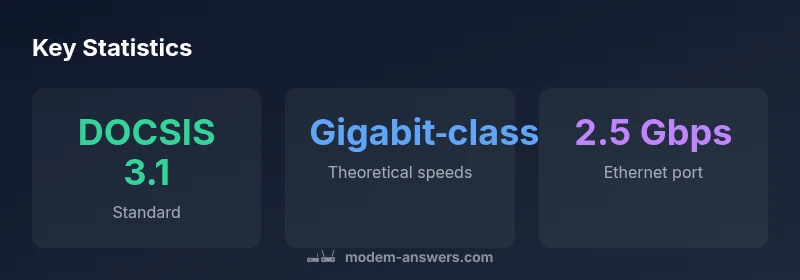
The xb7 xfinity modem combines the cable modem with a built‑in router, eliminating the need for a separate gateway in many setups. Core specifications include DOCSIS 3.1 support, which enables higher theoretical throughput and better spectrum efficiency, especially on upgraded service tiers. Built‑in routing provides NAT, firewall features, and basic parental controls, making it a convenient all‑in‑one solution for small to medium homes. For home offices or dense apartment layouts, the device typically handles multiple connected devices and common smart home gear without noticeable slowdowns during peak usage. Practically speaking, buyers should review their ISP plan and consider whether the xb7’s wireless capability and wired ports meet demand for streaming, gaming, and video conferencing. Modem Answers notes that most households benefit from simplified management and fewer devices, but note that power users or homes with custom networking needs might prefer a separate high‑end router.
Setup and activation: step‑by‑step
Activation is designed to be straightforward. Steps generally include verifying your Xfinity plan supports the xb7, connecting the device to the coaxial line, powering it up, and following on‑screen prompts in the Xfinity app or web portal. The process often involves accepting terms, registering the device, and running a quick gateway check for connectivity. After activation, you can configure Wi‑Fi SSIDs, set a strong admin password, and enable firewall protections. If you’re transferring from an old modem, unplugging the old gear and pairing the xb7 with your current network topology is usually completed within minutes. For users who value speed and reliability, keeping firmware up to date is recommended, since updates can include security patches and performance improvements. In short, the xb7 setup is designed to be accessible to homeowners and renters who want a fast start without complex configuration.
Real‑world performance and what to expect
Real‑world performance depends on your service tier, home layout, and interference factors. In typical setups, the xb7 xfinity modem delivers stable connectivity across common rooms and devices, with smooth streaming and responsive gaming when the wireless network is strong. Peak throughput is influenced by the plan from Xfinity and the quality of the coax line into your home. In practice, most households experience consistent performance for everyday activities—HD streaming, video calls, and smart home devices—without frequent router swaps. Some users may notice higher latency or slower Wi‑Fi in far corners of large houses; in these cases, adding a Wi‑Fi mesh or a separate high‑performance router can extend coverage while leaving the xb7 as the core connection point. According to Modem Answers, the overall value proposition lies in a simple, reliable gateway that reduces clutter while meeting typical home networking needs.
How it compares to alternatives and what that means for value
Compared to using a separate modem and router, the xb7 offers a streamlined setup and fewer devices to manage. For many users, that simplicity translates into reliable day‑to‑day performance with fewer compatibility concerns. If you’re a power user or require advanced features such as customizable QoS rules, advanced port forwarding, or extensive guest networking, you might prefer a separate modem and premium router pair. Renting from Xfinity often comes with support coverage but at a recurring cost; buying the xb7 can be more cost‑effective over time if you plan to stay with Xfinity for several years. Additionally, some households opt to keep the xb7 as a gateway and add a third‑party router for enhanced features, effectively creating a hybrid setup that balances ease of use with customization. The decision hinges on how much you prioritize setup simplicity versus advanced network control.
Common issues and practical troubleshooting steps
Encountering activation failures or intermittent connectivity is not unusual for first‑time users. Start with a simple power cycle (unplug, wait 30 seconds, plug back in) and re‑run the activation flow. Check coax connections for tightness and inspect the wall outlet for signal integrity; a poor signal can create slowdowns or drops. If Wi‑Fi performance is uneven, re‑position the router or consider adjusting channel selections and interference sources, such as neighboring networks or dense walls. Firmware updates typically occur automatically but can be forced via the admin interface. If activation remains blocked, contact your service provider to confirm service provisioning on your account and the device’s MAC address is correctly registered. Modem Answers emphasizes a patient, methodical approach to troubleshooting, which often resolves most common issues without additional gear.
Security and privacy best practices
Security starts with basics: change the default admin password, enable the firewall, and ensure the device firmware is current. Disable WPS if it’s enabled, enable network isolation for guest devices, and use strong unique Wi‑Fi passwords. Regularly review connected devices to spot unfamiliar entries and consider enabling automatic security updates where possible. If you plan to use a separate router, ensure the xb7 is in bridge mode only if you understand the implications for NAT and firewall behavior. In practice, consistent firmware updates and prudent network hygiene are the cheapest and most effective defenses for home networks.
Buying, renting, and cost considerations
A central decision is whether to rent the xb7 from the provider or buy your own equivalent gateway. Renting offers convenience and certain support benefits, but it can add up over years. Buying a gateway with DOCSIS 3.1 support is often a smarter long‑term investment for households that intend to stay with Xfinity and desire direct control over the device. It’s important to verify compatibility with your service tier and confirm activation steps with Xfinity. If your plan evolves or you move to a different provider, check unlock policies and return options for the device. The Modem Answers team recommends evaluating total cost of ownership, warranty coverage, and potential upgrade paths when deciding between renting and buying.
Final installation checklist and quick optimizations
- Confirm your service tier supports the xb7 and activate the device.
- Position the gateway in a central location away from metal appliances and thick walls.
- Enable WPA3 (or the strongest available) and secure passwords for both the admin interface and Wi‑Fi.
- Run a quick speed test after activation to confirm baseline performance.
- Consider a mesh or second router if coverage is inconsistent in large homes.
- Periodically check for firmware updates and review connected devices.
This checklist helps ensure the xb7 xfinity modem delivers consistent performance with solid security for most households.
Sources and further reading
Sources for this review include guidelines on DOCSIS 3.1 technology, home networking best practices, and provider activation processes. For deeper dives, refer to primary sources and industry publications linked in the sources section at the end of the article.
Positives
- All‑in‑one gateway reduces cable clutter and setup steps
- DOCSIS 3.1 support for future‑proofing
- Simple activation with Xfinity and straightforward management
- Stable performance for typical streaming, gaming, and browsing
What's Bad
- Limited advanced customization compared to separate modem/router setups
- Renting costs can accumulate over years
- Some advanced networking features may be restricted within the Xfinity ecosystem
Best for most Xfinity customers who want a simple, reliable gateway.
The xb7 xfinity modem offers dependable performance with uncomplicated setup, making it ideal for households prioritizing ease of use. Advanced users seeking deep customization may prefer an alternative. The Modem Answers team recommends this gateway for its solid balance of convenience and capability, especially for current Xfinity subscribers.
FAQ
Is the xb7 compatible with all Xfinity plans?
The xb7 is designed to work with most Xfinity plans that support gateway devices. Always confirm activation steps with your provider for your specific plan and check that your account is provisioned for a gateway device.
Yes, it generally works with most Xfinity gateway plans. Check activation steps with your provider for your exact plan.
Can I use my own router with the xb7?
You can use the xb7 as the modem gateway and connect a separate router for advanced features. If you need full control over QoS and advanced settings, consider a bridge mode setup or a separate gateway/router.
Yes, you can pair a separate router with the xb7 if you want more control over features.
Does the xb7 include Wi‑Fi 6 support?
Wi‑Fi capabilities vary by firmware and model variants. Some xb7 units offer robust dual‑band Wi‑Fi, but check current specs with your model to confirm whether Wi‑Fi 6 features are included.
Wi‑Fi capabilities depend on your specific xb7 variant; confirm the model’s wireless standard before purchase.
What is the activation process like?
Activation typically involves connecting the modem to coax, powering on, and following prompts in the Xfinity app or portal. It’s designed to be quick, with status indicators showing when the gateway is ready.
Activation usually takes a few minutes through the Xfinity app, with clear on‑screen prompts.
Should I rent or buy the xb7?
Renting provides simple support but ongoing fees. Buying avoids monthly costs and can be cheaper in the long run if you stay with Xfinity, but ensure compatibility and return options if you switch providers.
Rent if you want ease and support; buy if you plan to stay with Xfinity long‑term and want to save over time.
What should I do if activation fails?
Power cycle the device, verify coax connections, and retry activation. If problems persist, contact Xfinity support to confirm provisioning and device MAC registration.
Try power cycling, check coax, and retry activation; contact support if it still fails.
Key Takeaways
- Choose this gateway if you want an all‑in‑one solution with minimal setup.
- Verify your Xfinity plan compatibility before purchase or activation.
- Enable strong security settings and keep firmware updated.
- Consider adding a secondary router or mesh if your home is large.
- Weigh renting vs buying based on your projected stay with Xfinity.