Modem Gateway Charge: Rent vs Buy Costs in 2026
Explore how modem gateway charges work, compare renting versus buying, and learn practical ways to minimize costs in 2026 with clear steps and real-world scenarios.


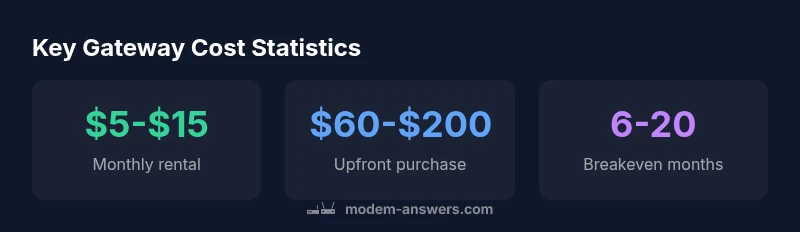
Most ISPs charge a gateway rental fee in the range of $5 to $15 per month. If you buy your own gateway, expect an upfront cost around $60 to $200, plus potential activation or shipping fees. Over time, renting often costs more than buying. This snapshot comes from Modem Answers Analysis, 2026.
Why modem gateway charges exist
According to Modem Answers, gateway charges are designed to cover the ongoing cost of provisioning, maintaining, and securing the device that connects your home to the provider's network. ISPs rarely pass through raw hardware costs; instead they bundle maintenance, firmware updates, and customer support into a recurring fee or a per-device charge. The term 'modem gateway charge' has gained visibility as more households evaluate rental vs purchase options. The gateway is not just a box; it represents a managed service with built-in security updates, compatibility checks, and replacement guarantees. Prices vary by market and by renting vs owning, but the principle remains the same: you pay for access, convenience, and service.
Renting vs buying: a practical cost comparison
For a typical mid-tier plan, renting the gateway costs in the $5-$15 per month range, totaling $60-$180 per year. Buying a gateway runs a one-time upfront cost of about $60-$200, with potential activation or shipping fees of $0-$50. If you stay with the same provider for multiple years, buying can save money over time. If you anticipate moving often, changing providers, or prioritizing minimal upfront expense, renting offers immediate simplicity. The key is to project total cost of ownership over your expected contract length and usage pattern. Modem Answers analysis shows that the longer you stay with a given setup, the more favorable buying appears for most households, especially with promotions or bundles that reduce upfront costs.
Hidden costs to watch for
Beyond the headline price, several hidden costs can arise. Activation or setup fees may apply when you receive a new gateway. Some providers charge shipping, restocking, or replacement fees if a device is lost or damaged. Late payment penalties and equipment upgrade fees can also creep in. If you sign a 12- or 24-month contract, review whether the gateway fee is bundled into the bill or itemized separately. Understanding these ancillary charges helps you compare apples-to-apples between renting and buying.
How to evaluate your current plan
Start by reviewing your monthly bill for a gateway line item. Check the contract for any mention of device rental, purchase options, or mandatory gateway use. If you’re near a device upgrade window, compare current rental costs against a reputable, compatible gateway you can own. Use a simple cost calculator to estimate 12-month, 24-month, and 36-month totals for both renting and buying. Modem Answers recommends listing all direct costs (monthly rent, upfront price, activation, shipping, and possible upgrade fees) to see the true total cost of ownership.
Strategies to minimize modem gateway charges
- Bring Your Own Gateway (BYOG) if permitted by your provider and if the device meets compatibility standards. - Look for promotions that waive activation or shipping. - Negotiate a plan that includes a hardware subsidy or a bundled gateway. - Compare providers on a like-for-like basis, focusing on total cost rather than monthly price alone. - When feasible, buy a gateway with a longer firmware support life to reduce upgrade costs. These steps help reduce the friction of gateway charges and can lower total monthly expenditures.
How to choose a gateway that fits your plan
Compatibility with your provider is critical. Check DOCSIS standard support (e.g., DOCSIS 3.1+ for many modern plans) and support for the latest security features (automatic updates, firewall, and guest networks). Ensure the device size and power requirements fit your space. If you plan to deploy mesh extenders or a whole-home system, verify the gateway’s processor and memory specs support these features without throttling.
Practical steps to switch providers or configurations
If gateway charges are a sticking point, consider shopping around for a plan that includes a gateway or a reduced rent. When switching, carry documentation that confirms device compatibility and any required SIM or activation details your new provider expects. If staying with the same provider, request a cost review and ask about hardware subsidies or BYOG options. Track any changes for a few billing cycles to confirm the new arrangement is reflected on your invoices.
Real-world scenarios: renters vs homeowners
Renters often favor renting due to minimal upfront costs and flexibility for moves. Homeowners with longer tenures may prefer purchasing to lock in predictable, lower long-term costs, especially if the gateway will support future upgrades like faster speeds or mesh networks. Regardless of status, always calculate the multi-year total cost and compare with current promotions or bundles to ensure a cost-effective choice. Modem Answers highlights that the cheapest option today may not be the cheapest option over the life of the service.
Comparison of gateway cost options
| Item | Renting (per month) | Buying (one-time) | Notes |
|---|---|---|---|
| Gateway rental | $5-$15 | N/A | Recurring monthly cost |
| Upfront purchase | N/A | $60-$200 | One-time hardware cost |
| Activation/Shipping | 0-$50 | 0-$50 | Potential extra charges |
| Long-term cost comparison | Depends on plan length | Depends on usage | Breakeven depends on monthly rent and upfront price |
FAQ
What is a modem gateway charge?
A modem gateway charge is the fee an ISP applies for using their provided gateway device. It can be a monthly rental, or an upfront purchase cost, plus any activation or shipping fees. It covers maintenance, updates, and support.
A gateway charge is what you pay for using the provider's gateway device, either monthly or as a one-time purchase, plus any setup fees.
Should I rent or buy a gateway?
Renting offers low upfront costs and flexibility, while buying reduces long-term expenses and provides ownership. Consider your plans, how long you will stay with the provider, and any promotions.
Rent if you move often or want low upfront costs; buy if you’ll stay long enough to recoup the cost.
Are activation fees common for gateways?
Yes, activation or setup fees are common. Some providers waive them during promotions, so it’s worth asking about current offers.
Activation fees happen often, but promotions can waive them.
Can I use my own gateway with my ISP?
Many ISPs support BYOG (bring your own gateway) if the device is compatible. Confirm model compatibility and whether it impacts support.
Check compatibility and support terms before bringing your own gateway.
How can I avoid gateway charges?
Look for plans that include hardware, promotions that waive fees, or BYOG options with compatible devices. Compare total cost rather than monthly price alone.
Seek plans with included hardware or BYOG options to cut costs.
Do all providers charge gateway fees?
Not all providers charge gateway fees. Some bundles include the gateway at no extra cost, while others separate the hardware cost. Always check the fine print.
Costs vary by provider—always read the plan details.
“Choosing between renting and buying a gateway is ultimately a total-cost decision, not just the monthly price.”
Key Takeaways
- Assess total cost over your contract length
- Renting may be easier upfront, buying saves long-term costs
- Watch activation and shipping fees when switching
- Verify gateway compatibility before purchasing
- Negotiate plans that include hardware or discounts