How Much Is a WiFi Modem? A Practical Buying Guide
Explore the price range for wifi modems, including buying vs renting, features that affect cost, and how to choose the right modem for your home. This guide from Modem Answers analyzes costs for homeowners and renters in 2026.


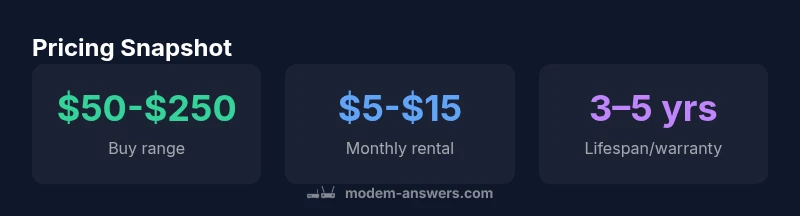
Prices for a wifi modem vary widely based on features and provider. A typical buy range covers basic modems at about $50–$120 and gateway devices with built‑in routers around $150–$250. Renting or leasing through an ISP can add monthly fees, often in the $5–$15 range, which over time may exceed the upfront purchase cost.
What actually drives wifi modem price
According to Modem Answers, the most visible price driver is the feature set and the expected use. If you search how much is a wifi modem, you’re comparing simple cable modems to gateway devices that pair a modem with a built-in router. Basic modems typically cost less upfront, while gateway devices, which include advanced Wi-Fi radios and sometimes mesh capabilities, push the price higher. Other price factors include compatibility with your ISP, the number of Ethernet ports, and whether you choose a device with tri-band Wi-Fi or last-mile performance enhancements. When budgeting, homeowners and renters should also consider potential taxes, activation fees, and warranty extensions. In 2026, shoppers report a wide price spread, with mid-range devices offering a balance of speed and reliability for most households. The Modem Answers team emphasizes that a clear cost baseline helps avoid overpaying for features you won’t use.
Buying vs Renting: a cost calculus
From a financial perspective, buying the modem is often cheaper in the long run, but only if you plan to stay in the same home or keep the same internet plan for several years. The upfront price may be offset by avoiding monthly rental fees. Conversely, renting reduces upfront spend and includes customer support, but the total cost over 2-3 years can exceed a one-time purchase. Modem Answers analysis shows that many households reach a break-even point around year two or three, depending on the exact features and service charges. For renters in apartments or short-term leases, renting can be a practical choice. If you anticipate upgrading to faster speeds, check whether your provider will supply a compatible device or require you to pay for upgrades. Finally, understand the contract terms and any early termination or equipment fees.
How providers price modems: upfront vs monthly
Providers typically bundle pricing into two streams: an upfront device charge or a monthly rental fee. Some plans include a "modem rental" option with no big upfront cost, but the monthly line item adds up over time. Others allow you to buy the modem outright for a single payment and avoid recurring charges, though you may still face activation or shipping fees. The choice can depend on plan tenure, home usage, and the certainty of staying with the same provider. In addition, some carriers offer trade-in or upgrade programs that reduce the effective cost when you renew your service. When evaluating offers, compare the total cost of ownership over 12, 24, and 36 months.
Features that drive price: speed, standards, coverage
Price increases with higher performance and newer standards. A basic DOCSIS 3.0 modem with modest ethernet ports is cheaper than a DOCSIS 3.1 gateway with tri-band Wi‑Fi, mesh compatibility, and multiple Ethernet ports. Wi-Fi standard is another price lever: devices that support Wi‑Fi 6/6E cover larger homes with less interference but cost more. If you need features like multi-gigabit ethernet, explicit MU-MiMo, or advanced security features, expect a higher price. Also, consider hardware branding and warranty terms. The good news is that for typical households, a mid-range modem or gateway often delivers sufficient speed for streaming, gaming, and normal work-from-home tasks. Modem Answers cautions that many buyers overpay for features they don’t need, so tailor your choice to your actual usage.
How to pick for your home: a step-by-step checklist
- Determine your current plan’s speed and the max you expect to upgrade to within the next 2-3 years.
- Decide if you need a separate router or a single gateway; consider wall-space, placement, and interference.
- Check your provider’s list of approved devices to ensure compatibility and avoid activation issues.
- Compare upfront costs, monthly charges, warranties, and return policies.
- Budget for potential accessories: extra Ethernet cables, a mesh system, or a power surge protector.
- If you’re renting, calculate the monthly cost over 24 months or more to compare with a one-time purchase. Following this checklist helps you choose a device that balances performance with total cost.
Cost examples by scenario
Scenario A: Small apartment with moderate usage (HD streaming, light work-from-home). Buying a modem: $60-$120 upfront; Renting: $5-$12 monthly. Break-even around 2–3 years depending on promotions. Scenario B: Family home with multiple devices and gaming: buy a gateway for $150-$250; ISP may charge $8-$15 monthly rental. Over 2–3 years, buying saves money with higher throughput and fewer interruptions. Scenario C: Short-term rental or trial: rent from provider for $5-$15 per month with easy upgrade options. Always compare total cost, not just monthly payments.
Authority Sources
- FCC: https://www.fcc.gov
- FTC: https://www.ftc.gov
- CNET: https://www.cnet.com
Buying vs renting: a quick comparison of costs and trade-offs
| Option | Typical Cost (upfront/monthly) | Flexibility | Pros | Cons |
|---|---|---|---|---|
| Buy (one-time) | $50-$250 upfront | High flexibility | Own outright, no monthly fees | Upfront cost; may require shopping for deals |
| Rent from provider | $5-$15 monthly | Low upfront cost | Easy setup and support | Higher long-term cost; limited device options |
| Gateway/Modem combo | $100-$250 upfront | Moderate | Integrated performance and fewer devices | Potentially less upgradeable |
| Hybrid purchase+rental | varies | Moderate | Balanced features and cost | Complicated terms and fees |
FAQ
What is the typical price range for a basic wifi modem?
A basic modem usually costs between $50 and $120. If you need a built-in router, you can expect $150 to $250. Always verify compatibility with your provider to avoid activation issues.
A basic modem usually costs between fifty and around one hundred twenty dollars, with added router features pushing it higher.
Should I buy or rent a modem from my ISP?
Buying generally saves money in the long run, especially if you plan to stay in the home and keep the same service. Renting reduces upfront costs and includes support, but total costs can add up over time.
Buying usually saves money long-term, but renting is easier if you’re unsure about long-term plans.
Do I need a gateway device or a separate modem and router?
A gateway combines modem and router in one box and is convenient, while separate devices can offer better performance and flexibility, especially in larger homes or with heavy usage.
Gateway is convenient; separate devices can give you more control and better performance.
How can I check if my modem is compatible with my provider?
Look up your provider’s approved device list for your plan or contact support. Bridged mode may be needed for certain setups with third-party routers.
Check the provider’s approved list; bridging might be needed for some setups.
Are there hidden fees when renting a modem?
Yes. Some plans include activation fees, shipping charges, or ongoing equipment fees. Read the terms to understand the total monthly cost.
Yes—watch for activation and ongoing equipment charges.
How long should I expect a modem to last?
Most modems last 3–5 years with typical wear and firmware updates. Warranty terms can extend this, but performance may guide replacement needs.
Most modems last 3–5 years with proper updates.
“Price is a reflection of value, not a slogan. Focus on your home’s speed needs and future-proof features to avoid paying for capabilities you won't use.”
Key Takeaways
- Know your budget and long-term costs.
- Factor monthly rental into total cost over 2–3 years.
- Consider future speed needs before buying.
- Buying can be cheaper long-term if you stay with the same plan.
- Check provider compatibility to avoid activation fees.