What Modem Do I Need for Fiber: An Essential Guide
Learn how to choose the right modem or gateway for fiber internet. This guide covers ONTs, GPON/XGS-PON compatibility, provider requirements, and step-by-step setup for homeowners and renters.


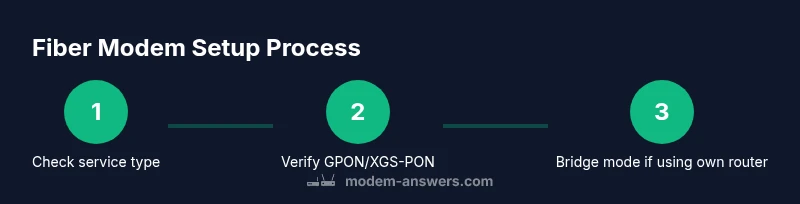
Goal: determine the correct fiber modem setup. You’ll confirm if your service uses an ONT, select a compatible modem or gateway, check provider requirements, and outline installation steps. In six steps, you’ll verify compatibility, gather options, and plan activation with your ISP. This quick guide helps homeowners and renters avoid buying the wrong modem and ensures a smooth activation.
Understanding Fiber Equipment: ONT, Gateway, and Modem
When you subscribe to fiber internet, the term modem is used differently than with cable service. Many providers use an Optical Network Terminal (ONT) that converts light signals to Ethernet, while others offer an integrated fiber gateway that handles both ONT and routing. For homeowners wondering what modem do i need for fiber, the answer depends on your provider’s architecture and your chosen network setup. In most cases you’ll either connect a separate router behind an ONT or use a gateway device that includes routing functionality. Understanding these components helps you avoid buying the wrong device and prepares you for a smooth activation. Modem Answers has found that the right equipment choice hinges on provider requirements and the expected network topology rather than a single universal modem.
GPON vs XGS-PON: What It Means for Compatibility
GPON (Gigabit Passive Optical Network) and XGS-PON are common fiber standards. GPON is widely deployed and compatible with many older fiber plans, while XGS-PON offers higher throughput for multi-gigabit services. The key takeaway for compatibility is to verify which standard your address uses and then select hardware that explicitly supports that standard. If your provider lists GPON or XGS-PON as supported, ensure the device you choose has the corresponding port or dual compatibility. This distinction matters because a mis-match can prevent your modem/gateway from achieving the full advertised speeds.
Do You Need a Modem for Fiber? Common Setups
In many fiber setups, you do not need a traditional cable modem. An ONT sits at the edge of the network and converts fiber to Ethernet. Depending on the service, you may use an ISP-provided gateway that handles the ONT functions and routing, or you may opt to connect your own router behind a bridge-mode gateway. If you plan to use your own router, you’ll likely enable bridge mode on the gateway or ONT so your router can manage DHCP, NAT, and firewall rules. The choice between an all-in-one gateway and a two-device setup depends on your preferences for control, security, and future-proofing.
How to Verify Provider Requirements
Before purchasing anything, check your provider’s official documentation for equipment compatibility. Look for a list of approved models or a note about required ONT/gateway configurations. Talk to customer support if you’re unsure whether your address requires FTTH, GPON, or XGS-PON hardware. Keeping a copy of your service terms and any activation notes will help you avoid buying the wrong device and reduce installation delays.
How to Choose a Fiber-Ready Modem or Gateway
When selecting a device, prioritize fiber-specific features over generic cable specs. Look for explicit GPON/XGS-PON support, and confirm you can place the device in bridge mode if you want to run your own router. Check the device’s compatibility with your ISP’s address and service tier. If you use your own router, ensure the gateway supports bridging, has robust warranty coverage, and offers easy firmware updates. Reading user reviews about reliability and customer support quality can also help you avoid trouble down the line.
Typical Home and Apartment Setups
For apartments or small homes, a single gateway device may be enough, especially if it includes ONT functions and a built-in router. For larger homes or offices, you might prefer a separate ONT (or a gateway that provides ONT functionality) plus a dedicated high-performance router placed closer to the center of the home. Placement matters for Wi‑Fi coverage; aim for a central location and minimal obstructions to maximize signal strength.
Troubleshooting Quick Wins If Your Device Isn’t Connecting
First, restart the ONT/gateway and router in sequence to clear transient faults. Verify that the device is in the correct mode (bridge vs router) based on your plan. Double-check cabling with high-quality Ethernet cables (Cat5e or better). If problems persist, contact your provider to confirm compatibility and to verify you’re not on a legacy profile that requires a specific model.
Tools & Materials
- ISP account details (address, plan, service type)(Needed to verify compatibility with your exact service)
- Documentation from your provider on required equipment(Some providers require a whitelist or approved list)
- Modem or gateway (compatible with fiber ONT or gateway mode)(Check supported standards like GPON/XGS-PON)
- Ethernet cables (Cat5e or better)(For reliable links between ONT/gateway and router)
- Power strip with surge protection(Helpful for safe, surge-protected setup)
- Pen and paper or device to record model numbers(Track tested configurations and results)
Steps
Estimated time: 60-90 minutes
- 1
Confirm service type and requirements
Identify whether your fiber plan uses an ONT or a gateway with ONT functionality. This determines whether you need a separate modem, a gateway, or a bridge-mode setup. Start by checking your account portal or calling support to confirm the exact equipment requirements.
Tip: Take notes of any model numbers or whitelist IDs your provider mentions. - 2
Gather potential device options
Collect a short list of GPON/XGS-PON compatible devices that your provider approves for your address. Compare specs, bridge-mode capability, and warranty terms. Avoid devices you know are incompatible with your service type.
Tip: Prioritize devices with clear return policies and easy firmware updates. - 3
Verify address-specific compatibility
Double-check that your chosen device is listed as compatible for your exact service address. Some carriers enable or disable features based on location or plan tier. Make sure your account shows the correct service type (FTTH, GPON, etc.).
Tip: If in doubt, request a written confirmation from support before purchasing. - 4
Prepare the network hardware
Inspect cables for damage, label ports, and set aside all components you’ll use. Ensure you have a router if you plan to customize your network beyond basic routing. If you’ll bridge, ensure you know how to access bridge-mode settings on the device.
Tip: Use high-quality Ethernet cables and keep power adapters accessible. - 5
Connect the ONT/gateway to fiber and power
Connect the fiber line to the ONT or gateway input per the provider’s instructions. Power up the device and wait for indicator lights to reach a steady state before testing.
Tip: Don’t force connections; if lights are abnormal, consult support before proceeding. - 6
Configure bridge mode if using your own router
If you’re using a separate router, enable bridge mode on the gateway or ONT so the router handles DHCP and NAT. Follow the device’s manual for precise steps, then verify that the router is obtaining an IP address.
Tip: Bridge mode steps vary by model; refer to the manufacturer’s guide for exact steps. - 7
Test the connection and performance
Run a few speed tests and check latency, jitter, and packet loss. Verify that wired devices perform as expected and test wireless devices from multiple locations. Document results for future reference.
Tip: Test with a wired connection first to establish a baseline. - 8
Schedule activation and keep records
If activation is required by your ISP, schedule it and confirm a smooth handoff. Save model numbers, firmware versions, and support contacts for future reference.
Tip: Keep a written activation window and a backup plan in case of delays.
FAQ
Do I still need a modem for fiber service?
Fiber service often uses an ONT or a gateway. A traditional cable modem won’t work. Always verify with your provider and use equipment on the approved list.
Most fiber setups use an ONT or a gateway. A cable modem won’t work; check the provider’s approved equipment list.
Can I reuse my old cable modem with fiber?
No. Fiber networks use GPON/XGS-PON and ONTs. A cable modem operates on DOCSIS and is not compatible with fiber installations.
You’ll typically need a GPON/XGS-PON device or an ONT provided by the ISP.
What is an ONT and do I need one?
ONT stands for Optical Network Terminal. It converts optical signals to Ethernet. Some providers supply it as part of a gateway; others require a separate device.
An ONT is the fiber-to-Ethernet converter. Your ISP may provide it or require you to use a gateway that includes ONT functionality.
What features matter most when choosing a fiber modem?
Look for explicit GPON/XGS-PON support, bridge mode capability, and verified compatibility with your ISP and address. Reliability and warranty are also important.
Prioritize GPON/XGS-PON support, bridge mode, and provider compatibility.
Do I need bridge mode if I want to use my own router?
Yes. Bridge mode lets your own router manage DHCP, NAT, and firewall, avoiding double-NAT and potential conflicts.
Bridge mode is usually necessary when using your own router with a fiber gateway.
How can I verify compatibility before buying?
Check the provider’s official list of approved devices and confirm the exact service type for your address. If in doubt, contact support for written confirmation.
Check the provider’s approved device list and confirm service type for your address.
Watch Video
Key Takeaways
- Confirm provider requirements before purchasing any device
- Choose GPON/XGS-PON compatible devices for your address
- Decide between all-in-one gateway vs separate ONT + router
- Enable bridge mode if you use your own router
- Test connection thoroughly and document results