Does Spectrum Modem Have WiFi? A Practical Guide for Home
Explore whether Spectrum modems include WiFi, the difference between gateway devices and standalone modems, and how to choose the best setup for your home network. Expert guidance from Modem Answers to help homeowners decide between gateway and router options.


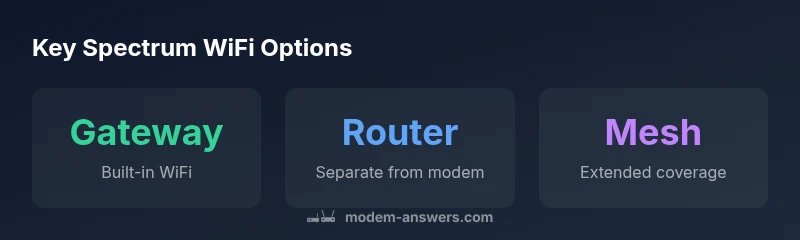
Yes—Spectrum often offers gateway devices that combine modem and router with built-in WiFi. However, some Spectrum modems are standalone modems that require a separate router. If you rent a gateway from Spectrum, WiFi is ready to use out of the box; if you have a standalone modem, you’ll need to add a wireless router or mesh system.
Spectrum Modems and WiFi Basics
According to Modem Answers, Spectrum's device lineup falls into two broad categories: gateways that combine modem and router with built-in WiFi, and standalone modems that provide internet access but rely on an external wireless router. If you’re asking does spectrum modem have wifi, the answer depends on the device type you received or rent. For most customers, gateway devices include WiFi by default, offering immediate wireless coverage once activated. Standalone modems do not generate wireless networks on their own; you’ll need a separate router. The naming can be confusing, but the practical difference is simple: gateways handle both functions in one box; standalone modems separate the two tasks. This matters for setup speed, device management, and future expansion, especially in homes where multiple wireless devices or smart-home tech demand reliable coverage.
In practice, many Spectrum subscribers rely on gateway devices exactly for the ease of setup and the assurance of a ready-made WiFi network. If your home already has a preferred router or a mesh system, you can still integrate those with a modem-only setup. The choice often comes down to how much you value simplicity versus customization, and whether you expect to expand your home network in the coming years.
Do Spectrum Modems Always Include WiFi?
The short answer is: not always. Spectrum's lineup includes both gateway devices with built-in WiFi and standalone modems that require a separate router. In practice, most customers who want a plug-and-play home network opt for a gateway because it reduces the number of devices and avoids configuration steps beyond activation. If you already own a good router and you’re comfortable managing two devices, you can certainly use a standalone modem with your existing gear. The critical check is to verify the model you receive or purchase; the best practice is to confirm with Spectrum support whether the device includes wireless radios and what firmware features are included for WiFi management.
If you’re unsure about your current device, the quickest test is to look at the device label for “WiFi” or “Wireless” indicators, or to log into the device’s admin page and search for a Wireless or WLAN section. Some users also check the light indicators on the box; active wireless LEDs usually signal WiFi functionality.
Gateway vs Standalone: What That Means for Your Home Network
Choosing between a gateway and a standalone modem has practical implications for coverage, performance, and management. A gateway bundles the modem and router in a single unit, which minimizes the number of devices to place, power, and troubleshoot. The built-in WiFi on modern gateways typically supports both 2.4 GHz and 5 GHz bands, allowing you to balance range and speed across different rooms and devices. A standalone modem, paired with a separate router or mesh system, can offer more customization options, such as advanced parental controls, guest networks, and finer control over channel selection. In larger homes, mesh systems connected to a modem-only setup can deliver more consistent coverage than a single gateway. Your choice should reflect your home’s size, wall construction, and the number of devices that rely on wireless connectivity.
How to Check If Your Spectrum Device Has WiFi
Start with the obvious checks: inspect the device for an antenna or a visible wireless label. Next, access the device’s admin page via a browser using the gateway’s default IP address (often something like 192.168.0.1) and look for a Wireless or WLAN section. If you see settings for SSID, security (WPA2/WPA3), and a wireless network name, you have WiFi built-in. If those options are missing, you likely have a standalone modem. If you’re uncertain, contact Spectrum support and provide the device model; they can confirm whether the device includes wireless radios and help you enable WiFi if you’re using a gateway.
Renting a Gateway vs Using Your Own Router
Renting a gateway from Spectrum offers a simplified path to WiFi without extra equipment or setup steps. This option includes installation support and automatic firmware updates, reducing maintenance. Using your own router with a modem-only plan can deliver stronger or more customized features, such as advanced QoS, VPN compatibility, or better parent controls. If you opt for your own gear, you’ll need to configure the modem in bridge mode or IP Passthrough to ensure your router handles the network traffic. Weigh the convenience of rental against the control and potential cost savings of a separate router setup.
How to Set Up WiFi on a Spectrum Gateway
If you’ve chosen a gateway, the setup is largely guided by Spectrum’s activation process. After connecting the device to power and your coaxial line, follow the on-screen prompts to activate your service. Then navigate to the Wireless settings in the admin page to customize your SSID (network name) and password. Use a strong password and enable WPA2/WPA3 security. For best results, place the gateway in a central location away from thick walls or metal appliances, ideally elevated and unobstructed. If you’re using a mesh system, place satellites strategically to maximize coverage.
Spectrum WiFi Speeds and Limitations
WiFi speed on Spectrum devices depends on a mix of factors including your plan, device capabilities, and home layout. Gateway devices typically support multiple bands, and real-world speeds can vary based on interference from nearby networks, household electronics, and the number of devices connected simultaneously. For households with heavy streaming, gaming, or smart-home devices across several rooms, you may get the best results by placing the gateway centrally and adding a mesh node where signal strength drops. Always run a speed test after setup to verify you’re getting the expected performance on both 2.4 GHz and 5 GHz bands.
Security and Privacy Considerations
WiFi security should be a core part of your home network plan. Enable WPA2 or WPA3 encryption, keep firmware up to date, and set a unique administrator password on the gateway or router. Consider enabling a guest network for visitors to keep your main network private. Regularly review connected devices and disable WPS if possible to reduce potential attack surfaces. If you rely on a third-party router, ensure its security updates are current and that it supports modern encryption standards. Balancing convenience with security is essential for a safe home network.
Real-World Setup Scenarios: Renting Gateway vs. Using Own Router
In practice, many households prefer gateway devices for their simplicity—one device to manage, activate, and secure. If your home requires tighter control over parental features, QoS, or advanced VPN options, a separate router or mesh system can deliver more nuance. For renters or busy households, renting a Spectrum gateway minimizes the setup burden and ensures compatibility with service updates. For tech-savvy homeowners, using a standalone modem with a high-performance router can offer superior customization and potential cost savings over time, albeit with more maintenance.
Final Checklist: Quick Reference for Spectrum WiFi Choices
- Identify whether your Spectrum device is a gateway or a standalone modem.
- If you want WiFi immediately, choose a gateway or add a router/mesh system.
- Ensure you have a strong WPA2/WPA3 password and a unique network name.
- Place your device centrally and off the floor for best coverage.
- If you use your own router, set the modem to bridge mode or IP Passthrough as needed.
- Run a speed test after setup to verify performance and adjust as necessary.
Spectrum device options and WiFi availability
| Device Type | WiFi Availability | Ideal Use Case |
|---|---|---|
| Gateway (Modem+Router) | Built-in WiFi | Small to large homes desiring simple setup |
| Standalone Modem | No built-in WiFi | Users with existing router or mesh system |
| Gateway with Optional Upgrade | Built-in WiFi + mesh extension | Expanded coverage for multi-story homes |
FAQ
Does Spectrum provide WiFi with their modems?
Spectrum's gateway devices typically include built-in WiFi, delivering wireless access right after activation. If you use a standalone modem, WiFi won’t be included and you’ll need a separate router.
Yes. If you get a gateway, you’ll have built-in WiFi. Standalone modems do not create WiFi networks on their own.
Can I use my own router with Spectrum if I have a modem-only plan?
Yes. You can connect your own router by putting the modem in bridge mode or IP Passthrough, then configure your router as the main network device. Activation steps may vary by model.
Yes, you can use your own router. Bridge mode or IP Passthrough is usually required.
Do Spectrum gateways support dual-band 2.4/5 GHz WiFi?
Most Spectrum gateway devices support dual-band WiFi, offering both 2.4 GHz and 5 GHz networks. The exact bands depend on the model and firmware.
Most gateways offer 2.4 and 5 GHz, but check your model.
Is the WiFi on Spectrum devices locked to Spectrum service?
WiFi settings on Spectrum gateways are part of your home network configuration. If you bring your own router, you can disable Spectrum’s WiFi and use your own network.
Your own router can replace Spectrum WiFi; disable the built-in one if you prefer.
How do I change the WiFi name and password on a Spectrum gateway?
Log into the gateway admin page, navigate to Wireless settings, and update the SSID and password. Use a strong password and consider enabling a guest network.
Open the gateway page, go to Wireless settings, and update your SSID and password.
What security practices should I follow for Spectrum WiFi?
Enable WPA2/WPA3, keep firmware updated, use a strong password, and limit admin access. Regularly review connected devices and disable features you don’t use.
Enable modern encryption, keep updates current, and review connected devices regularly.
When should I consider upgrading to a mesh system?
If you have a large or multi-story home with WiFi dead spots, a mesh system can provide seamless coverage beyond a single gateway.
If coverage is inconsistent, consider adding a mesh network.
Can I mix Spectrum services with third-party gear?
Yes, you can connect third-party routers or mesh systems, but ensure compatibility with Spectrum's activation process and potential bridge mode settings.
You can use third-party gear, but follow setup instructions for compatibility.
“WiFi performance is largely about choosing the right device type for your home and knowing how to optimize placement and security. Spectrum’s gateway option simplifies setup, while a dedicated router offers deeper control.”
Key Takeaways
- Decide between gateway and standalone modem first
- Choose gateway for plug-and-play WiFi
- Plan placement to optimize coverage
- Consider mesh for large homes