Can You Replace Spectrum Modem with Your Own? A Practical Guide
Learn whether you can replace Spectrum modem with your own, how to check compatibility, activate a BYO modem, and optimize your home network.


According to Modem Answers, can you replace spectrum modem with my own? In many homes, the answer is yes, as long as you have a compatible DOCSIS modem and the service plan supports BYO devices. This guide shows how to verify compatibility, schedule activation, and set up your own modem (with or without a separate router). Expect to save monthly rental fees and gain more control over your home network, while ensuring compliance with Spectrum’s activation steps.
What owning your modem means for your home network
Owning your own modem is about replacing Spectrum’s rented device with a device you own and control. For most home internet plans, a compatible DOCSIS modem is all that’s required to access the same broadband speeds, improve flexibility, and potentially cut monthly rental costs. Your home network becomes more customizable when you pair a BYO modem with a preferred router. However, ownership does not automatically grant any additional service level beyond what your plan provides. You still must adhere to Spectrum’s activation rules and the modem’s compatibility with your plan. This section sets the foundation for understanding the practical implications of BYO modems in everyday use.
Key considerations include ensuring signal quality from the coax line, verifying that your modem supports your plan’s speed tier, and recognizing that some features (like voice services) may require Spectrum’s gateway. As you evaluate can you replace spectrum modem with my own, think about long-term costs, potential savings, and network-management preferences that would change with a BYO setup.
can you replace spectrum modem with my own? Key questions
If you’re wondering can you replace spectrum modem with my own, the short answer is often yes—but with caveats. You’ll need a DOCSIS 3.0 or newer device, and your service plan must permit BYO hardware. Activation usually requires MAC address, account verification, and possibly an activation window. If you want Wi‑Fi, you can pair a separate router, or choose a modem-router combo that Spectrum approves. Budget for the upfront cost of the modem and the ongoing consideration of firmware updates. The payoff comes from eliminating rental fees and gaining broader control over your home network setup.
In practice, many homeowners achieve reliable connections by maintaining the same speed tier they have with Spectrum, then using their own modem and router. If your goal is stable performance with flexible networking, replacing Spectrum’s modem is a viable path—provided you follow Spectrum’s activation steps and confirm compatibility with your plan.
Spectrum's policy on owned modems and service terms
Spectrum generally allows customers to use their own modems, subject to compatibility. The key rules focus on DOCSIS standards, supported speeds, and whether the plan relies on Spectrum-managed voice services. If you plan to disengage Spectrum’s gateway for Wi‑Fi, you’ll often be better off with a separate router behind a BYO modem. Always confirm the current policy and any plan-specific restrictions by checking Spectrum’s official resources or calling customer support. The main aim is to ensure your device is recognized on the network and activated correctly. This aligns with the broader practice of BYO modem adoption in modern homes.
A caveat: some bundles or service tiers may require you to use Spectrum’s equipment for certain features. If you rely on VoIP or triple-play services, you may need to preserve the Spectrum gateway to maintain those features. In those cases, consider whether the benefits of BYO hardware outweigh the need for full service functionality.
Compatibility basics: DOCSIS standard, speeds, and plans
The heart of BYO modem viability is DOCSIS compatibility and alignment with your plan’s speeds. Most modern Spectrum plans work with DOCSIS 3.0 or 3.1 devices. DOCSIS 3.1 often provides better performance and future-proofing for higher-speed tiers, but it’s not strictly required for basic internet access. When evaluating can you replace spectrum modem with my own, check the modem’s labeling for DOCSIS version, supported channel bonding, and Ethernet port capacity. Also verify if the modem supports IPv4/IPv6, management access, and proper energy efficiency features. If your plan is on the lower end of Spectrum’s offerings, a DOCSIS 3.0 modem may suffice, while higher speeds may benefit from 3.1 capabilities.
Another factor is the channel bonding configuration. A modem with multiple downstream and upstream channels can deliver more stable performance during peak usage. However, the exact performance you’ll experience depends on network conditions and your home wiring. Spectrum’s compatibility list is the most reliable resource when determining if a specific model will work with your plan, so start there before purchasing.
In short, understanding DOCSIS versions and plan compatibility helps answer can you replace spectrum modem with my own with confidence. It also shapes your expectations around speed, latency, and the features you’ll get when you switch.
How to check if a modem is compatible (practical steps)
To determine compatibility, start by locating Spectrum’s official list of approved modems for your region and plan. Look for DOCSIS version, maximum supported speeds, and whether the device is listed as compatible with your service address. Gather the modem’s MAC address, model number, and firmware details; you’ll need these for activation. If you’re uncertain, call Spectrum customer support or use the activation wizard to verify before purchase. After you’ve chosen a modem, confirm that your chosen router (if any) can be chained behind the modem without conflicting features.
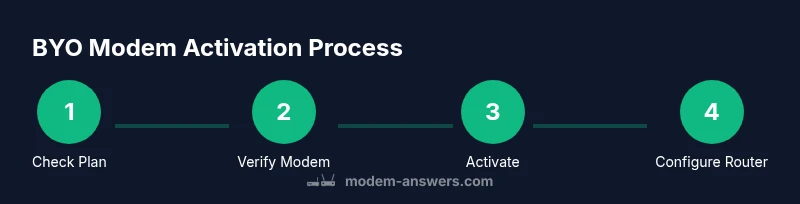
A practical approach: 1) confirm plan and speed tier; 2) verify DOCSIS compatibility; 3) confirm activation requirements; 4) prepare a back-up plan with a recommended router. This process ensures you can answer can you replace spectrum modem with my own with minimal friction and avoid unnecessary equipment purchases.
Step-by-step plan to switch to your own modem
This section outlines a practical, high-level plan you can follow to switch to your own modem. It does not replace the detailed steps in the dedicated Step-by-Step block but offers context for planning and budgeting. Start by confirming your current plan allows BYO modems, then select a DOCSIS 3.0/3.1 modem that supports your desired speed tier. Prepare your activation details, including MAC address and Spectrum account information. Schedule activation during a window when you can be present to complete the process. If you plan to use your own router, decide whether you’ll enable bridge mode on the modem and what network settings you’ll configure on the router.
Cost-wise, BYO can reduce monthly rental fees, though the upfront cost of the modem and potential extended warranties should be considered. You’ll also want to ensure you can easily obtain firmware updates and replacement parts for the device you choose. A thoughtful approach reduces surprises and makes can you replace spectrum modem with my own a smooth, predictable change.
Configuring a separate router with your own modem
When using a separate router with your own modem, you typically place the modem in front of the router and enable bridge mode to avoid double NAT. Bridge mode forwards IP addresses directly to your router, giving you better control over internal IP addressing and firewall settings. If your router supports advanced features like QoS, parental controls, or guest networks, bridging ensures those features operate more predictably. Alternatively, you can keep the modem’s Wi‑Fi turned off and rely entirely on the router for wireless coverage. Each option has trade-offs in terms of management, security updates, and performance.
Before you flip the switch, document your current network topology, label cables, and create a quick backup of any essential settings. After enabling bridge mode, test devices across wired and wireless connections to confirm stable internet access and consistent speeds. If you encounter issues, consult Spectrum’s activation portal or call support to verify the MAC address and service status.
Troubleshooting activation and initial connection issues
New BYO installations can face initial hiccups. Common issues include modem not appearing in Spectrum’s activation system, no internet light on the device, or slow speeds after activation. Start with the basics: verify coax connections are snug, power cycle the modem, and use a wired device to test the connection. If activation stalls, ensure you’re using the MAC address provided by the modem and that the device is on Spectrum’s approved list. Check for error codes on the modem’s status page and reset if needed. If problems persist, contact Spectrum with your modem type and MAC address for activation assistance.
Document what you changed, the exact modem model, and the activation time. This helps Spectrum diagnose issues quickly and minimizes repeat steps. As a precaution, avoid changing router settings during activation; you may want to restore previous configurations after activation if you’re troubleshooting. A careful approach significantly reduces the time to a stable BYO modem setup.
Costs, savings, and long-term considerations
Switching to a BYO modem can impact your long-term costs and network management. Renting from Spectrum includes ongoing support for the gateway and optional technical help. Owning your modem eliminates monthly rental fees, but you bear the upfront cost of the device and any required accessories. Over time, the savings can be substantial, especially if you exist in a household with multiple devices and constant usage. Consider the total cost of ownership, including potential repair or replacement costs, firmware updates, and the availability of replacement parts. If your plan changes, verify compatibility and whether Spectrum will support the new setup without requiring a return to rental equipment.
From the Modem Answers perspective, the decision to BYO is often a balance between long-term savings and the convenience of provider-supplied hardware. Evaluate your technical comfort, the importance of full provider support, and how you value custom network features when weighing the costs.
Security, privacy, and best practices after switching
Security and privacy should be prioritized after you switch to your own modem. Update the firmware on both the modem and your router when updates are available, enable strong Wi-Fi encryption (WPA3 if supported, or at least WPA2), and use a unique, long password for your network. Disable remote management on devices you don’t need to manage externally. Regularly monitor connected devices and review access logs if your router provides them. Additionally, maintain a backup of your network configuration so you can recover quickly after a hardware failure. By following these best practices, you reduce exposure to vulnerabilities and preserve control over your home network.
In closing, adopting a BYO modem can be a smart move for many households, especially if you prefer to optimize performance and customize your network. The Modem Answers team emphasizes evaluating compatibility, planning activations carefully, and prioritizing security to ensure a smooth, long-term transition.
Tools & Materials
- DOCSIS 3.0 or 3.1 modem(Must be compatible with Spectrum and support your plan's speed tier)
- Coaxial cable(RG6 or better, in good condition)
- Ethernet cable (Cat5e/6+)(For wired connections to your router)
- Router (optional for Wi‑Fi)(If you plan to use your own router behind the modem)
- Computer or mobile device(Used for activation and configuration)
- Spectrum account details(Account number and service address for activation)
Steps
Estimated time: 60-90 minutes
- 1
Verify service compatibility
Check your Spectrum plan and confirm BYO modem is allowed. Look for any restrictions related to voice services or gateway usage.
Tip: Call support if you’re unsure about BYO eligibility for your plan. - 2
Choose a compatible modem
Select a DOCSIS 3.0/3.1 modem from a reputable brand that supports your speed tier and has good firmware support.
Tip: Avoid models with known issues for your plan region. - 3
Collect MAC address and serial
Locate the device MAC address and serial on the modem label. You’ll need this for activation.
Tip: Write the MAC address down before disconnecting your old equipment. - 4
Power down existing equipment
Unplug the current modem and router to avoid power surges and to prepare for the BYO setup.
Tip: Keep the coax connection loose enough to reposition the new modem. - 5
Connect the modem to coax and power
Attach the coaxial cable securely and plug the modem into power. Wait for the status lights to stabilize.
Tip: If lights stay red or blinking, reseat cables and reboot. - 6
Activate the modem with Spectrum
Use Spectrum’s activation portal or call to register the MAC address and assign the service.
Tip: Have your account information handy for a smooth activation. - 7
Configure router and bridge mode if needed
If using a separate router, decide whether to enable bridge mode on the modem to avoid double NAT.
Tip: Test a wired connection first to confirm stability.
FAQ
Can I use my own modem with Spectrum Internet?
Yes, you can usually use your own modem if it’s DOCSIS compatible and Spectrum approves it for your plan. Activation is required and may involve providing the MAC address.
Yes. You can bring your own modem as long as it’s compatible and activated with Spectrum.
Will Spectrum still rent a gateway if I bring my own modem?
Spectrum may still offer or require a gateway for certain services, especially if you use voice features. If your plan supports BYO modem without VoIP, you typically won’t need the gateway for internet service.
You might still need Spectrum’s gateway for voice services, depending on your plan.
What features must my modem support?
Your modem should support DOCSIS 3.0 or 3.1, be listed as compatible with Spectrum, and match your plan’s speed tier. An Ethernet port and compatibility with IPv4/IPv6 are standard expectations.
Make sure it supports DOCSIS 3.0 or 3.1 and your speed tier.
How do I activate a BYO modem?
Use Spectrum’s activation portal or call support, and provide the MAC address and account details to register the device.
Activation is done through the portal or by phone with your MAC address.
Can I use a router with my own modem?
Yes. Use your own router and consider enabling bridge mode on the modem to avoid double NAT for smoother performance.
Yes, you can use your own router, and you may enable bridge mode on the modem.
What if my modem isn’t on Spectrum’s compatibility list?
If it isn’t on the official list, it may not work reliably. Choose a model from the approved list to minimize activation issues.
If it’s not on the approved list, it may not work or be activated.
Watch Video
Key Takeaways
- BYO modem is often possible with Spectrum if compatible
- DOCSIS version and plan compatibility matter most
- Activation requires MAC address and proper validation
- Bridging mode can optimize home networks with a separate router
- Ownership can reduce monthly rental costs over time