Best modem and router compatible with Spectrum: A comprehensive comparison
A thorough, analytical comparison of modem-only + router, modem-router combo, and Spectrum approved gateway options for Spectrum compatibility. Learn how to choose, what to check, and how to set up for optimal home networks.


For Spectrum internet, the safest path to reliable service is to use a Spectrum-approved modem with a separate router, or a high-quality modem-router combo that is on Spectrum’s approved list. In general, you’ll gain best performance by choosing a device that supports DOCSIS 3.1 and Wi‑Fi 6 or better, while ensuring the model is on Spectrum’s compatibility list.
How Spectrum Compatibility Works
Spectrum delivers cable internet through coaxial infrastructure, so the critical piece is whether your equipment is DOCSIS compliant and listed on Spectrum’s approved device list. Compatibility hinges on two factors: the DOCSIS standard (3.0 vs 3.1) and the device's ability to handle Spectrum's service profile. According to Modem Answers, the most reliable path is to pick equipment that explicitly appears on Spectrum’s approved list and to prioritize DOCSIS 3.1 devices for future-proofing. If you’re selecting a modem-router combo, verify that the model is Spectrum-approved, and ensure it supports modern Wi‑Fi standards. This upfront check reduces installation friction, minimizes support calls, and helps ensure you receive the speeds your plan promises. The goal is to minimize bottlenecks at the gateway and keep your local network from becoming the weak link in your home setup.
Core Options: Separate Modem + Router vs All-in-One
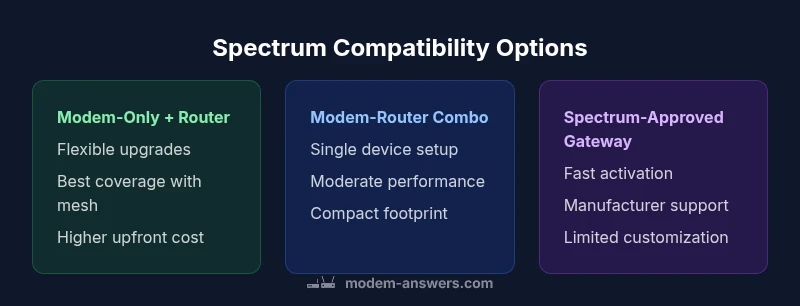
There are three broad configurations homeowners typically consider. The first is Modem-Only plus a separate Router: a classic setup that maximizes flexibility. The second is a Modem-Router Combo, where the modem and wireless router are integrated into a single device, often marketed as a gateway. The third is a Spectrum-Approved Gateway provided by the provider; this is a managed, pre-configured option that ensures compatibility but limits some customization. The pros and cons vary: separate devices give you ramp-friendly Wi-Fi upgrades and better signal distribution across large spaces; all-in-one devices simplify wiring and reduce clutter but can become bottlenecks if either the modem or router struggles under load. When Spectrum-approved, gateway devices minimize compatibility questions but tie you to a single ecosystem and sometimes a monthly rental. Consider your home size, number of devices, and tolerance for ongoing support when weighing these options. For larger homes, separate devices or a high-end router with a robust mesh system tends to outperform a single gateway.
The Role of DOCSIS and Wi-Fi Standards
DOCSIS 3.0 vs 3.1 matters for compatibility and future-proofing. DOCSIS 3.1 enables higher potential throughput and better spectral efficiency, which many current Spectrum plans assume. Wi‑Fi standards (Wi‑Fi 5, 6, and 6E) determine how many devices you can support with reliable performance in a busy home. Newer standards deliver improved range and speed, especially when multiple devices stream video, engage in video calls, or participate in online gaming. Your best practice is to pair a DOCSIS 3.1 modem with a router that supports Wi‑Fi 6 or newer. In space-constrained layouts, prioritize a router with strong antenna configurations and consider mesh expansion for dead zones. Avoid older equipment that struggles during peak usage.
How to Check Spectrum's Approved Modem List
Begin at Spectrum’s official site and locate the current list of approved modems. The list changes as new devices receive certification and as service profiles evolve. When reviewing models, confirm DOCSIS version, maximum channel bonding, and support for IPv6 and WPA3 security. If you plan to buy, cross-check user feedback about real-world reliability and how activation proceeds with Spectrum. Renters may favor compact, portable gear that travels well, while homeowners may value higher performance and upgradeability. In multi-dwelling environments, be mindful of potential interference with neighboring networks and test performance during typical peak times.
Setup Scenarios: Small Apartment vs Large Home
In a small apartment, a compact modem-router combo with solid Wi‑Fi coverage may be enough, provided the space is not heavily congested. For larger homes or multi-story layouts, consider separate devices or a reputable mesh system to blanket the space with reliable signals. A separate modem and router allow you to position access points near critical zones for better coverage, while a mesh system simplifies scaling across rooms. Spectrum compatibility remains essential in all configurations; ensure the modem is on the approved list and that the router supports modern security and performance standards. If you travel or rent, seek gear that travels easily and can be reconfigured quickly in a new location.
Performance Expectations and Real-World Numbers
Real-world performance depends on plan details, network congestion, home layout, and device capabilities. Newer hardware typically yields more stable connections and better handling of multiple devices, streaming, and gaming traffic. The key differentiator is how well the gateway processes uplink and downlink traffic during busy periods. A separate modem and router setup offers more flexibility to upgrade components as usage evolves, which is advantageous for households with growing smart-home ecosystems. Run speed tests in your typical environment and at peak usage times to understand whether your current gear meets demand. Modem Answers analysis suggests planning around peak hours reduces the likelihood of sluggish performance.
Practical Setup Checklist for Spectrum Compatible Configurations
- Confirm Spectrum compatibility by checking the official approved modem list. 2) Decide on a configuration based on home size and performance needs. 3) Choose a DOCSIS 3.1 modem and a modern Wi‑Fi router (Wi‑Fi 6 or newer) for best future-proofing. 4) If renting, compare total cost of ownership with buying your own equipment. 5) Place your router centrally and at an elevated position, away from obstructions. 6) Enable security features: WPA3, guest networks, and regular firmware updates. 7) Test throughput at different times and locations to identify weak spots. 8) Keep activation documentation handy for future moves.
Common Pitfalls and How to Avoid Them
Common mistakes include relying on an old modem that Spectrum no longer supports, buying a router with limited firmware updates, poor router placement that creates dead zones, and not validating equipment against Spectrum’s approved list. Another pitfall is underestimating the benefits of a mesh system for larger spaces. Finally, avoid skipping security updates and guest-network configurations in pursuit of simplicity; modern networks benefit from active security practices and regular firmware refreshes.
Final Setup Recommendations for Different Living Situations
Small apartment: A high-quality modem-router combo with robust indoor coverage can be adequate if the area is well-contained. Medium home: A separate modem and router, possibly enhanced with a compact mesh to fill gap zones, often yields better reliability. Large homes or multi-story layouts: A dedicated modem plus a high-performance router with a mesh backbone is recommended; ensure Spectrum compatibility for every device and plan for future upgrades as your usage grows. For renters and homeowners alike, balance upfront cost, long-term value, and support options, and always verify compatibility before buying.
Feature Comparison
| Feature | Modem-Only + Separate Router | Modem-Router Combo (All-in-One) | Spectrum-Approved Gateway |
|---|---|---|---|
| Setup Ease | Moderate — two devices to configure and place | Moderate — one device to configure | Low — provider pre-configured gateway |
| Upgrade Path | Most flexible — upgrade modem and router independently | Moderate — limited by one device's capabilities | Low — tied to provider hardware and firmware |
| Wi-Fi Performance | Best when paired with quality router or mesh system | Strong in many homes but depends on the device | Moderate; built-in hardware may limit range/speed |
| Space & Clutter | Requires two devices and more cables | One device to manage | One device to manage |
| Cost & Ownership | Potentially higher upfront; long-term flexibility pays off | Mid-range upfront; often includes router | Lower upfront but possible rental or upgrade costs over time |
| Future-Proofing | Easily upgrade components as tech evolves | Limited by device specs | Dependent on provider refresh cycles |
Positives
- Flexible upgrade path for Wi-Fi and modem components
- Better heat management and fault isolation with separate devices
- Easier troubleshooting when one device fails
- Potential for lower long-term cost if you own equipment outright
What's Bad
- Higher upfront cost due to multiple devices
- More cables and space required
- Two devices require more setup and ongoing maintenance
- Possible compatibility concerns if one device is not on the approved list
Separate modem + router generally offers the best balance of performance and future-proofing for Spectrum compatibility
For most homes, buying a DOCSIS 3.1 modem and a modern router provides flexibility, better coverage, and easier upgrades. A high-quality modem-router combo is a solid alternative for small spaces or strict budget constraints, while provider gateways are the simplest path but limit customization and future growth.
FAQ
What does Spectrum require for compatible modems?
Spectrum requires a DOCSIS 3.0 or 3.1 modem that appears on Spectrum’s approved list. The list is periodically updated as new devices are certified and service plans evolve. Always verify the latest approved models on Spectrum’s site before purchasing.
Spectrum needs a DOCSIS 3.0 or 3.1 modem that Spectrum officially approves. Check the latest list on Spectrum’s site to confirm compatibility.
Can I use an old modem with Spectrum?
Only if the old modem is on the current approved list and matches your service plan. If not, activation may fail or you won’t receive optimal speeds. When in doubt, upgrade to a newer DOCSIS 3.1 modem from Spectrum’s approved roster.
Only if it’s on Spectrum’s approved list; otherwise, you’ll likely run into activation or performance issues.
Should I rent equipment from Spectrum or buy my own hardware?
Renting from Spectrum offers convenience and service support, but ongoing rental costs add up. Buying your own equipment can be cheaper in the long run and gives you full control over settings, but you’ll take on activation and troubleshooting responsibility.
Rent if you want simplicity and less setup work; buy if you want long-term savings and control.
What is DOCSIS 3.1 and why does it matter for Spectrum?
DOCSIS 3.1 supports higher real-world speeds and better efficiency, which aligns with many Spectrum higher tier plans. If you plan to upgrade to faster services, ensure your modem supports 3.1 and that your router can handle the traffic.
DOCSIS 3.1 lets you get faster, more reliable speeds and should be on your checklist for future-proofing.
Is a separate router always better than a gateway for Spectrum?
Not always. In smaller spaces or for basic usage, a gateway can be sufficient and simpler. In larger homes or with heavy traffic, a separate router with a good modem often provides better coverage and flexibility.
It depends on space and needs; separate devices usually win for bigger homes.
How often should I upgrade modem/router equipment?
Upgrade should be considered every few years as tech standards advance and service plans evolve. If you notice slowdowns, dead zones, or incompatible firmware, it’s a good time to update.
Typically, every few years, or when you start seeing performance issues.
Key Takeaways
- Verify Spectrum compatibility on the official list before buying
- Choose DOCSIS 3.1 and Wi‑Fi 6 or newer for future-proofing
- Separate devices often deliver the best performance in larger homes
- Gateways simplify setup but limit upgrade options
- Test network performance in your home environment to validate choices